edge bevel for workspace

free scripts, plugins, models, textures
User avatar
clintonman
Captain
Posts: 5659
Joined: 21 May 2009, 21:08
Type the number ten into the box: 0
Location: California

edge bevel for workspace

Post by clintonman »

I just finished an edge bevel script, trueBevel, for workspace 7.61
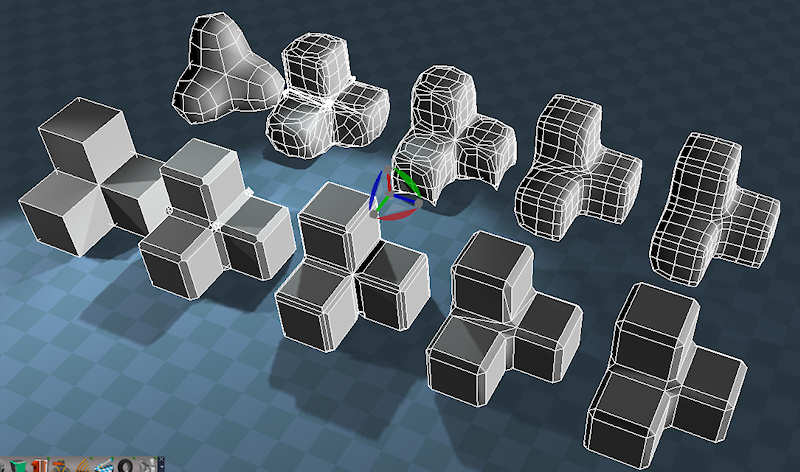
trueEdgeBevel.jpg
Image shows left to right with smooth versions in back: a basic mesh, modelspace chamfer, workspace edge bevel, the new edge bevel and finally the new edge bevel after cleanup. They all have the same basic offset values for the bevels.

Behind the scenes:
It makes an inset bevel
then one by one it deletes the points of the original edge selection
between each point deletion it quadrifies all the faces

It's best to triangulate circular pieces(Ngons) before the bevel.

The script can potentially take up a lot of undo's so make a copy of the object and if you don't like the result just delete the copy and try again.

http://www.clintons3d.com/plugins/trues ... index.html"
Clinton Reese

http://clintons3d.com
pugman 1
Captain
Posts: 1555
Joined: 21 May 2009, 19:26
Type the number ten into the box: 0
Location: Germany

Re: edge bevel for workspace

Post by pugman 1 »

Thanks for this it will be very usefull
keep up the good work
Great one
User avatar
clintonman
Captain
Posts: 5659
Joined: 21 May 2009, 21:08
Type the number ten into the box: 0
Location: California

Re: edge bevel for workspace

Post by clintonman »

Made a small update to the trueBevel script(now version 1.0). It includes a test button that makes a temporary bevel that can be used to preview the offset value. It runs a basic bevel, waits a moment, then runs an undo command. See the first post for the link.
Clinton Reese

http://clintons3d.com
User avatar
Steinie
Captain
Posts: 2958
Joined: 21 May 2009, 17:38
Type the number ten into the box: 10

Re: edge bevel for workspace

Post by Steinie »

This was perfect timing and badly needed. Just this week I wished for this feature and forgot you had developed one for us already.
With the new preview feature will the undo problem remain from your first version?
I will also assume this will only bevel the selected polys and not the whole object?
froo
Captain
Posts: 2554
Joined: 22 May 2009, 12:13

Re: edge bevel for workspace

Post by froo »

Clinton, You Are Smokin! Very prolific with scripts and plugins.
I am really dragging behind here! But I have the info I need now.
And thanks again for that 'ID' type script! Very useful!

Froo
User avatar
clintonman
Captain
Posts: 5659
Joined: 21 May 2009, 21:08
Type the number ten into the box: 0
Location: California

Re: edge bevel for workspace

Post by clintonman »

Steinie wrote:This was perfect timing and badly needed. Just this week I wished for this feature and forgot you had developed one for us already.
With the new preview feature will the undo problem remain from your first version?
I will also assume this will only bevel the selected polys and not the whole object?
Yep, the undo problem remains because it does so many steps to create the final bevel. The preview/test bevel doesn't have this problem since it has only one step and it undo's itself automatically.
Clinton Reese

http://clintons3d.com
froo
Captain
Posts: 2554
Joined: 22 May 2009, 12:13

Re: edge bevel for workspace

Post by froo »

would it be possible, to disable the undo's? I have not looked at the script yet, so I am not aware whether the undos are required for processing or not.

EDIT:
Not sure if disabling of Undo/Redo is even possible; have not checked. But, would 'Flatten' be an option; perform a Flatten after every step, to essentially 'pop' the undos, off the undo stack?
User avatar
clintonman
Captain
Posts: 5659
Joined: 21 May 2009, 21:08
Type the number ten into the box: 0
Location: California

Re: edge bevel for workspace

Post by clintonman »

froo wrote:would it be possible, to disable the undo's? I have not looked at the script yet, so I am not aware whether the undos are required for processing or not.

EDIT:
Not sure if disabling of Undo/Redo is even possible; have not checked. But, would 'Flatten' be an option; perform a Flatten after every step, to essentially 'pop' the undos, off the undo stack?
I'm pretty sure Flatten is a part of the undos, because you can undo a flatten.

I didn't see any way to control undo via script. Plugin's have control, but not scripts as far as I can see.
Clinton Reese

http://clintons3d.com
froo
Captain
Posts: 2554
Joined: 22 May 2009, 12:13

Re: edge bevel for workspace

Post by froo »

oh ok. I thought, Flatten (Flatten History) essentially consolidated all the changes made during edits, into a node, and removed the Undo history. :)
User avatar
clintonman
Captain
Posts: 5659
Joined: 21 May 2009, 21:08
Type the number ten into the box: 0
Location: California

Re: edge bevel for workspace

Post by clintonman »

Update - January 8 2012

Removed the test button and made the offset interactively update the preview. It still uses the same basic methods except it has a watchdog driving the script when the offset changes. Best results come from smoothly and continuously changing the offset and zooming in closer to reduce the flicker from the undo step. Also changed the installer to automatic.
Clinton Reese

http://clintons3d.com
Peter
Senior Chief Petty Officer
Posts: 170
Joined: 18 Apr 2010, 15:18
Type the number ten into the box: 0
Location: Texas

Re: edge bevel for workspace

Post by Peter »

Big improvement. Thanks a lot :bananathumb:
a day without orange juice is like... a day without orange juice
User avatar
clintonman
Captain
Posts: 5659
Joined: 21 May 2009, 21:08
Type the number ten into the box: 0
Location: California

Re: edge bevel for workspace

Post by clintonman »

Changed so the bevel offset can be smaller and is not allowed to go into negative values. This change came about because I beveled a small mesh and it turned into a mess that took a while to clean it up.
http://clintons3d.com/plugins/truespace ... bevel.html
Clinton Reese

http://clintons3d.com
User avatar
trueBlue
Captain
Posts: 5548
Joined: 06 Jul 2009, 22:50
Type the number ten into the box: 10

Re: edge bevel for workspace

Post by trueBlue »

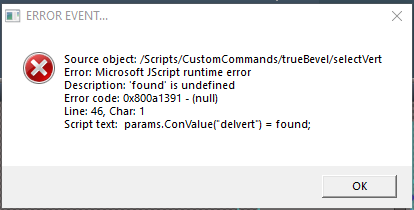
Couple things I notice about your Edge Bevel
1.) Does not restore prior PE selection mode.
2.) Faucet normal is not set.
3.) Stray vertices.
4.) Error

I added a script at the end of the chain that fixes 1 & 2

Code: Select all

var RestorePEselectionMode = params.ConValue('RestorePEselectionMode');
MeshModifiers.AutofacetNormals('',-1)
Node.Value('/Preferences/Mesh Editor Settings','PE selection mode') = RestorePEselectionMode;
MeshModifiers.ActivatePointEditWidget('','','Default');
The RestorePEselectionMode attribute is hooked up to selectVertexMode, 2 - PEselectionMode attribute

With the stray vertices, I am able to fix it with the Heal command.
Not sure how to add that function.

4.) Error
Edge Bevel error.PNG
Edge Bevel error.PNG (10.71 KiB) Viewed 3929 times
User avatar
clintonman
Captain
Posts: 5659
Joined: 21 May 2009, 21:08
Type the number ten into the box: 0
Location: California

Re: edge bevel for workspace

Post by clintonman »

4.) It's difficult to fix an error without steps to reproduce it or some kind of sample.
Clinton Reese

http://clintons3d.com
User avatar
trueBlue
Captain
Posts: 5548
Joined: 06 Jul 2009, 22:50
Type the number ten into the box: 10

Re: edge bevel for workspace

Post by trueBlue »

Not sure of the steps needed to produce the error.
Adding var to found seems to be the solution though
User avatar
clintonman
Captain
Posts: 5659
Joined: 21 May 2009, 21:08
Type the number ten into the box: 0
Location: California

Re: edge bevel for workspace

Post by clintonman »

Update July 12, 2021

updated from changes in the unofficial update version of the script.

bevel preview is more reliable and it works, seems to have gotten broken at some point in time
does not clear undo history until after the tool is run
cleaned up - removed a lot of unused/unneeded code


http://clintons3d.com/plugins/truespace ... bevel.html
Clinton Reese

http://clintons3d.com
User avatar
clintonman
Captain
Posts: 5659
Joined: 21 May 2009, 21:08
Type the number ten into the box: 0
Location: California

Re: edge bevel for workspace

Post by clintonman »

A bug found by trueBlue.
You can't reset the offset unless you have a point edit selection.

I looked at it and thought, "Wow, I have no idea how to fix it" Then I notice that the bevel preview doesn't account for starting the tool with no selection. So I add a timer so it can tell the difference between no selection at all and a mysterious no selection because an undo didn't run properly.
then I go back to the original problem and it's fixed :roll: :)

I'll attach the change here for easy testing before updating the installer.
Attachments
trueBevel.RsObj
(92.35 KiB) Downloaded 192 times
Clinton Reese

http://clintons3d.com

Return to “Repositorium”