http://clintons3d.com/plugins/truespace ... align.html
Align and Distribute script for tS7.61
-
clintonman

- Captain
- Posts: 5659
- Joined: 21 May 2009, 21:08
- Type the number ten into the box: 0
- Location: California
Align and Distribute script for tS7.61
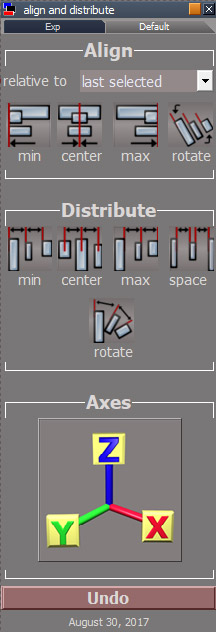
Script works similarly to align and distribute found in Inkscape and some Adobe applications.
http://clintons3d.com/plugins/truespace ... align.html
http://clintons3d.com/plugins/truespace ... align.html
-
BNG

- Chief Warrant Officer
- Posts: 684
- Joined: 16 Oct 2009, 03:26
- Type the number ten into the box: 0
- Location: Texas
Re: Align and Distribute script for tS7.61
Awesome Clinton thanks for releasing this. I really need to do more on the workspace side of TS; I seem stuck on mostly using modelside at present.
Casual Truespace 3D modeling hobbyist. My Truespace blog and simple 3d Modeling Tutorials for Casual Model Makers.
-
Draise

- Captain
- Posts: 3200
- Joined: 21 Sep 2009, 19:33
- Type the number ten into the box: 0
- Location: Bogota, Colombia
Re: Align and Distribute script for tS7.61
This is a beautiful addon. I am definately going to try make a webseries in the WS.
-
bitkar

- Captain
- Posts: 2089
- Joined: 16 Mar 2010, 07:14
- Type the number ten into the box: 0
- Location: Czech Republic
Re: Align and Distribute script for tS7.61
i have never liked workspace too much and propably will never like modelside... so Iam stuck too.
Michal aka bitkar
tS freak since tS2 (1998) and forever (tS7.61 modeler)
tS freak since tS2 (1998) and forever (tS7.61 modeler)
-
the_ant

- Chief Petty Officer
- Posts: 155
- Joined: 02 Jun 2009, 09:26
- Type the number ten into the box: 0
- Location: Perugia - Italy
Re: Align and Distribute script for tS7.61
Awesome! 
...and...what do you think about an option like "look-at" the "first, middle or last selection"?
...and...what do you think about an option like "look-at" the "first, middle or last selection"?
-
clintonman
- Captain
- Posts: 5659
- Joined: 21 May 2009, 21:08
- Type the number ten into the box: 0
- Location: California
Re: Align and Distribute script for tS7.61
Thanks.the_ant wrote: 08 Sep 2017, 17:22 Awesome!
...and...what do you think about an option like "look-at" the "first, middle or last selection"?
As far as look-at, I thought of it and decided to pass. Too much effort. I almost passed on all the rotations. Ended up doing them because most of that work was already done in the doom3 import export scripts and the final piece for distributed rotations wasn't too bad.
-
Emmanuel

- Chief Warrant Officer
- Posts: 670
- Joined: 14 Jun 2009, 06:47
Re: Align and Distribute script for tS7.61
Very handy tool ! Thank you very much Clinton 
Is there any chance you will make a Modeler version also ?
Is there any chance you will make a Modeler version also ?
-
clintonman
- Captain
- Posts: 5659
- Joined: 21 May 2009, 21:08
- Type the number ten into the box: 0
- Location: California
Re: Align and Distribute script for tS7.61
Probably not. It can be done but it's much easier to do this sort of thing in workspace.Emmanuel wrote: 10 Sep 2017, 06:12 Very handy tool ! Thank you very much Clinton
Is there any chance you will make a Modeler version also ?
-
seppgirty

- Master Chief Petty Officer
- Posts: 354
- Joined: 22 May 2009, 03:34
- Type the number ten into the box: 0
- Location: pittsburgh Pa.
Re: Align and Distribute script for tS7.61
Clinton has released so many plugins. Would be great if there where some videos to go along with them. Anyway, Thanks for still caring about truespace clinton. 
truespace 3.2, 5.2, 6.6, ani-pack, flash plugin,........ you can check out my films athttp://www.chaosbrosfilms.com
-
clintonman
- Captain
- Posts: 5659
- Joined: 21 May 2009, 21:08
- Type the number ten into the box: 0
- Location: California
Re: Align and Distribute script for tS7.61
Yep, I know what you mean. On most pages for the scripts you see the words "you tube here". I hope to have some time in the near future to make those videos.seppgirty wrote: 29 Oct 2017, 14:36 Clinton has released so many plugins. Would be great if there where some videos to go along with them. Anyway, Thanks for still caring about truespace clinton.
-
Steinie

- Captain
- Posts: 2958
- Joined: 21 May 2009, 17:38
- Type the number ten into the box: 10
Re: Align and Distribute script for tS7.61
Thanks for this one Clinton! I can think of a lot of uses for it. Is there more than one undo or is that not possible?
I keep reading about how some of you like Model Side and some like the otherside. Well I like both sides! There are tools on both sides I find usefull.
I keep reading about how some of you like Model Side and some like the otherside. Well I like both sides! There are tools on both sides I find usefull.
-
clintonman
- Captain
- Posts: 5659
- Joined: 21 May 2009, 21:08
- Type the number ten into the box: 0
- Location: California
Re: Align and Distribute script for tS7.61
Only one undo for when you run it and then notice the settings were wrong. The undo button runs the undo command a bunch of times to get back to the previous state.Steinie wrote: 29 Oct 2017, 16:00 Thanks for this one Clinton! I can think of a lot of uses for it. Is there more than one undo or is that not possible?
I keep reading about how some of you like Model Side and some like the otherside. Well I like both sides! There are tools on both sides I find usefull.
-
clintonman
- Captain
- Posts: 5659
- Joined: 21 May 2009, 21:08
- Type the number ten into the box: 0
- Location: California
Re: Align and Distribute script for tS7.61
Update March 2020
fixed a bug - alignment relative to first selected or last selected, the first or last selected item was moving in some cases when it should not be moving at all.
http://clintons3d.com/plugins/truespace ... align.html
fixed a bug - alignment relative to first selected or last selected, the first or last selected item was moving in some cases when it should not be moving at all.
http://clintons3d.com/plugins/truespace ... align.html
-
clintonman
- Captain
- Posts: 5659
- Joined: 21 May 2009, 21:08
- Type the number ten into the box: 0
- Location: California
Re: Align and Distribute script for tS7.61
January 2021
Update to work with new NURBS objects
Update to work with new NURBS objects
-
the_ant
- Chief Petty Officer
- Posts: 155
- Joined: 02 Jun 2009, 09:26
- Type the number ten into the box: 0
- Location: Perugia - Italy
Re: Align and Distribute script for tS7.61
Hi Master of t.Space! 
Have a question about Align functions in Modelspace
Is there a tsx plugin to align (in place) an axis to another for rotation?

Have a question about Align functions in Modelspace
Is there a tsx plugin to align (in place) an axis to another for rotation?
-
clintonman
- Captain
- Posts: 5659
- Joined: 21 May 2009, 21:08
- Type the number ten into the box: 0
- Location: California
Re: Align and Distribute script for tS7.61
I don't know.the_ant wrote: 10 Jan 2021, 09:36 Hi Master of t.Space!
Have a question about Align functions in Modelspace
Is there a tsx plugin to align (in place) an axis to another for rotation?
-
the_ant
- Chief Petty Officer
- Posts: 155
- Joined: 02 Jun 2009, 09:26
- Type the number ten into the box: 0
- Location: Perugia - Italy
Re: Align and Distribute script for tS7.61
Could it to be possible in Workspace with your Align script?
(ie. i want that an object got same axes orientation of another without rotate it...so could move it parallel to source object in object-mode instead world or view-mode)
(ie. i want that an object got same axes orientation of another without rotate it...so could move it parallel to source object in object-mode instead world or view-mode)
-
clintonman
- Captain
- Posts: 5659
- Joined: 21 May 2009, 21:08
- Type the number ten into the box: 0
- Location: California
Re: Align and Distribute script for tS7.61
No it's not possible from workspace. There is no common axis between model and workspace.the_ant wrote: 11 Jan 2021, 14:04 Could it to be possible in Workspace with your Align script?
(ie. i want that an object got same axes orientation of another without rotate it...so could move it parallel to source object in object-mode instead world or view-mode)
You could manually copy the rotation values from the first object to the axis of the second object using the object info panel along with the axes tool.
-
clintonman
- Captain
- Posts: 5659
- Joined: 21 May 2009, 21:08
- Type the number ten into the box: 0
- Location: California
Re: Align and Distribute script for tS7.61
Here is a script that might help. Copy it into the python script manager "Scene"
Select the source object
Run the Scene script
Select the target object
The axes from the first will copy into the second.
It's a little awkward because the script manager switches to the selected item automatically.
Select the source object
Run the Scene script
Select the target object
The axes from the first will copy into the second.
It's a little awkward because the script manager switches to the selected item automatically.
Code: Select all
import trueSpace

doc = trueSpace.GetActiveDocument()

doc.ClearOutTxt()

obj = doc.CurrentSelection()

axrotation = obj.AxesOrientation

print("select target object")


def onselectionchanged():
	global axrotation

	obj = doc.CurrentSelection()

	obj.AxesOrientation = axrotation

	doc.ClearOutTxt()

trueSpace.Stop()-
the_ant
- Chief Petty Officer
- Posts: 155
- Joined: 02 Jun 2009, 09:26
- Type the number ten into the box: 0
- Location: Perugia - Italy
Re: Align and Distribute script for tS7.61
Thanks Clintonman
i will try it
..nevertheless it's strange nobody never thought about this function into a plugin...
i will try it
..nevertheless it's strange nobody never thought about this function into a plugin...
-
the_ant
- Chief Petty Officer
- Posts: 155
- Joined: 02 Jun 2009, 09:26
- Type the number ten into the box: 0
- Location: Perugia - Italy
Re: Align and Distribute script for tS7.61

- Attachments
-