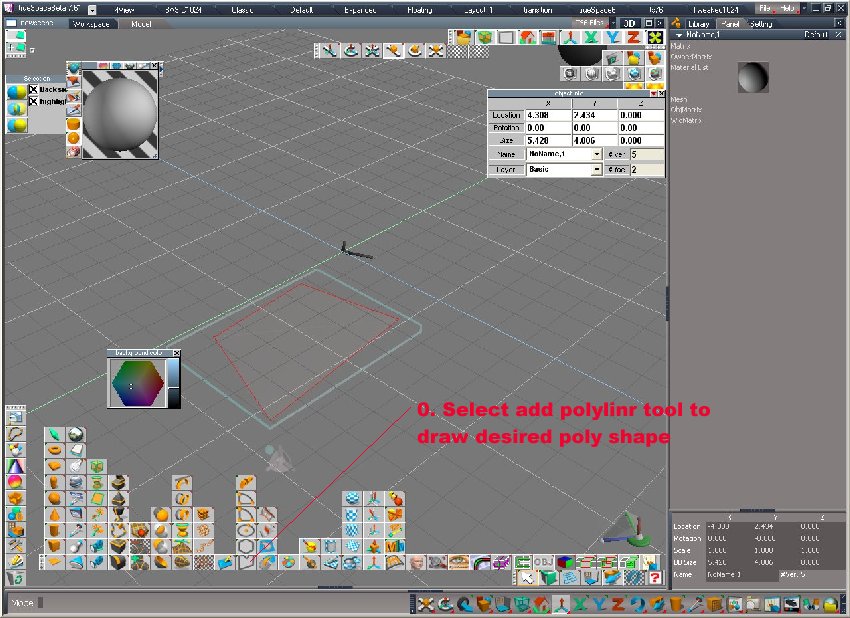
hi how would i split or draw polygons , i have a flat shape ive drawn then done boolean substract to make polygon
(is there another way to make a polygon from flat drawn polyline) i want to draw more polygon lines,shapes within the single flat shape
thanks again for all your help i will promise to do more reading of manual and google for further queries , i just wanted a fast start
regards mike
how do i split polygon
-
automike
- Petty Officer Second Class
- Posts: 22
- Joined: 11 Nov 2009, 19:06
how do i split polygon
-
Breech Block

- Master Chief Petty Officer
- Posts: 482
- Joined: 13 Jun 2009, 20:31
Re: how do i split polygon
Hi Automike. As a tip, it always helps when you post if you specify whether you are working in Modelside or Workspace side as sometimes the answer you need can be entirely different. It also helps to post a screen shot to illustrate what you are trying to achieve.
To try and answer your question, right clicking on an object and entering Point Edit mode gives you the most control over an object. Here you will gain access to tools such as slice and sweep which should cater for your needs. Always try to avoid Boolean Operations if you can as they may lead to complications further down the line. HTH.
To try and answer your question, right clicking on an object and entering Point Edit mode gives you the most control over an object. Here you will gain access to tools such as slice and sweep which should cater for your needs. Always try to avoid Boolean Operations if you can as they may lead to complications further down the line. HTH.

-
automike
- Petty Officer Second Class
- Posts: 22
- Joined: 11 Nov 2009, 19:06
Re: how do i split polygon
im in the model space i want to split a flat square i drew with polyline , what would be the right way to convert to polygon than i want to splity into two halves
regards mike
regards mike
-
Breech Block
- Master Chief Petty Officer
- Posts: 482
- Joined: 13 Jun 2009, 20:31
Re: how do i split polygon
Sorry automike, it's a bit difficult for me to understand exactly what you after here without an image for reference. By a flat square I presume you mean a plane. And now you want to cut it in half, although if as you say you drew it, I dont quite understand why you couldn't draw it to the correct shape in the first place. How you go about splitting your object into two halves also depends on the shape you have drawn and how exact you want the split to be. In Point Edit mode you could quad divide it, which will divide your shape into equal parts and then select the edges you want and then use the seperate tool. If your shape has uneven sides and thus the quad divide can't place an edge down the middle, use the add edges tool to place one manually. If the seperate tool is not to your liking simply delete one half of your objects vertices and then outside of PE mode copy the object and then mirror it to get the other half back again. HTH.
-
fahembree
- Chief Petty Officer
- Posts: 108
- Joined: 22 May 2009, 02:28
Re: how do i split polygon
If I understand you question correctly these images show how to do what you want, I think.
THe images came out in reverse order after uploading.
THe images came out in reverse order after uploading.
- Attachments
-
-