Origin Widgets

User avatar
clintonman
Captain
Posts: 5659
Joined: 21 May 2009, 21:08
Type the number ten into the box: 0
Location: California

Origin Widgets

Post by clintonman »

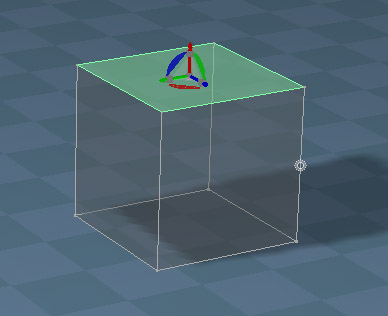
OriginWidget.jpg
OriginWidget.jpg (39.48 KiB) Viewed 2987 times
Origin indicator on the far left edge of the cube.

This was originally developed to make the workspace NURBS edges a little bit more like handles.

Use the ctrl button plus LMB or RMB on the widget cubes to scale from the origin instead of the center of the selection or object.

PE widget - ctrl + LMB the center sphere to set the origin to the selection.

Installation is not permanent.
The scripts have no safety checks for multiple runs - only run them one time.
Reset default context to remove the changes.
Attachments
PE Widget Updater06.RsObj
(44.83 KiB) Downloaded 171 times
Object Nav Widget Updater05.RsObj
(40.23 KiB) Downloaded 200 times
Clinton Reese

http://clintons3d.com
User avatar
trueBlue
Captain
Posts: 5548
Joined: 06 Jul 2009, 22:50
Type the number ten into the box: 10

Re: Origin Widgets

Post by trueBlue »

Cool, I was wondering if the other widgets could have this Mesh Origin indicator
One little caveat...
When you MMB + Drag the widget's Sphere that moves the widget, the Mesh Origin indicator moves with it
User avatar
clintonman
Captain
Posts: 5659
Joined: 21 May 2009, 21:08
Type the number ten into the box: 0
Location: California

Re: Origin Widgets

Post by clintonman »

trueBlue wrote: 25 Jul 2021, 22:16 Cool, I was wondering if the other widgets could have this Mesh Origin indicator
One little caveat...
When you MMB + Drag the widget's Sphere that moves the widget, the Mesh Origin indicator moves with it
:o Well, don't see any way around that. I'll make a note, thanks.
Clinton Reese

http://clintons3d.com
User avatar
trueBlue
Captain
Posts: 5548
Joined: 06 Jul 2009, 22:50
Type the number ten into the box: 10

Re: Origin Widgets

Post by trueBlue »

I tried to implement the Ctrl + LMB gesture in the Centered Object Navigation Widget/Boxes minus the Origin object
It is not working
Does it it not support this?
User avatar
clintonman
Captain
Posts: 5659
Joined: 21 May 2009, 21:08
Type the number ten into the box: 0
Location: California

Re: Origin Widgets

Post by clintonman »

trueBlue wrote: 26 Jul 2021, 00:16 I tried to implement the Ctrl + LMB gesture in the Centered Object Navigation Widget/Boxes minus the Origin object
It is not working
Does it it not support this?
It works with lmb and rmb already.

Edit: hm maybe something is happening, it does the scale without the ctrl...

Nope it's ok, must have been something else.
Reset default context
made sure the centered nav widget was active
ran the script and it works as expected
Clinton Reese

http://clintons3d.com
User avatar
trueBlue
Captain
Posts: 5548
Joined: 06 Jul 2009, 22:50
Type the number ten into the box: 10

Re: Origin Widgets

Post by trueBlue »

clintonman wrote: 26 Jul 2021, 00:27
trueBlue wrote: 26 Jul 2021, 00:16 I tried to implement the Ctrl + LMB gesture in the Centered Object Navigation Widget/Boxes minus the Origin object
It is not working
Does it it not support this?
It works with lmb and rmb already.

Edit: hm maybe something is happening, it does the scale without the ctrl...

Nope it's ok, must have been something else.
Reset default context
made sure the centered nav widget was active
ran the script and it works as expected
Thank you, that did it!
User avatar
trueBlue
Captain
Posts: 5548
Joined: 06 Jul 2009, 22:50
Type the number ten into the box: 10

Re: Origin Widgets

Post by trueBlue »

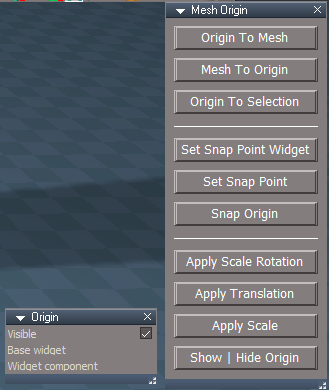
Origin
Exported the Visible aspect of the Static widget controller
Mesh Origin.png
Mesh Origin.png (33.58 KiB) Viewed 2959 times
Mesh Origin
Add
Hide | Show Origin

Code: Select all

if(Node.ConExists("/Widgets/Select/Default object navigation widget/Origin", "Visible")) {
RsTool.ToggleValue("/Widgets/Select/Default object navigation widget/Origin/Visible")
}
if(Node.ConExists("/Widgets/Edit/Point edit widget/Origin", "Visible")) {
RsTool.ToggleValue("/Widgets/Edit/Point edit widget/Origin/Visible")
}
RsTool.Arrow();
User avatar
clintonman
Captain
Posts: 5659
Joined: 21 May 2009, 21:08
Type the number ten into the box: 0
Location: California

Re: Origin Widgets

Post by clintonman »

trueBlue wrote: 26 Jul 2021, 02:07 Origin
Exported the Visible aspect of the Static widget controller
Mesh Origin.png

Mesh Origin
Add
Hide | Show Origin

Code: Select all

if(Node.ConExists("/Widgets/Select/Default object navigation widget/Origin", "Visible")) {
RsTool.ToggleValue("/Widgets/Select/Default object navigation widget/Origin/Visible")
}
if(Node.ConExists("/Widgets/Edit/Point edit widget/Origin", "Visible")) {
RsTool.ToggleValue("/Widgets/Edit/Point edit widget/Origin/Visible")
}
RsTool.Arrow();
Very nice, what does the RsTool.Arrow() do?
Clinton Reese

http://clintons3d.com
User avatar
trueBlue
Captain
Posts: 5548
Joined: 06 Jul 2009, 22:50
Type the number ten into the box: 10

Re: Origin Widgets

Post by trueBlue »

That is the Object tool command
I used it to refresh the obj widget
User avatar
clintonman
Captain
Posts: 5659
Joined: 21 May 2009, 21:08
Type the number ten into the box: 0
Location: California

Re: Origin Widgets

Post by clintonman »

trueBlue wrote: 26 Jul 2021, 03:50 That is the Object tool command
I used it to refresh the obj widget
I think I'll skip that part of it.
If you have a group member selected it will be deselected and the group will be selected.
It also exits pe mode.

Maybe you can use
Widgets.ActivateDefaultWidget(); for object
to refresh the widgets

Edit: just did a test and it works. Updates the widget without losing/changing selection. It just needs to only be run in object mode, not pe mode. Nothing needed for pe widget since it updates as soon as you make a new selection.
Clinton Reese

http://clintons3d.com
User avatar
trueBlue
Captain
Posts: 5548
Joined: 06 Jul 2009, 22:50
Type the number ten into the box: 10

Re: Origin Widgets

Post by trueBlue »

clintonman wrote: 26 Jul 2021, 05:04
trueBlue wrote: 26 Jul 2021, 03:50 That is the Object tool command
I used it to refresh the obj widget
I think I'll skip that part of it.
If you have a group member selected it will be deselected and the group will be selected.
It also exits pe mode.

Maybe you can use
Widgets.ActivateDefaultWidget(); for object
to refresh the widgets

Edit: just did a test and it works. Updates the widget without losing/changing selection. It just needs to only be run in object mode, not pe mode. Nothing needed for pe widget since it updates as soon as you make a new selection.
I improved the Show | Hide Origin 'Indicator' script
Can you try this and see if it is a keeper?

Code: Select all

var util = System.CreateDO("Clintons3D Package/Utility functions");
if(Node.ConExists("/Widgets/Select/Default object navigation widget/Origin", "Visible")) {
RsTool.ToggleValue("/Widgets/Select/Default object navigation widget/Origin/Visible")

if(Node.ConExists("/Widgets/Select/Default object navigation widgetONW1/Origin", "Visible"))
RsTool.ToggleValue("/Widgets/Select/Default object navigation widgetONW1/Origin/Visible")

if(Node.ConExists("/Widgets/Select/Default object navigation widgetONW2/Origin", "Visible"))
RsTool.ToggleValue("/Widgets/Select/Default object navigation widgetONW2/Origin/Visible")

if(Node.ConExists("/Widgets/Select/Default object navigation widgetONW3/Origin", "Visible"))
RsTool.ToggleValue("/Widgets/Select/Default object navigation widgetONW3/Origin/Visible")

if(Node.ConExists("/Widgets/Select/Default object navigation widgetONW4/Origin", "Visible"))
RsTool.ToggleValue("/Widgets/Select/Default object navigation widgetONW4/Origin/Visible")

if(!Node.ConExists(Node.Selection(), "Selection"))
Widgets.ActivateDefaultWidget()
}

if(Node.ConExists("/Widgets/Edit/Point edit widget/Origin", "Visible")) {
RsTool.ToggleValue("/Widgets/Edit/Point edit widget/Origin/Visible")

if(Node.ConExists("/Widgets/Edit/Point edit mode widgetPEW1/Origin", "Visible"))
RsTool.ToggleValue("/Widgets/Edit/Point edit mode widgetPEW1/Origin/Visible")

if(Node.ConExists("/Widgets/Edit/Point edit mode widgetPEW2/Origin", "Visible"))
RsTool.ToggleValue("/Widgets/Edit/Point edit mode widgetPEW2/Origin/Visible")

if(Node.ConExists("/Widgets/Edit/Point edit mode widgetPEW3/Origin", "Visible"))
RsTool.ToggleValue("/Widgets/Edit/Point edit mode widgetPEW3/Origin/Visible")
}

if(Node.Value("/Widgets/Edit/Point edit widget/Origin", "Visible") == true) {
util.SetStatusMessage("Origin indicator is Visible", 5000);
if(Node.ConExists(Node.Selection(), "Selection"))
MeshModifiers.InvertSelection('');
MeshModifiers.PeDeselect('');
}

if(Node.Value("/Widgets/Edit/Point edit widget/Origin", "Visible") == false) {
util.SetStatusMessage("Origin indicator is Hidden", 5000);
MeshModifiers.InvertSelection('');
MeshModifiers.PeDeselect('')
}
One thing though, since this script toggles the "Visible" attribute, all widgets have to be initially in the same state
User avatar
clintonman
Captain
Posts: 5659
Joined: 21 May 2009, 21:08
Type the number ten into the box: 0
Location: California

Re: Origin Widgets

Post by clintonman »

trueBlue wrote: 07 Aug 2021, 23:03
clintonman wrote: 26 Jul 2021, 05:04
trueBlue wrote: 26 Jul 2021, 03:50 That is the Object tool command
I used it to refresh the obj widget
I think I'll skip that part of it.
If you have a group member selected it will be deselected and the group will be selected.
It also exits pe mode.

Maybe you can use
Widgets.ActivateDefaultWidget(); for object
to refresh the widgets

Edit: just did a test and it works. Updates the widget without losing/changing selection. It just needs to only be run in object mode, not pe mode. Nothing needed for pe widget since it updates as soon as you make a new selection.
I improved the Show | Hide Origin 'Indicator' script
Can you try this and see if it is a keeper?

Code: Select all

var util = System.CreateDO("Clintons3D Package/Utility functions");
if(Node.ConExists("/Widgets/Select/Default object navigation widget/Origin", "Visible")) {
RsTool.ToggleValue("/Widgets/Select/Default object navigation widget/Origin/Visible")

if(Node.ConExists("/Widgets/Select/Default object navigation widgetONW1/Origin", "Visible"))
RsTool.ToggleValue("/Widgets/Select/Default object navigation widgetONW1/Origin/Visible")

if(Node.ConExists("/Widgets/Select/Default object navigation widgetONW2/Origin", "Visible"))
RsTool.ToggleValue("/Widgets/Select/Default object navigation widgetONW2/Origin/Visible")

if(Node.ConExists("/Widgets/Select/Default object navigation widgetONW3/Origin", "Visible"))
RsTool.ToggleValue("/Widgets/Select/Default object navigation widgetONW3/Origin/Visible")

if(Node.ConExists("/Widgets/Select/Default object navigation widgetONW4/Origin", "Visible"))
RsTool.ToggleValue("/Widgets/Select/Default object navigation widgetONW4/Origin/Visible")

if(!Node.ConExists(Node.Selection(), "Selection"))
Widgets.ActivateDefaultWidget()
}

if(Node.ConExists("/Widgets/Edit/Point edit widget/Origin", "Visible")) {
RsTool.ToggleValue("/Widgets/Edit/Point edit widget/Origin/Visible")

if(Node.ConExists("/Widgets/Edit/Point edit mode widgetPEW1/Origin", "Visible"))
RsTool.ToggleValue("/Widgets/Edit/Point edit mode widgetPEW1/Origin/Visible")

if(Node.ConExists("/Widgets/Edit/Point edit mode widgetPEW2/Origin", "Visible"))
RsTool.ToggleValue("/Widgets/Edit/Point edit mode widgetPEW2/Origin/Visible")

if(Node.ConExists("/Widgets/Edit/Point edit mode widgetPEW3/Origin", "Visible"))
RsTool.ToggleValue("/Widgets/Edit/Point edit mode widgetPEW3/Origin/Visible")
}

if(Node.Value("/Widgets/Edit/Point edit widget/Origin", "Visible") == true) {
util.SetStatusMessage("Origin indicator is Visible", 5000);
if(Node.ConExists(Node.Selection(), "Selection"))
MeshModifiers.InvertSelection('');
MeshModifiers.PeDeselect('');
}

if(Node.Value("/Widgets/Edit/Point edit widget/Origin", "Visible") == false) {
util.SetStatusMessage("Origin indicator is Hidden", 5000);
MeshModifiers.InvertSelection('');
MeshModifiers.PeDeselect('')
}
One thing though, since this script toggles the "Visible" attribute, all widgets have to be initially in the same state
This one only toggles the active widgets and sets the non-active widgets.
Does not lose point edit selection.
Reduced time of the point edit widget message. This doesn't work well and I don't think it's even needed really, but 5 seconds was too long for an instantaneous change and if you run it too often(spamming it to turn off and on constantly) only the "hidden" message shows.

Code: Select all

// Execute 
// Called to execute the command 
function Execute(params) 
{
	var util = System.CreateDO("Clintons3D Package/Utility functions");

	if (Node.ConExists("/Widgets/Select/Default object navigation widget/Origin", "Visible")) {
		var isVisible = !Node.Value("/Widgets/Select/Default object navigation widget/Origin", "Visible");

		RsTool.ToggleValue("/Widgets/Select/Default object navigation widget/Origin/Visible")

		if (Node.ConExists("/Widgets/Select/Default object navigation widgetONW1/Origin", "Visible"))
			// RsTool.ToggleValue("/Widgets/Select/Default object navigation widgetONW1/Origin/Visible")
			util.SetNodeValueInt("/Widgets/Select/Default object navigation widgetONW1/Origin", "Visible", isVisible);

		if (Node.ConExists("/Widgets/Select/Default object navigation widgetONW2/Origin", "Visible"))
			// RsTool.ToggleValue("/Widgets/Select/Default object navigation widgetONW2/Origin/Visible")
			util.SetNodeValueInt("/Widgets/Select/Default object navigation widgetONW2/Origin", "Visible", isVisible);

		if (Node.ConExists("/Widgets/Select/Default object navigation widgetONW3/Origin", "Visible"))
			// RsTool.ToggleValue("/Widgets/Select/Default object navigation widgetONW3/Origin/Visible")
			util.SetNodeValueInt("/Widgets/Select/Default object navigation widgetONW3/Origin", "Visible", isVisible);

		if (Node.ConExists("/Widgets/Select/Default object navigation widgetONW4/Origin", "Visible"))
			// RsTool.ToggleValue("/Widgets/Select/Default object navigation widgetONW4/Origin/Visible")
			util.SetNodeValueInt("/Widgets/Select/Default object navigation widgetONW4/Origin", "Visible", isVisible);

		if (!Node.ConExists(Node.Selection(), "Selection"))
			Widgets.ActivateDefaultWidget();
	}

	if (Node.ConExists("/Widgets/Edit/Point edit widget/Origin", "Visible")) {
		isVisible = !Node.Value("/Widgets/Edit/Point edit widget/Origin", "Visible");

		RsTool.ToggleValue("/Widgets/Edit/Point edit widget/Origin/Visible")

		if (Node.ConExists("/Widgets/Edit/Point edit mode widgetPEW1/Origin", "Visible"))
			// RsTool.ToggleValue("/Widgets/Edit/Point edit mode widgetPEW1/Origin/Visible")
			util.SetNodeValueInt("/Widgets/Edit/Point edit mode widgetPEW1/Origin", "Visible", isVisible);

		if (Node.ConExists("/Widgets/Edit/Point edit mode widgetPEW2/Origin", "Visible"))
			// RsTool.ToggleValue("/Widgets/Edit/Point edit mode widgetPEW2/Origin/Visible")
			util.SetNodeValueInt("/Widgets/Edit/Point edit mode widgetPEW2/Origin", "Visible", isVisible);

		if (Node.ConExists("/Widgets/Edit/Point edit mode widgetPEW3/Origin", "Visible"))
			// RsTool.ToggleValue("/Widgets/Edit/Point edit mode widgetPEW3/Origin/Visible")
			util.SetNodeValueInt("/Widgets/Edit/Point edit mode widgetPEW3/Origin", "Visible", isVisible);

			if (Node.ConExists(Node.Selection(), "Selection")){
				MeshModifiers.InvertSelection('');
				MeshModifiers.InvertSelection('');
			}

		if (Node.Value("/Widgets/Edit/Point edit widget/Origin", "Visible") == true) {
			// util.SetStatusMessage("Origin indicator is Visible", 5000);
			util.SetStatusMessage("Origin indicator is Visible", 2000);
			// if (Node.ConExists(Node.Selection(), "Selection"))
			// 	MeshModifiers.InvertSelection('');
			// MeshModifiers.PeDeselect('');
		}

		if (Node.Value("/Widgets/Edit/Point edit widget/Origin", "Visible") == false) {
			// util.SetStatusMessage("Origin indicator is Hidden", 5000);
			util.SetStatusMessage("Origin indicator is Hidden", 2000);
			// MeshModifiers.InvertSelection('');
			// MeshModifiers.PeDeselect('')
		}
	}

}
Clinton Reese

http://clintons3d.com
User avatar
trueBlue
Captain
Posts: 5548
Joined: 06 Jul 2009, 22:50
Type the number ten into the box: 10

Re: Origin Widgets

Post by trueBlue »

Much better!
Probably do not need the status message when showing the Origin indicator

Code: Select all

//util.SetStatusMessage("Origin indicator is Visible", 2000);

Return to “Workspace Side”