Import tS object files to Blender updated to work with the new 2.80 beta version.
The Blender 2.74 conversion was done in 2015
http://clintons3d.com/plugins/carrara/index.html
Original for Blender 2.32: http://scorpius.github.io/blender-plugins.htm
trueSpace COB import for Blender
-
clintonman

- Captain
- Posts: 5659
- Joined: 21 May 2009, 21:08
- Type the number ten into the box: 0
- Location: California
trueSpace COB import for Blender
-
Finis

- Captain
- Posts: 5410
- Joined: 21 May 2009, 18:26
- Type the number ten into the box: 0
- Location: America!
Re: trueSpace COB import for Blender
Excellent. Thanks! I have some old TS things I want to use but I don't want to install TS just to get them.
I prefer dangerous freedom over peaceful servitude. -- Thomas Jefferson/Jean Jacques Rousseau
-
clintonman
- Captain
- Posts: 5659
- Joined: 21 May 2009, 21:08
- Type the number ten into the box: 0
- Location: California
Re: trueSpace COB import for Blender
Added some more changes today:
imports curves
reads all transformations: translation, rotation and scale
imports curves
reads all transformations: translation, rotation and scale
-
clintonman
- Captain
- Posts: 5659
- Joined: 21 May 2009, 21:08
- Type the number ten into the box: 0
- Location: California
Re: trueSpace COB import for Blender
Todays changes:
Rotations are not converted correctly so they've been removed
Position and scale are still used
Added lights
Reads the scn file extension
Rotations are not converted correctly so they've been removed
Position and scale are still used
Added lights
Reads the scn file extension
-
Emmanuel

- Chief Warrant Officer
- Posts: 670
- Joined: 14 Jun 2009, 06:47
Re: trueSpace COB import for Blender
Thank you Clinton for all your efforts. It's greatly appreciated.
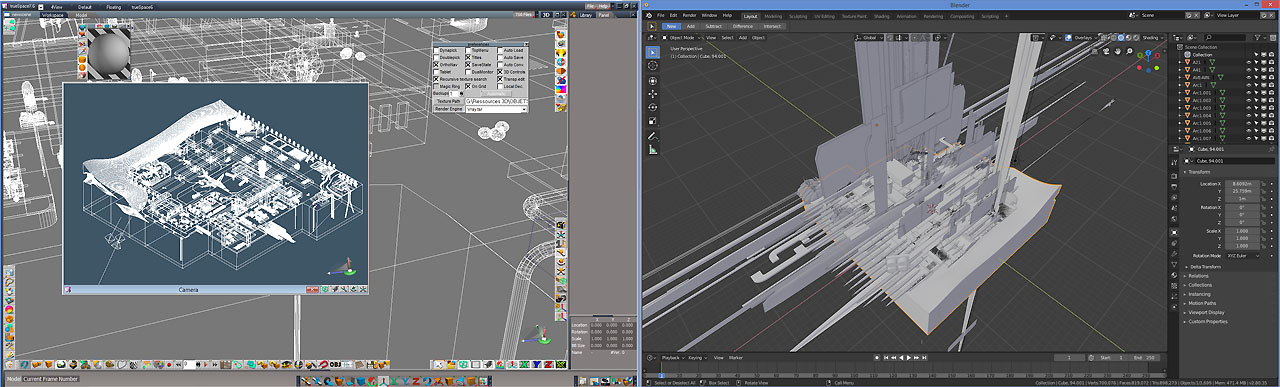
A test made with the previous version didn't work for me. I mean, simple objects load well but entire scene generates errors. See below.
I will try the new one.
A test made with the previous version didn't work for me. I mean, simple objects load well but entire scene generates errors. See below.
I will try the new one.
-
clintonman
- Captain
- Posts: 5659
- Joined: 21 May 2009, 21:08
- Type the number ten into the box: 0
- Location: California
Re: trueSpace COB import for Blender
Todays update:
Rotations are working now. This was also affecting other items like scale in the first version released.
Only problem is lights are off by 180 degrees. trueSpace lights point in +Z direction and Blender lights point in -Z direction
Rotations are working now. This was also affecting other items like scale in the first version released.
Only problem is lights are off by 180 degrees. trueSpace lights point in +Z direction and Blender lights point in -Z direction
-
clintonman
- Captain
- Posts: 5659
- Joined: 21 May 2009, 21:08
- Type the number ten into the box: 0
- Location: California
Re: trueSpace COB import for Blender
Final update, for a while:
imports trueSpace scene layers into Blender collections
import cameras
light and camera rotations are off by 180 degrees and I think the camera may need an additional twist on it's view axis for it's top to point upward
imports trueSpace scene layers into Blender collections
import cameras
light and camera rotations are off by 180 degrees and I think the camera may need an additional twist on it's view axis for it's top to point upward
-
Emmanuel
- Chief Warrant Officer
- Posts: 670
- Joined: 14 Jun 2009, 06:47
Re: trueSpace COB import for Blender
Thank you Clinton.
I can load entire scenes without errors now. Scn support is great .
.
Will you add animation and material support ?
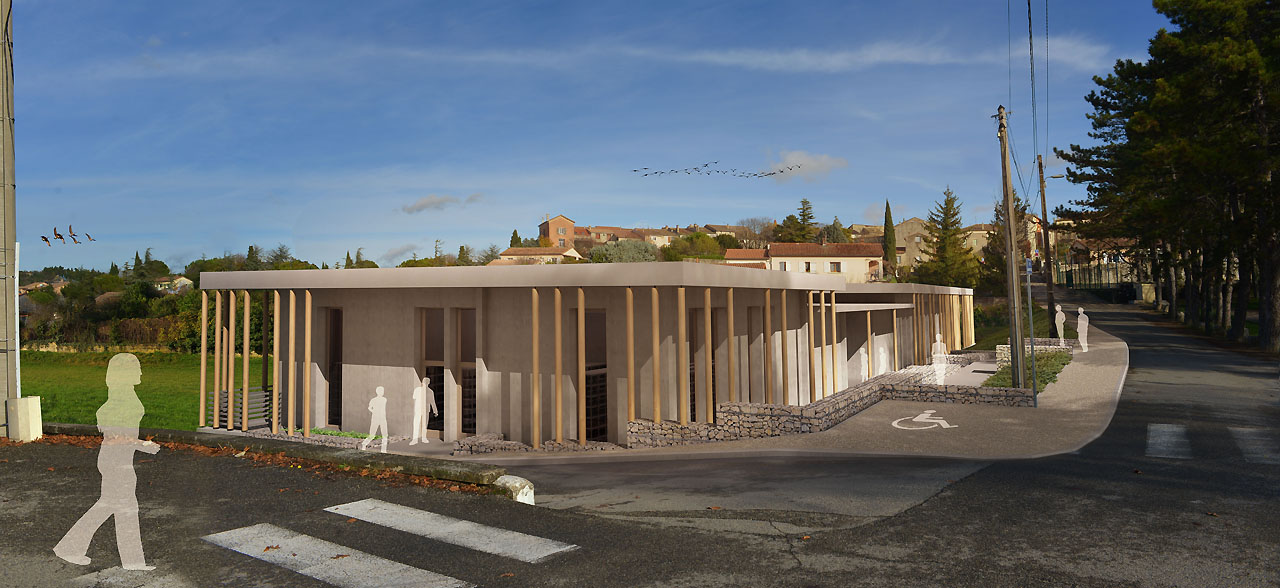
The renders below come from trueSpace (VRay) ; I can't wait to see how it would render with Blender's Eevee real-time render engine !
I can load entire scenes without errors now. Scn support is great
.
The renders below come from trueSpace (VRay) ; I can't wait to see how it would render with Blender's Eevee real-time render engine !

-
clintonman
- Captain
- Posts: 5659
- Joined: 21 May 2009, 21:08
- Type the number ten into the box: 0
- Location: California
Re: trueSpace COB import for Blender
Thanks for the feedback, it's nice to know that it's helpful to someone.Emmanuel wrote: 07 Dec 2018, 18:29 ..
Will you add animation and material support ?
...
Might add animation and materials in the future after solving the camera and light issues.
-
trueBlue

- Captain
- Posts: 5548
- Joined: 06 Jul 2009, 22:50
- Type the number ten into the box: 10
Re: trueSpace COB import for Blender
Awesome Clinton!
Thank you!
Might mention to Save As with the .py file extension. For me it was saving in the .hml file extension
Thank you!
Might mention to Save As with the .py file extension. For me it was saving in the .hml file extension
-
clintonman
- Captain
- Posts: 5659
- Joined: 21 May 2009, 21:08
- Type the number ten into the box: 0
- Location: California
Re: trueSpace COB import for Blender
Can you tell me what browser you're using? It might be smooth for me because python is installed on my system. I'll try to find a machine without python and try it.trueBlue wrote: 07 Dec 2018, 20:15 Awesome Clinton!
Thank you!
Might mention to Save As with the .py file extension. For me it was saving in the .hml file extension
Edit: OK found another pc and MS Edge showed the problem. I added a mime type to the website for python files. It should hopefully be ok now.
-
trueBlue
- Captain
- Posts: 5548
- Joined: 06 Jul 2009, 22:50
- Type the number ten into the box: 10
Re: trueSpace COB import for Blender
Yup I am using Edge - Save Target As
It works as expected now.
Thanks again
It works as expected now.
Thanks again
-
bitkar

- Captain
- Posts: 2089
- Joined: 16 Mar 2010, 07:14
- Type the number ten into the box: 0
- Location: Czech Republic
Re: trueSpace COB import for Blender
it is definatly useful... i will use it when it supports all lighting and material features. If you can model and setup in tS and render in blender, thats is like a dream.
Michal aka bitkar
tS freak since tS2 (1998) and forever (tS7.61 modeler)
tS freak since tS2 (1998) and forever (tS7.61 modeler)
-
trueBlue
- Captain
- Posts: 5548
- Joined: 06 Jul 2009, 22:50
- Type the number ten into the box: 10
Re: trueSpace COB import for Blender
Curious?bitkar wrote: 12 Dec 2018, 14:07 it is definatly useful... i will use it when it supports all lighting and material features. If you can model and setup in tS and render in blender, thats is like a dream.
Why would you want tS lights, cameras, and materials imported?
Wouldn't it be easier and more accurate to use Blender's lights, cameras, and materials?
-
bitkar
- Captain
- Posts: 2089
- Joined: 16 Mar 2010, 07:14
- Type the number ten into the box: 0
- Location: Czech Republic
Re: trueSpace COB import for Blender
maybe its because I master tS but can do pretty nothiing in Blender...? :) Its easier for tS user to have the most work in tS and render and tweak something minor in blender.
Michal aka bitkar
tS freak since tS2 (1998) and forever (tS7.61 modeler)
tS freak since tS2 (1998) and forever (tS7.61 modeler)
-
Emmanuel
- Chief Warrant Officer
- Posts: 670
- Joined: 14 Jun 2009, 06:47
Re: trueSpace COB import for Blender
I understand Bitkar concerns.
trueSpace's workflow is soooo efficient, the less we do in Blender the more we save to spend time with our wife and children
Let's take texture painting task. In trueSpace if I want to apply a texture to my object, I just have to clic the Paint tool, select the texture color shader, choose the texture, clic the Paint icon and it's done ! 5 clics only.
Okay, for this time price you don't have all the features the new real-time materials may offer. But who cares ? If you are not designing a video game, and simply want to render an architectural visualization, trueSpace workflow is unbeatable.
Same with scene navigation. When you got used to trueSpace's view widgets and the must-have plugins (ZoomToFit, EyeZoom, FindCamera), moving your eye in a Blender scene is a million years backward.
trueSpace's workflow is soooo efficient, the less we do in Blender the more we save to spend time with our wife and children
Let's take texture painting task. In trueSpace if I want to apply a texture to my object, I just have to clic the Paint tool, select the texture color shader, choose the texture, clic the Paint icon and it's done ! 5 clics only.
Okay, for this time price you don't have all the features the new real-time materials may offer. But who cares ? If you are not designing a video game, and simply want to render an architectural visualization, trueSpace workflow is unbeatable.
Same with scene navigation. When you got used to trueSpace's view widgets and the must-have plugins (ZoomToFit, EyeZoom, FindCamera), moving your eye in a Blender scene is a million years backward.
-
clintonman
- Captain
- Posts: 5659
- Joined: 21 May 2009, 21:08
- Type the number ten into the box: 0
- Location: California
Re: trueSpace COB import for Blender
Another update
Found out the rotations were completely wrong and fixed it. Rotations are weird because you can get to the same orientation using different values. So you think you got it then one more test and you see it's not really working.
Light and Camera rotations also working now.
So now animation should be possible in the future.
As of now the things that don't transfer over are:
animation
camera fov
materials
Found out the rotations were completely wrong and fixed it. Rotations are weird because you can get to the same orientation using different values. So you think you got it then one more test and you see it's not really working.
Light and Camera rotations also working now.
So now animation should be possible in the future.
As of now the things that don't transfer over are:
animation
camera fov
materials
-
clintonman
- Captain
- Posts: 5659
- Joined: 21 May 2009, 21:08
- Type the number ten into the box: 0
- Location: California
Re: trueSpace COB import for Blender
Couldn't let it go.
Last version uploaded today now supports animation. Not thoroughly tested but looks ok to me.
Last version uploaded today now supports animation. Not thoroughly tested but looks ok to me.
-
clintonman
- Captain
- Posts: 5659
- Joined: 21 May 2009, 21:08
- Type the number ten into the box: 0
- Location: California
Re: trueSpace COB import for Blender
Another update.
Added material color, color texture and bump texture import.
3 color procedural textures: cubes, wrapped checker and wrapped textured brick
Dont fully understand the Blender node material system so it's a bit rough around the edges.
TODO: camera fov and I think the materials probably need some kind of UV mapping node added for the textures.
Edit:
After midnight...
added uv mapping nodes and the textures are better now
camera is a no go for field of view - tS uses size to control the fov but the scale values(not size) saved to the file dont match up
Added material color, color texture and bump texture import.
3 color procedural textures: cubes, wrapped checker and wrapped textured brick
Dont fully understand the Blender node material system so it's a bit rough around the edges.
TODO: camera fov and I think the materials probably need some kind of UV mapping node added for the textures.
Edit:
After midnight...
added uv mapping nodes and the textures are better now
camera is a no go for field of view - tS uses size to control the fov but the scale values(not size) saved to the file dont match up
-
Emmanuel
- Chief Warrant Officer
- Posts: 670
- Joined: 14 Jun 2009, 06:47
Re: trueSpace COB import for Blender
Clinton, it's a dream come true 


 There is no emoticon to express my feelings !
THANK YOU VERY MUCH
Some scenes or textures don't load well and it's not easy to figure what's wrong with it, especially with textures. Also, on big scenes, somes objects are ignored and I can't figure why.
But on a new project jointly built both with trueSpace and Blender it will be easy to identify the type of object that can pass through and the situations that lead to errors. I will report my findings on this topic.
There is no emoticon to express my feelings ! THANK YOU VERY MUCH
Some scenes or textures don't load well and it's not easy to figure what's wrong with it, especially with textures. Also, on big scenes, somes objects are ignored and I can't figure why.
But on a new project jointly built both with trueSpace and Blender it will be easy to identify the type of object that can pass through and the situations that lead to errors. I will report my findings on this topic.
Last edited by Emmanuel on 19 Dec 2018, 10:25, edited 1 time in total.
-
bitkar
- Captain
- Posts: 2089
- Joined: 16 Mar 2010, 07:14
- Type the number ten into the box: 0
- Location: Czech Republic
Re: trueSpace COB import for Blender
clintonman is THE MAN! i see he is the man that cannot go to sleep when there is something in the back of his head not sorted out :)
Michal aka bitkar
tS freak since tS2 (1998) and forever (tS7.61 modeler)
tS freak since tS2 (1998) and forever (tS7.61 modeler)
-
clintonman
- Captain
- Posts: 5659
- Joined: 21 May 2009, 21:08
- Type the number ten into the box: 0
- Location: California
Re: trueSpace COB import for Blender
Thanks, looking forward to your findings.Emmanuel wrote: 18 Dec 2018, 19:01 Clinton, it's a dream come true
THANK YOU VERY MUCH
Some scenes or textures don't load well and it's not easy to figure what's wrong with it, especially with textures. Also, on big scenes, somes objects are ignored and I can't figure why.
But on a new project jointly built both with trueSpace and Blender it will be easy to identify the type of object that can pass through and the situations that lead to errors. I will report my findings on this topic.
-
clintonman
- Captain
- Posts: 5659
- Joined: 21 May 2009, 21:08
- Type the number ten into the box: 0
- Location: California
Re: trueSpace COB import for Blender
Jun 7 2020 Update:
fix material color error
added import of nurbs patches from trueSpace
fix material color error
added import of nurbs patches from trueSpace