primitives
-
bkjernisted
- Chief Petty Officer
- Posts: 114
- Joined: 23 May 2009, 06:10
primitives
On both vista 32bit vista and windows xp 64 bit I am having similar problems. On the model side (6.6) when I left click on a cube and then left click and drag a plane is created within the grid lines. to get height from the plane I need to then hold down both mouse buttons without letting go of the left mouse button. On the workspace side (7.61) when I left click on a primitive it is created correctly when you drag the mouse. The problem I'm having is that the cube for example will not expand to give me the option of choosing either the nurbs cube or the metaball cube. Is there a key you have to hit? Thanks!
-
spacekdet

- Captain
- Posts: 1810
- Joined: 27 May 2009, 15:00
- Type the number ten into the box: 10
- Location: On the day shift at the Utility Muffin Research Kitchen
Re: primitives
NURBS and Metaballs are Model side only.
...at least for now, there is work being done by some genius forum members on implementing a NURBS solution on the Workspace side.
Workspace has some cool improvements for creating Primitives.
Right Click a Primitive icon and open the Stack view. Click 'Panel' tab.
Note the drop down lists, experiment with the different options to see what they can do.
In either Model or Workspace side, one click should create a Primitive according to the options you set up beforehand via right-click on the Primitive icon.
Click-Drag will 'draw' a Prim to your liking, but you should only need right-click-drag to add height.
...at least for now, there is work being done by some genius forum members on implementing a NURBS solution on the Workspace side.
Workspace has some cool improvements for creating Primitives.
Right Click a Primitive icon and open the Stack view. Click 'Panel' tab.
Note the drop down lists, experiment with the different options to see what they can do.
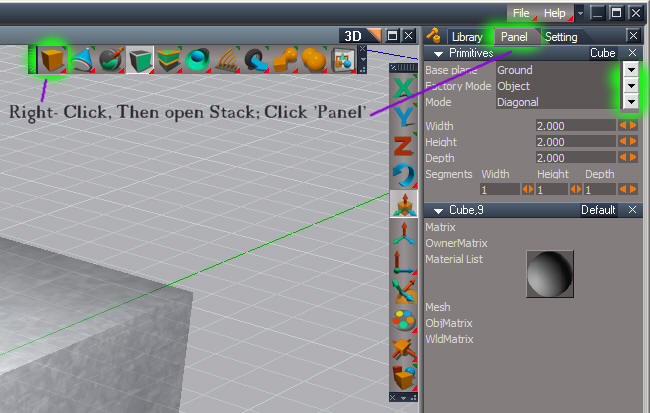
Click-Drag will 'draw' a Prim to your liking, but you should only need right-click-drag to add height.
-
bkjernisted
- Chief Petty Officer
- Posts: 114
- Joined: 23 May 2009, 06:10
Re: primitives
Spacekdet thanks for your explanation! I really thought the primitives had the nurbs and metablls because of the triangles at the top and bottom of the icons.I need to read the manual yet! Your a great help to newbies like me. Thanks again!