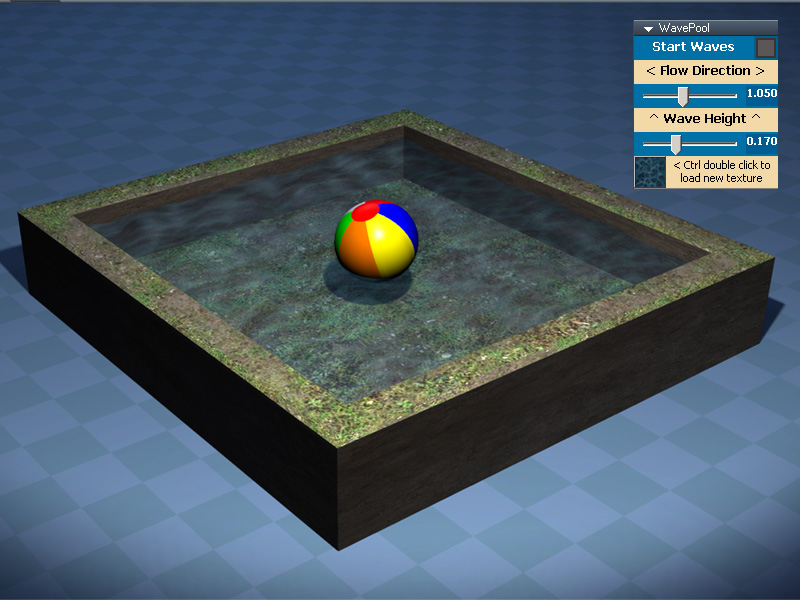
Here is an attached workSpace object I did some time ago. Select the pool in the 3D view & in the Panel stack check Start Waves.
You can control the Flow Direction & Wave Height with the sliders.
Thanks to Délé for procedural scripts!
Wave Pool
-
danperk
Wave Pool
-
clintonman
- Captain
- Posts: 5659
- Joined: 21 May 2009, 21:08
- Type the number ten into the box: 0
- Location: California
Re: Wave Pool
I modified it to simulate reflection using D3D Render texture target. I had to change the uv mapping and remove the repeating uv to get it to work.
- Attachments
-
- rtReflection.zip
- (1.02 MiB) Downloaded 325 times
-
danperk
Re: Wave Pool
Nice work Clinton!
I decreased the load a little by reducing the texture size to 256 x 256 and increasing the AA to 2.
Also added a post-processing node to the Texture render target & encapsulated all so pool could
be repositioned again.
Happy to see there are still people on this forum with an OPEN MIND to the possibilities of WorkSpace!!!
I decreased the load a little by reducing the texture size to 256 x 256 and increasing the AA to 2.
Also added a post-processing node to the Texture render target & encapsulated all so pool could
be repositioned again.
Happy to see there are still people on this forum with an OPEN MIND to the possibilities of WorkSpace!!!
-
clintonman
- Captain
- Posts: 5659
- Joined: 21 May 2009, 21:08
- Type the number ten into the box: 0
- Location: California
Re: Wave Pool
Thanks, the bloom is a nice touch. I was inspired by your wave pool and another post asking about reflective materials.
-
Draise
- Captain
- Posts: 3200
- Joined: 21 Sep 2009, 19:33
- Type the number ten into the box: 0
- Location: Bogota, Colombia
Re: Wave Pool
VERY VERY cool!

