A while ago Dele created a fog material for TS7.6
I don't have a link, sorry.
I wasn't satisfied that the shader didn't fade the shadowed portion of an object to the fog color.
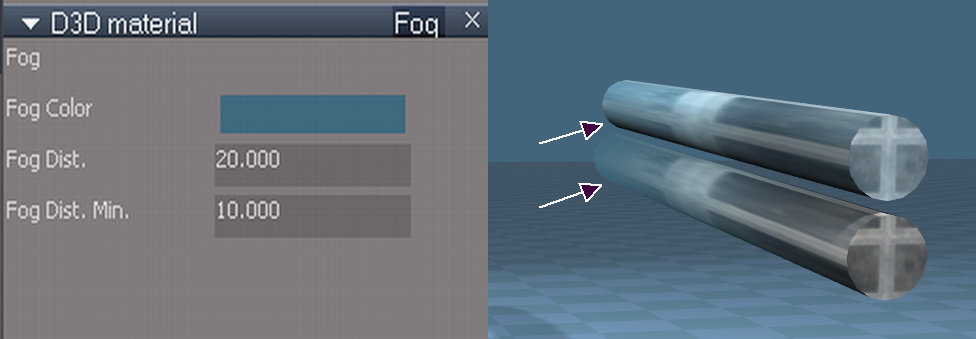
So I took Dele's LE fog shader blocks and applied them in a different way to a Blinn shader I found in the library. Here is the result. Notice how the shadowed portion of the lower cylinder fades to the fog color as well as the lit part. Ths upper cylinder uses Dele's original shader.
The new shader has a minimum fog distance. Areas of an object closer to the viewer than this distance are unaffected by the fog.
I've attached the shader for those who'd like to use it. Let me know if it has any problems. I'm kind of inexperienced programming in the LE but I'll do my best.
Improved fog shader
-
Peter
- Senior Chief Petty Officer
- Posts: 170
- Joined: 18 Apr 2010, 15:18
- Type the number ten into the box: 0
- Location: Texas
Improved fog shader
- Attachments
-
- MappedBlinnFog.zip
- (64.33 KiB) Downloaded 322 times
-
a day without orange juice is like... a day without orange juice
-
Cayenne
- Chief Petty Officer
- Posts: 119
- Joined: 03 Jun 2009, 20:05
- Type the number ten into the box: 0
- Location: U.K.
Re: Improved fog shader
Hi Peter , thanks downloaded but will be a few days till I get to look at it .
smart
regards
Paul
smart
regards
Paul
-
Draise

- Captain
- Posts: 3200
- Joined: 21 Sep 2009, 19:33
- Type the number ten into the box: 0
- Location: Bogota, Colombia
Re: Improved fog shader
Cool! I'm really looking forward to trying it out! Do you have any tutorials or help file as to how to use it? I relatively new to trueSpace, but I love it's awesome lifetime renders. Thanks!
Peace bro =)
-Draise
Peace bro =)
-Draise
-
Peter
- Senior Chief Petty Officer
- Posts: 170
- Joined: 18 Apr 2010, 15:18
- Type the number ten into the box: 0
- Location: Texas
Re: Improved fog shader
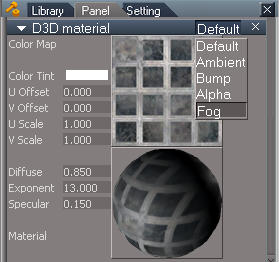
To use it just apply to an object like a typical material. When you edit the material pull down the combo box under 'default' to go to the fog settings. Make the fog the same color as the background.Draise wrote:Cool! I'm really looking forward to trying it out! Do you have any tutorials or help file as to how to use it? I relatively new to trueSpace, but I love it's awesome lifetime renders. Thanks!
Peace bro =)
-Draise
Adjust the Fog Dist numbers till it fades out at the desired distance from the camera view.
The 'Min' input makes the fog turn off completely when the distance is closer than a certain point.
The numbers you enter are by trial & error, but it takes just a few tries. The fog inputs are pictured in my first post.
Enjoy.
- Attachments
-
- info.jpg (14.67 KiB) Viewed 6247 times
a day without orange juice is like... a day without orange juice
-
Jimmer
- Chief Petty Officer
- Posts: 122
- Joined: 22 May 2009, 11:54
Re: Improved fog shader
GREAT JOB !!!! Have not tried it, but it's something WorkSpace has
very, very badly needed.....
very, very badly needed.....
-
Peter
- Senior Chief Petty Officer
- Posts: 170
- Joined: 18 Apr 2010, 15:18
- Type the number ten into the box: 0
- Location: Texas
Re: Improved fog shader
Thanks.Jimmer wrote:GREAT JOB !!!! Have not tried it, but it's something WorkSpace has
very, very badly needed.....
Dele really deserves the credit. He wrote the original shader blocks for the WS.
a day without orange juice is like... a day without orange juice
-
Jimmer
- Chief Petty Officer
- Posts: 122
- Joined: 22 May 2009, 11:54
Re: Improved fog shader
Has anyone tried applying mutilple, (different) textures WITH fog, to a single object ? This might expose an issue with the fog.
-
Peter
- Senior Chief Petty Officer
- Posts: 170
- Joined: 18 Apr 2010, 15:18
- Type the number ten into the box: 0
- Location: Texas
Re: Improved fog shader
You mean like this?Jimmer wrote:Has anyone tried applying mutilple, (different) textures WITH fog, to a single object ? This might expose an issue with the fog.
(multiple fog materials on one mesh object)
It seems to work as expected. Is this what you meant?
- Attachments
-

a day without orange juice is like... a day without orange juice
-
Peter
- Senior Chief Petty Officer
- Posts: 170
- Joined: 18 Apr 2010, 15:18
- Type the number ten into the box: 0
- Location: Texas
Re: Improved fog shader
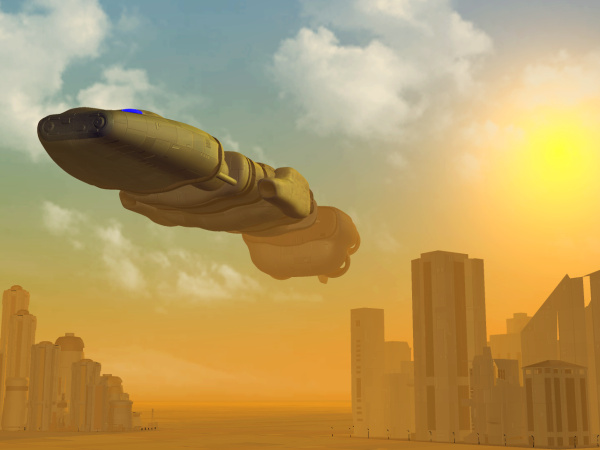
I never really showed a good example of how this results.
Here is a scene in the workspace with the fog shader on all the objects.
I keep using the same sky, I know, but this is just a demo
Models were found around the internet. Sky is from parva.
Here is a scene in the workspace with the fog shader on all the objects.
I keep using the same sky, I know, but this is just a demo
Models were found around the internet. Sky is from parva.
- Attachments
-
a day without orange juice is like... a day without orange juice
-
Draise
- Captain
- Posts: 3200
- Joined: 21 Sep 2009, 19:33
- Type the number ten into the box: 0
- Location: Bogota, Colombia
Re: Improved fog shader
Great image showing the use of it! =)
-
v3rd3
- Lieutenant Commander
- Posts: 1191
- Joined: 21 May 2009, 20:04
Re: Improved fog shader
Really nice work.
-
spacekdet

- Captain
- Posts: 1810
- Joined: 27 May 2009, 15:00
- Type the number ten into the box: 10
- Location: On the day shift at the Utility Muffin Research Kitchen
Re: Improved fog shader
Orange fog.
Somewhere, Roman is smiling.
This could be a caliGallery winner!
Somewhere, Roman is smiling.
This could be a caliGallery winner!
-
trueBlue

- Captain
- Posts: 5548
- Joined: 06 Jul 2009, 22:50
- Type the number ten into the box: 10
-
Peter
- Senior Chief Petty Officer
- Posts: 170
- Joined: 18 Apr 2010, 15:18
- Type the number ten into the box: 0
- Location: Texas
Re: Improved fog shader
Thanks all. I'm sticking it in my "ideas folder"
a day without orange juice is like... a day without orange juice