Hey guys,
just want to share this funny thing with you. Nothing technical, just fun.
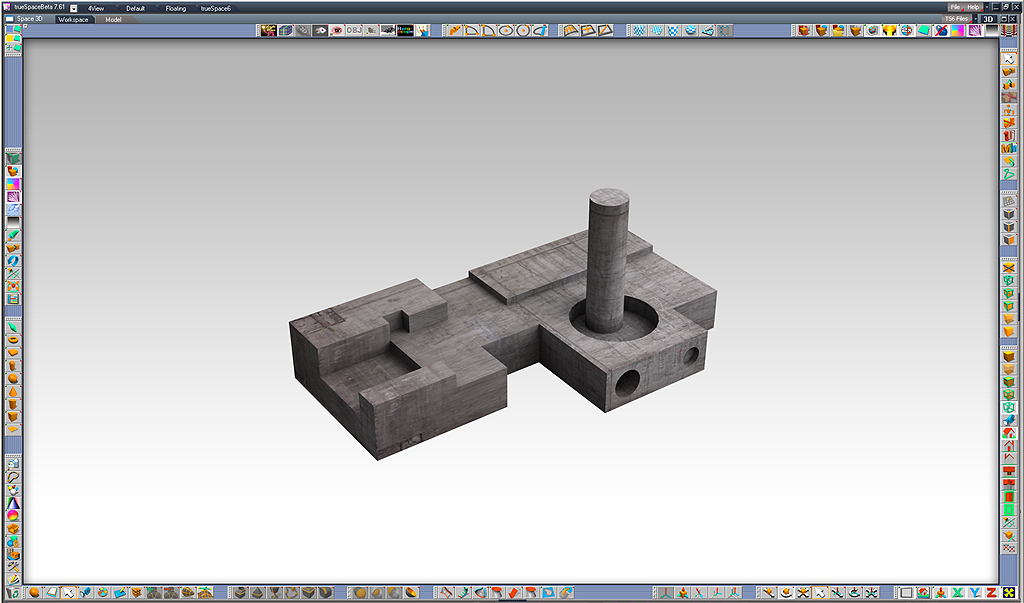
To make the trueSpace interface look less cluttered I placed a background image
with graphics to make it look as if something was added to the interface. Perhaps it looks silly but
it helps me to focus better on my work. The coloured line around the workspace seems
to keep the icons all in place. Also the gradient background and shadow trick gives the feeling
of depth to the working space.
Funny trick with interface
-
Buzz

- Chief Petty Officer
- Posts: 150
- Joined: 05 Jul 2009, 12:46
- Type the number ten into the box: 0
- Location: Netherlands
Funny trick with interface
- Attachments
-
-
Accu
- Petty Officer First Class
- Posts: 78
- Joined: 21 Jul 2009, 18:00
Re: Funny trick with interface
I like it!
One of the reasons I don't use tS7 is the interface. I always found a way to move or lose the icons in tS7. I want them to stay where they are.
How did you set it like that?
One of the reasons I don't use tS7 is the interface. I always found a way to move or lose the icons in tS7. I want them to stay where they are.
How did you set it like that?
-
marcel

- Captain
- Posts: 2247
- Joined: 21 May 2009, 19:52
- Type the number ten into the box: 0
- Location: paris - France
Re: Funny trick with interface
good idea Buzz.
Design - illustration - Animation
http://www.crea-vision.fr
http://www.crea-vision.fr
-
Buzz
- Chief Petty Officer
- Posts: 150
- Joined: 05 Jul 2009, 12:46
- Type the number ten into the box: 0
- Location: Netherlands
Re: Funny trick with interface
Accu, all iconbars can still be moved around. It's just an optical trick. It looks as if the icons are part of the coloured bar around the screen. It really gives the feel as if it's part of the interface. I like it too. I made the background graphic fit exactly the trueSpace screen, that's important so it won't distort. It's an optical trick but it can be of help to make the workspace clean and tidy.
Marcel perhaps you have an idea to be added to this.
If any of you programmers out there can add this to the real interface...
Marcel perhaps you have an idea to be added to this.
If any of you programmers out there can add this to the real interface...
-
MikomDude

- Captain
- Posts: 1930
- Joined: 04 Oct 2010, 11:12
- Type the number ten into the box: 0
- Location: The Hague, Netherlands
Re: Funny trick with interface
Cool  but how exactly did you do it?
but how exactly did you do it?-
Buzz
- Chief Petty Officer
- Posts: 150
- Joined: 05 Jul 2009, 12:46
- Type the number ten into the box: 0
- Location: Netherlands
Re: Funny trick with interface
Mikom, I made this image in Photoshop and use this as background image in trueSpace, instead of colour.
- Attachments
-

-
MikomDude
- Captain
- Posts: 1930
- Joined: 04 Oct 2010, 11:12
- Type the number ten into the box: 0
- Location: The Hague, Netherlands
Re: Funny trick with interface
Ehh yes but how do I ad it as a background? is there a setting I have to change in TrueSpace?
-
Buzz
- Chief Petty Officer
- Posts: 150
- Joined: 05 Jul 2009, 12:46
- Type the number ten into the box: 0
- Location: Netherlands
Re: Funny trick with interface
Look for this icon. Here you can add a background image.
- Attachments
-

- background button.jpg (78.47 KiB) Viewed 6129 times
-
Emmanuel

- Chief Warrant Officer
- Posts: 670
- Joined: 14 Jun 2009, 06:47
Re: Funny trick with interface
Cool idea !
BTW, did anyone tried to tweak tS to replace the blue background color trueSpace shows by default with the neutral grey we had in tS6 and older ?
BTW, did anyone tried to tweak tS to replace the blue background color trueSpace shows by default with the neutral grey we had in tS6 and older ?
-
MikomDude
- Captain
- Posts: 1930
- Joined: 04 Oct 2010, 11:12
- Type the number ten into the box: 0
- Location: The Hague, Netherlands
Re: Funny trick with interface
Yeah, I know that but that only ads a background image to the renders right? Not a permanent background.Buzz wrote:Look for this icon. Here you can add a background image.
-
marcel
- Captain
- Posts: 2247
- Joined: 21 May 2009, 19:52
- Type the number ten into the box: 0
- Location: paris - France
Re: Funny trick with interface
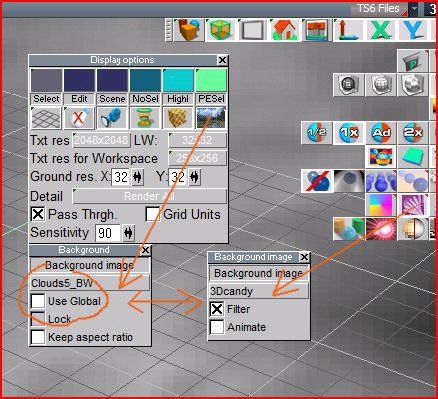
there is a way more interesting to use background with 2 pictures: one for the background of the interface and one for the background of the scene if the scene need a background.
- choose the background of the scene as Buzz show it (1).
- choose a background for the interface (2)
now you can switch between both background with the 'use global" setting.
- when use global is selected you have the background of the scene
- when use global is not selected you have the background of the interface.
(background color (2) and background effect shader (1) need to be activated together if you want to switch)
- choose the background of the scene as Buzz show it (1).
- choose a background for the interface (2)
now you can switch between both background with the 'use global" setting.
- when use global is selected you have the background of the scene
- when use global is not selected you have the background of the interface.
(background color (2) and background effect shader (1) need to be activated together if you want to switch)
- Attachments
-
Design - illustration - Animation
http://www.crea-vision.fr
http://www.crea-vision.fr
-
marcel
- Captain
- Posts: 2247
- Joined: 21 May 2009, 19:52
- Type the number ten into the box: 0
- Location: paris - France
Re: Funny trick with interface
i forgot to say: if the use global is not selected the background appear automatically each time you open trueSpace. which is useful for an interface.
Design - illustration - Animation
http://www.crea-vision.fr
http://www.crea-vision.fr
-
MikomDude
- Captain
- Posts: 1930
- Joined: 04 Oct 2010, 11:12
- Type the number ten into the box: 0
- Location: The Hague, Netherlands
Re: Funny trick with interface
Ok thanks I'll try it.
I'll try it.-
Buzz
- Chief Petty Officer
- Posts: 150
- Joined: 05 Jul 2009, 12:46
- Type the number ten into the box: 0
- Location: Netherlands
Re: Funny trick with interface
Marcel, you hit the nail right on the head! I didn't thought about this way of using the background. With your trick it's possible to render with a neutral background, let's say white, and when modelling using the interface background without pressing buttons. Thanks Marcel!

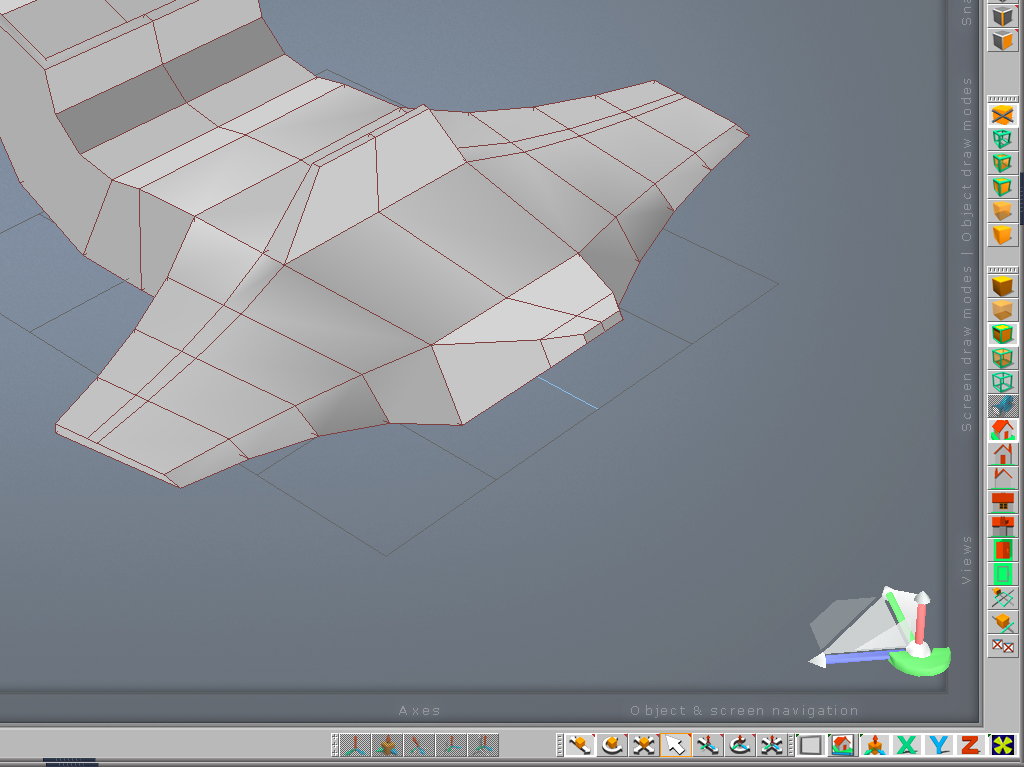
I've added some labels to it . Perhaps its useful for newcomers to get familiar with the icons, what they mean.
The fun part is as that it looks as if trueSpace had a interface makeover.
I've added some labels to it
. Perhaps its useful for newcomers to get familiar with the icons, what they mean.The fun part is as that it looks as if trueSpace had a interface makeover.
- Attachments
-
-

-
Buzz
- Chief Petty Officer
- Posts: 150
- Joined: 05 Jul 2009, 12:46
- Type the number ten into the box: 0
- Location: Netherlands
Re: Funny trick with interface
Hi all you trueSpacers out there.
Created a new interface background to give the icons its place and keep it all tidy and clean. It's all fake of course but it really helps me to focus during modelling.
Created a new interface background to give the icons its place and keep it all tidy and clean. It's all fake of course but it really helps me to focus during modelling.
- Attachments
-
-


-
BNG

- Chief Warrant Officer
- Posts: 684
- Joined: 16 Oct 2009, 03:26
- Type the number ten into the box: 0
- Location: Texas
Re: Funny trick with interface
Personally, I prefer a very cluttered look like this one. It could be I just too lazy to keep it clean or maybe just a glutten for eye strain?
- Attachments
-

- The messier the better for me

Casual Truespace 3D modeling hobbyist. My Truespace blog and simple 3d Modeling Tutorials for Casual Model Makers.
-
Finis

- Captain
- Posts: 5410
- Joined: 21 May 2009, 18:26
- Type the number ten into the box: 0
- Location: America!
Re: Funny trick with interface
Buzz that looks great. That's professional level style in my opinion. Also, your labeled interface is a very good idea. How about posting a full size image of it for people, especially new TS users, to use? Maybe the latest one with labels?
BNG, That looks like my house.
BNG, That looks like my house.
I prefer dangerous freedom over peaceful servitude. -- Thomas Jefferson/Jean Jacques Rousseau
-
froo
- Captain
- Posts: 2554
- Joined: 22 May 2009, 12:13
Re: Funny trick with interface
Very neat and clean Buzz. How do you mean, it's fake? How do you get that overlay into Model side? Also, can that be converted to Workspace side?
-
Prodigy

- Site Admin
- Posts: 957
- Joined: 21 May 2009, 14:46
- Type the number ten into the box: 0
- Location: Uruguay
Re: Funny trick with interface
agree with froo..
๑۩۞۩๑ prodigy ๑۩۞۩๑
-
Finis
- Captain
- Posts: 5410
- Joined: 21 May 2009, 18:26
- Type the number ten into the box: 0
- Location: America!
Re: Funny trick with interface
Buzz said in earlier post.Buzz wrote:... I placed a background image with graphics to make it look as if something was added to the interface.
I prefer dangerous freedom over peaceful servitude. -- Thomas Jefferson/Jean Jacques Rousseau
-
spacekdet

- Captain
- Posts: 1810
- Joined: 27 May 2009, 15:00
- Type the number ten into the box: 10
- Location: On the day shift at the Utility Muffin Research Kitchen
Re: Funny trick with interface
Works great until you change a toolbar.