Ts7.1 Beta 8 Animation
-
lrdsatyr8
- Petty Officer First Class
- Posts: 68
- Joined: 24 Mar 2013, 20:19
- Type the number ten into the box: 10
Ts7.1 Beta 8 Animation
Has anyone done any physical simulation using the animation features of Ts7? I've been trying to create some gears and test out gear ratios. Want to make one gear turn and the other react to it, but can't figure out how to get it going. Any help would be nice.
-
FHembree

- Master Chief Petty Officer
- Posts: 337
- Joined: 21 Feb 2011, 17:43
- Type the number ten into the box: 9
Re: Ts7.1 Beta 8 Animation
Didn't create this file and I don't think this is what you are looking for, but it is a gear file, and its interesting.
It doesn't check gear ratios, those had to be calculated before drawing the 3d file.
Turn on timer event to see gears turn.
It doesn't check gear ratios, those had to be calculated before drawing the 3d file.
Turn on timer event to see gears turn.
- Attachments
-
- GEAR_E.rar
- (1.39 MiB) Downloaded 354 times
-
lrdsatyr8
- Petty Officer First Class
- Posts: 68
- Joined: 24 Mar 2013, 20:19
- Type the number ten into the box: 10
Re: Ts7.1 Beta 8 Animation
Maybe it's me... I really haven't done much of anything but maybe look around the Workside... most of the work I have done is in the Modelside. I remember being able to do animation in the model side going as far back as version 2, but with the new addition of the the physical simulations in Ts7 I was hoping someone had some insight in how to use and play around in it.FHembree wrote:Didn't create this file and I don't think this is what you are looking for, but it is a gear file, and its interesting.
It doesn't check gear ratios, those had to be calculated before drawing the 3d file.
Turn on timer event to see gears turn.
-
Draise

- Captain
- Posts: 3200
- Joined: 21 Sep 2009, 19:33
- Type the number ten into the box: 0
- Location: Bogota, Colombia
Re: Ts7.1 Beta 8 Animation
Well create two fixed pivot points on both your objects, assign a physics material to both, then assign a constant rotational force to one of the cogs. Watch them spin when you hit "Run Simulation"! button. Then you can even tug around, stop the simulation, etc, in realtime. Later you can bake the animation if you'd like. You could also animate the rotation of one, and assign the two pins to the other obejct and watch it also spin. make sure your colission fidelity is very high.
-
lrdsatyr8
- Petty Officer First Class
- Posts: 68
- Joined: 24 Mar 2013, 20:19
- Type the number ten into the box: 10
Re: Ts7.1 Beta 8 Animation
Well... I've tried but it seems not to work. If the object is a simple object (like a single cylinder) I can get it to spin. But if I add anything to it (either glued or unioned) whether I run the simulation before or after, the motion is always ruined. The simple spin on the z axis become erratic and the whole object begins moving all over the place. Any ideas?
-
Finis

- Captain
- Posts: 5410
- Joined: 21 May 2009, 18:26
- Type the number ten into the box: 0
- Location: America!
Re: Ts7.1 Beta 8 Animation
I vaguely remember a plug-in that animated machines, tank treads, wheels, gears, etc. Vctek.
I prefer dangerous freedom over peaceful servitude. -- Thomas Jefferson/Jean Jacques Rousseau
-
BNG

- Chief Warrant Officer
- Posts: 684
- Joined: 16 Oct 2009, 03:26
- Type the number ten into the box: 0
- Location: Texas
Re: Ts7.1 Beta 8 Animation
I have if anyone needs it. Leroy.
Casual Truespace 3D modeling hobbyist. My Truespace blog and simple 3d Modeling Tutorials for Casual Model Makers.
-
lrdsatyr8
- Petty Officer First Class
- Posts: 68
- Joined: 24 Mar 2013, 20:19
- Type the number ten into the box: 10
Re: Ts7.1 Beta 8 Animation
I'd like to try it out! Am getting quite frustrated over this.BNG wrote:I have if anyone needs it. Leroy.
-
lrdsatyr8
- Petty Officer First Class
- Posts: 68
- Joined: 24 Mar 2013, 20:19
- Type the number ten into the box: 10
Re: Ts7.1 Beta 8 Animation
Ok... do this... Create a cylinder and apply the rotation to it. Now... attach a box to that cylinder and run the simulation again. It throws the intial motion completely out of whack and it doesn't just sit there and rotate anymore... now it flys all over the place wildly.
-
Draise
- Captain
- Posts: 3200
- Joined: 21 Sep 2009, 19:33
- Type the number ten into the box: 0
- Location: Bogota, Colombia
Re: Ts7.1 Beta 8 Animation
Hmmm yeah. I see what's going on.
My next idea is to actually build the pivot and socket for the simulation. Put collisions to Vertice type and try that.
My next idea is to actually build the pivot and socket for the simulation. Put collisions to Vertice type and try that.
-
Finis
- Captain
- Posts: 5410
- Joined: 21 May 2009, 18:26
- Type the number ten into the box: 0
- Location: America!
Re: Ts7.1 Beta 8 Animation
TS 7.6 model side
The blue gear has no physics properties and is keyframe animated to spin. It is the motor to drive the rest. The green and pink gears are driven by physics simulation. They move because the blue gear is turning.
The green and pink gears have physics properties and each has an Object Fixation Point at the centers of the end faces.
To add Object Fixation Points first give the object basic physics properties (cloth, wood, metal). Then select it and click the Fixation Point 1 icon. The point will appear in the center of the object. Move the fixation point, as you would move any object, to the desired location. In this case to the center of one 'round' face. Create fixation point 2 for the other face. There is an option somewhere for the fixation points to move with the object. I don't know where that is but be sure they do.
For best results with TS physics right click the start simulation icon. Constant time: uncheck, collision detection: vertex + face, integrity checking: all.
Attached is a zip with the TS 7.6 model side scene file for this.
For attaching things (group ?) to gears I can only guess. Things to try:
- In any case do grouping, Booleans, etc. first then apply physics or keyframes.
- Try applying the physics properties to a group rather than its components.
- Use a rigid IK joint to connect the objects. No skeleton is needed for this. You can connect objects directly with IK joints in TS.
- Use the Mesh Collapse plug-in to merge the objects into one mesh.
The blue gear has no physics properties and is keyframe animated to spin. It is the motor to drive the rest. The green and pink gears are driven by physics simulation. They move because the blue gear is turning.
The green and pink gears have physics properties and each has an Object Fixation Point at the centers of the end faces.
To add Object Fixation Points first give the object basic physics properties (cloth, wood, metal). Then select it and click the Fixation Point 1 icon. The point will appear in the center of the object. Move the fixation point, as you would move any object, to the desired location. In this case to the center of one 'round' face. Create fixation point 2 for the other face. There is an option somewhere for the fixation points to move with the object. I don't know where that is but be sure they do.
For best results with TS physics right click the start simulation icon. Constant time: uncheck, collision detection: vertex + face, integrity checking: all.
Attached is a zip with the TS 7.6 model side scene file for this.
For attaching things (group ?) to gears I can only guess. Things to try:
- In any case do grouping, Booleans, etc. first then apply physics or keyframes.
- Try applying the physics properties to a group rather than its components.
- Use a rigid IK joint to connect the objects. No skeleton is needed for this. You can connect objects directly with IK joints in TS.
- Use the Mesh Collapse plug-in to merge the objects into one mesh.
- Attachments
-
- PhysGearsTS76modelside.zip
- (204.21 KiB) Downloaded 341 times
-

- PhysGears.gif (195.1 KiB) Viewed 7061 times
Last edited by Finis on 06 Nov 2015, 00:06, edited 4 times in total.
I prefer dangerous freedom over peaceful servitude. -- Thomas Jefferson/Jean Jacques Rousseau
-
spacekdet

- Captain
- Posts: 1810
- Joined: 27 May 2009, 15:00
- Type the number ten into the box: 10
- Location: On the day shift at the Utility Muffin Research Kitchen
Re: Ts7.1 Beta 8 Animation
Simulations were never my thing, but somewhere in Model side I remember being able to set a single or double fixation point in order to nail down the axis of a rotating part.
Might have been a right-click option on something else because now I can't seem to find it at the moment.
Not very helpful, I know, but it's in there somewhere!
(EDIT) See Finis's post above/below.
Yay, Finis
Might have been a right-click option on something else because now I can't seem to find it at the moment.
Not very helpful, I know, but it's in there somewhere!
(EDIT) See Finis's post above/below.
Yay, Finis
-
Emmanuel

- Chief Warrant Officer
- Posts: 670
- Joined: 14 Jun 2009, 06:47
Re: Ts7.1 Beta 8 Animation
Thanks for the tutorial Finis.
It is good to remember that we have such tools... I realize that in 18 years of trueSpace daily work I NEVER made use of its simulation capabilities

It is good to remember that we have such tools... I realize that in 18 years of trueSpace daily work I NEVER made use of its simulation capabilities
-
trueBlue

- Captain
- Posts: 5548
- Joined: 06 Jul 2009, 22:50
- Type the number ten into the box: 10
Re: Ts7.1 Beta 8 Animation
Good one Finis!
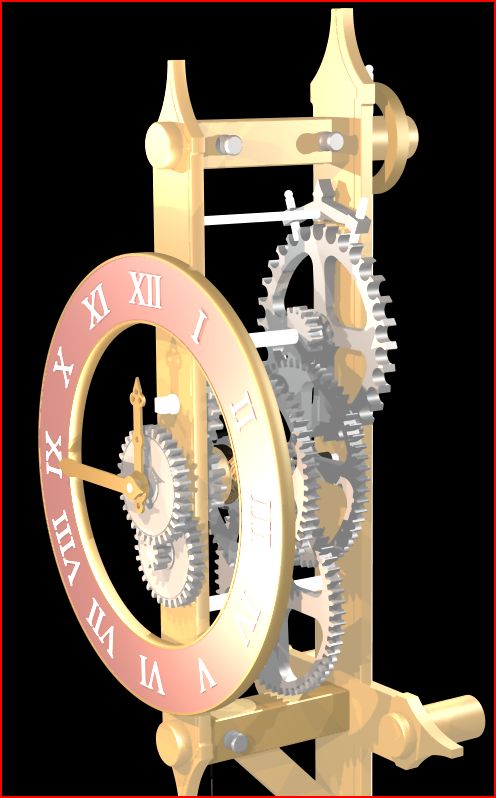
Willing to tackle this one?
Willing to tackle this one?
-
Finis
- Captain
- Posts: 5410
- Joined: 21 May 2009, 18:26
- Type the number ten into the box: 0
- Location: America!
Re: Ts7.1 Beta 8 Animation
Thanks everyone.
I hope that info is what lrdsatyr8 needs.
It was nice to visit TS again but I'll devote my efforts to learning Blender. Judging from videos Blender has a great physics system and lots of simulation ability including water, waves, and breaking stuff. trueBlue that clock looks like a job for Blender.
Edit: I tried this with 10 or 11 gears. The fixation points will move with a gear and will move with multiple gears selected but won't rotate with them even if they are grouped. The fixation points are hard to keep in the correct positions. The errors where things move into each other accumulate so that the gear teeth co-occupy space and gears don't rotate correctly. You would have to use many polygons on the objects to improve that and the simulation would be very slow.
lrdsatyr8, I would not recommend TS for physics simulations of your gears unless it is just two or three. If you just want to key frame animated gears for illustration maybe but not as a test of function. Maybe Blender is what you need for that. I don't know Blender yet but its physics seems much better based on videos of things people have done.
I hope that info is what lrdsatyr8 needs.
It was nice to visit TS again but I'll devote my efforts to learning Blender. Judging from videos Blender has a great physics system and lots of simulation ability including water, waves, and breaking stuff. trueBlue that clock looks like a job for Blender.
Edit: I tried this with 10 or 11 gears. The fixation points will move with a gear and will move with multiple gears selected but won't rotate with them even if they are grouped. The fixation points are hard to keep in the correct positions. The errors where things move into each other accumulate so that the gear teeth co-occupy space and gears don't rotate correctly. You would have to use many polygons on the objects to improve that and the simulation would be very slow.
lrdsatyr8, I would not recommend TS for physics simulations of your gears unless it is just two or three. If you just want to key frame animated gears for illustration maybe but not as a test of function. Maybe Blender is what you need for that. I don't know Blender yet but its physics seems much better based on videos of things people have done.
I prefer dangerous freedom over peaceful servitude. -- Thomas Jefferson/Jean Jacques Rousseau
-
BNG
- Chief Warrant Officer
- Posts: 684
- Joined: 16 Oct 2009, 03:26
- Type the number ten into the box: 0
- Location: Texas
Re: Ts7.1 Beta 8 Animation
This plugin is mainly for tank tracks but give it a try a see if it can you going in the right direction. Leroy.lrdsatyr8 wrote:I'd like to try it out! Am getting quite frustrated over this.BNG wrote:I have if anyone needs it. Leroy.
- Attachments
-
- vcTek.zip
- (1.26 MiB) Downloaded 357 times
Casual Truespace 3D modeling hobbyist. My Truespace blog and simple 3d Modeling Tutorials for Casual Model Makers.
-
lrdsatyr8
- Petty Officer First Class
- Posts: 68
- Joined: 24 Mar 2013, 20:19
- Type the number ten into the box: 10
Re: Ts7.1 Beta 8 Animation
Thanks Finis... you helped alot. I did find that you have to actually phsychically make the entire housing that the pivots sit in for it to work. For example... if you have a gear, you have to have it on a axle... and the axle must be sitting in a hole at both ends on a fixed object that doesn't move. That helped alot. The physics work, but you're right... they are slow. Took about an hour to get a good gear train to move properly but it worked enough to prove a hypothesis I had about a gearing system for a particular project I'm working on. Thank you again for your help!Finis wrote:Thanks everyone.
I hope that info is what lrdsatyr8 needs.
It was nice to visit TS again but I'll devote my efforts to learning Blender. Judging from videos Blender has a great physics system and lots of simulation ability including water, waves, and breaking stuff. trueBlue that clock looks like a job for Blender.
Edit: I tried this with 10 or 11 gears. The fixation points will move with a gear and will move with multiple gears selected but won't rotate with them even if they are grouped. The fixation points are hard to keep in the correct positions. The errors where things move into each other accumulate so that the gear teeth co-occupy space and gears don't rotate correctly. You would have to use many polygons on the objects to improve that and the simulation would be very slow.
lrdsatyr8, I would not recommend TS for physics simulations of your gears unless it is just two or three. If you just want to key frame animated gears for illustration maybe but not as a test of function. Maybe Blender is what you need for that. I don't know Blender yet but its physics seems much better based on videos of things people have done.