I just don't know how to use, any tutorial? I want to make a curve in a rope...
Thanks in Advance
Bend Tool...
-
LeonRegis

- Captain
- Posts: 1946
- Joined: 18 Aug 2009, 17:36
- Type the number ten into the box: 0
- Location: Brazil/Earth/Orion Arm/Milky Way/4th Dimension/This Universe/Multiverse???/Singularity???
Bend Tool...
Be the change you want to see in the world. - Mohandas Gandhi
-
Breech Block

- Master Chief Petty Officer
- Posts: 482
- Joined: 13 Jun 2009, 20:31
Re: Bend Tool...
I think you would be far better off using the sweep tool and SDS. Far simpler, more accurate and takes a lot less time. HTH.
It you post a graphic of what your aiming to achieve, I'd be happy to help further.
It you post a graphic of what your aiming to achieve, I'd be happy to help further.

-
marcel

- Captain
- Posts: 2247
- Joined: 21 May 2009, 19:52
- Type the number ten into the box: 0
- Location: paris - France
Re: Bend Tool...
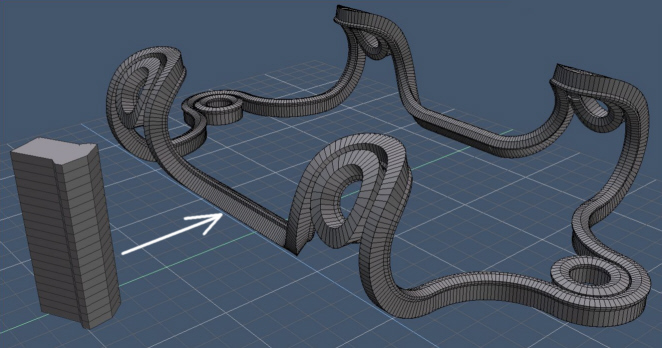
Here is an example of what you can do with the blend tool in several minutes. but you can also use it for thing very different. A use of the tool is to create a round tower by working on flat object and to paint the textures on the flat surface. With the blend tool you can create a curved surface of the whole. UV map follow the curve.
Skew and taper tool can be used with the blend tool to do many thing. A lot of tool in modelside are not used by people because they don't know their possibility. It is why they are not in the workspace which is a pity.
Skew and taper tool can be used with the blend tool to do many thing. A lot of tool in modelside are not used by people because they don't know their possibility. It is why they are not in the workspace which is a pity.
- Attachments
-
Design - illustration - Animation
http://www.crea-vision.fr
http://www.crea-vision.fr
-
Cayenne
- Chief Petty Officer
- Posts: 119
- Joined: 03 Jun 2009, 20:05
- Type the number ten into the box: 0
- Location: U.K.
Re: Bend Tool...
If you look in the workspace base objects library there is a scripted object made by Glen Gordon called Cable.
On its top panel it has parameters that can be adjusted .
it has two shapes (cubes) which can be moved about to form the end points of the cable (these can be changed to another mesh if you need to)
the material can be accessed in the LE and the textures used in the shader can be changed to what you need.
As far as I know but havent tried it yet the results could be flattened afterwards to keep the shape static.
Also I think in some old tests I did this cable will also react to physics in a realtime scene, (however I may remember wrong in this case)
On its top panel it has parameters that can be adjusted .
it has two shapes (cubes) which can be moved about to form the end points of the cable (these can be changed to another mesh if you need to)
the material can be accessed in the LE and the textures used in the shader can be changed to what you need.
As far as I know but havent tried it yet the results could be flattened afterwards to keep the shape static.
Also I think in some old tests I did this cable will also react to physics in a realtime scene, (however I may remember wrong in this case)
-
marcel
- Captain
- Posts: 2247
- Joined: 21 May 2009, 19:52
- Type the number ten into the box: 0
- Location: paris - France
Re: Bend Tool...
Thank Paul! that can help peoples who need a rope (but only on workspace). The problem for new users is to have the idea to search a scripted object on a library. that kind of function need to be as a standard tool on the interface (with possibility to export on modelside throught the bridge) but I know workspace is not finish 
Design - illustration - Animation
http://www.crea-vision.fr
http://www.crea-vision.fr
-
spacekdet

- Captain
- Posts: 1810
- Joined: 27 May 2009, 15:00
- Type the number ten into the box: 10
- Location: On the day shift at the Utility Muffin Research Kitchen
Re: Bend Tool...
I like NURBS for making ropes, wires, or cables.
Model/6.6 tut here showing how using Loft and Rail Tools.
There's more than one way to skin a cat.
Model/6.6 tut here showing how using Loft and Rail Tools.
There's more than one way to skin a cat.
-
marcel
- Captain
- Posts: 2247
- Joined: 21 May 2009, 19:52
- Type the number ten into the box: 0
- Location: paris - France
Re: Bend Tool...
The question of Leonregis was about the bend tool. also you can use the bend tool with the nurbs and that is a good thing that many soft can't do.
Design - illustration - Animation
http://www.crea-vision.fr
http://www.crea-vision.fr