Hey everyone. The PC my wife uses died a couple weeks ago, so I set her up with the 'later' one I built.
This is the sequence of events.
1) System would freeze: disk light stayed on, screen was black.
A system reboot would get it going again.
This went on for several weeks.
2) System would freeze. A reboot would allow the system to be on
for a few minutes, then a system freeze would occur.
Cranked up the CPU cooling fan speed, and rebooted.
This worked for a couple weeks.
3) Now, system will no longer boot.
I smell a nasty acrid smell, like fried electronics.
Here's my question. This seems to point to a fried CPU, but, will the CPU alone
deliver that 'fried electronics' smell? I believe I built this system around the year
2000, so it's 11 years old, approximately. So, I don't want to spend much money
trying to repair it. See, it could be the CPU ($10), or the power supply ($40), or the mobo ($50).
If it's just the CPU, no problem. But, I'd buy a CPU only if I knew, that the CPU itself
could give off that smell if it were fried.
I could reuse some parts (hard drives, cd/dvd drives), and sell others (video card, memory).
So what do you think? If the CPU were fried, could it give off that smell? Like I said,
the symptoms point to a CPU failure, as described above. But the smell makes me doubt,
that the CPU is the only problem. If it's not the only problem, to heck with it. But if it is, I
can save the system for $10.
Thanks!
Froo
Dead Sytem; CPU? MOBO? Power Supply?
-
froo
- Captain
- Posts: 2554
- Joined: 22 May 2009, 12:13
Dead Sytem; CPU? MOBO? Power Supply?
-
MikomDude

- Captain
- Posts: 1930
- Joined: 04 Oct 2010, 11:12
- Type the number ten into the box: 0
- Location: The Hague, Netherlands
Re: Dead Sytem; CPU? MOBO? Power Supply?
A ten year old PC? I'd say that isn't worth spending money on. By the way, you can get those kind of old PCs everywhere, even I have a couple lying around my apartment. The thing is, people cared more about their computers back then, therefore it's easier to find such an old PC rather than an old "new" pc. It's really strange...
I recommend you just buy a disc-hub or whatever it's called. You take out the harddrive from the old computer and connect it to a working PC through the hub. They don't cost that much and you'll be able to use it as a portable hard drive (depending on what kind of hub you get).
I recommend you just buy a disc-hub or whatever it's called. You take out the harddrive from the old computer and connect it to a working PC through the hub. They don't cost that much and you'll be able to use it as a portable hard drive (depending on what kind of hub you get).
-
v3rd3
- Lieutenant Commander
- Posts: 1191
- Joined: 21 May 2009, 20:04
Re: Dead Sytem; CPU? MOBO? Power Supply?
If you fry a cpu the smell can come from the heat transfer paste.
If you have not cleaned the cabinet in a long time the smell can come from dust burning.
If you suspect you have a heat problem you might consider downloading pc wizard. http://www.cpuid.com/softwares/pc-wizard.html
The software is free and will interrogate the temp sensors in your hardware (assuming if finds them).
If you have not cleaned the cabinet in a long time the smell can come from dust burning.
If you suspect you have a heat problem you might consider downloading pc wizard. http://www.cpuid.com/softwares/pc-wizard.html
The software is free and will interrogate the temp sensors in your hardware (assuming if finds them).
-
froo
- Captain
- Posts: 2554
- Joined: 22 May 2009, 12:13
Re: Dead Sytem; CPU? MOBO? Power Supply?
Thanks Mikomdude and v3rd3.
Good ideas. I saw some IDE to SATA converters in a MicroCenter ad for about $15.
That makes sense that the smell would come from the heat transfer paste.
I asked the same question elsewhere; one person commented this could be
the result of popped capacitors on the motherboard, so I will check that as well.
Good ideas. I saw some IDE to SATA converters in a MicroCenter ad for about $15.
That makes sense that the smell would come from the heat transfer paste.
I asked the same question elsewhere; one person commented this could be
the result of popped capacitors on the motherboard, so I will check that as well.
-
froo
- Captain
- Posts: 2554
- Joined: 22 May 2009, 12:13
Re: Dead Sytem; CPU? MOBO? Power Supply?
I do see 3 large capacitors with raised tops, near the CPU. Hm.... maybe that's the problem.
-
Steinie

- Captain
- Posts: 2958
- Joined: 21 May 2009, 17:38
- Type the number ten into the box: 10
Re: Dead Sytem; CPU? MOBO? Power Supply?
Usually the cpu paste has dried up or the cpu has become unseated against the heat sink, power supply is being overworked or going bad, a fan has stopped working and you now have heat build-up, dust, dust build up on any of the fans including the video board fan (causing less airflow and again higher temperatures), clogged vents and/ or blocked vents. I've had all these problems at one time or another.
A visual inspection and your nose should root out the problem.
If the capacitors have an "X" on the top then yes that was one of your problems. However what caused them to pop? That was the real problem.
Was your computer a Dell?
http://blogs.computerworld.com/17421/ho ... reputation"
A visual inspection and your nose should root out the problem.
If the capacitors have an "X" on the top then yes that was one of your problems. However what caused them to pop? That was the real problem.
Was your computer a Dell?
http://blogs.computerworld.com/17421/ho ... reputation"
-
spacekdet

- Captain
- Posts: 1810
- Joined: 27 May 2009, 15:00
- Type the number ten into the box: 10
- Location: On the day shift at the Utility Muffin Research Kitchen
Re: Dead Sytem; CPU? MOBO? Power Supply?
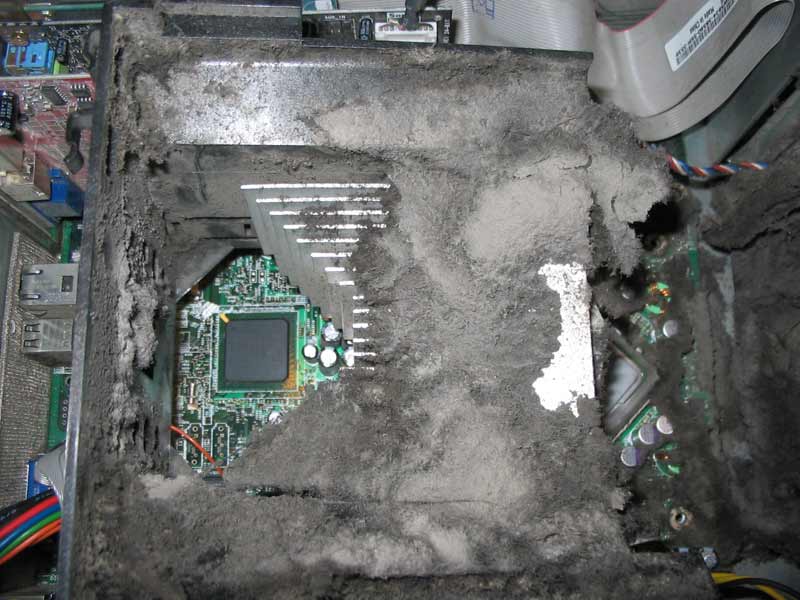
Well, there's your problem right there...
-
froo
- Captain
- Posts: 2554
- Joined: 22 May 2009, 12:13
Re: Dead Sytem; CPU? MOBO? Power Supply?
Boy you ain't kiddin spacekdet! Geez... 
-
MikomDude
- Captain
- Posts: 1930
- Joined: 04 Oct 2010, 11:12
- Type the number ten into the box: 0
- Location: The Hague, Netherlands
Re: Dead Sytem; CPU? MOBO? Power Supply?
Ha! That's a dusty PC 
-
froo
- Captain
- Posts: 2554
- Joined: 22 May 2009, 12:13
Re: Dead Sytem; CPU? MOBO? Power Supply?
Yes, Steinie, they have an 'X' on the top. They are scored that way to avoid a potential explosion.
I read this page; pretty cool actually.
Long story short, this swelling appears to be caused by hydrogen gas buildup inside the capacitor,
as explained in the wiki page below. The scoring allows the capacitor top to expand, relieving pressure.
In my case, it may very well be, that these capacitors just 'died of old age', since the motherboard is at
least 10 years old or so, and had been running pretty much 24/7 for very long periods of time.
http://en.wikipedia.org/wiki/Capacitor_plague"
I read this page; pretty cool actually.
Long story short, this swelling appears to be caused by hydrogen gas buildup inside the capacitor,
as explained in the wiki page below. The scoring allows the capacitor top to expand, relieving pressure.
In my case, it may very well be, that these capacitors just 'died of old age', since the motherboard is at
least 10 years old or so, and had been running pretty much 24/7 for very long periods of time.
http://en.wikipedia.org/wiki/Capacitor_plague"
-
froo
- Captain
- Posts: 2554
- Joined: 22 May 2009, 12:13
Re: Dead Sytem; CPU? MOBO? Power Supply?
May be better to just keep this system for spare parts, in case something on the other legacy system
goes.
I am looking a barebones systems on Newegg, to get ideas.
While I have a couple IDE hard drives in limbo, it'd be a good idea to get a package with
a SATA drive.
And, I'm pretty keen on getting an nVidia video card. My experiences with applications requiring
OpenGL support have been kinda frustrating when using ATI cards. Most the barebones systems
I have seen at Newegg this week, either offer an ATI card, or no card at all. So, that may be an add-on.
It will most likely be several months before I can even seriously entertain the idea. Maybe around
Christmas (Black Friday, say), they will have a 'Black Friday' blowout deal. Last year they had some
really good deals but I didn't need anything at the time. Hopefully by then we can get some of these
little 'bi*ch bills' paid off and out of the way, and not replaced with new ones. Hargh.
goes.
I am looking a barebones systems on Newegg, to get ideas.
While I have a couple IDE hard drives in limbo, it'd be a good idea to get a package with
a SATA drive.
And, I'm pretty keen on getting an nVidia video card. My experiences with applications requiring
OpenGL support have been kinda frustrating when using ATI cards. Most the barebones systems
I have seen at Newegg this week, either offer an ATI card, or no card at all. So, that may be an add-on.
It will most likely be several months before I can even seriously entertain the idea. Maybe around
Christmas (Black Friday, say), they will have a 'Black Friday' blowout deal. Last year they had some
really good deals but I didn't need anything at the time. Hopefully by then we can get some of these
little 'bi*ch bills' paid off and out of the way, and not replaced with new ones. Hargh.
-
jeffroig
- Chief Warrant Officer
- Posts: 662
- Joined: 22 May 2009, 10:49
- Type the number ten into the box: 0
Re: Dead Sytem; CPU? MOBO? Power Supply?
Here are some things to try.
When you turn it on does it go to the prompt screen displaying the logo and showing press f12 or f2 for this.
If so then the cpu may still be ok.
Does the motherboard have the video and NIC card built into it.
If so trying installing another video card as a bad video chip will freeze up the bus and cause nothing to work, same applies to the nic card.
If your board has both of these items built in then you will also need to go into the bios and change the setting in there to use one other than what is built in.
You could also have a bad power supply.
What happens with a power supply is that while a bad one will power the computer on it can not provide the load to spin up the hard drive during the boot sequence as it puts a heavy load on it then.
If you have another computer that you can use to test your components in it will help, you can test your hard drive, video card, nic card, sound card etc...
One of my computers was doing a very similar thing, it would be running fine and then all of a sudden the screen would freeze and I would get black squares on the screen and I could do nothing but reboot it. I tested the hard drive and it was fine, the video was built in so I installed a new card and the problem is gone.
If you have a electronics recycling program in your area you can always go by there and they will sell you a old PC for next to nothing to take parts out of.
I hope this helps, lets us know what you find out.
When you turn it on does it go to the prompt screen displaying the logo and showing press f12 or f2 for this.
If so then the cpu may still be ok.
Does the motherboard have the video and NIC card built into it.
If so trying installing another video card as a bad video chip will freeze up the bus and cause nothing to work, same applies to the nic card.
If your board has both of these items built in then you will also need to go into the bios and change the setting in there to use one other than what is built in.
You could also have a bad power supply.
What happens with a power supply is that while a bad one will power the computer on it can not provide the load to spin up the hard drive during the boot sequence as it puts a heavy load on it then.
If you have another computer that you can use to test your components in it will help, you can test your hard drive, video card, nic card, sound card etc...
One of my computers was doing a very similar thing, it would be running fine and then all of a sudden the screen would freeze and I would get black squares on the screen and I could do nothing but reboot it. I tested the hard drive and it was fine, the video was built in so I installed a new card and the problem is gone.
If you have a electronics recycling program in your area you can always go by there and they will sell you a old PC for next to nothing to take parts out of.
I hope this helps, lets us know what you find out.
..
-
froo
- Captain
- Posts: 2554
- Joined: 22 May 2009, 12:13
Re: Dead Sytem; CPU? MOBO? Power Supply?
Thanks Jeff.
It does not boot at all now.
All the fans spin.
Initially the system would freeze; a reboot got it going again.
Then that stopped working, so I cranked up the fan speed, to the max.
That kept it going for awhile.
Then it stopped booting completely.
I opened the power supply, and there is at least one capacitor that is 'puffed up',
meaning, it's 'broken', and leaking. On the top, at the scoring, there is a little rust colored
stuff. I will see if I can take a picture to show you what I mean. In addition,
that capacitor is loosened from the board. Same thing is on the motherboard
of the system, near the CPU. A couple capacitors are loose, with puffed up
tops.
I could replace these capacitors, and the power supply. It's just a matter of
having the time and money to put into it. Both are pretty limited currently.
Thanks!
It does not boot at all now.
All the fans spin.
Initially the system would freeze; a reboot got it going again.
Then that stopped working, so I cranked up the fan speed, to the max.
That kept it going for awhile.
Then it stopped booting completely.
I opened the power supply, and there is at least one capacitor that is 'puffed up',
meaning, it's 'broken', and leaking. On the top, at the scoring, there is a little rust colored
stuff. I will see if I can take a picture to show you what I mean. In addition,
that capacitor is loosened from the board. Same thing is on the motherboard
of the system, near the CPU. A couple capacitors are loose, with puffed up
tops.
I could replace these capacitors, and the power supply. It's just a matter of
having the time and money to put into it. Both are pretty limited currently.
Thanks!
-
jeffroig
- Chief Warrant Officer
- Posts: 662
- Joined: 22 May 2009, 10:49
- Type the number ten into the box: 0
Re: Dead Sytem; CPU? MOBO? Power Supply?
Are you saying the power supply capacitors are puffed?
The brown rust colored stuff is the electrolytic chemical that makes up the capacitor.
Or are there capacitors on the mother board that are puffed.
If it is just a power supply I can help out there.
I have a few extra ones here.
I will just need to know the wattage rating on the supply and see what connectors you have.
It sounds like you had a surge of electricity come through and blow out a resistor that then caused the other problems.
Let me know what you need and I will see what I have.
If you pay for the shipping I will provide the parts for free.
The brown rust colored stuff is the electrolytic chemical that makes up the capacitor.
Or are there capacitors on the mother board that are puffed.
If it is just a power supply I can help out there.
I have a few extra ones here.
I will just need to know the wattage rating on the supply and see what connectors you have.
It sounds like you had a surge of electricity come through and blow out a resistor that then caused the other problems.
Let me know what you need and I will see what I have.
If you pay for the shipping I will provide the parts for free.
..
-
froo
- Captain
- Posts: 2554
- Joined: 22 May 2009, 12:13
Re: Dead Sytem; CPU? MOBO? Power Supply?
Hi Jeff.
Capacitors are in the power supply and the motherboard.
There is definite leakage in the power supply capacitor.
There are 4 capacitors on the motherboard that are puffed,
with no leakage.
This is not the same brand/model, but it shows what the power connectors
to the mobo look like:
http://cgi.ebay.com/ws/eBayISAPI.dll?Vi ... 3625372754"
Depending on the cost of shipping, it may be cheaper and easier for me to just
buy a new power supply around here. Also, I don't know when I will be able to
have the funds for it. But thank you very much for the offer!
Also, if I buy a PSU from, say, MicroCenter and the system is still fried, I can at
least return it for a refund or store credit.
Here's another thing... this and the other computer have always been fussy.
I think there are problems with the USB ports; in the past I had to disconnect
and reconnect the mouse, keyboard, etc. to get them recognized, as well as
switch them around. At least one port does not even work. So, we'll see if
this ever works again.
Capacitors are in the power supply and the motherboard.
There is definite leakage in the power supply capacitor.
There are 4 capacitors on the motherboard that are puffed,
with no leakage.
This is not the same brand/model, but it shows what the power connectors
to the mobo look like:
http://cgi.ebay.com/ws/eBayISAPI.dll?Vi ... 3625372754"
Depending on the cost of shipping, it may be cheaper and easier for me to just
buy a new power supply around here. Also, I don't know when I will be able to
have the funds for it. But thank you very much for the offer!
Also, if I buy a PSU from, say, MicroCenter and the system is still fried, I can at
least return it for a refund or store credit.
Here's another thing... this and the other computer have always been fussy.
I think there are problems with the USB ports; in the past I had to disconnect
and reconnect the mouse, keyboard, etc. to get them recognized, as well as
switch them around. At least one port does not even work. So, we'll see if
this ever works again.
-
jeffroig
- Chief Warrant Officer
- Posts: 662
- Joined: 22 May 2009, 10:49
- Type the number ten into the box: 0
Re: Dead Sytem; CPU? MOBO? Power Supply?
I will look and see if I have one for you.
In the mean time I sent you a PM.
In the mean time I sent you a PM.
..