How save and open in tS

User avatar
Gustibus
Seaman
Posts: 8
Joined: 26 Jun 2009, 19:04

How save and open in tS

Post by Gustibus »

:bananahi: I'm still :mrgreen: on tS
I have problem (well more a lot of problems), but this tortures me at the moment. I worked with Dogwaffle, and there was simple storing ( save as Bmp, Jpg, Png, Targa format).
At tS7.6 saves as RsObj or RsScn format. Can me please someone explains, how these files are being opened?
Kind regard to all and thank you for help.
User avatar
Steinie
Captain
Posts: 2958
Joined: 21 May 2009, 17:38
Type the number ten into the box: 10

Re: How save and open in tS

Post by Steinie »

trueSpace 7.6 is really two programs. On the workSpace side you can
load/save a RsObj or RsScn format and on the Model side you can load/save a
*.scn or *.cob formats. There is also a plug-in OBJ importer/exporter on the Model
side called LUUV and on the workSpace side Frootee is selling an Importer (and soon
an Exporter) for OBJ files.
Bmp, Jpg, Png, Targa etc are graphic file formats which are applied to an OBJ/cob/RsObj for example
using the Material Editor.
stan
Master Chief Petty Officer
Posts: 584
Joined: 21 May 2009, 17:20

Re: How save and open in tS

Post by stan »

rsobj and rsscn are internal types for ts7.6. if you want an image like bmp you need to render using one of the render engines. vray was the only render engine on workspace side unless you use the realtime rendering( which is part of 7.6, using dx shaders).

modelside though has lightworks and virtualight renderers.
User avatar
Gustibus
Seaman
Posts: 8
Joined: 26 Jun 2009, 19:04

Re: How save and open in tS

Post by Gustibus »

Thank you to both for help. If I right understand must to get one of the render engines, if I want to show my product. Is this the correct render engine ;
http://vray.info/store.asp
Or is another way? :?:
I am not from "computer" generation, that is why thank you for every help.
v3rd3
Lieutenant Commander
Posts: 1191
Joined: 21 May 2009, 20:04

Re: How save and open in tS

Post by v3rd3 »

Vray is no longer available so you will have to use .X renders included in the workspace side or add a new rendering tool.

A free tool for using the Yafaray render engine can be found at http://www.yafaray4ts.org. The current version 0.7 supports the 7.61 workspace side.
User avatar
Gustibus
Seaman
Posts: 8
Joined: 26 Jun 2009, 19:04

Re: How save and open in tS

Post by Gustibus »

I saw already this Web page, but I didn't read well. (RTFM) I speak to my self, but I forget always.
A million thanks.
v3rd3
Lieutenant Commander
Posts: 1191
Joined: 21 May 2009, 20:04

Re: How save and open in tS

Post by v3rd3 »

Please... this is a family site... it should be RTM.... RTFM is highly inappropriate.... :mrgreen:
Karthogen
Master Chief Petty Officer
Posts: 454
Joined: 03 Jun 2009, 14:12

Re: How save and open in tS

Post by Karthogen »

TS 7.6 contains render options on both teh workspace and model side.

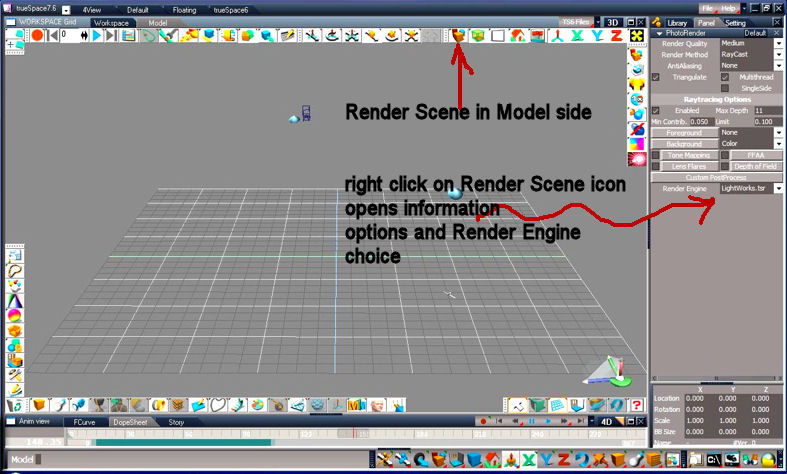
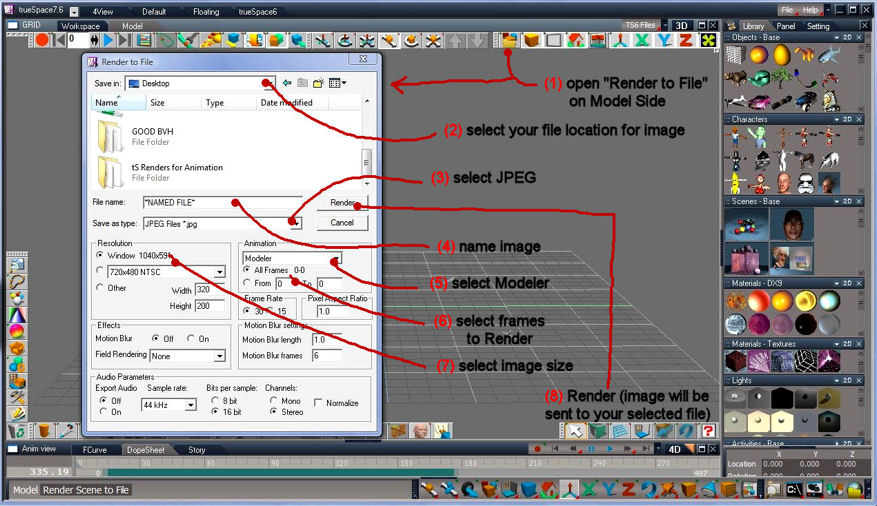
On Model ther is the render button at the top right bar that will give options for the file type you want to save.

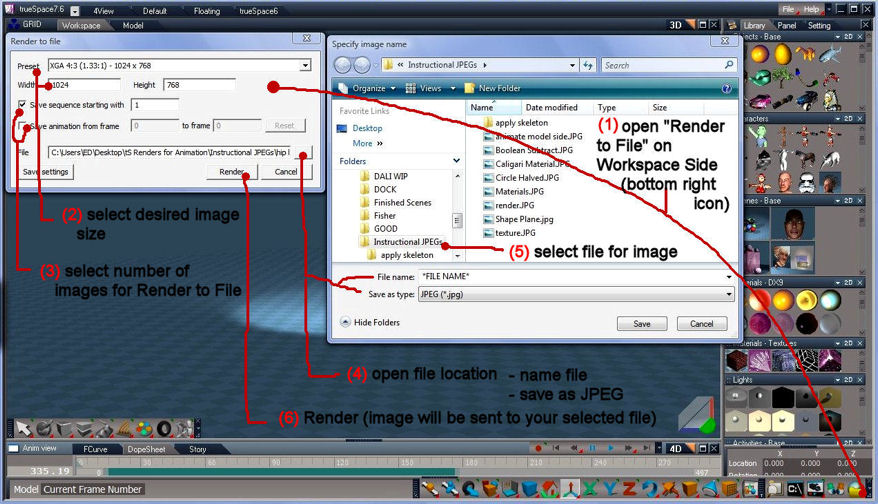
On Workspace side the render button is on teh bottom right bar and will again give you options for what fiel type you are looking for.
Mr. 3d

Re: How save and open in tS

Post by Mr. 3d »

Maybe these can be of some assistance...
Render.JPG
Render to File WorkSpace JPEG.JPG
Render to File Model Side JPEG.JPG
User avatar
Gustibus
Seaman
Posts: 8
Joined: 26 Jun 2009, 19:04

Re: How save and open in tS

Post by Gustibus »

v3rd3; sory for (RTFM). This I got answer from Philip (dogwaffle).
Karthogen; I read the help manual, but i didn't know meaning of word (RENDER)
Mr. 3d; :worship: this helps me gigantically. This me refundet joy to work with tS.
For my English (am from Slovenia) I need translator, that is why me picture very eases understanding.

Thank you all.
v3rd3
Lieutenant Commander
Posts: 1191
Joined: 21 May 2009, 20:04

Re: How save and open in tS

Post by v3rd3 »

No Gus please let me apologize.... I was joking about the 3rd letter of 4. Although nobody here really cusses as we all get along so well I do not believe there is a rule prohibiting it.....

Return to “New Users”