Texturing, Mapping & SDS Question

Technical questions, etc..
User avatar
DesignDevil
Master Chief Petty Officer
Posts: 500
Joined: 22 May 2009, 08:52
Type the number ten into the box: 0
Location: Neuruppin, Germany, Earth.

Texturing, Mapping & SDS Question

Post by DesignDevil »

Hi together, today i have a question about texturing, mapping and apply SDS to a model. I often had this problem but i could solve this in the past thrue workarounds - today i want a answer ;) .

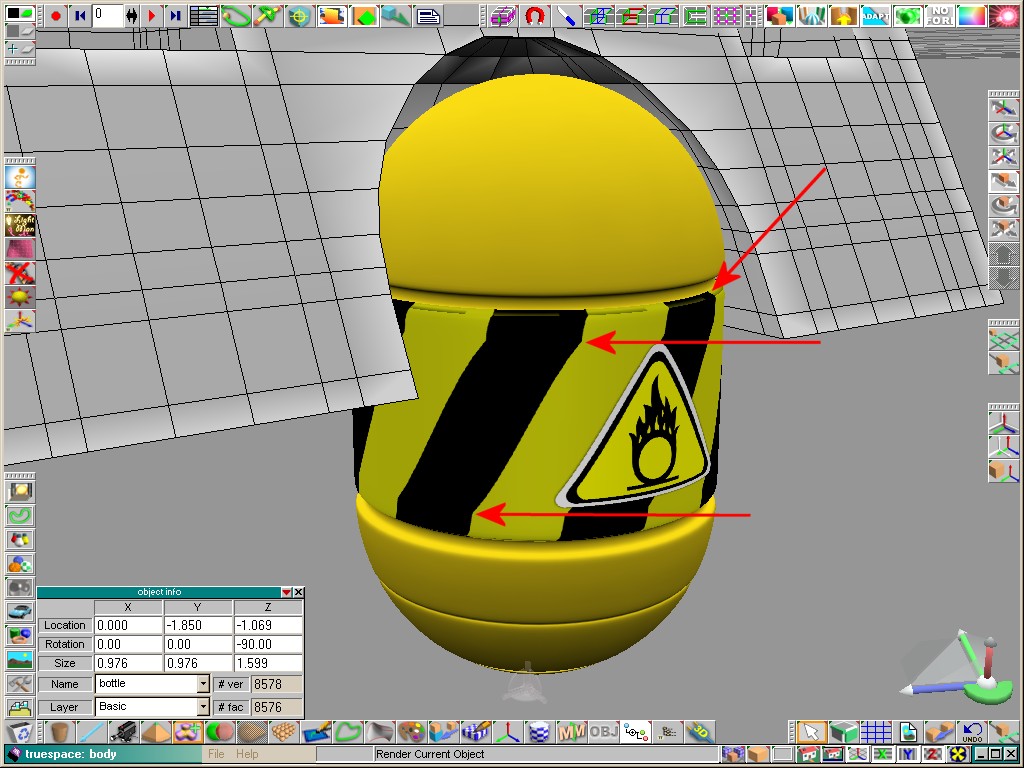
Below are my model (the yellow bottle or tank). It is just one part of a bigger model and all parts are build relative low poly because, and this is the importend information: i want to animate this object later !

As you can see there is a texture applied in the middle of the bottle - the yellow, black stripes. I mapped this texture with cylindrical projection onto the SDS version of the model:
003.jpg
But here comes the problem. To animate the object i have to delete the SDS layers again because i can just animate in low poly version. Otherwise it slows to much down. But after deleting the SDS layers the mapping is lost and after applying again the SDS layers it looks now like this:
004.jpg
I had to remap the bottle all the time if i add the SDS again.

I also tried to map the texture onto the low poly model but this detroys also the mapping if i add SDS onto it and as conclusion it looks like the image above.

The question is: How can i get a perfect mapped texture onto the low poly object so that the mapping stay intact no matter how often i add or delete SDS?
I still use TrueSpace 6.6
Link: My Youtube Channel
Link: www.DesignDevil.de - Plugins, Tutorials and more about TrueSpace 6.6
User avatar
RAYMAN
Captain
Posts: 2547
Joined: 21 May 2009, 18:56

Re: Texturing, Mapping & SDS Question

Post by RAYMAN »

this is actually pretty logic as different levels of sds have different uv coordinates.
jumping from one level to the other without remapping isnt possible.
But if you make that thing efficiently you get something like 1000-2000 polys which isnt much.
the curvy parts need more the straight need less polys.
with the right 3d application you can animate millions of these parts with dozens of movements.
The trick is instancing of animations.
i wrote a lot about that in the past here.... it works....
Truespace isnt efficient... ;)
Peter
Attachments
boje move.jpg
User avatar
DesignDevil
Master Chief Petty Officer
Posts: 500
Joined: 22 May 2009, 08:52
Type the number ten into the box: 0
Location: Neuruppin, Germany, Earth.

Re: Texturing, Mapping & SDS Question

Post by DesignDevil »

Well, "the right 3d application" is not the discussion point - i still use trueSpace ;)

Ok, that means i have to live with that solution ... sad ...
I still use TrueSpace 6.6
Link: My Youtube Channel
Link: www.DesignDevil.de - Plugins, Tutorials and more about TrueSpace 6.6
User avatar
RAYMAN
Captain
Posts: 2547
Joined: 21 May 2009, 18:56

Re: Texturing, Mapping & SDS Question

Post by RAYMAN »

DesignDevil wrote:Well, "the right 3d application" is not the discussion point - i still use trueSpace ;)

Ok, that means i have to live with that solution ... sad ...
It means that the amount of animated objects is limited....... ;)
plus it means that you do the texturing with the finished object rather then with a step ahead......
but what you can do is make the object in Truespace and also animate it there and then host it in an application or render engine that can do
instancing via the collada file with animation option checked from workspace side..... :)
User avatar
bitkar
Captain
Posts: 2089
Joined: 16 Mar 2010, 07:14
Type the number ten into the box: 0
Location: Czech Republic

Re: Texturing, Mapping & SDS Question

Post by bitkar »

iam not home to test it... but if you only switch the sds layer, not destroy it with the SDS- icon, it should preserve the UV for the layer you will use finally. So just SDS it until you get the level of detail, then map it and then dont destroy the SDS, ohly switch it to lower with a 3D control widget (color balls), then animate it. For final render, switch bach to that detailed level.
Will this work?
Michal aka bitkar
tS freak since tS2 (1998) and forever (tS7.61 modeler)

Return to “TechForum”