I have.. a lot of scripts and buttons and modified setups, and.. unfortunately it broke my Material picker. It doesn't work.
I have tried to copy the default Context material picker and widget into my modified Context, but still not working. Why would that be?
Material Picker not working [SOLVED]
-
Draise

- Captain
- Posts: 3200
- Joined: 21 Sep 2009, 19:33
- Type the number ten into the box: 0
- Location: Bogota, Colombia
Material Picker not working [SOLVED]
Last edited by Draise on 19 May 2015, 00:04, edited 1 time in total.
-
trueBlue

- Captain
- Posts: 5548
- Joined: 06 Jul 2009, 22:50
- Type the number ten into the box: 10
Re: Material Picker not working
Post it and I will take a look at it.
-
Draise
- Captain
- Posts: 3200
- Joined: 21 Sep 2009, 19:33
- Type the number ten into the box: 0
- Location: Bogota, Colombia
Re: Material Picker not working
Here you go: DOWNLOAD
-
trueBlue
- Captain
- Posts: 5548
- Joined: 06 Jul 2009, 22:50
- Type the number ten into the box: 10
Re: Material Picker not working
I looked at your context but I am not finding your "Material Picker". Can you give some more details? Maybe post some screen grabs of your issue?
-
Draise
- Captain
- Posts: 3200
- Joined: 21 Sep 2009, 19:33
- Type the number ten into the box: 0
- Location: Bogota, Colombia
Re: Material Picker not working
You can't even find it?!
Let me double check.

Pick Material - it's failing, not working at all.
I am not sure what the nodes are for such a system, I found things in /widgets/tools/Material Editor/Inspect - but i replaced it with the working one and it didn't fix it.
At the root, there is also /Material Editor with the editor there, it's also identical to the working one. Not sure - are there other things concerning the material picker that might influence it's function?
Let me double check.
Pick Material - it's failing, not working at all.
I am not sure what the nodes are for such a system, I found things in /widgets/tools/Material Editor/Inspect - but i replaced it with the working one and it didn't fix it.
At the root, there is also /Material Editor with the editor there, it's also identical to the working one. Not sure - are there other things concerning the material picker that might influence it's function?
-
spacekdet

- Captain
- Posts: 1810
- Joined: 27 May 2009, 15:00
- Type the number ten into the box: 10
- Location: On the day shift at the Utility Muffin Research Kitchen
Re: Material Picker not working
Mine doesn't work either.
Makes texturing less fun.
Using VRay, though.
Makes texturing less fun.
Using VRay, though.
-
stan
- Master Chief Petty Officer
- Posts: 584
- Joined: 21 May 2009, 17:20
Re: Material Picker not working
MeshModifiers.ToggleTool('/Widgets/Tools/Material editor/Inspect') should be in the inspect tool icon on both editors.
If you put that line above in a script command and run it, it should work with either editor open. It should activate the eye dropper widget. Then you know the issue in the editor nodes.
Here is both working editors in the rar.
If you put that line above in a script command and run it, it should work with either editor open. It should activate the eye dropper widget. Then you know the issue in the editor nodes.
Here is both working editors in the rar.
- Attachments
-
- D3D Material Editor.rar
- (96.8 KiB) Downloaded 415 times
-
trueBlue
- Captain
- Posts: 5548
- Joined: 06 Jul 2009, 22:50
- Type the number ten into the box: 10
Re: Material Picker not working
Sorry I was looking for what I thought was a modified Material Inspect tool, or?Draise wrote:You can't even find it?!
I looked at your Context and I can see that the Material Editor fires the Inspect widget but it does not work, for whatever reason, I can not tell. After I load my context it works. So something seems wrong with your context. Sorry I was not more helpful. I believe Clinton had intermittent problems with it too.
-
stan
- Master Chief Petty Officer
- Posts: 584
- Joined: 21 May 2009, 17:20
Re: Material Picker not working
I should have mentioned if the editors are ok then look in "/Widgets/Active Widgets Layer2/Active Widget, 2" at least it's there in my setup. When you click on the inspect icon it should change places with the select tool widget( in my case replacing the contents of 'Active Widget, 2') . It might not, if you find it in either Active Widget Layer nodes when not active, delete it as it might not be getting removing automatically. hth
-
clintonman

- Captain
- Posts: 5659
- Joined: 21 May 2009, 21:08
- Type the number ten into the box: 0
- Location: California
Re: Material Picker not working
You can fix by deleting the extra drag and drop widgets.
Widgets/Active Widgets Layer 2/Active Widget, 4
Widgets/Active Widgets Layer 2/Active Widget, 3
leave the first drag and drop untouched
Widgets/Active Widgets Layer 2/Active Widget, 2
Widgets/Active Widgets Layer 2/Active Widget, 4
Widgets/Active Widgets Layer 2/Active Widget, 3
leave the first drag and drop untouched
Widgets/Active Widgets Layer 2/Active Widget, 2
-
Draise
- Captain
- Posts: 3200
- Joined: 21 Sep 2009, 19:33
- Type the number ten into the box: 0
- Location: Bogota, Colombia
Re: Material Picker not working
I gave it a shot, and it didn't work. Found the toolbars, removed them, replaced them with the good ones, still didn't fix it.. I think I'll just save off my toolbars and scripts, and start from scratch again, see if that fixes it.
-
stan
- Master Chief Petty Officer
- Posts: 584
- Joined: 21 May 2009, 17:20
Re: Material Picker not working
I got it to work in your ctx..but removed the cube widget and cage to do it. The cage did come back and the inspect tool still works, but I can't get the cube back. The issue might be with one of them. Here is your slightly altered ctx..
- Attachments
-
- default.rar
- (6.39 MiB) Downloaded 375 times
-
Draise
- Captain
- Posts: 3200
- Joined: 21 Sep 2009, 19:33
- Type the number ten into the box: 0
- Location: Bogota, Colombia
Re: Material Picker not working
Thank you stan. I'll give that a try. I've been resetting my context too much lately trying out too many new script combinations and things!  I'll see what I can do about that viewport cube.
I'll see what I can do about that viewport cube.-
stan
- Master Chief Petty Officer
- Posts: 584
- Joined: 21 May 2009, 17:20
Re: Material Picker not working
If it isn't working again its the cage that caused it, because I didn't do a ts restart to check.
-
Draise
- Captain
- Posts: 3200
- Joined: 21 Sep 2009, 19:33
- Type the number ten into the box: 0
- Location: Bogota, Colombia
Re: Material Picker not working
Hmm.. so I'll try remove the cage. Yeah, it didn't work again.
-
Draise
- Captain
- Posts: 3200
- Joined: 21 Sep 2009, 19:33
- Type the number ten into the box: 0
- Location: Bogota, Colombia
Re: Material Picker not working
I did a clean install just out of curiousity.. and.. well....... my material picker is.. not working on a clean install. So - I may have an issue with... something else?
-
stan
- Master Chief Petty Officer
- Posts: 584
- Joined: 21 May 2009, 17:20
Re: Material Picker not working
The only thing you could try is deleting in your fresh install:
Widgets/Active Widgets Layer 2/Active Widget, 2
Widgets/Active Widgets Layer 2/Active Widget, 2
-
Draise
- Captain
- Posts: 3200
- Joined: 21 Sep 2009, 19:33
- Type the number ten into the box: 0
- Location: Bogota, Colombia
Re: Material Picker not working
I fixed it.
Download fixed Layout
I isolated one bad RSX, and re-installed everything.
1. Saved off my toolbars
2. Saved off my custom scripts
3. Encapsulated all the buttons and saved off my Workspace Nav configuration (which is dynamic according to the viewport)
3. Reset to default context
4. Uninstalled all custom RSX's
5. Rebooted the software
6. Copied back all my custom scripts
7. Loaded all the RSX's I need
8. Loaded all the toolbars I need
9. Delete all Workspace Nav buttons
10. Unencapsulate new buttons for the Workspace Nav
Everything is working fine now. There was one bad RSX that didn't even register in the plugin panel when loaded, but I had installed - something about widgets - and it had been mucking everything up. But just uninstalling it didn't fix the issue.
That ate my afternoon!!! But.. now my trueSpace is stronger than ever.
Download fixed Layout
I isolated one bad RSX, and re-installed everything.
1. Saved off my toolbars
2. Saved off my custom scripts
3. Encapsulated all the buttons and saved off my Workspace Nav configuration (which is dynamic according to the viewport)
3. Reset to default context
4. Uninstalled all custom RSX's
5. Rebooted the software
6. Copied back all my custom scripts
7. Loaded all the RSX's I need
8. Loaded all the toolbars I need
9. Delete all Workspace Nav buttons
10. Unencapsulate new buttons for the Workspace Nav
Everything is working fine now. There was one bad RSX that didn't even register in the plugin panel when loaded, but I had installed - something about widgets - and it had been mucking everything up. But just uninstalling it didn't fix the issue.
That ate my afternoon!!! But.. now my trueSpace is stronger than ever.
-
Draise
- Captain
- Posts: 3200
- Joined: 21 Sep 2009, 19:33
- Type the number ten into the box: 0
- Location: Bogota, Colombia
Re: Material Picker not working
Just incase you were wondering which was not registering yet was installed by me earlier on in life? The following:
RsWidgetPlugin.RSX
RsWidgetPlugin.RSX
-
Draise
- Captain
- Posts: 3200
- Joined: 21 Sep 2009, 19:33
- Type the number ten into the box: 0
- Location: Bogota, Colombia
Re: Material Picker not working [SOLVED]
The RSX came with Stan's layers, he updated it with a new RSX.
If that doesn't fix it immediately, delete the Widgets/Active Widgets Layer 2/Active Widget, 2 as mentioned before.
If that doesn't fix it immediately, delete the Widgets/Active Widgets Layer 2/Active Widget, 2 as mentioned before.
-
trueBlue
- Captain
- Posts: 5548
- Joined: 06 Jul 2009, 22:50
- Type the number ten into the box: 10
Re: Material Picker not working [SOLVED]
I downloaded your new context and tried it out but I still have the same problem with the Material Inspect widget not working. In addition I noticed the Point Edit widgets are messed up too. Note I did not load any RSX except Clintons3D and Vray. So something odd there atleast on my end.
Reading the Rosetta log file after trying to point edit I notice this:
INFO Node.Value("/Layers/Selection Change Event, 2", "Active") = 0;Widgets.ActivateDefaultWidget(); - 16 ms 0x00000000 [RsSysCore.cpp(700)]
11:01:22.772 INFO Widgets.ActivateDefaultWidget()
Also noticed the the Default Context widget is modified to unselect.
Activity.Run("/Scripts/CustomCommands/unSelectable/deselectIt");
Reading the Rosetta log file after trying to point edit I notice this:
INFO Node.Value("/Layers/Selection Change Event, 2", "Active") = 0;Widgets.ActivateDefaultWidget(); - 16 ms 0x00000000 [RsSysCore.cpp(700)]
11:01:22.772 INFO Widgets.ActivateDefaultWidget()
Also noticed the the Default Context widget is modified to unselect.
Activity.Run("/Scripts/CustomCommands/unSelectable/deselectIt");
-
Draise
- Captain
- Posts: 3200
- Joined: 21 Sep 2009, 19:33
- Type the number ten into the box: 0
- Location: Bogota, Colombia
Re: Material Picker not working [SOLVED]
Yeah, the one I fixed and uploaded still had the second widget error that needed deleting. Found out the next day.
My Point Edit widgets are modified by script? Rsx? I don't know what that error is, but I found that one also.
My Point Edit widgets are modified by script? Rsx? I don't know what that error is, but I found that one also.
-
trueBlue
- Captain
- Posts: 5548
- Joined: 06 Jul 2009, 22:50
- Type the number ten into the box: 10
Re: Material Picker not working [SOLVED]
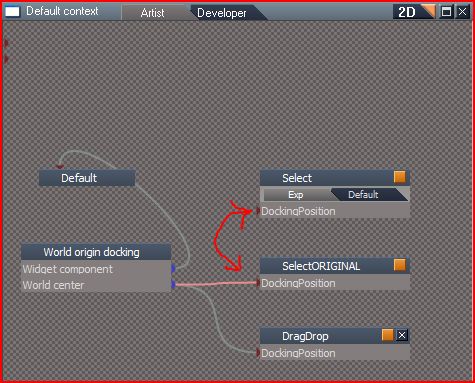
The installation of the unSelectable script seems to be the problem which modifies the Default Context widget, because I hooked up the SelectORIGINAL and the Material Inspect and Point Edit Widgets work now.trueBlue wrote:Also noticed the the Default Context widget is modified to unselect.
Activity.Run("/Scripts/CustomCommands/unSelectable/deselectIt");
//deselectIt
//
// November 24 2010
//
// January 2 2011 - can interfere with scripts that use selection changes so add active
//
// Clinton Reese
// http://www.clintons3d.com"
//
// script placed in /Scripts/CustomCommands and run from a custom Select node in the widgets
// /Widgets/Edit/Default context/Select