Not sure if this has been posted here yet. Daz studio pro , hexagon, brice pro 7 free
http://www.daz3d.com/i/0/0?
Free Hexagon 2.5 ,Daz Studio 4 Pro, Bryce 7 Pro
-
DanX
- Senior Chief Petty Officer
- Posts: 179
- Joined: 23 May 2009, 17:53
- Type the number ten into the box: 0
- Location: Florida
Free Hexagon 2.5 ,Daz Studio 4 Pro, Bryce 7 Pro
Last edited by DanX on 04 Feb 2012, 17:04, edited 1 time in total.
-
Moonman

- Petty Officer First Class
- Posts: 58
- Joined: 21 May 2009, 22:15
- Type the number ten into the box: 0
Re: Daz
Just got 'em. Heck of a deal.
BTW, you might change the title of the thread to "Free Daz Software - Hexagon/Bryce/Daz". I think others might take a look.
BTW, you might change the title of the thread to "Free Daz Software - Hexagon/Bryce/Daz". I think others might take a look.
-
DanX
- Senior Chief Petty Officer
- Posts: 179
- Joined: 23 May 2009, 17:53
- Type the number ten into the box: 0
- Location: Florida
Re: Daz
Yes I should have titled it better and it is a great deal... I know I paid for Daz Studio Pro not long ago and it was worth it then so I am glad to see you guys be able to get it for free.. HEHE All of us Truespacers know the feeling all to well.
the fbx exporter is priceless if you are building games.
The PhotoShop bridge is awesome
The Z-brush Goz app is crazy awesome.
The rigging tools are the best I have seen.
There is to much impressive stuff to list here.
the fbx exporter is priceless if you are building games.
The PhotoShop bridge is awesome
The Z-brush Goz app is crazy awesome.
The rigging tools are the best I have seen.
There is to much impressive stuff to list here.
-
Meffy

- Petty Officer Third Class
- Posts: 12
- Joined: 25 Jul 2010, 16:37
Re: Free Hexagon 2.5 ,Daz Studio 4 Pro, Bryce 7 Pro
This was mentioned over on KVRaudio.com, a computer music forum where I'm a moderator, and I jumped right on the deal. One poster pointed out that a LOT more than just the three programs have been made free through February. View the whole product line and sort by increasing price. You'll get several pages of freebies, including 3D models (mostly useful), tutorials, documentation, and add-ons.
Being both greedy and in a tight place financially, I gratefully grabbed nearly everything -- over US$2440 worth of schtuff for $0. Naturally, as DAZ is largely a content provider, it's a Gillette-style deal: they give you the razors (one-time deal) so you'll want to buy blades (ongoing revenue). Of course a major aspect of the give-away is grabbing brain-share away from competitors, which I'm sure they hope will result in more content being submitted for them to sell.
I don't mind. Not when it comes to $2440+ of goodies free. 8-} Won't stop me from using TrueSpace but it's always nice to have multiple options.
Best,
Meffy
Being both greedy and in a tight place financially, I gratefully grabbed nearly everything -- over US$2440 worth of schtuff for $0. Naturally, as DAZ is largely a content provider, it's a Gillette-style deal: they give you the razors (one-time deal) so you'll want to buy blades (ongoing revenue). Of course a major aspect of the give-away is grabbing brain-share away from competitors, which I'm sure they hope will result in more content being submitted for them to sell.
I don't mind. Not when it comes to $2440+ of goodies free. 8-} Won't stop me from using TrueSpace but it's always nice to have multiple options.
Best,
Meffy
-
Draise

- Captain
- Posts: 3200
- Joined: 21 Sep 2009, 19:33
- Type the number ten into the box: 0
- Location: Bogota, Colombia
Re: Free Hexagon 2.5 ,Daz Studio 4 Pro, Bryce 7 Pro
Cool business plan, I must say.
Have to try the programs.
Have to try the programs.
-
splinters
- Chief Warrant Officer
- Posts: 733
- Joined: 21 May 2009, 18:55
- Type the number ten into the box: 0
Re: Free Hexagon 2.5 ,Daz Studio 4 Pro, Bryce 7 Pro
Daz studio has been free for a while but this is the Pro version...same with Bryce.
You really cannot fault this freebie!!
You really cannot fault this freebie!!
-
Kot
- Seaman
- Posts: 5
- Joined: 03 Sep 2009, 11:53
Re: Daz
If you paid for it less than 30 days ago, then you can get your money backDanX wrote:I know I paid for Daz Studio Pro not long ago and it was worth it then so I am glad to see you guys be able to get it for free.. HEHE All of us Truespacers know the feeling all to well.

-
brotherx
- Petty Officer Second Class
- Posts: 29
- Joined: 10 Jun 2009, 12:50
- Type the number ten into the box: 0
- Location: Galway, Ireland
Re: Free Hexagon 2.5 ,Daz Studio 4 Pro, Bryce 7 Pro
Got an email about it and went and registered for licenses on my phone immediately. Probably never use them though but free is free.
I've recently started using Cararra 8 Pro for fun. IMO, it is not as friendly as TrueSpace...has a few nice features like bullet physics tho but again so far nothing TrueSpace didn't do.
Anyway, I see Cararra 8.5 is going to use some new engine called Genesis for posing/people/whatever you call it and the beta now supports it but you need Daz Studio 4 for it to work. I suspect that's why the standard one was made free originally.
Hexagon is a tad unstable but is light and fast. I got it years ago when they had a 40USD upgrade from some mag or other from v1. Ideal for modelling. It's a shame some of the features in Hexagon aren't in Cararra as its vertex modeller isn't exactly simple (and also slightly unstable)
Hexagon does tend to crash a lot on windows 7 though which is a real shame.
To be honest, my issue with the Daz products is a lack of any form of tutorial videos. I've just been feeling my way around and over the last year I've made little progress. There was, it turned out, a bunch of videos but mostly they are dead links.
I've recently started using Cararra 8 Pro for fun. IMO, it is not as friendly as TrueSpace...has a few nice features like bullet physics tho but again so far nothing TrueSpace didn't do.
Anyway, I see Cararra 8.5 is going to use some new engine called Genesis for posing/people/whatever you call it and the beta now supports it but you need Daz Studio 4 for it to work. I suspect that's why the standard one was made free originally.
Hexagon is a tad unstable but is light and fast. I got it years ago when they had a 40USD upgrade from some mag or other from v1. Ideal for modelling. It's a shame some of the features in Hexagon aren't in Cararra as its vertex modeller isn't exactly simple (and also slightly unstable)
Hexagon does tend to crash a lot on windows 7 though which is a real shame.
To be honest, my issue with the Daz products is a lack of any form of tutorial videos. I've just been feeling my way around and over the last year I've made little progress. There was, it turned out, a bunch of videos but mostly they are dead links.
-
bitkar

- Captain
- Posts: 2089
- Joined: 16 Mar 2010, 07:14
- Type the number ten into the box: 0
- Location: Czech Republic
Re: Free Hexagon 2.5 ,Daz Studio 4 Pro, Bryce 7 Pro
i tried hexagon, well its not bad... seems quite intuitive and logical. But... i confirmed myself again, that trueSpace is much much further.
Michal aka bitkar
tS freak since tS2 (1998) and forever (tS7.61 modeler)
tS freak since tS2 (1998) and forever (tS7.61 modeler)
-
theuns
- Lieutenant Junior Grade
- Posts: 868
- Joined: 10 Jun 2009, 11:21
- Type the number ten into the box: 0
- Location: South Africa
Re: Free Hexagon 2.5 ,Daz Studio 4 Pro, Bryce 7 Pro
I have seen some amazing things done with Hexagon so it certainly is capable.
Also got all the serial keys for those apps, will download them later tonight.
Just my luck though that after I bought Bryce 7, they give it away for free. Is it even worth buying apps these days? Why not just wait until they give them away
Got Carrara 6 long ago but only tried it a little and never went back to it... guess I'm also spoiled to the world of CGI Apps after having been converted to trueSpace... *sigh*
But I have to move on, haven't done anything in almost a year because I get so frustrated with tS crashing to much and I miss doing 3D, so I have to make myself try a few apps and just choose the best and stick with it...
Also got all the serial keys for those apps, will download them later tonight.
Just my luck though that after I bought Bryce 7, they give it away for free. Is it even worth buying apps these days? Why not just wait until they give them away
Got Carrara 6 long ago but only tried it a little and never went back to it... guess I'm also spoiled to the world of CGI Apps after having been converted to trueSpace... *sigh*
But I have to move on, haven't done anything in almost a year because I get so frustrated with tS crashing to much and I miss doing 3D, so I have to make myself try a few apps and just choose the best and stick with it...
theuns - tSer since 2000
. http://theunsfvo.cgarena.com/" onclick="window.open(this.href);return false; |:.
. http://bluestarcreations.wordpress.com/" onclick="window.open(this.href);return false; |:.
.
http://theunsfvo.cgarena.com/" onclick="window.open(this.href);return false; |:..
http://bluestarcreations.wordpress.com/" onclick="window.open(this.href);return false; |:.-
tylerzambori
- Senior Chief Petty Officer
- Posts: 170
- Joined: 06 Aug 2009, 23:02
Re: Free Hexagon 2.5 ,Daz Studio 4 Pro, Bryce 7 Pro
Hi Guys,
Just to let you know - you can get hexagon tutorials
at ezbrush:
http://www.ezbrush.mediabakers.com/EZTu ... rials.html"
And you can get video training for Carrara 8 in the daz store:
https://www.daz3d.com/i/shop/itemdetails/?item=10850"
and there's a further one for advanced instruction, which
was on sale last december, but I didn't have the cash then.
I would look for the march sales to see if these go on sale
again.
Other than that, I'm using old books.
HTH!
PS: Hexagon version 2.5.1.79 has had a lot of bug fixes:
http://forum.daz3d.com/viewtopic.php?t=175853"
but apparently it is not getting much attention since.
Just to let you know - you can get hexagon tutorials
at ezbrush:
http://www.ezbrush.mediabakers.com/EZTu ... rials.html"
And you can get video training for Carrara 8 in the daz store:
https://www.daz3d.com/i/shop/itemdetails/?item=10850"
and there's a further one for advanced instruction, which
was on sale last december, but I didn't have the cash then.
I would look for the march sales to see if these go on sale
again.
Other than that, I'm using old books.
HTH!
PS: Hexagon version 2.5.1.79 has had a lot of bug fixes:
http://forum.daz3d.com/viewtopic.php?t=175853"
but apparently it is not getting much attention since.
-
MikomDude

- Captain
- Posts: 1930
- Joined: 04 Oct 2010, 11:12
- Type the number ten into the box: 0
- Location: The Hague, Netherlands
Re: Free Hexagon 2.5 ,Daz Studio 4 Pro, Bryce 7 Pro
Thanks for the links Tylerzambori. 
-
tylerzambori
- Senior Chief Petty Officer
- Posts: 170
- Joined: 06 Aug 2009, 23:02
Re: Free Hexagon 2.5 ,Daz Studio 4 Pro, Bryce 7 Pro
Yer welcome
-
brotherx
- Petty Officer Second Class
- Posts: 29
- Joined: 10 Jun 2009, 12:50
- Type the number ten into the box: 0
- Location: Galway, Ireland
Re: Free Hexagon 2.5 ,Daz Studio 4 Pro, Bryce 7 Pro
Well that would explain hexagon crashing. I have an older version. I find it annoying that you find out about updates accidentally as they don't have an easy way of checking.
-
DanX
- Senior Chief Petty Officer
- Posts: 179
- Joined: 23 May 2009, 17:53
- Type the number ten into the box: 0
- Location: Florida
Re: Free Hexagon 2.5 ,Daz Studio 4 Pro, Bryce 7 Pro
Geek at play has a bunch of great hexagon video's. http://www.geekatplay.com/hexagontutorials/begining.php
-
Meffy
- Petty Officer Third Class
- Posts: 12
- Joined: 25 Jul 2010, 16:37
Re: Free Hexagon 2.5 ,Daz Studio 4 Pro, Bryce 7 Pro
Thanks for those tutorial links. I'm still using TS for my 3D work but trying to make time now and then to play with these freebies. Tuts and the like are much appreciated.
-
jamesmc
- Captain
- Posts: 1776
- Joined: 08 Jul 2009, 15:35
Re: Free Hexagon 2.5 ,Daz Studio 4 Pro, Bryce 7 Pro
Walk by faith, not by sight.
-
Finis

- Captain
- Posts: 5410
- Joined: 21 May 2009, 18:26
- Type the number ten into the box: 0
- Location: America!
Re: Free Hexagon 2.5 ,Daz Studio 4 Pro, Bryce 7 Pro
JamesMC!  Thanks for that link. Good they aren't going out of business. Maybe they will upgrade their programs since they are hoping for more non-hobby users.
Played with Bryce a little. I look forward to putting my elegant bridge scene in it. Anyone know if Bryce can do terrain to simulate the Earth's curvature? I got a few crashes. Seemed to happen if I didn't let the preview complete in material editor before clicking more stuff.
Looked at promo's and video's of Hexagon. Looks good to me but watching out for deja-moo (heard this bull before). Try it out when I have time.
When I signed up there were many things in the ready to download account area. Now there's not. Is the free offer over?
Thanks for that link. Good they aren't going out of business. Maybe they will upgrade their programs since they are hoping for more non-hobby users.Played with Bryce a little. I look forward to putting my elegant bridge scene in it. Anyone know if Bryce can do terrain to simulate the Earth's curvature? I got a few crashes. Seemed to happen if I didn't let the preview complete in material editor before clicking more stuff.
Looked at promo's and video's of Hexagon. Looks good to me but watching out for deja-moo (heard this bull before). Try it out when I have time.
When I signed up there were many things in the ready to download account area. Now there's not. Is the free offer over?
I prefer dangerous freedom over peaceful servitude. -- Thomas Jefferson/Jean Jacques Rousseau
-
jamesmc
- Captain
- Posts: 1776
- Joined: 08 Jul 2009, 15:35
Re: Free Hexagon 2.5 ,Daz Studio 4 Pro, Bryce 7 Pro
No, it's still going on and can be downloaded.Finis wrote:JamesMC!
Played with Bryce a little. I look forward to putting my elegant bridge scene in it. Anyone know if Bryce can do terrain to simulate the Earth's curvature? I got a few crashes. Seemed to happen if I didn't let the preview complete in material editor before clicking more stuff.
Looked at promo's and video's of Hexagon. Looks good to me but watching out for deja-moo (heard this bull before). Try it out when I have time.
When I signed up there were many things in the ready to download account area. Now there's not. Is the free offer over?
BTW, the best way to get free products from DAZ3D is to go to the option "Show all products" and sort by Low to High.
The "freebies" showing zero price will show up first.
Should see a page like in the image below:
Walk by faith, not by sight.
-
DanX
- Senior Chief Petty Officer
- Posts: 179
- Joined: 23 May 2009, 17:53
- Type the number ten into the box: 0
- Location: Florida
Re: Free Hexagon 2.5 ,Daz Studio 4 Pro, Bryce 7 Pro
Yes nice read. Would be awesome for them to really improve Daz studio. A lot of features are plug-ins now but who knows maybe they will make some things native that are not. It seems they have a good programing team would be nice to see Daz studio become the new standard in figure animation
It would be worth me spending my money back a few months ago to end up with a much more functional and usable app and have a bunch of my Truespace friends along for the trip as well.
If you like LuxRender pret -a- 3D has a good plug-in for Daz studio http://preta3d.com/reality-2-0
I have had this since it was released I just have not had time to really get into it.
I am trying to learn Z-brush or at least get to the point where I can get what I want out of it plus several other 3D apps including Vue and JavaScript .... A lot to retain for a old guy when I have a long hard day job.
It would be worth me spending my money back a few months ago to end up with a much more functional and usable app and have a bunch of my Truespace friends along for the trip as well.
If you like LuxRender pret -a- 3D has a good plug-in for Daz studio http://preta3d.com/reality-2-0
I have had this since it was released I just have not had time to really get into it.
I am trying to learn Z-brush or at least get to the point where I can get what I want out of it plus several other 3D apps including Vue and JavaScript
.... A lot to retain for a old guy when I have a long hard day job.-
Finis
- Captain
- Posts: 5410
- Joined: 21 May 2009, 18:26
- Type the number ten into the box: 0
- Location: America!
Re: Free Hexagon 2.5 ,Daz Studio 4 Pro, Bryce 7 Pro
[quote="jamesmc"]... the best way to get free products from DAZ3D is to go to the option "Show all products" ... /quote] Yeah I saw that but what I mean is if you log in to your DAZ account (seemed necessary to get one when I got the DS/Hex/Bryce freebies). There is a section called available downloads and that contained things I don't see in the "products" freebies. There were many things there but now it is empty. For example it had some Bryce materials packages.
No problem. I'm happy to get the free programs but if that other stuff was still there I might get some of that too. I'll check the "products" freebies again.
Played with Hexagon a little. I think I'm going to like it.
No problem. I'm happy to get the free programs but if that other stuff was still there I might get some of that too. I'll check the "products" freebies again.
Played with Hexagon a little. I think I'm going to like it.
I prefer dangerous freedom over peaceful servitude. -- Thomas Jefferson/Jean Jacques Rousseau
-
Steinie

- Captain
- Posts: 2958
- Joined: 21 May 2009, 17:38
- Type the number ten into the box: 10
Re: Free Hexagon 2.5 ,Daz Studio 4 Pro, Bryce 7 Pro
Hexagon is a great modeling program...I even payed for it.
DanX, if your old... then call me Grandpa...
Welcome back James, we missed you.
DanX, if your old... then call me Grandpa...
Welcome back James, we missed you.
-
Finis
- Captain
- Posts: 5410
- Joined: 21 May 2009, 18:26
- Type the number ten into the box: 0
- Location: America!
Re: Free Hexagon 2.5 ,Daz Studio 4 Pro, Bryce 7 Pro
There are manuals for Bryce and Hexagon in the docs folders under the folder where the programs were installed. Example: C:\Program Files\DAZ 3D\Bryce7\Docs
I guess DAZ Studio has them too.
I guess DAZ Studio has them too.
I prefer dangerous freedom over peaceful servitude. -- Thomas Jefferson/Jean Jacques Rousseau
-
froo
- Captain
- Posts: 2554
- Joined: 22 May 2009, 12:13
Re: Free Hexagon 2.5 ,Daz Studio 4 Pro, Bryce 7 Pro
I'll have to download those manuals. Thanks!
Good to see you back as well James!
Good to see you back as well James!
-
bitkar
- Captain
- Posts: 2089
- Joined: 16 Mar 2010, 07:14
- Type the number ten into the box: 0
- Location: Czech Republic
Re: Free Hexagon 2.5 ,Daz Studio 4 Pro, Bryce 7 Pro
iam getting newsletter emails, and there isi a 10 USD voucher for 3D DAZ stuff! it expires at 29th Feb.
10BucksFree
10BucksFree
Michal aka bitkar
tS freak since tS2 (1998) and forever (tS7.61 modeler)
tS freak since tS2 (1998) and forever (tS7.61 modeler)
-
Finis
- Captain
- Posts: 5410
- Joined: 21 May 2009, 18:26
- Type the number ten into the box: 0
- Location: America!
Re: Free Hexagon 2.5 ,Daz Studio 4 Pro, Bryce 7 Pro
Hexagon Question
Is there a way to rotate the universal manipulator? I mean change its orientation without changing the object. I couldn't find this in docs or on the web.
(There has to be a bad sci fi story where the bad guy wants to gain ultimate power by finding the universal manipulator.)
Is there a way to rotate the universal manipulator? I mean change its orientation without changing the object. I couldn't find this in docs or on the web.
(There has to be a bad sci fi story where the bad guy wants to gain ultimate power by finding the universal manipulator.)
I prefer dangerous freedom over peaceful servitude. -- Thomas Jefferson/Jean Jacques Rousseau
-
jamesmc
- Captain
- Posts: 1776
- Joined: 08 Jul 2009, 15:35
Re: Free Hexagon 2.5 ,Daz Studio 4 Pro, Bryce 7 Pro
Finis wrote:Hexagon Question
Is there a way to rotate the universal manipulator? I mean change its orientation without changing the object. I couldn't find this in docs or on the web.
(There has to be a bad sci fi story where the bad guy wants to gain ultimate power by finding the universal manipulator.)
Go to the Tools menu, you can choose "selection," "world," or "bounding box" to change the orientation.
Or use the menu selection show in image (left top)
- Attachments
-

- manipulator iniatilization mode.jpg (6.99 KiB) Viewed 5003 times
Walk by faith, not by sight.
-
Finis
- Captain
- Posts: 5410
- Joined: 21 May 2009, 18:26
- Type the number ten into the box: 0
- Location: America!
Re: Free Hexagon 2.5 ,Daz Studio 4 Pro, Bryce 7 Pro
Thanks James!
I'm getting frustrated with Hexagon's UI or the documentation for important points is lacking. Here's some more Hexagon questions:
A. How to change the UV view to another view (left, front, etc.)? If I pick a multi view layout the UV view refuses to change to any other view. It shows the UV view from the front, side or top (a line) but it is still the UV view.
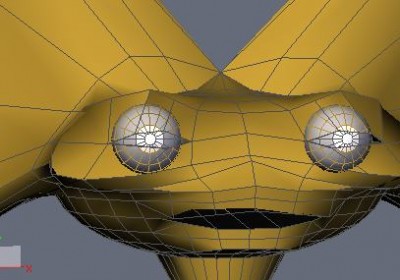
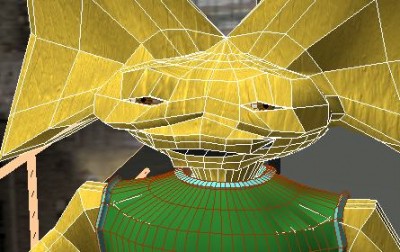
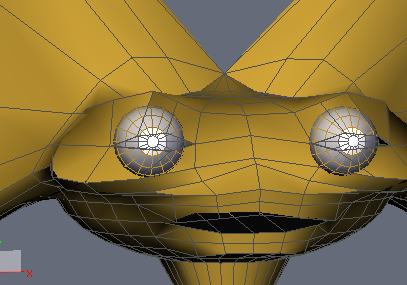
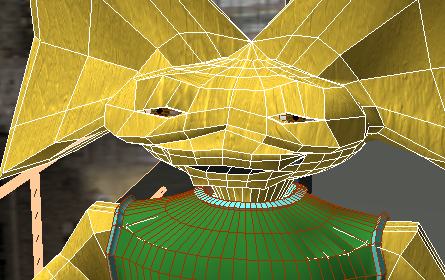
B. How can I see a solid render, preferably with wire, without transparency? I want to see a view similar to TS-B (below, TS model side DX display) while altering an SDS control mesh wire. Live feedback while altering his expression similar to TS 5 SDS. What I get with Hexagon solid with wire views is like HX-B (below) with the eyes completely visible. So far controls about showing the back and preference settings about transparency haven't helped.
C. How to stop the colors/texture from disappearing when I zoom in? Things near the "camera" disappear. Sometimes not so near. Sometimes wires seem behave this way too. Preferences about clipping planes have no effect on this.
I'm getting frustrated with Hexagon's UI or the documentation for important points is lacking. Here's some more Hexagon questions:
A. How to change the UV view to another view (left, front, etc.)? If I pick a multi view layout the UV view refuses to change to any other view. It shows the UV view from the front, side or top (a line) but it is still the UV view.
B. How can I see a solid render, preferably with wire, without transparency? I want to see a view similar to TS-B (below, TS model side DX display) while altering an SDS control mesh wire. Live feedback while altering his expression similar to TS 5 SDS. What I get with Hexagon solid with wire views is like HX-B (below) with the eyes completely visible. So far controls about showing the back and preference settings about transparency haven't helped.
C. How to stop the colors/texture from disappearing when I zoom in? Things near the "camera" disappear. Sometimes not so near. Sometimes wires seem behave this way too. Preferences about clipping planes have no effect on this.
- Attachments
-
- HX-B
-
- TS-B
I prefer dangerous freedom over peaceful servitude. -- Thomas Jefferson/Jean Jacques Rousseau
-
jamesmc
- Captain
- Posts: 1776
- Joined: 08 Jul 2009, 15:35
Re: Free Hexagon 2.5 ,Daz Studio 4 Pro, Bryce 7 Pro
Open GL camera is not real good in Hexagon. However, I'm not sure what you mean about disappearing as one can zoom down to the level where everything disappears. Which means you zoomed past the point,edge or face and are looking at it from the other (non-normal side. ). Also, if the eyeballs are part of group, you can click the eyeball in the properties tray to make them invisible while working around the eye.Finis wrote:Thanks James!
I'm getting frustrated with Hexagon's UI or the documentation for important points is lacking. Here's some more Hexagon questions:
A. How to change the UV view to another view (left, front, etc.)? If I pick a multi view layout the UV view refuses to change to any other view. It shows the UV view from the front, side or top (a line) but it is still the UV view.
I don't use UV in Hexagon, I find it cumbersome.
B. How can I see a solid render, preferably with wire, without transparency? I want to see a view similar to TS-B (below, TS model side DX display) while altering an SDS control mesh wire. Live feedback while altering his expression similar to TS 5 SDS. What I get with Hexagon solid with wire views is like HX-B (below) with the eyes completely visible. So far controls about showing the back and preference settings about transparency haven't helped.
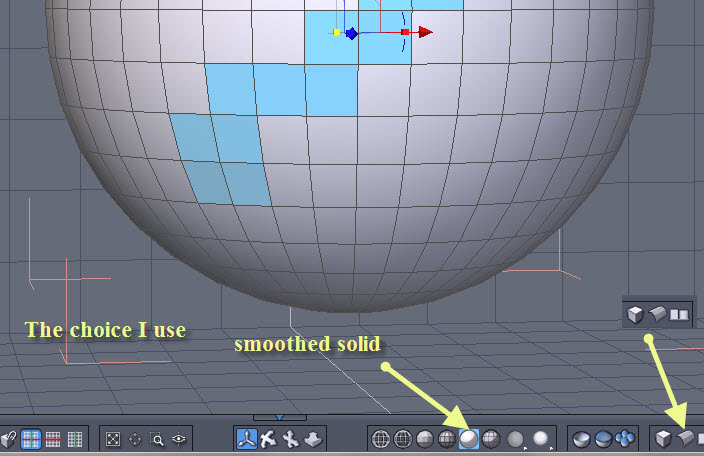
You can show/hide backfaces and etc. on the bottom icon menu. Should have a solid wire with a white appearance and blue faces/edges/points. (see images attached)
C. How to stop the colors/texture from disappearing when I zoom in? Things near the "camera" disappear. Sometimes not so near. Sometimes wires seem behave this way too. Preferences about clipping planes have no effect on this.
- Attachments
-
Walk by faith, not by sight.
-
Finis
- Captain
- Posts: 5410
- Joined: 21 May 2009, 18:26
- Type the number ten into the box: 0
- Location: America!
Re: Free Hexagon 2.5 ,Daz Studio 4 Pro, Bryce 7 Pro
Thanks again James.
I tried Hexagon's UV thing once and it is cumbersome. TS's is unusable but Hexagon's might not be worth the effort. My trouble wasn't with the UV system but that Hexagon insists on having once view in a multi view set up be the UV system. I can't find how to change it to show the model. The 4-view set up did mysteriously change to persp-top-front-side instead of persp-front-top-UV when I exited and re-entered the program. That behavior is not consistent and shouldn't be the way to do it.
Show back faces didn't help the eye balls problem. Making the eyes invisible defeats the purpose. I need to see them where they are not covered by the face to adjust the face. I'll try applying solid colors instead of the image textures.
The disappearing parts seem to encounter an uncontrollable clipping plane. They disappear a certain distance from the camera/view but that distance might be far from the camera or allow me to zoom in close. I'm not finding anything to control that. Preferably turn it off. It reacts as you said to entering the object where some faces are simply behind the camera. This is not that.
There is little documentation for Hexagon. Their website has little and the docs that came with it (in the installation directories) aren't for this version and the links to videos are broken. No docs kills good programs. Look at Messiah 3D's lack of popularity.
I think Hexagon is mostly designed to model single objects. It seems set up well for that. My trouble comes from the grouped objects. Maybe ungrouping the objects.
White texture? It has image textures. Maybe assigning plain colors in Hexagon will work better. Anyway, TS 5 did the job. If I switch to Hexagon as my main modeler then work flow would be mostly model first then texture.
I tried Hexagon's UV thing once and it is cumbersome. TS's is unusable but Hexagon's might not be worth the effort. My trouble wasn't with the UV system but that Hexagon insists on having once view in a multi view set up be the UV system. I can't find how to change it to show the model. The 4-view set up did mysteriously change to persp-top-front-side instead of persp-front-top-UV when I exited and re-entered the program. That behavior is not consistent and shouldn't be the way to do it.
Show back faces didn't help the eye balls problem. Making the eyes invisible defeats the purpose. I need to see them where they are not covered by the face to adjust the face. I'll try applying solid colors instead of the image textures.
The disappearing parts seem to encounter an uncontrollable clipping plane. They disappear a certain distance from the camera/view but that distance might be far from the camera or allow me to zoom in close. I'm not finding anything to control that. Preferably turn it off. It reacts as you said to entering the object where some faces are simply behind the camera. This is not that.
There is little documentation for Hexagon. Their website has little and the docs that came with it (in the installation directories) aren't for this version and the links to videos are broken. No docs kills good programs. Look at Messiah 3D's lack of popularity.
I think Hexagon is mostly designed to model single objects. It seems set up well for that. My trouble comes from the grouped objects. Maybe ungrouping the objects.
White texture? It has image textures. Maybe assigning plain colors in Hexagon will work better. Anyway, TS 5 did the job. If I switch to Hexagon as my main modeler then work flow would be mostly model first then texture.
I prefer dangerous freedom over peaceful servitude. -- Thomas Jefferson/Jean Jacques Rousseau
-
jamesmc
- Captain
- Posts: 1776
- Joined: 08 Jul 2009, 15:35
Re: Free Hexagon 2.5 ,Daz Studio 4 Pro, Bryce 7 Pro
I have the video files for Hexagon, but can't seem to upload a zip file here to the forums.
Walk by faith, not by sight.
-
Shell1850
- Chief Petty Officer
- Posts: 135
- Joined: 21 May 2009, 21:44
Re: Free Hexagon 2.5 ,Daz Studio 4 Pro, Bryce 7 Pro
Good place for Hexagon tutorials.
http://geekatplay.com/"
It is free or you can pay 20 dollars for download.
http://geekatplay.com/"
It is free or you can pay 20 dollars for download.
-
Finis
- Captain
- Posts: 5410
- Joined: 21 May 2009, 18:26
- Type the number ten into the box: 0
- Location: America!
Re: Free Hexagon 2.5 ,Daz Studio 4 Pro, Bryce 7 Pro
Thanks everyone.
James, are those tutorials on the web somewhere I could get or watch them?
Shell1850, those tutorials will get me going with Hexagon. Lots of tutorials for several programs there.
James, are those tutorials on the web somewhere I could get or watch them?
Shell1850, those tutorials will get me going with Hexagon. Lots of tutorials for several programs there.
I prefer dangerous freedom over peaceful servitude. -- Thomas Jefferson/Jean Jacques Rousseau
-
jamesmc
- Captain
- Posts: 1776
- Joined: 08 Jul 2009, 15:35
Re: Free Hexagon 2.5 ,Daz Studio 4 Pro, Bryce 7 Pro
Finis wrote:Thanks everyone.
James, are those tutorials on the web somewhere I could get or watch them?
Shell1850, those tutorials will get me going with Hexagon. Lots of tutorials for several programs there.
No, this are the videos in French and English that came with the user manual and for some reason never made it in the later versions of the manual.
Here are more videos from CG Dreams on Hexagon. He has Zbrush and Modo tutorials thrown in there as well.
http://www.youtube.com/user/CGDreamsTut ... ture=watch"
Walk by faith, not by sight.
-
Finis
- Captain
- Posts: 5410
- Joined: 21 May 2009, 18:26
- Type the number ten into the box: 0
- Location: America!
Re: Free Hexagon 2.5 ,Daz Studio 4 Pro, Bryce 7 Pro
Daz Studio 4.5 Pro is now available free. Like me, most U3DA people are probably interested in Bryce and Hexagon and not so much in Daz Studio but it has its uses. It uses 3Delight to render so I might use it for that. If there were free normal clothes for the figures it might be good for populating 3D things like architectural models.
Their instructions on getting it are not that good. Do this: Download the software from their site. Install it. "Purchase" the software from their store. Get the serial number from your Daz account. Start the program and register with the serial number. Some features are locked until you register. Your account will have some free stuff for it in the downloads section.
Their instructions on getting it are not that good. Do this: Download the software from their site. Install it. "Purchase" the software from their store. Get the serial number from your Daz account. Start the program and register with the serial number. Some features are locked until you register. Your account will have some free stuff for it in the downloads section.
I prefer dangerous freedom over peaceful servitude. -- Thomas Jefferson/Jean Jacques Rousseau