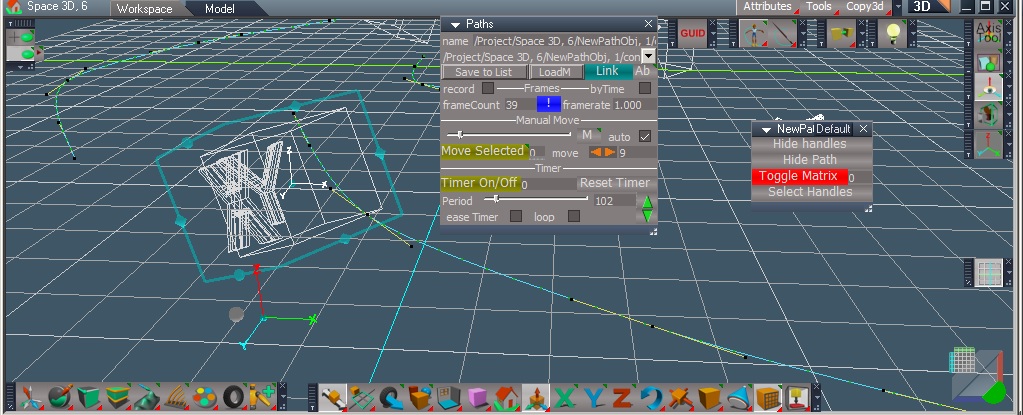
This is a path system base on the original work of Clinton's in his nurbs cuve script. Thanks!
It brings path animation to workspace.
There is a draw new path feature, activate the draw widget and create a new path.
Open the Paths panel to link object to the path you created and animate..
The two main icons shown access them.
The panel is the main place for animating of objects on a selected path. There is manual and timer methods.A clips aspect and easing aspect.
There are secondary controls on each path node are for hiding path points and handles, matrix / ownermatrix toggle, segments between handles, upvectors and toggle parallel transport.
I hope Draise will elaborate on my brief descriptions at a later point.
After creating a new path which is best done in top view or your object's z axis is on the ground so what you draw is where you expect it to be. You must use 'save to list' icon on main panel. Once added to list you must select it in menu and use 'loader' icon to access it. It will become the 'name' on top of panel, once done you can now link your object. It is possible to link any object to the path with thie 'link' icon as well. There is an 'L' icon next to it to aid in locating object to path, mainyly used if your path matrix is toggled to matrix. The default is ownermatrix.
Frames section is for recording.
record checkbox checked is on.
byTime is a secondary way to use easing. It creates by time not by frame if used.
manual move section
auto records all frames when checked, only one at a time otherwise.
timer section
loop checkbox on/off
ease timer - it must be checked to function with the timer and unchecked for manual move.
period slows or speeds up time.
clips aspect
new track clip icon for creating new track
and methods for naming and retrieving from list.
easing aspect
there are up to three methods at a time available. The checkbox must be checked to use.
there is a long menu of easing methods to choose from. These are using Penner's easing algorithms. Select one from menu to use and set frames beginning and duration.
Paths can be edited and ctrl points moved, added or deleted.
The select by move icon in edit mode might not work at times, forget why. This should be in errors ..
That's the basics..
errors ..
if you save to a new scene and forget to reload 'save to list' you get an error not a warning box..It's easy to forget and remember to use 'loader' icon again too.
Deleting a new path node before closing the draw widget gives a error. Simply close tool first.
Those I know about ..
Save your paths to a path library and use on any object in any scene..like modelside.
There are additional methods for path creation and import path found under the draw icon.
Enjoy..
PathTools for workspace
-
stan
- Master Chief Petty Officer
- Posts: 584
- Joined: 21 May 2009, 17:20
PathTools for workspace
- Attachments
-

-
Draise

- Captain
- Posts: 3200
- Joined: 21 Sep 2009, 19:33
- Type the number ten into the box: 0
- Location: Bogota, Colombia
Re: PathTools for workspace
Wonderful! You released it publically!
I have used this, and I can say that I vouch for it.
Later on I'll explain!
I have used this, and I can say that I vouch for it.
Later on I'll explain!
-
clintonman

- Captain
- Posts: 5659
- Joined: 21 May 2009, 21:08
- Type the number ten into the box: 0
- Location: California
Re: PathTools for workspace
Looking forward to itDraise wrote:Wonderful! You released it publically!
I have used this, and I can say that I vouch for it.
Later on I'll explain!

I played around with it a little bit.
What does the record checkbox do?
What's the difference between record by frames and by time?
Why does it have it's own point edit widget? How is it different than the standard?
-
stan
- Master Chief Petty Officer
- Posts: 584
- Joined: 21 May 2009, 17:20
Re: PathTools for workspace
Clinton,
What does the record checkbox do?
the record checkbox when checked records a keyframe for each path poiint when moved along path.
What's the difference between record by frames and by time?
-byTime was the original way of setting keyframes by time. Created many more frames. It was left in in case it was useful.
The default byFrame was easier for Draise to work with and edit after in fcurves.
Why does it have it's own point edit widget? How is it different than the standard?
It has it's own widget for the toolbar mainly. The rotate and scale parts maybe shouldn't be there.
I still like and use the popup toolbar in edit mode, slightly modified how it open /closes so it works better..
What does the record checkbox do?
the record checkbox when checked records a keyframe for each path poiint when moved along path.
What's the difference between record by frames and by time?
-byTime was the original way of setting keyframes by time. Created many more frames. It was left in in case it was useful.
The default byFrame was easier for Draise to work with and edit after in fcurves.
Why does it have it's own point edit widget? How is it different than the standard?
It has it's own widget for the toolbar mainly. The rotate and scale parts maybe shouldn't be there.
I still like and use the popup toolbar in edit mode, slightly modified how it open /closes so it works better..
-
Draise
- Captain
- Posts: 3200
- Joined: 21 Sep 2009, 19:33
- Type the number ten into the box: 0
- Location: Bogota, Colombia
Re: PathTools for workspace
Finally made a quick intro tutorial. It's uploading now.
-
Draise
- Captain
- Posts: 3200
- Joined: 21 Sep 2009, 19:33
- Type the number ten into the box: 0
- Location: Bogota, Colombia
Re: PathTools for workspace
Intro and tutorial to the basics of Stan's PathTools
-
BNG

- Chief Warrant Officer
- Posts: 684
- Joined: 16 Oct 2009, 03:26
- Type the number ten into the box: 0
- Location: Texas
Re: PathTools for workspace
Kudos to both for the plugin and tutorial. Thank, Leroy.
Casual Truespace 3D modeling hobbyist. My Truespace blog and simple 3d Modeling Tutorials for Casual Model Makers.
-
spacekdet

- Captain
- Posts: 1810
- Joined: 27 May 2009, 15:00
- Type the number ten into the box: 10
- Location: On the day shift at the Utility Muffin Research Kitchen
Re: PathTools for workspace
Stan is indeed the man.
Draise, you have a nice English accent for a guy from Columbia.
Draise, you have a nice English accent for a guy from Columbia.
-
Draise
- Captain
- Posts: 3200
- Joined: 21 Sep 2009, 19:33
- Type the number ten into the box: 0
- Location: Bogota, Colombia
Re: PathTools for workspace
Thanks guys, and yes, thanks Stan, very cool addon there.
I learnt English in New Zealand as a child, that might have helped my accent.
I learnt English in New Zealand as a child, that might have helped my accent.
-
stan
- Master Chief Petty Officer
- Posts: 584
- Joined: 21 May 2009, 17:20
Re: PathTools for workspace

-
Draise
- Captain
- Posts: 3200
- Joined: 21 Sep 2009, 19:33
- Type the number ten into the box: 0
- Location: Bogota, Colombia
Re: PathTools for workspace
My quick tutorial on it is now available again! Made it private by accident.
-
stan
- Master Chief Petty Officer
- Posts: 584
- Joined: 21 May 2009, 17:20
Re: PathTools for workspace
I can only say it works in win7 pro. I don't use my win 10 pro so I don't think I did more than install truespace set to a compatibility mode. vista maybe. I don't remember.
-
trueBlue

- Captain
- Posts: 5548
- Joined: 06 Jul 2009, 22:50
- Type the number ten into the box: 10
Re: PathTools for workspace
Win10 Home
Running tS761 UU9 in Compatibility Mode:
Windows Vtsta (Service Pack 2)
This is the OS that was used to program/compile Beta 8
Running tS761 UU9 in Compatibility Mode:
Windows Vtsta (Service Pack 2)
This is the OS that was used to program/compile Beta 8
-
stan
- Master Chief Petty Officer
- Posts: 584
- Joined: 21 May 2009, 17:20
Re: PathTools for workspace
this is how I see this working. Make your first object invisible if need be then parent on the other items you want to animate as well. I couldn't find Splinters motorcycle so the tricycle will have to do then an un-posed crazy bob riding into the sunset..just image it I took more than a few minutes to set this up.All the things you could animate by parenting them on for the ride. 
..

-
stan
- Master Chief Petty Officer
- Posts: 584
- Joined: 21 May 2009, 17:20
Re: PathTools for workspace
Here a proxy for TrueBlue is down at the beach on his poorly made surf board. Hang ten bro..shaa


-
stan
- Master Chief Petty Officer
- Posts: 584
- Joined: 21 May 2009, 17:20
Re: PathTools for workspace
Wipe out..a moment later the surf got rough.. The animating ideas are endless.. but my animation skills are not.. I just need to get banking added then you can sway from side to side or the g forces on that trike could be there as it turns.. 
the story continues wipe out or a funny hang ten..
The animating ideas are endless.. but my animation skills are not.. I just need to get banking added then you can sway from side to side or the g forces on that trike could be there as it turns.. 

-
trueBlue
- Captain
- Posts: 5548
- Joined: 06 Jul 2009, 22:50
- Type the number ten into the box: 10
Re: PathTools for workspace
Yahooooo, no Object flipping on my first try!
I think I discovered why, initially, the move tools have not been working for me
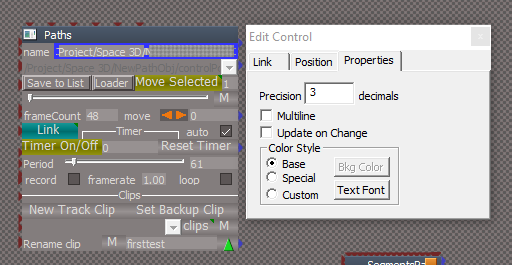
When you use Save to List, you have to press your Enter key after selecting from the list
I have been doing that previously, but also you have to do the same thing after using the Loader button
Modifying the "name" text control by checking "Update on Change" makes it work better
I think I discovered why, initially, the move tools have not been working for me
When you use Save to List, you have to press your Enter key after selecting from the list
I have been doing that previously, but also you have to do the same thing after using the Loader button
Modifying the "name" text control by checking "Update on Change" makes it work better
-
stan
- Master Chief Petty Officer
- Posts: 584
- Joined: 21 May 2009, 17:20
Re: PathTools for workspace
Maybe I unconnected the index its easy to happen, will check it out
found what it was. some how a line got deleted and the index was now in an 'if else' causing it to say its not there. The swapping matrix code was missing the else part.
found what it was. some how a line got deleted and the index was now in an 'if else' causing it to say its not there. The swapping matrix code was missing the else part.
-
stan
- Master Chief Petty Officer
- Posts: 584
- Joined: 21 May 2009, 17:20
Re: PathTools for workspace
Here are those changes including the update on change for name.
-
trueBlue
- Captain
- Posts: 5548
- Joined: 06 Jul 2009, 22:50
- Type the number ten into the box: 10
Re: PathTools for workspace
Sweet, it is working really well!
Some improvements:
.
Add: Cycle select Paths script and button to top right panel
Open floating panels up in different places
Draw Curve from Point Edit Vertex selection:
Restore: Point Selection Mode
Draw could still use some improvements with the end and or cancel process
Seems stuck in Point Edit Mode
CtrlPointTB
DynaPick has an intermittent working issue
Add: Select Edges 'Usefull for selecting Handels
Some improvements:
.
Add: Cycle select Paths script and button to top right panel
Open floating panels up in different places
Draw Curve from Point Edit Vertex selection:
Restore: Point Selection Mode
Draw could still use some improvements with the end and or cancel process
Seems stuck in Point Edit Mode
CtrlPointTB
DynaPick has an intermittent working issue
Add: Select Edges 'Usefull for selecting Handels
-
stan
- Master Chief Petty Officer
- Posts: 584
- Joined: 21 May 2009, 17:20
Re: PathTools for workspace
Here it is..
I won't change where you cycle panel aspects. I like it the way it is.
Panels now open all over the place. Not sure why one would open them all at the same time though.
Fixed the way CtrlPointTB works. Dynapick should be active now when toolbar opened. If not selected it will light up when chosen If some other tool other that vertex has been used on the edit nav toolbar you will have to select it. I won't add edge tool in the toolbar as it isn't really useful but you can press the 'e' key if you want to or select it in the nav toolbar, There is no issue with using rect select or the lasso tool they work too but won't add them.
Not sure what you mean about the draw curve? If you mean the draw path it works fine.
I won't change where you cycle panel aspects. I like it the way it is.
Panels now open all over the place. Not sure why one would open them all at the same time though.
Fixed the way CtrlPointTB works. Dynapick should be active now when toolbar opened. If not selected it will light up when chosen If some other tool other that vertex has been used on the edit nav toolbar you will have to select it. I won't add edge tool in the toolbar as it isn't really useful but you can press the 'e' key if you want to or select it in the nav toolbar, There is no issue with using rect select or the lasso tool they work too but won't add them.

- sfirstafter.jpg (30.03 KiB) Viewed 133 times
-
trueBlue
- Captain
- Posts: 5548
- Joined: 06 Jul 2009, 22:50
- Type the number ten into the box: 10
Re: PathTools for workspace
It does not cycle panel aspects, it cycle selects Path objects in the scenestan wrote: 08 Dec 2023, 14:51 Here it is..
I won't change where you cycle panel aspects. I like it the way it is.
Yesterday I had a bunch of crashes
Just before the crash, this is the state of the Info panel

- Path tS Crash.png (5.59 KiB) Viewed 136 times
I think I found a culprit to my crashes with your Installer
Paths panel
name, fileList and more importantly, the clipList attributes are populated with items that do not exist in my current scene
Your scripts do not get rid of them either
This is where my Cycle Select Paths script comes in handy
It has to be called from inside the Paths panel
Code: Select all
var cycle = -1;
function Execute(params)
{
	try
	{
		util = System.CreateDO("Clintons3D Package/Utility functions");
	}
	catch(err)
	{
		//System.Alert("Clintons3D Package  v.1638404 or higher must be installed");
		return;
	}

	var sceneObjs = GetSceneObjects();

	Space.Unselect()

	util.ClearStatusMessage(0)

	if(sceneObjs.length == 0) {
		if(Node.Exists('Status Message'))
			util.SetStatusMessage("No Paths found in your scene", 2000)
		else
			System.Alert("No Paths found in your scene")
			Node.Value(System.ThisOwner(), 'frameCount') = 0;
			Node.Value(System.ThisOwner(), 'name') = '';
			Node.ConReset(System.ThisOwner(), 'fileList')
			Node.ConReset(System.ThisOwner(), 'clipList')
		return;
	}

	cycle++;
	cycle = cycle % sceneObjs.length;

	var pathName = Node.ShortName(sceneObjs[cycle]);

	Node.Select(sceneObjs[cycle])

}

function GetSceneObjects()
{
	var objects = [];
	var scene = Space.CurrentScene();
	for(var i=0;i<Node.SubObjectCount(scene);i++) {
		var node = scene + "/" + Node.SubObject(scene, i);
		if(Node.ConExists(node, "UpVector")) {
			objects.push(node);
		}
	}
	return objects;
}
-
stan
- Master Chief Petty Officer
- Posts: 584
- Joined: 21 May 2009, 17:20
Re: PathTools for workspace
You should always check that the list is valid by clicking on save to list. Don't just think in a new scene or new install the list is valid. I doubt I would be able to clear list on scene change. On new install I''m just not clearing the list every time I put together a new install. I did a dew times but forget to.
As for the clip list I'll look at that later today.
As for the clip list I'll look at that later today.
-
trueBlue
- Captain
- Posts: 5548
- Joined: 06 Jul 2009, 22:50
- Type the number ten into the box: 10
Re: PathTools for workspace
If you want your Path Tools to be useful, you first need to look at how a user uses it from their perspective.
It starts by installing it.
The way it has been with all of your installers, it installs incomplete.
After installing and closing trueSpace, your Path Tools and your toolbar to open the Path Tools are gone
When you Reset to Default Context, everything that was installed is gone
It starts by installing it.
The way it has been with all of your installers, it installs incomplete.
After installing and closing trueSpace, your Path Tools and your toolbar to open the Path Tools are gone
When you Reset to Default Context, everything that was installed is gone
-
stan
- Master Chief Petty Officer
- Posts: 584
- Joined: 21 May 2009, 17:20
Re: PathTools for workspace
Here is the new version..
There was a space in front of the owned by value I didn't notice on the PathTools toolbar. It stays put now.
There is now a reset button under the PathPanel to clear values.
Realized there was still a not quite right tag alias in the vertex button. I did have to fix the tag alias value of the dynapick select earlier on. Then in the preobjects file of the toolbar prototypes so it would be correct on new windows or resetting..
There was a space in front of the owned by value I didn't notice on the PathTools toolbar. It stays put now.
There is now a reset button under the PathPanel to clear values.
Realized there was still a not quite right tag alias in the vertex button. I did have to fix the tag alias value of the dynapick select earlier on. Then in the preobjects file of the toolbar prototypes so it would be correct on new windows or resetting..
-
Emmanuel

- Chief Warrant Officer
- Posts: 670
- Joined: 14 Jun 2009, 06:47
Re: PathTools for workspace
Still getting the same error message on my side...
-
stan
- Master Chief Petty Officer
- Posts: 584
- Joined: 21 May 2009, 17:20
Re: PathTools for workspace
Emmanuel, could you post that error again.. I removed all the old discussions about errors. 
-
Emmanuel
- Chief Warrant Officer
- Posts: 670
- Joined: 14 Jun 2009, 06:47
Re: PathTools for workspace
stan wrote: 09 Dec 2023, 14:38 Emmanuel, could you post that error again.. I removed all the old discussions about errors.

-
stan
- Master Chief Petty Officer
- Posts: 584
- Joined: 21 May 2009, 17:20
Re: PathTools for workspace
This version covers that error i changed the value to a point. It was only used in that one place so I didn't use Point Data. It never gave that error, not even in win10 .
Here is the new version.
Upgrade to the reset code.. It was not resetting the connector with System.ThisOwner() + 'Paths'
Hope this works for you Emmanuel..It should at least get past that error.
Here is the new version.
Upgrade to the reset code.. It was not resetting the connector with System.ThisOwner() + 'Paths'
Hope this works for you Emmanuel..It should at least get past that error.
-
Emmanuel
- Chief Warrant Officer
- Posts: 670
- Joined: 14 Jun 2009, 06:47
Re: PathTools for workspace
Not yet.stan wrote: 09 Dec 2023, 19:16
Hope this works for you Emmanuel..It should at least get past that error.
Line 116 this time.
You have 7 versions left before you reach out the alphabet letters. Use the remaining bullets carefully
- Attachments
-

-
stan
- Master Chief Petty Officer
- Posts: 584
- Joined: 21 May 2009, 17:20
Re: PathTools for workspace
I might need to create more letters..
Now it seems not to like the array. Not sure which one..the truespace one or the jscript one
points new array();
if(points)
point = points.split(';');
One would think compatibility mode would accept these.
What compatibility mode are you using for truespace?
Now it seems not to like the array. Not sure which one..the truespace one or the jscript one
points new array();
if(points)
point = points.split(';');
One would think compatibility mode would accept these.
What compatibility mode are you using for truespace?
-
trueBlue
- Captain
- Posts: 5548
- Joined: 06 Jul 2009, 22:50
- Type the number ten into the box: 10
Re: PathTools for workspace
Emmanuel
Out of curiosity, I wonder if this tS761 Model exported Coil curve, converted to NewPathObj works for you
Out of curiosity, I wonder if this tS761 Model exported Coil curve, converted to NewPathObj works for you

- Attachments
-
- Space 3D46d0.RsScn
- (467.19 KiB) Downloaded 6 times
-
stan
- Master Chief Petty Officer
- Posts: 584
- Joined: 21 May 2009, 17:20
Re: PathTools for workspace
yes..I was going to ask him to try an imported curve too. But I do want to know what compatibility he uses.
I would try a pure import first to see if its just my array in the beginning of path creation..
I would try a pure import first to see if its just my array in the beginning of path creation..
-
Emmanuel
- Chief Warrant Officer
- Posts: 670
- Joined: 14 Jun 2009, 06:47
Re: PathTools for workspace
I am using Windows XP sp3 compatibility mode.
The error message comes up even with the coil curve...
The error message comes up even with the coil curve...
-
stan
- Master Chief Petty Officer
- Posts: 584
- Joined: 21 May 2009, 17:20
Re: PathTools for workspace
That's too bad I was hoping if the vista sp2 didn't work the xp sp2 might because the script engine was implemented at the beginning of the ts7 series.
I have a few other things to try to get past the unfinished sdk issues.The Point array data is non functional. Point data works though..
Sid you try to import a new curve? I uploaded one so you can try.
I have a few other things to try to get past the unfinished sdk issues.The Point array data is non functional. Point data works though..
Sid you try to import a new curve? I uploaded one so you can try.
-
stan
- Master Chief Petty Officer
- Posts: 584
- Joined: 21 May 2009, 17:20
Re: PathTools for workspace
Try this version.. The only flaw is the path is getting created at world 000, it's not reading the mouse listener data but if this works I''ll try to get that working too because it gives out the data.
I'm sure going through that alphabet lol..
I'm sure going through that alphabet lol..
-
Emmanuel
- Chief Warrant Officer
- Posts: 670
- Joined: 14 Jun 2009, 06:47
Re: PathTools for workspace
Version T is working for me. No more error message. 
-
stan
- Master Chief Petty Officer
- Posts: 584
- Joined: 21 May 2009, 17:20
Re: PathTools for workspace
woohoo.. I will figure out the location issue for the start of the path. 
-
Emmanuel
- Chief Warrant Officer
- Posts: 670
- Joined: 14 Jun 2009, 06:47
Re: PathTools for workspace
You are a master. I'm sure at the end your path tool will allow something like the turboSpline plugin can achieve !
-
stan
- Master Chief Petty Officer
- Posts: 584
- Joined: 21 May 2009, 17:20
Re: PathTools for workspace
Here is version U .. it has the world 000 problem fixed.. You should now be able to work as intended for path creation in win11. Might make it before letter Z.
-
Emmanuel
- Chief Warrant Officer
- Posts: 670
- Joined: 14 Jun 2009, 06:47
Re: PathTools for workspace
I can draw a path, but an other error pops up when I clic the Link button.

-
stan
- Master Chief Petty Officer
- Posts: 584
- Joined: 21 May 2009, 17:20
Re: PathTools for workspace
This version should have all the issues worked out on win11. I kept finding the offending code and rewriting it. I should have realized there would be other places in all those nodes.
I just added the fix for clips by turning off record before reset of timer.
I just added the fix for clips by turning off record before reset of timer.
-
trueBlue
- Captain
- Posts: 5548
- Joined: 06 Jul 2009, 22:50
- Type the number ten into the box: 10
Re: PathTools for workspace
Experimenting with a Camera parented to an object 'Dolly' assigned to a Circle path
.
When the Camera crosses a Handle, there is a little jerking happening

When the Camera crosses a Handle, there is a little jerking happening
-
stan
- Master Chief Petty Officer
- Posts: 584
- Joined: 21 May 2009, 17:20
Re: PathTools for workspace
Here is the way to use the record check ..you need not put a clip as one gets put in (but I must find the place it keeps putting clips if you do it wrong)
You like the way your obj runs the path so you hit the record button, then start the timer. it should give you data in the animation view. Uncheck the record box then reset timer. It might be if you reset the timer with record on you get many clips. I'm still looking.
trueBlue you should use the new version V now too.
Emmanuel, That turbo splines might work on a extrude for each frame but I would need to make it go to edit mode and use a face. Not sure,I think in that case you would extrude out the back of the starter object. Future ideas.
You like the way your obj runs the path so you hit the record button, then start the timer. it should give you data in the animation view. Uncheck the record box then reset timer. It might be if you reset the timer with record on you get many clips. I'm still looking.

Emmanuel, That turbo splines might work on a extrude for each frame but I would need to make it go to edit mode and use a face. Not sure,I think in that case you would extrude out the back of the starter object. Future ideas.
-
trueBlue
- Captain
- Posts: 5548
- Joined: 06 Jul 2009, 22:50
- Type the number ten into the box: 10
Re: PathTools for workspace
Have not experimented to much with Path tool Clips, but I suspect that using a Watch Dog for this might be problematicstan wrote: 11 Dec 2023, 01:36 Here is the way to use the record check ..you need not put a clip as one gets put in (but I must find the place it keeps putting clips if you do it wrong)
You like the way your obj runs the path so you hit the record button, then start the timer. it should give you data in the animation view. Uncheck the record box then reset timer. It might be if you reset the timer with record on you get many clips. I'm still looking.
Might be better, to make it manual
I was waiting for you to work out the kinks before testing a new version
-
trueBlue
- Captain
- Posts: 5548
- Joined: 06 Jul 2009, 22:50
- Type the number ten into the box: 10
Re: PathTools for workspace
In my previous post about the Watch Dog, I was referring to:
I have been doing some testing with the Reset Matrix & OwnerMatrix lines commented out AND only using the default Path Objects set to Matrix
Looks promising!
Also, Get Shear/Set Shear is causing errors and crashes
I will test your scene and new V version tomorrow(but I must find the place it keeps putting clips if you do it wrong)
I have been doing some testing with the Reset Matrix & OwnerMatrix lines commented out AND only using the default Path Objects set to Matrix
Looks promising!
Also, Get Shear/Set Shear is causing errors and crashes
-
Emmanuel
- Chief Warrant Officer
- Posts: 670
- Joined: 14 Jun 2009, 06:47
Re: PathTools for workspace
Yeah it works !stan wrote: 10 Dec 2023, 23:02 This version should have all the issues worked out on win11.

The recorded animation plays fine in Workspace and it seems recorded in the Animation Editor. But when I try to render it to file using Modeler's Render_to_file (selecting Workspace scene to render in the Animation options of the panel), it does not render the animation.
In trueSpace 7.6 we can render_to_file a Workspace scene using Lightworks renderer. The Bridge allows that.
It seems that this is impossible in trueSpace 7.61 though...
Too bad.
-
trueBlue
- Captain
- Posts: 5548
- Joined: 06 Jul 2009, 22:50
- Type the number ten into the box: 10
Re: PathTools for workspace
Is possible, but in a different wayEmmanuel wrote: 11 Dec 2023, 09:43Yeah it works !stan wrote: 10 Dec 2023, 23:02 This version should have all the issues worked out on win11.
The recorded animation plays fine in Workspace and it seems recorded in the Animation Editor. But when I try to render it to file using Modeler's Render_to_file (selecting Workspace scene to render in the Animation options of the panel), it does not render the animation.
In trueSpace 7.6 we can render_to_file a Workspace scene using Lightworks renderer. The Bridge allows that.
It seems that this is impossible in trueSpace 7.61 though...
Too bad.
tS Model and Workspace; Render to File do not support running scripts
But you can transfer Workspace Keyframes to Model using a script, then disconnect the script before using Model's Render to File
Animation using Stan's Path Tools version V

-
Emmanuel
- Chief Warrant Officer
- Posts: 670
- Joined: 14 Jun 2009, 06:47
Re: PathTools for workspace
Thanks for this trick !trueBlue wrote: 11 Dec 2023, 16:07 But you can transfer Workspace Keyframes to Model using a script, then disconnect the script before using Model's Render to File
Can you explain how to use it ?
I connect the WldMatrix of the object to Change detect, what next ?
-
trueBlue
- Captain
- Posts: 5548
- Joined: 06 Jul 2009, 22:50
- Type the number ten into the box: 10
Re: PathTools for workspace
Ensure that your object has a Workspace Clip and is at Frame 0Emmanuel wrote: 11 Dec 2023, 20:48Thanks for this trick !trueBlue wrote: 11 Dec 2023, 16:07 But you can transfer Workspace Keyframes to Model using a script, then disconnect the script before using Model's Render to File
Can you explain how to use it ?
I connect the WldMatrix of the object to Change detect, what next ?
Connect the object's WldMatrix to the Watch Dog Event's Change detect
Bridge = On
Synchronize Scene script
Check - Synchronize Selected
Check - Set Model Frame
Open Model and a Workspace view
An open Link Editor view is Required
In Model
Select your object is Required
Ensure that AutoRecord is enabled and at Frame 0
In Workspace's Anim Editor
Press the Move to next Frame icon for each Frame in the Clip is Required
Shortcut:
CTRL + RIGHT
Note: At the last Frame, Move to next Frame one more time, to get the last Frame in Model
Synchronize Scene script
Uncheck - Set Model Frames
If AutoRecord worked, you should now have the Workspace Keyframes in Model
Uncheck - AutoRecord
Play the Model animation with Synchronize Selected enabled, optional but the object must be selected is Required
I always have a hard time getting Model to Record or AutoRecord the first Frame at 0


- Workspace to Model Keyframes.png (26.56 KiB) Viewed 148 times
Edit2: Here is a New updated version:
- Attachments
-
- Workspace to Model Keyframes.RsObj
- (48.11 KiB) Downloaded 6 times
-
stan
- Master Chief Petty Officer
- Posts: 584
- Joined: 21 May 2009, 17:20
Re: PathTools for workspace
I started to export the version V scripts into ts76, It's not all that much of an issue. Mostly all of the script nodes have no problem coming into ts76. I will have to make some things from scratch like the toolbars, widgets and panels. In about two hours I rebuilt the NewPathObj. The inside scripts are all hooked up just the front end buttons and controls need to be finalized.
I wasn't sure if I make a ts76 version back then.. I couldn't find any trace of one. I found my original in a .rar file so I wouldn't touch it and it was ts761B8.

- anewpathobjin76.jpg (21.23 KiB) Viewed 182 times
-
Emmanuel
- Chief Warrant Officer
- Posts: 670
- Joined: 14 Jun 2009, 06:47
Re: PathTools for workspace
Brilliant. it works like a charm !trueBlue wrote: 11 Dec 2023, 21:38 Edit: Here is an updated version:
-
trueBlue
- Captain
- Posts: 5548
- Joined: 06 Jul 2009, 22:50
- Type the number ten into the box: 10
Re: PathTools for workspace
Still getting a Crash
I have narrowed it down to at least one possibility, there needs to be an AnimClip in the clipList
Needs to be in this state with your installer
I used the PathObj and added an AnimClip since it has a path
I have narrowed it down to at least one possibility, there needs to be an AnimClip in the clipList
Needs to be in this state with your installer
I used the PathObj and added an AnimClip since it has a path
-
stan
- Master Chief Petty Officer
- Posts: 584
- Joined: 21 May 2009, 17:20
Re: PathTools for workspace
TB you wanted it the list clean. Any way pressing the reset refreshes the list.. I can't say I get any crash in that circumstance. It should work just fine without any clip. Remember if you do record the clip gets added, don't add one. Once there a clip the list should have at least one in it. I noticed doing a second record just screws up the first one because you would need to clear all keyframes.. The only thing I thought was there should be a disconnect or disable a clip once there is one so if you add one in Pathtools the first clip isn't still active. So,don't add a clip.
I got a crash trying to move an item that had keyframes from where is was in mid animation run and it didn't like that but that truespace not pathtools. once you start getting an acceptable clip you should not use pathtools any more just work in ani view. Really you should iron out your path motion first before any recording of frames.. The only part that relies on keyframes is easing. That might take a few tries to get the results you want.
I'll look out for that crash but I haven't had any.
I got a crash trying to move an item that had keyframes from where is was in mid animation run and it didn't like that but that truespace not pathtools. once you start getting an acceptable clip you should not use pathtools any more just work in ani view. Really you should iron out your path motion first before any recording of frames.. The only part that relies on keyframes is easing. That might take a few tries to get the results you want.
I'll look out for that crash but I haven't had any.
-
trueBlue
- Captain
- Posts: 5548
- Joined: 06 Jul 2009, 22:50
- Type the number ten into the box: 10
Re: PathTools for workspace
All I know, since adding the AnimClip to the clipList, it is working better
Looking at your Linkit script, I see:
Maybe the Clip search or Chain scripts are the reason for the Crash, I do not know
Maybe running both at the same time is the reason, I do not know
There is a way to run the first one first and then the second one after the first one is finished
ScriptObject.Execute(System.ThisOwner()+'/Clip search")
Activity.Run(System.ThisOwner()+'/Chain')
Or make them both ScriptObject.Execute
Supposedly, any code below the ScriptObject.Execute does not run until it is finished
Whatever the reason almost every crash happens when pressing the Link button
I suspect that there is to much going on in the Linkit script
Isolating the Clip scripts from the Linkit script might be a better solution
Also, making the Clip scripts a Manual operation might be a better solution
IE: No Watch Dog Events for Clip scripts
I see your project like this:
Default aspect is for Loading and Assigning Paths with options to Move the assigned object ONLY (No Recording or Clips)
Switch to the Clips aspect to Record
I have yet to see Easing working or do not know how to use it yet
Looking at your Linkit script, I see:
Code: Select all
if(Node.ConExists(newit, 'AnimTrack')){Activity.Run(System.ThisOwner()+'/Clip search');
Activity.Run(System.ThisOwner()+'/Chain');
Maybe running both at the same time is the reason, I do not know
There is a way to run the first one first and then the second one after the first one is finished
ScriptObject.Execute(System.ThisOwner()+'/Clip search")
Activity.Run(System.ThisOwner()+'/Chain')
Or make them both ScriptObject.Execute
Supposedly, any code below the ScriptObject.Execute does not run until it is finished
Whatever the reason almost every crash happens when pressing the Link button
I suspect that there is to much going on in the Linkit script
Isolating the Clip scripts from the Linkit script might be a better solution
Also, making the Clip scripts a Manual operation might be a better solution
IE: No Watch Dog Events for Clip scripts
I see your project like this:
Default aspect is for Loading and Assigning Paths with options to Move the assigned object ONLY (No Recording or Clips)
Switch to the Clips aspect to Record
I have yet to see Easing working or do not know how to use it yet
-
stan
- Master Chief Petty Officer
- Posts: 584
- Joined: 21 May 2009, 17:20
Re: PathTools for workspace
obj with clip
object with no clip
I know I posted those yesterday but they vanished and it's not logged that my post was deleted.
I tried this morning to use clips with active frames and I still get no crashes. I run the clip part way or all the way to end click link again it just pops back to the start. I move the object off the path 0 and it just pops back. I can't find any crash.
Have you been using the same scene or trying a new one each time? resetting ctx to clear out any error that might be there? I just can't reproduce your issue.
easing is only used during the record process. it just sets the keyframes to the different easing methods. There are 3 you can use none one or all. There is easing to start so you ease into the movement etc.
You are right in that each panel aspect is for different parts of the process. move is to see what you are doing but record sets keyframes. Adding easing sets them according to the ease types used. You don't set keyframes with the move tool just the timer. After that stop using the PathTools or create new clips remember to disable the previous c;ip and try a different easing or frame rate. Or go to aniview and remove all the keyframes. You can modify the clip in the aniview after that. You can manually set keyframe with the move tools but you do it in aniview.


I tried this morning to use clips with active frames and I still get no crashes. I run the clip part way or all the way to end click link again it just pops back to the start. I move the object off the path 0 and it just pops back. I can't find any crash.

easing is only used during the record process. it just sets the keyframes to the different easing methods. There are 3 you can use none one or all. There is easing to start so you ease into the movement etc.
You are right in that each panel aspect is for different parts of the process. move is to see what you are doing but record sets keyframes. Adding easing sets them according to the ease types used. You don't set keyframes with the move tool just the timer. After that stop using the PathTools or create new clips remember to disable the previous c;ip and try a different easing or frame rate. Or go to aniview and remove all the keyframes. You can modify the clip in the aniview after that. You can manually set keyframe with the move tools but you do it in aniview.
-
trueBlue
- Captain
- Posts: 5548
- Joined: 06 Jul 2009, 22:50
- Type the number ten into the box: 10
Re: PathTools for workspace
I have Version V, your widgets, and toolbars installed permanently
Saved PathTools, Toolbars and Widgets to preobjects
Modified reset.js loads PathTools to System
I have been using the same scene to test
Cube - Location, Rotation, and Scale Normalized to World 0.000, 0.000, 0.000
NewPathObject and PathObj set to use Matrix
When tS761 crashes, I Reset to Default Context and restart tS761
Reload my testing scene
What is odd and I cannot figure out why, when I navigate to PathTools, I get an Alert
This Alert comes from the slideit script
I currently have several scripts that use Watch Dog Event(s) in UUCommands and CustomCommands
None of these scripts have the above behavior
I am currently trying a modified Linkit script
I added two lines:
matrix = System.CreateDO('Math Package/Matrix Float Data');
matrix.LoadIdentity()
Saved PathTools, Toolbars and Widgets to preobjects
Modified reset.js loads PathTools to System
I have been using the same scene to test
Cube - Location, Rotation, and Scale Normalized to World 0.000, 0.000, 0.000
NewPathObject and PathObj set to use Matrix
When tS761 crashes, I Reset to Default Context and restart tS761
Reload my testing scene
What is odd and I cannot figure out why, when I navigate to PathTools, I get an Alert
This Alert comes from the slideit script

None of these scripts have the above behavior
I am currently trying a modified Linkit script
I added two lines:
matrix = System.CreateDO('Math Package/Matrix Float Data');
matrix.LoadIdentity()
-
stan
- Master Chief Petty Officer
- Posts: 584
- Joined: 21 May 2009, 17:20
Re: PathTools for workspace
I think at the moment you should just try using it as I gave it. So it can be check in that manner. Adding it to pre objects don't use that at the moment.
Stop using the same scene if you get the crash. It's in there some where. If your ctx gets redone.
Open the installer again from your object library and one click to pop it in a fresh ctx.
And don't bother trying to modify scripts or don't bother telling me about the issue. I don't know what the script is like if you do.
Please just use it as I posted for now.
Stop using the same scene if you get the crash. It's in there some where. If your ctx gets redone.
Open the installer again from your object library and one click to pop it in a fresh ctx.
And don't bother trying to modify scripts or don't bother telling me about the issue. I don't know what the script is like if you do.
Please just use it as I posted for now.
-
trueBlue
- Captain
- Posts: 5548
- Joined: 06 Jul 2009, 22:50
- Type the number ten into the box: 10
Re: PathTools for workspace
I have tried it as is for several days!stan wrote: 14 Dec 2023, 17:04 I think at the moment you should just try using it as I gave it. So it can be check in that manner. Adding it to pre objects don't use that at the moment.
Stop using the same scene if you get the crash. It's in there some where. If your ctx gets redone.
Open the installer again from your object library and one click to pop it in a fresh ctx.
And don't bother trying to modify scripts or don't bother telling me about the issue. I don't know what the script is like if you do.
Please just use it as I posted for now.
There is nothing wrong with my simple scene that is saved to a library
When your unmodified PathTools using the LINK button crashes, I have to Reset to Default Context and restart tS761
I do not use my simple scene that crashed, I load the one from the library
I just added the two lines this morning to the link script and will try it and see if it stops the crash
My test is very simple, I draw a path, Save to File, Load it and Link the object
I use the Move tools and Timer, nothing else
I Link other objects to the same Path
It does not always crash, but when it does it is consistent and the only way to resolve it, is Start Over using the steps mentioned above
-
stan
- Master Chief Petty Officer
- Posts: 584
- Joined: 21 May 2009, 17:20
Re: PathTools for workspace
Here is version W
It takes care of the link issue.
I found the reason. I woke in the night remembering an old issue and knew what to do.
It should work better now.
EDIT: added a load on change or load on select? to the path list so you don't need to use the LoadM manual button.
added three new buttons to the clip section to Disable/Inable a clip. Diosconnect/Connect selected clip. Delete/Undo (RsApp.Undo()). These are to help with clips and the multi clip issue that happens to me, so I assume it could to others.
It gives better clip maintenance so you need not open the object. If you notice multi clips you didn't put there trueSpace did..That you should delete by hand, it's when you do a record of keyframes that multi clip might appear if you don't disable the first clip.
I just put Cello's find the "Large address aware" patch in. Big improvement editing my scripts in the Paths panel.
It takes care of the link issue.
I found the reason. I woke in the night remembering an old issue and knew what to do.
It should work better now.
EDIT: added a load on change or load on select? to the path list so you don't need to use the LoadM manual button.
added three new buttons to the clip section to Disable/Inable a clip. Diosconnect/Connect selected clip. Delete/Undo (RsApp.Undo()). These are to help with clips and the multi clip issue that happens to me, so I assume it could to others.
It gives better clip maintenance so you need not open the object. If you notice multi clips you didn't put there trueSpace did..That you should delete by hand, it's when you do a record of keyframes that multi clip might appear if you don't disable the first clip.
I just put Cello's find the "Large address aware" patch in. Big improvement editing my scripts in the Paths panel.

-
stan
- Master Chief Petty Officer
- Posts: 584
- Joined: 21 May 2009, 17:20
Re: PathTools for workspace
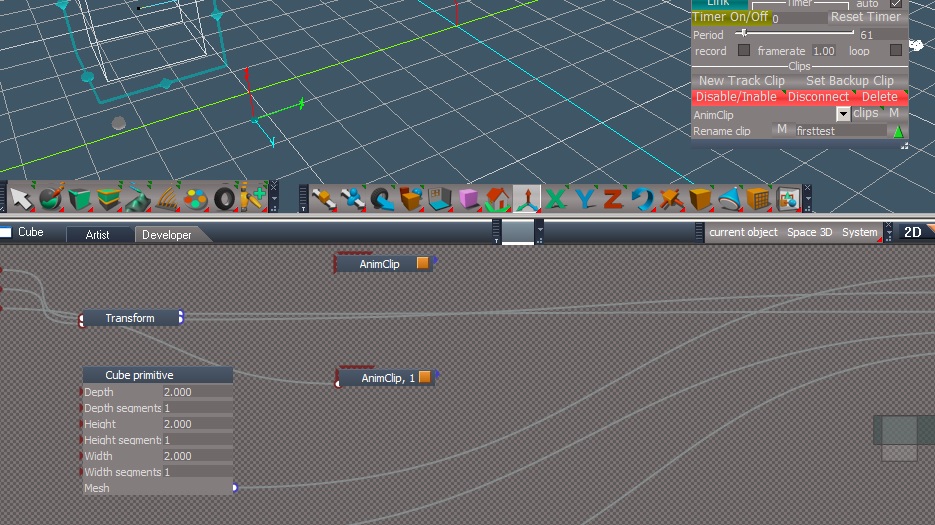
This shows a way to disconnect the first clip wen adding a new one so there are no multi clips appearing when you record on the new clip.
I first disconnect the first, then when I run record a second time it's done on a new clip that trueSpace added. No multi clips to delete. If the first is just disabled a new clip doesn't get added.
I first disconnect the first, then when I run record a second time it's done on a new clip that trueSpace added. No multi clips to delete. If the first is just disabled a new clip doesn't get added.
-
trueBlue
- Captain
- Posts: 5548
- Joined: 06 Jul 2009, 22:50
- Type the number ten into the box: 10
Re: PathTools for workspace
Working pretty well so far, no crashes yet
When you change the Segments, the path has Kinks, which causes the object to jerk at the Handles
.
When changing the + X, + Y, - X, - Y; Up Vectors, the object's Yaw flips 180 degrees
.
When you change the Segments, the path has Kinks, which causes the object to jerk at the Handles

When changing the + X, + Y, - X, - Y; Up Vectors, the object's Yaw flips 180 degrees

- Up Vectors.png (8.69 KiB) Viewed 184 times
How so?I just put Cello's find the "Large address aware" patch in. Big improvement editing my scripts in the Paths panel.
-
stan
- Master Chief Petty Officer
- Posts: 584
- Joined: 21 May 2009, 17:20
Re: PathTools for workspace
The "Large address aware" patch' gave me the ram or memory to open the panel node without crashing. The innards have gotten unwieldy. It gives truespace both sides more memory available. I was wondering if you use it in your UU version.. I'm not sure if it's self contained ..It's a small patch so it might be. Then it could be put in your UU before you repack the program. It opens truespace to more than 2 gigs of ram so one can use what is available on your system..
I found where I think that first click on the 'M' button when the watchdogs are asleep makes the obj disappear momentarily . I think it's the one in the path node. Haven't figured out how to remedy it yet. But I can still get the squish issue momentarily, no crash though. I've tried D3DView.Refresh(); at first in the path panel to no avail.
At the moment I think triggering the path's watchdog does no good things. So I think I need to think a little on how to make it active yet cause no motion at 0 on the move so it immediately is working.
I'll see what I can do about that flipping Z. Give me a bit of time to examine that.
For the segments issue, originally it's supposed to be done in the beginning because the panel links to the one in the PathTools not the in scene ones. I just watched it. For some reason it did seem to work anyway after the creation. I did put the refresh blue button for that...but don't know why it works.
Its like I wouldn't mind making the path node open by panel too but how? It's not one panel it's one for each path reacting to the same panel open call.
I found where I think that first click on the 'M' button when the watchdogs are asleep makes the obj disappear momentarily . I think it's the one in the path node. Haven't figured out how to remedy it yet. But I can still get the squish issue momentarily, no crash though. I've tried D3DView.Refresh(); at first in the path panel to no avail.
At the moment I think triggering the path's watchdog does no good things. So I think I need to think a little on how to make it active yet cause no motion at 0 on the move so it immediately is working.
I'll see what I can do about that flipping Z. Give me a bit of time to examine that.
For the segments issue, originally it's supposed to be done in the beginning because the panel links to the one in the PathTools not the in scene ones. I just watched it. For some reason it did seem to work anyway after the creation. I did put the refresh blue button for that...but don't know why it works.
Its like I wouldn't mind making the path node open by panel too but how? It's not one panel it's one for each path reacting to the same panel open call.
-
stan
- Master Chief Petty Officer
- Posts: 584
- Joined: 21 May 2009, 17:20
Re: PathTools for workspace
Here is what I get using xy block and model. Remember I flipped z to get X in front with Y on right and Z up. I believe that means we have a right hand matrix. The only ones that seem odd are the Y and -Y up. It might be I need to tweak the Y so it's feet first or head first if it doesn't screw up the Z up. It might alter the up X and -X to flip which is what you probably mean about the 180 flip.
I realize only after you were using the one on the path. I hope you used the blue button right after. Clinton made that part of the code. I just added a button to refresh the framerate to match.
I'm not sure it is a fixable thing in the code at least by me. It could just it works better on some curves when done after creation. It works fine if done before. So not sure what one would do. It uses the CoxDeBoor function which was written by them, not even the guy who put out the code Bateman changed it other that to use OpenGL. I trust what Clinton did. He just found the length of the curve points and added the new positions between each original position of two points. He uses the square root of them. Following what Bateman did.
That part reminds me of a script Dele made to put a line between to points no matter where you pulled the points. Not sure if it made it into the library.
Then the CoxDeBoor function figures out the curve. Bateman did all of that which Clinton just translated into ts friendly code.

I'm not sure it is a fixable thing in the code at least by me. It could just it works better on some curves when done after creation. It works fine if done before. So not sure what one would do. It uses the CoxDeBoor function which was written by them, not even the guy who put out the code Bateman changed it other that to use OpenGL. I trust what Clinton did. He just found the length of the curve points and added the new positions between each original position of two points. He uses the square root of them. Following what Bateman did.
That part reminds me of a script Dele made to put a line between to points no matter where you pulled the points. Not sure if it made it into the library.
Then the CoxDeBoor function figures out the curve. Bateman did all of that which Clinton just translated into ts friendly code.
-
stan
- Master Chief Petty Officer
- Posts: 584
- Joined: 21 May 2009, 17:20
Re: PathTools for workspace
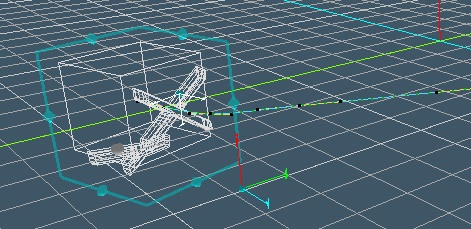
Here is the upvector positions. They seem as good as it gets.
This is upX
This is upY
This is upZ
This is up -X
This is up-Y
This is up -Z
Trying to get the best first manual start and obj turning in to upvector on start. I realize it's the upvector because if you start with no Parallel Transport engaged it open just fine. That at the moment is part of the first start strategy.
Still have a few things to fix..
This is upX



Still have a few things to fix..
-
stan
- Master Chief Petty Officer
- Posts: 584
- Joined: 21 May 2009, 17:20
Re: PathTools for workspace
Here is version X.
It should be fairly stable, with one known issue. if you put an object on world 0,0,0 (normalize location) then make a new path, it will crash when you try to link. Why I really don't know yet but it happens every time.
Upvectors are all working as in the last post.
When starting and using the M button to get the watchdog working it unselects the object.
Banking has been introduced. It is still limited to z upVector. The one flaw in it is I haven't figured out how to rotate in object space so it rotates in world only which has it's drawbacks. Basically it is like no parallel transport. The object always banks in world so doesn't adjust as it rounds a corner.
EDIT:Here is the completed banking system.
This is the latest version with the banking system completed.
Something I was trying to test but I can't get it to do is keyframe changes in the bank angle over a couple frames.
I removed the file due to new release..
It should be fairly stable, with one known issue. if you put an object on world 0,0,0 (normalize location) then make a new path, it will crash when you try to link. Why I really don't know yet but it happens every time.
Upvectors are all working as in the last post.
When starting and using the M button to get the watchdog working it unselects the object.
Banking has been introduced. It is still limited to z upVector. The one flaw in it is I haven't figured out how to rotate in object space so it rotates in world only which has it's drawbacks. Basically it is like no parallel transport. The object always banks in world so doesn't adjust as it rounds a corner.

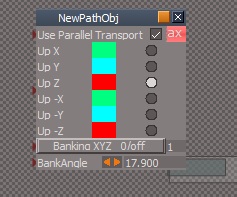
- bankingXYZ.jpg (21.31 KiB) Viewed 144 times
Something I was trying to test but I can't get it to do is keyframe changes in the bank angle over a couple frames.
I removed the file due to new release..
-
stan
- Master Chief Petty Officer
- Posts: 584
- Joined: 21 May 2009, 17:20
Re: PathTools for workspace
Here is the final version.
The last thing I wanted it to do was open the panel for the current path, so when you link the panel pops up on screen.
That makes it easier to know which path you are using so working with the tools for that path are at your disposal.
If you do close the panel make sure that the obj for the path is selected when you press link again to open it. It's because the link button relies on the selected object to link.
There was one new panel aspect I forgot to mention in my last post. The Scale aspect. It' will preserve the scale of your obj when checked as the default it not preserved because I noticed on an imported curve it stretched the obj, otherwise use Clinton's FreezeTransform to preserve the scale of your obj.
Another observation to note is when using OwnerMatrix as the path matrix you can rotate and locate your object as you desire in relation to the path. If you choose Matrix your obj will be perpendicular to the path, with the path coming from the obj center.
I could not find a way to link the pivot as it is parented to the obj, but using OwnerMatrix makes that issue moot.
The last thing I wanted it to do was open the panel for the current path, so when you link the panel pops up on screen.
That makes it easier to know which path you are using so working with the tools for that path are at your disposal.
If you do close the panel make sure that the obj for the path is selected when you press link again to open it. It's because the link button relies on the selected object to link.
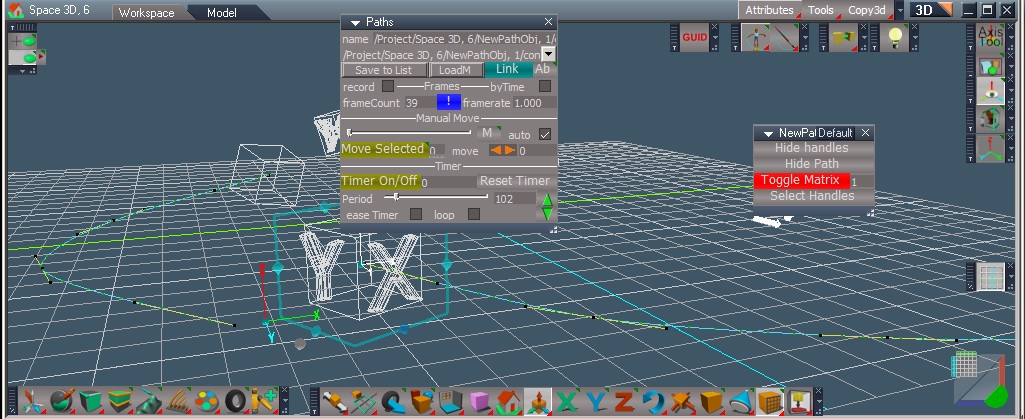
There was one new panel aspect I forgot to mention in my last post. The Scale aspect. It' will preserve the scale of your obj when checked as the default it not preserved because I noticed on an imported curve it stretched the obj, otherwise use Clinton's FreezeTransform to preserve the scale of your obj.
Another observation to note is when using OwnerMatrix as the path matrix you can rotate and locate your object as you desire in relation to the path. If you choose Matrix your obj will be perpendicular to the path, with the path coming from the obj center.
I could not find a way to link the pivot as it is parented to the obj, but using OwnerMatrix makes that issue moot.

- Example of using OwnerMatrix to position obj on path.