So I ran into a little issue with Lightworks. So far I have been using mainly the workspace side with the realtime rendering. But, I decided to give model side and lightworks a try on a scene.
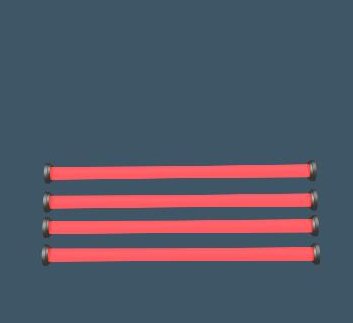
I had a door and I wanted to make a laser light sensor path across the door. I figured this seemed simple enough, one cylinder a little detail on the ends. Quick medal material on the ends, and a transparent ligthed material on the remainder of the cylinder conecting the two ends.
Looked pretty decent after fooling around with the ambient and transperancy for a while.... But, My render time jumped from 10-12 minutes for the scene to 17 hours after adding 4 of these objects. What am I missing or is there a better way to do this?
Help, LightWorks rendering time.
-
Karthogen
- Master Chief Petty Officer
- Posts: 454
- Joined: 03 Jun 2009, 14:12
Help, LightWorks rendering time.
-
Karthogen
- Master Chief Petty Officer
- Posts: 454
- Joined: 03 Jun 2009, 14:12
Re: Help, LightWorks rendering time.
Here is what should render and only took 10 seconds to render the 4 of them by themselves.
- Laser sensor.jpg (6.22 KiB) Viewed 6351 times
-
v3rd3
- Lieutenant Commander
- Posts: 1191
- Joined: 21 May 2009, 20:04
Re: Help, LightWorks rendering time.
Just a couple of things I would suggest.
Based on the posts by Wizard regarding moving from workspace to model side you might consider loading your scene, switch to modelside, turn off the bridge then save the scene as a TS 6.6 scene. After your save try the render again.
If the render is slowed down because of memory you might try cancelling the render in modelside (escape key). Once you have control of TS stay in the modelside and use the TS 6.6 menu to create a new blank scene. Then exit TS. When you restart TS the blank scene should be loaded by default.
Load your .scn file from the TS 6.6 menu and start your render again.
If the problem persists you will need to upload your scene here so we can take a look at it.
HTH
Based on the posts by Wizard regarding moving from workspace to model side you might consider loading your scene, switch to modelside, turn off the bridge then save the scene as a TS 6.6 scene. After your save try the render again.
If the render is slowed down because of memory you might try cancelling the render in modelside (escape key). Once you have control of TS stay in the modelside and use the TS 6.6 menu to create a new blank scene. Then exit TS. When you restart TS the blank scene should be loaded by default.
Load your .scn file from the TS 6.6 menu and start your render again.
If the problem persists you will need to upload your scene here so we can take a look at it.
HTH
-
Karthogen
- Master Chief Petty Officer
- Posts: 454
- Joined: 03 Jun 2009, 14:12
Re: Help, LightWorks rendering time.
hmm.. That didn't work. I lost a light or two when I turned off the bridge. All I really did on the workspace side was create the mesh, all the textures and most of the lights were set up on the model side.
So I saved it in the TS6 menu as a scene, cleared the old scene, restarted reloaded from the old TS6 menu, and still exceptionally long render times.
Scene is around 250,000 faces
with 42 mesh objects.
Is there anything else I may be missing?
So I saved it in the TS6 menu as a scene, cleared the old scene, restarted reloaded from the old TS6 menu, and still exceptionally long render times.
Scene is around 250,000 faces
with 42 mesh objects.
Is there anything else I may be missing?
-
v3rd3
- Lieutenant Commander
- Posts: 1191
- Joined: 21 May 2009, 20:04
Re: Help, LightWorks rendering time.
Can you upload the scene so I can take a look at it?
-
Karthogen
- Master Chief Petty Officer
- Posts: 454
- Joined: 03 Jun 2009, 14:12
Re: Help, LightWorks rendering time.
How do I upload teh Scene?
Just updoad the RSCN file, or is there a special way?
So I deleted those four lights from the scene and the render time goes back down to 10 min. I added just one of those lights and it is back to hours. I added just Plain objects and it was still 10. It must have something to do with how I set up the material light in a long tube with a different material on the end.
Is there a limit to teh number of objects, or lights in a scene?
I am going to try it on a different computer and also try to split the Light into 3 peices, the light seperate from the two end pices that are metal. I thought it was odd for the render times to increase by that much by adding one item.
Just updoad the RSCN file, or is there a special way?
So I deleted those four lights from the scene and the render time goes back down to 10 min. I added just one of those lights and it is back to hours. I added just Plain objects and it was still 10. It must have something to do with how I set up the material light in a long tube with a different material on the end.
Is there a limit to teh number of objects, or lights in a scene?
I am going to try it on a different computer and also try to split the Light into 3 peices, the light seperate from the two end pices that are metal. I thought it was odd for the render times to increase by that much by adding one item.
-
nigec

- Master Chief Petty Officer
- Posts: 561
- Joined: 21 May 2009, 18:46
Re: Help, LightWorks rendering time.
Material lights do take a long time to render.. have you tried using the constant shader
This uses the constant shader with abit of transparency, then red lights between the beams to give a glow sort of feel, 30 seconds to render
I turned off shadows on the red part of the beem
This uses the constant shader with abit of transparency, then red lights between the beams to give a glow sort of feel, 30 seconds to render
I turned off shadows on the red part of the beem
-
Karthogen
- Master Chief Petty Officer
- Posts: 454
- Joined: 03 Jun 2009, 14:12
Re: Help, LightWorks rendering time.
Can I use the constant shader on Model side with teh LW materials or is that just for workspace?
I am going to try and add a simple object with the same amterial to the cnter fo teh scene and see if it has the same affect. If it does I am definately not using that material anymore.
I am going to try and add a simple object with the same amterial to the cnter fo teh scene and see if it has the same affect. If it does I am definately not using that material anymore.
-
nigec
- Master Chief Petty Officer
- Posts: 561
- Joined: 21 May 2009, 18:46
Re: Help, LightWorks rendering time.
Thats entirely modelside.. actually it was done in TS6.6
- Attachments
-

-
Karthogen
- Master Chief Petty Officer
- Posts: 454
- Joined: 03 Jun 2009, 14:12
Re: Help, LightWorks rendering time.
Perfect thank you. I was trying to avoid the glow as much as possible as lasers are suppose to disipate very little over short distances that was exactly what I needed.
Changed it to a constant shader on model side and bamn back to a 10 minute render.
Thank you all for the help this really showed me a few things. I am not sure what the limitation was on the material light but, I am thinking it was my PC. I tryed a lot of things and just adding that additional area light killed the render, over and over again. Is there an option for showing model side withough the tectures until render? maybe that will speed some movement up.
Changed it to a constant shader on model side and bamn back to a 10 minute render.
Thank you all for the help this really showed me a few things. I am not sure what the limitation was on the material light but, I am thinking it was my PC. I tryed a lot of things and just adding that additional area light killed the render, over and over again. Is there an option for showing model side withough the tectures until render? maybe that will speed some movement up.
-
nigec
- Master Chief Petty Officer
- Posts: 561
- Joined: 21 May 2009, 18:46
Re: Help, LightWorks rendering time.
I alway have the veiw set as wire frame, it does make things run a lot quicker,.
there is pros and cons, , I do use textured if I'm modeling a face/figure or an object that has detail
there is pros and cons, , I do use textured if I'm modeling a face/figure or an object that has detail