Ambience TV with Lightwork
-
marcel

- Captain
- Posts: 2247
- Joined: 21 May 2009, 19:52
- Type the number ten into the box: 0
- Location: paris - France
Ambience TV with Lightwork
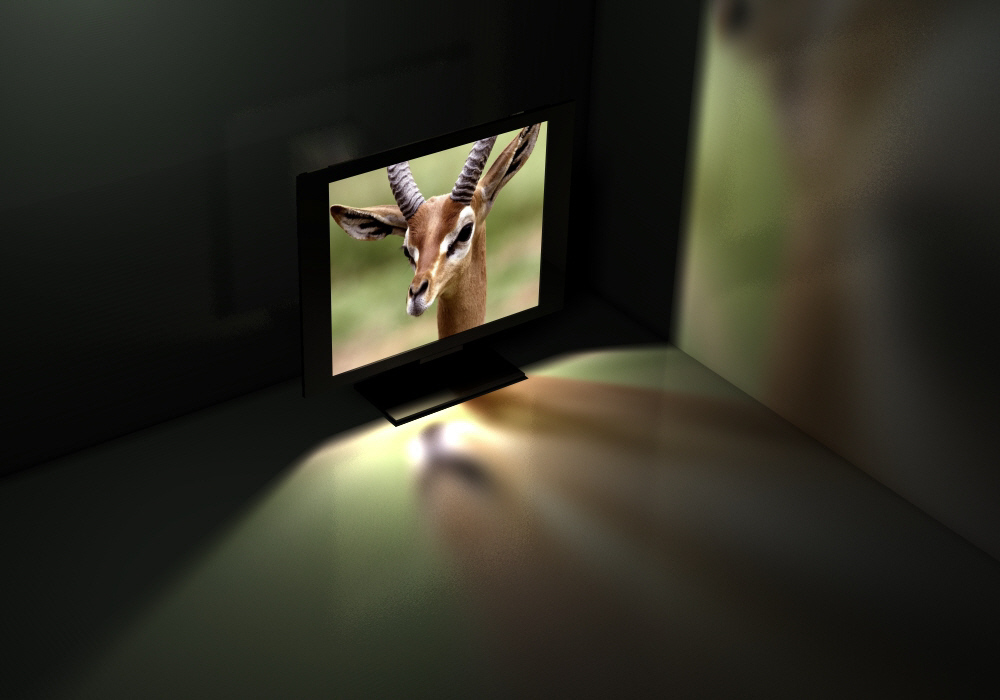
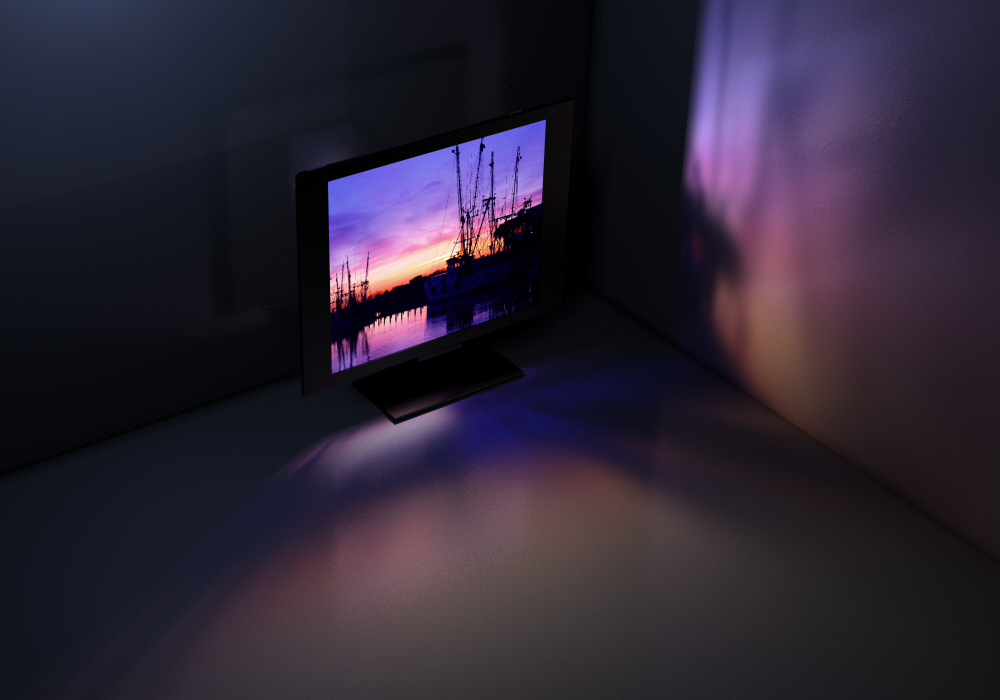
To do an ambience for a dark room with a TV, i use different planes with different shader on the screen. the light pass through the planes and the screen then create a colored and blurred light on the room. the shader of the wall help to diffuse the light. With these tests i use only one light for each scene. The same light illuminates the wall behind the TV. The ambiance follow the picture. i don't need to modify the setting. I'll try later with an animation of the ambiance when i start a real video on the TV and i"ll give more explanation on the process.
- Attachments
-
-
Design - illustration - Animation
http://www.crea-vision.fr
http://www.crea-vision.fr
-
splinters
- Chief Warrant Officer
- Posts: 733
- Joined: 21 May 2009, 18:55
- Type the number ten into the box: 0
Re: Ambience TV with Lightwork
Nice work Marcel, good too see great results still achieved with LW and tS.. 
-
RAYMAN

- Captain
- Posts: 2547
- Joined: 21 May 2009, 18:56
Re: Ambience TV with Lightwork
Yes in fact those render engines arent that much different from each other.... If .. yes if all the shaders that you need are implementedsplinters wrote:Nice work Marcel, good too see great results still achieved with LW and tS..
well and the implementation of lightworks was very well made and nice.
Good job Marcel !
Peter
-
theuns
- Lieutenant Junior Grade
- Posts: 868
- Joined: 10 Jun 2009, 11:21
- Type the number ten into the box: 0
- Location: South Africa
Re: Ambience TV with Lightwork
that looks awesome marcel! could you give us some wireframe shots with the shader details so we can try? or perhaps the test scene itself? Would love to try that out but I'm not sure what you mean with the different planes 
theuns - tSer since 2000
. http://theunsfvo.cgarena.com/" onclick="window.open(this.href);return false; |:.
. http://bluestarcreations.wordpress.com/" onclick="window.open(this.href);return false; |:.
.
http://theunsfvo.cgarena.com/" onclick="window.open(this.href);return false; |:..
http://bluestarcreations.wordpress.com/" onclick="window.open(this.href);return false; |:.-
marcel
- Captain
- Posts: 2247
- Joined: 21 May 2009, 19:52
- Type the number ten into the box: 0
- Location: paris - France
Re: Ambience TV with Lightwork
Maybe that help you:
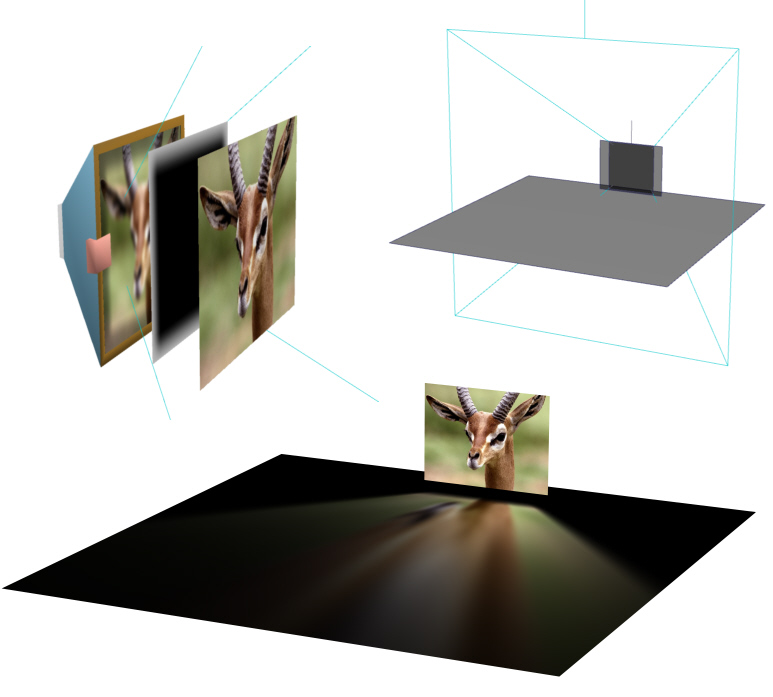
I do 3 things for a better control of the result.
1- a plane for the tv with the original picture. It don't cast shadow.
2- a plane with alpha mask to control the outline of the projection of the light. It cast shadow.
3- a projector light with a transparent shadow. His picture is the same than the original picture but blured to create a diffuse projection on the ground. The projector adjust the intensity and the falloff with distance.
That's all! Simple and fast to render. (only 1 seconde for the picture with my old computer). We can consider use that for a complex scene without difficulty to render. The best example would be to do a cathedral to show the stained from inside.
I do 3 things for a better control of the result.
1- a plane for the tv with the original picture. It don't cast shadow.
2- a plane with alpha mask to control the outline of the projection of the light. It cast shadow.
3- a projector light with a transparent shadow. His picture is the same than the original picture but blured to create a diffuse projection on the ground. The projector adjust the intensity and the falloff with distance.
That's all! Simple and fast to render. (only 1 seconde for the picture with my old computer). We can consider use that for a complex scene without difficulty to render. The best example would be to do a cathedral to show the stained from inside.
- Attachments
-
Design - illustration - Animation
http://www.crea-vision.fr
http://www.crea-vision.fr
-
theuns
- Lieutenant Junior Grade
- Posts: 868
- Joined: 10 Jun 2009, 11:21
- Type the number ten into the box: 0
- Location: South Africa
Re: Ambience TV with Lightwork
ah, I see... and the 1st and 2nd plane must have transparency for the light to shine through right?
theuns - tSer since 2000
. http://theunsfvo.cgarena.com/" onclick="window.open(this.href);return false; |:.
. http://bluestarcreations.wordpress.com/" onclick="window.open(this.href);return false; |:.
.
http://theunsfvo.cgarena.com/" onclick="window.open(this.href);return false; |:..
http://bluestarcreations.wordpress.com/" onclick="window.open(this.href);return false; |:.-
marcel
- Captain
- Posts: 2247
- Joined: 21 May 2009, 19:52
- Type the number ten into the box: 0
- Location: paris - France
Re: Ambience TV with Lightwork
No. Only the plane with alpha mask have transparency (due to his alpha mask). The other (who simulate the screen of the tv) don't need transparency because it don't cast shadow. The light pass trought. You can also change the blur of the image used for the projector light to enhance the effect on the ground.
If you don't need a blured outline of the light, it is possible to erase the plane with alpha mask. In this way, you don't need transparency shadow with the projector light and win time to render.
If you don't need a blured outline of the light, it is possible to erase the plane with alpha mask. In this way, you don't need transparency shadow with the projector light and win time to render.
Design - illustration - Animation
http://www.crea-vision.fr
http://www.crea-vision.fr