Problem rendering PNG format transparency

Legacy tS 6.6
User avatar
Cellulo
Lieutenant
Posts: 927
Joined: 27 Sep 2012, 07:48
Type the number ten into the box: 9
Location: France

Problem rendering PNG format transparency

Post by Cellulo »

Recently i have donwloaded some lowpoly japanese 3d objects in mqo format (metasequoia), i have convert them in obj format with 3Dace to import in truespace 6, some 3d object have texture in PNG format, like wings on body, or leaf on lowpoly tree, when i do the rendering region in truespace 6 the transparency don't work. i can see the transparency when i am right-click on the object to go edit mode but no transprency appear in the rendering. :(

Maybe i forget a specific setting somewhere ?

Here screenshot:

Image


You can download and test the files here (obj format):

LPtree_and_LPgirl.zip
User avatar
Emmanuel
Chief Warrant Officer
Posts: 670
Joined: 14 Jun 2009, 06:47

Re: Problem rendering PNG format transparency

Post by Emmanuel »

TrueSpace does not automatically apply the transparency from a PNG texture file.
You have to load this file also as "transparency map". To do this, clic the first icon (from the left) in the "Color" box of the material editor and select Transparency:transparency_map. Then load your file.
User avatar
Cellulo
Lieutenant
Posts: 927
Joined: 27 Sep 2012, 07:48
Type the number ten into the box: 9
Location: France

Re: Problem rendering PNG format transparency

Post by Cellulo »

Thanks Emmanuel, transparency work after reassign the texture on the model. :bananacool2:
Last edited by Cellulo on 20 Apr 2013, 18:27, edited 1 time in total.
User avatar
Cellulo
Lieutenant
Posts: 927
Joined: 27 Sep 2012, 07:48
Type the number ten into the box: 9
Location: France

Re: Problem rendering PNG format transparency

Post by Cellulo »

Hey emmanuel, it is possible to see the transparency in real time in the UI of truespace 6 ?
User avatar
spacekdet
Captain
Posts: 1810
Joined: 27 May 2009, 15:00
Type the number ten into the box: 10
Location: On the day shift at the Utility Muffin Research Kitchen

Re: Problem rendering PNG format transparency

Post by spacekdet »

I'm not emmanuel, but I'll take a stab at it.

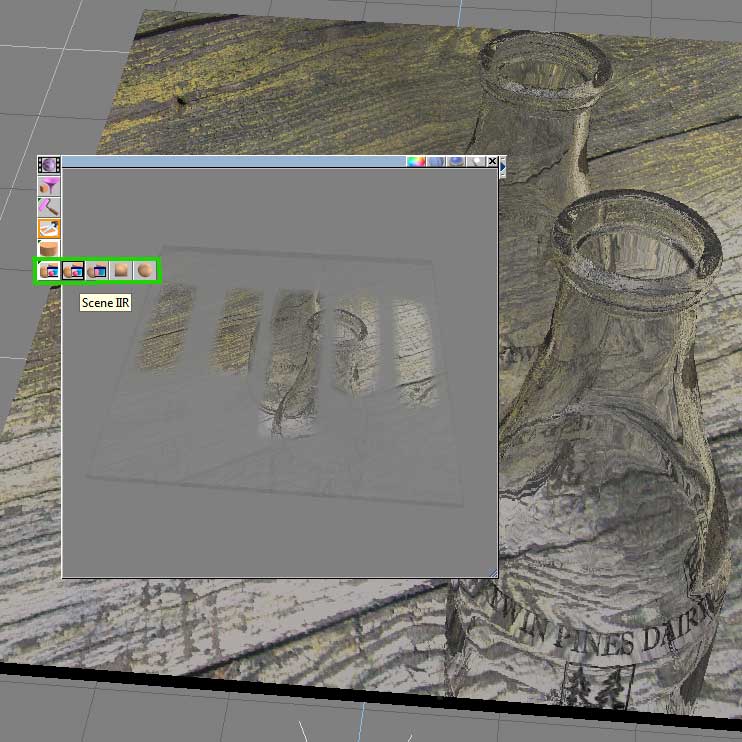
For tS6 'faux realtime', try using the Scene IRR or Area IRR function in the Material Editor.

Drag/ resize Mat Editor over area or in desired modeling pane and switch the 'Sample: Sphere' to Area or Scene IRR.

Clicking in Mat editor window will refresh and re-render preview, giving an 'almost real time' preview.
scene_IRR_faux_realtime.jpg
User avatar
Emmanuel
Chief Warrant Officer
Posts: 670
Joined: 14 Jun 2009, 06:47

Re: Problem rendering PNG format transparency

Post by Emmanuel »

spacekdet wrote:
For tS6 'faux realtime', try using the Scene IRR or Area IRR function in the Material Editor.
Or turn the Bridge on Auto mode, and open a Workspace 3D window !
Workspace side helps sometimes :D

Modeler side does not support true real-time display but there is always a workaround...
User avatar
BNG
Chief Warrant Officer
Posts: 684
Joined: 16 Oct 2009, 03:26
Type the number ten into the box: 0
Location: Texas

Re: Problem rendering PNG format transparency

Post by BNG »

I don't know if this applies but recently I was working on some tank tracks and rendered it as 32bit png and had good results rendering a transparent model minus the back ground itself, so maybe you could try 32bit verses a 24bit render of the texture?
Here's what it looked like using 32bit. Image That's odd this doesn't show the tranparency?
Here's what it looks like on my modeling forum. Leroy's tank track work in progress. I had a hell of time matching the tank sprocket with all the other parts.
User avatar
spacekdet
Captain
Posts: 1810
Joined: 27 May 2009, 15:00
Type the number ten into the box: 10
Location: On the day shift at the Utility Muffin Research Kitchen

Re: Problem rendering PNG format transparency

Post by spacekdet »

See? I knew Workspace was good for something!
But he asked about v.6 so I tried to answer that.