I can't put High Res images in a scene, so I'm putting a 2500x2500 image... I also need to know if there is a way to do a object that imitates the HDRI and then be able to put images with more resolutions, the clouds are pixelated and looks false.
I need help, is the last part I need.
HDRI Problems
-
LeonRegis

- Captain
- Posts: 1946
- Joined: 18 Aug 2009, 17:36
- Type the number ten into the box: 0
- Location: Brazil/Earth/Orion Arm/Milky Way/4th Dimension/This Universe/Multiverse???/Singularity???
HDRI Problems
Be the change you want to see in the world. - Mohandas Gandhi
-
RAYMAN

- Captain
- Posts: 2547
- Joined: 21 May 2009, 18:56
Re: HDRI Problems
Your background and the hdri do not have to be the same....
you can just apply higher res texture to a plane that you insert behind your object and use the hdri
for lighting.... you just have to disable the shadows.. and you can even use the background with light emitting properties......
Peter
you can just apply higher res texture to a plane that you insert behind your object and use the hdri
for lighting.... you just have to disable the shadows.. and you can even use the background with light emitting properties......
Peter
-
LeonRegis
- Captain
- Posts: 1946
- Joined: 18 Aug 2009, 17:36
- Type the number ten into the box: 0
- Location: Brazil/Earth/Orion Arm/Milky Way/4th Dimension/This Universe/Multiverse???/Singularity???
Re: HDRI Problems
It's that I'll use in a animation and there is the angle problem so I would like to use the background or a object like a dome, anyway I didn't know we can put a image on background! Dumb I'm. 
Be the change you want to see in the world. - Mohandas Gandhi
-
LeonRegis
- Captain
- Posts: 1946
- Joined: 18 Aug 2009, 17:36
- Type the number ten into the box: 0
- Location: Brazil/Earth/Orion Arm/Milky Way/4th Dimension/This Universe/Multiverse???/Singularity???
Re: HDRI Problems
I did a test and seems that I cannot use background because it don't generates a ''dome'' that I can look at anywhere (like hdri does), so there is a way to do it with the background? And also seems that HDRI support larger images than background, right?
Be the change you want to see in the world. - Mohandas Gandhi
-
RAYMAN
- Captain
- Posts: 2547
- Joined: 21 May 2009, 18:56
Re: HDRI Problems
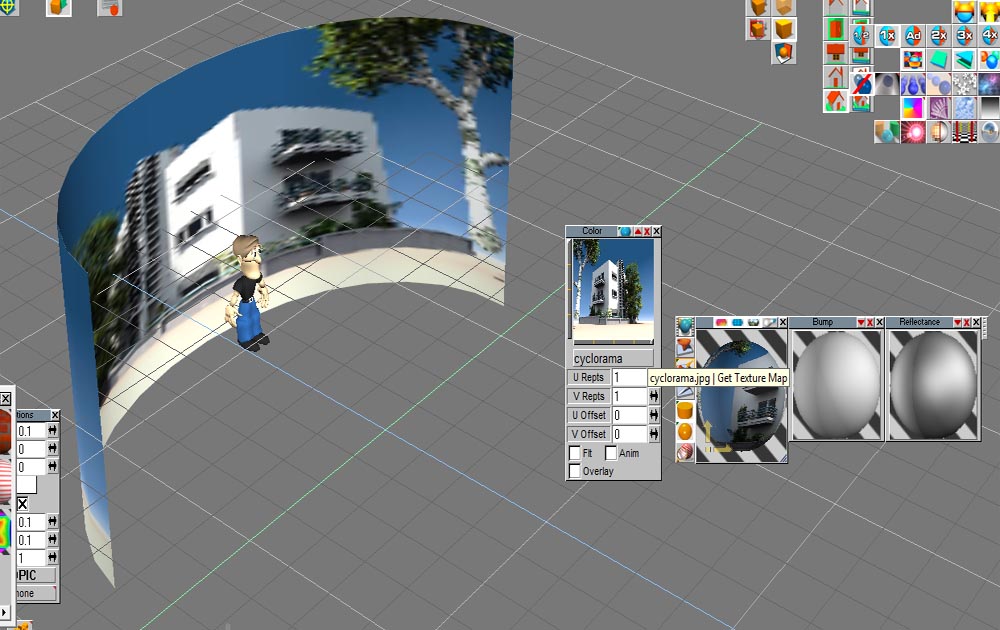
No problem Leon you can also put it onto a curved surface just like your hdri is... do you realy need a dome ? Most people put it on a cyclorama typ object...leonregis wrote:It's that I'll use in a animation and there is the angle problem so I would like to use the background or a object like a dome, anyway I didn't know we can put a image on background! Dumb I'm.
Peter
- Attachments
-
-
LeonRegis
- Captain
- Posts: 1946
- Joined: 18 Aug 2009, 17:36
- Type the number ten into the box: 0
- Location: Brazil/Earth/Orion Arm/Milky Way/4th Dimension/This Universe/Multiverse???/Singularity???
Re: HDRI Problems
It's a rocket launch so I'll need to look from several angles and up and down, I don't know much but what is a clycorama? I need to look up too...
Be the change you want to see in the world. - Mohandas Gandhi
-
marcel

- Captain
- Posts: 2247
- Joined: 21 May 2009, 19:52
- Type the number ten into the box: 0
- Location: paris - France
Re: HDRI Problems
In your thread "mars mission" i explain how to do a sky dome. As i explain after, you can't use a cylindrical background for your rocket if the cam rotate in a vertical plane because the perspective become too bad quickly on the cylinder. you have 3 way for the background: the plane, the cylinder or the dome. It depend of the movement of the cam and the effect you want.
Design - illustration - Animation
http://www.crea-vision.fr
http://www.crea-vision.fr
-
LeonRegis
- Captain
- Posts: 1946
- Joined: 18 Aug 2009, 17:36
- Type the number ten into the box: 0
- Location: Brazil/Earth/Orion Arm/Milky Way/4th Dimension/This Universe/Multiverse???/Singularity???
Re: HDRI Problems
I know, but this image don't fit.
- Attachments
-
- Sky.rar
- (1.06 MiB) Downloaded 217 times
Be the change you want to see in the world. - Mohandas Gandhi
-
nigec

- Master Chief Petty Officer
- Posts: 561
- Joined: 21 May 2009, 18:46
Re: HDRI Problems
there's a nice tool here:
http://www.hdrlabs.com/sibl/index.html"
Basiclly it splits the HDRI into 3; the enviroment hdri which is where all the light is coming from, this doesn't need to be a hi res image, then you get a hi res background image and also a reflections hrdri

http://www.hdrlabs.com/sibl/index.html"
Basiclly it splits the HDRI into 3; the enviroment hdri which is where all the light is coming from, this doesn't need to be a hi res image, then you get a hi res background image and also a reflections hrdri
-
LeonRegis
- Captain
- Posts: 1946
- Joined: 18 Aug 2009, 17:36
- Type the number ten into the box: 0
- Location: Brazil/Earth/Orion Arm/Milky Way/4th Dimension/This Universe/Multiverse???/Singularity???
Re: HDRI Problems
Thanks Nigec.
Marcel how can I put that image I posted before in you dome? For some reason it don't work but on HDRI yes...
Marcel how can I put that image I posted before in you dome? For some reason it don't work but on HDRI yes...
Be the change you want to see in the world. - Mohandas Gandhi
-
RAYMAN
- Captain
- Posts: 2547
- Joined: 21 May 2009, 18:56
Re: HDRI Problems
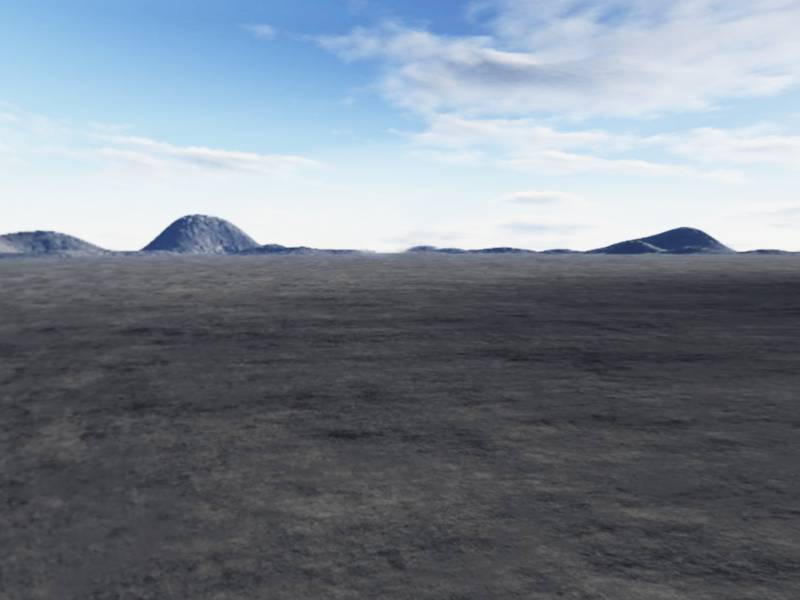
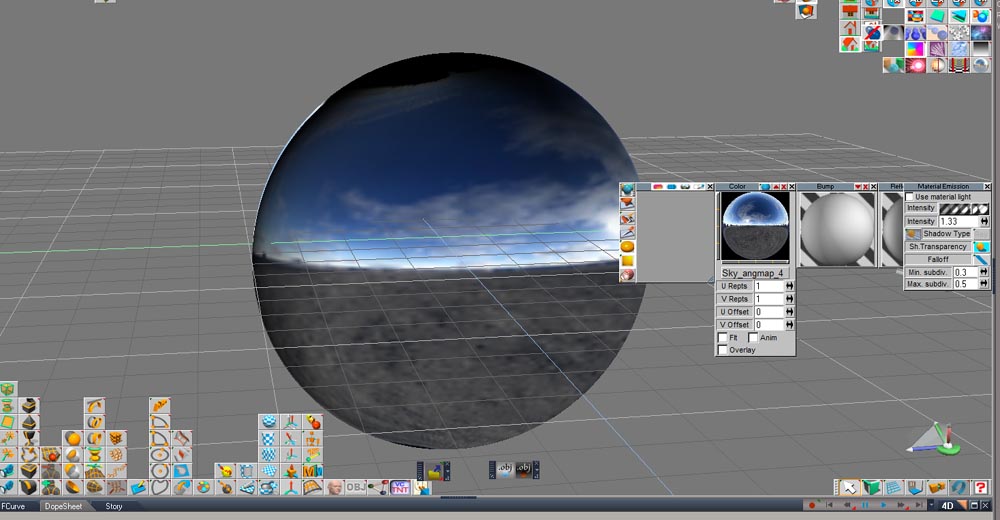
It works to put that map onto a hemispere with spherical uv projection ......
- Attachments
-
- hemi.zip
- (546.01 KiB) Downloaded 208 times
-
-
-
marcel
- Captain
- Posts: 2247
- Joined: 21 May 2009, 19:52
- Type the number ten into the box: 0
- Location: paris - France
Re: HDRI Problems
Leon: the image you have posted is not a reference for a 360 degrees uvmap for what i explain because the image did not fit behind. it is the result of a render on a sphere. a kind of preview you can find on the web to choose a hdri. you need to use an original image (without deformation and do what i explain in your "mission.." thread. all you need is clouds seeing from below, not the ground. i am not sure you understand what i explain when i see what you have posted or maybe try an other method.
Design - illustration - Animation
http://www.crea-vision.fr
http://www.crea-vision.fr
-
LeonRegis
- Captain
- Posts: 1946
- Joined: 18 Aug 2009, 17:36
- Type the number ten into the box: 0
- Location: Brazil/Earth/Orion Arm/Milky Way/4th Dimension/This Universe/Multiverse???/Singularity???
Re: HDRI Problems
Marcel, when I use the polar filter stays a line, I use Photoshop 7, so which software do you use, because your polar don't have any line.
Thanks in Advance
Thanks in Advance
Be the change you want to see in the world. - Mohandas Gandhi
-
marcel
- Captain
- Posts: 2247
- Joined: 21 May 2009, 19:52
- Type the number ten into the box: 0
- Location: paris - France
Re: HDRI Problems
Not a problem of soft.
before use the polar filter, you need to have right and left edge identical like an image used for a mosaic without visible joins. (it is what i said in first step on the method).
before use the polar filter, you need to have right and left edge identical like an image used for a mosaic without visible joins. (it is what i said in first step on the method).
Design - illustration - Animation
http://www.crea-vision.fr
http://www.crea-vision.fr
-
LeonRegis
- Captain
- Posts: 1946
- Joined: 18 Aug 2009, 17:36
- Type the number ten into the box: 0
- Location: Brazil/Earth/Orion Arm/Milky Way/4th Dimension/This Universe/Multiverse???/Singularity???
Re: HDRI Problems
But mosaic filter pixelate the image, and it downs the quality, but even this way which mosaic number I should use? (1, 2, 3...).
TA
TA
Be the change you want to see in the world. - Mohandas Gandhi
-
marcel
- Captain
- Posts: 2247
- Joined: 21 May 2009, 19:52
- Type the number ten into the box: 0
- Location: paris - France
Re: HDRI Problems
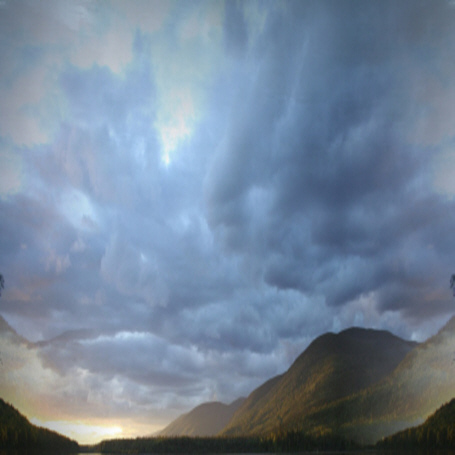
Sorry. When i say mosaic, it is NOT the mosaic filter of photoshop! Totally different. To use an image for a "mosaic" without joint, you need to have left and right identical.
See the photo:
The original on top have left and right different: the polar filter create a line (what you do).
The image modified on bottom have left and right identical: now the polar create a correct map without joint.
See the photo:
The original on top have left and right different: the polar filter create a line (what you do).
The image modified on bottom have left and right identical: now the polar create a correct map without joint.
- Attachments
-

Design - illustration - Animation
http://www.crea-vision.fr
http://www.crea-vision.fr
-
marcel
- Captain
- Posts: 2247
- Joined: 21 May 2009, 19:52
- Type the number ten into the box: 0
- Location: paris - France
Re: HDRI Problems
Now i can do the dome:
-resize the modified image to a square.
-create a polar image
-do the dome with planar uv.
Note: you can smooth the center of polar.jpg for a best texture.
-resize the modified image to a square.
-create a polar image
-do the dome with planar uv.
Note: you can smooth the center of polar.jpg for a best texture.
- Attachments
-
-
-
Design - illustration - Animation
http://www.crea-vision.fr
http://www.crea-vision.fr
-
LeonRegis
- Captain
- Posts: 1946
- Joined: 18 Aug 2009, 17:36
- Type the number ten into the box: 0
- Location: Brazil/Earth/Orion Arm/Milky Way/4th Dimension/This Universe/Multiverse???/Singularity???
Re: HDRI Problems
Thanks again, but what tool did you use to make the sides equal?
Be the change you want to see in the world. - Mohandas Gandhi
-
marcel
- Captain
- Posts: 2247
- Joined: 21 May 2009, 19:52
- Type the number ten into the box: 0
- Location: paris - France
Re: HDRI Problems
It depend of your soft. you can use a filter to do that (a kind of filter to do invisible joint). i don't know the name of this filter on photoshop. I used an old video editor (more ten years old) to do that. in my editor it was named "mosaic" but it is not the same in photoshop.
you can also do that manually if you have not the filter:
-copy a portion of the left of the image
-duplicate the object and move it at the right of the image
-do a syimetrical image of the object
-do a transparency with a gradient mask
That all. i am sure there is a filter to do that on Photoshop with one clik but i don't use Photoshop and i can't help you.
you can also do that manually if you have not the filter:
-copy a portion of the left of the image
-duplicate the object and move it at the right of the image
-do a syimetrical image of the object
-do a transparency with a gradient mask
That all. i am sure there is a filter to do that on Photoshop with one clik but i don't use Photoshop and i can't help you.
Design - illustration - Animation
http://www.crea-vision.fr
http://www.crea-vision.fr
-
Finis

- Captain
- Posts: 5410
- Joined: 21 May 2009, 18:26
- Type the number ten into the box: 0
- Location: America!
Re: HDRI Problems
My Paint Shop Pro 7 doesn't have anything like the polar filter. I'll look around for a free one.
The filter, effect, or tool to make the sides equal usually has "seamless" or "tile" or "tiled" in its name. It probably changes the top and bottom too so you will need to find and change the tool's options if possible. If there are no options try adding solid color bars to the top and bottom of the picture (remove later) so the tool might not adjust those edges.
You could get a skydome image from the web somewhere that is already made to wrap around a hemisphere with spherical projection.
The filter, effect, or tool to make the sides equal usually has "seamless" or "tile" or "tiled" in its name. It probably changes the top and bottom too so you will need to find and change the tool's options if possible. If there are no options try adding solid color bars to the top and bottom of the picture (remove later) so the tool might not adjust those edges.
You could get a skydome image from the web somewhere that is already made to wrap around a hemisphere with spherical projection.
I prefer dangerous freedom over peaceful servitude. -- Thomas Jefferson/Jean Jacques Rousseau
-
marcel
- Captain
- Posts: 2247
- Joined: 21 May 2009, 19:52
- Type the number ten into the box: 0
- Location: paris - France
Re: HDRI Problems
Thank finis for the info.
the spherical projection is the standard uvmap we use. It is simple to do and good if we don't see the top of the dome (the clouds are "strange" at this position). the planar uv with a polar image is another method to see all the sky with less deformation because we can change the center of the polar.jpg (with a good cloud or other thing). I tested it inside a realtime dome and it seem more real when I looked up.
The best is to create a polar image with a 360 degrees panoramic image in hd (used often for a cylindrical projection). there is many manner to do the same thing. it depend of your animation. Still image have not this kind of problem.
the spherical projection is the standard uvmap we use. It is simple to do and good if we don't see the top of the dome (the clouds are "strange" at this position). the planar uv with a polar image is another method to see all the sky with less deformation because we can change the center of the polar.jpg (with a good cloud or other thing). I tested it inside a realtime dome and it seem more real when I looked up.
The best is to create a polar image with a 360 degrees panoramic image in hd (used often for a cylindrical projection). there is many manner to do the same thing. it depend of your animation. Still image have not this kind of problem.
Design - illustration - Animation
http://www.crea-vision.fr
http://www.crea-vision.fr
-
Finis
- Captain
- Posts: 5410
- Joined: 21 May 2009, 18:26
- Type the number ten into the box: 0
- Location: America!
Re: HDRI Problems
The "skydome" images I'm referring to are made to wrap with the standard spherical projection. As I noted before, they are the same as Mercator projection maps. Most are half spheres. However, many, especially free ones, aren't of suitable quality to avoid artifacts at the top.
Is the HDRI probe type image usable with the planar projection as described in your method?
(I'm glad you explained this method. Being able to make our own skies from regular photos is great. I'm just pointing out to Leon that since he is currently having trouble using the method he could get something from the web to finish this project.)
Is the HDRI probe type image usable with the planar projection as described in your method?
(I'm glad you explained this method. Being able to make our own skies from regular photos is great. I'm just pointing out to Leon that since he is currently having trouble using the method he could get something from the web to finish this project.)
I prefer dangerous freedom over peaceful servitude. -- Thomas Jefferson/Jean Jacques Rousseau
-
marcel
- Captain
- Posts: 2247
- Joined: 21 May 2009, 19:52
- Type the number ten into the box: 0
- Location: paris - France
Re: HDRI Problems
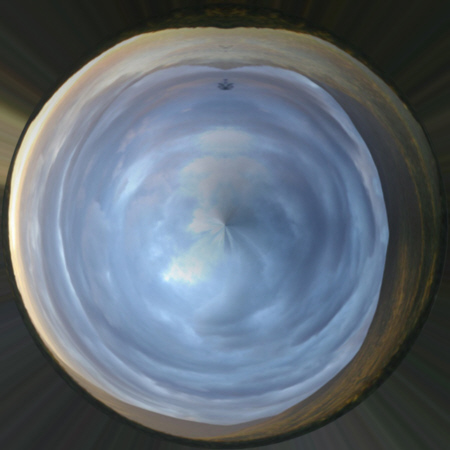
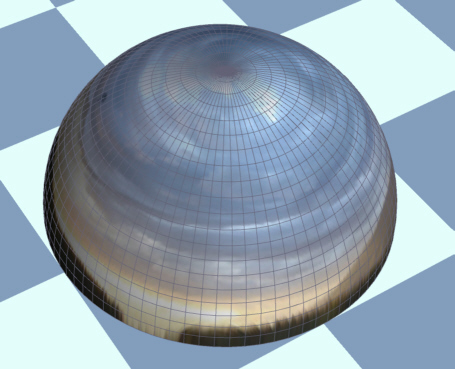
Finis: you can convert a hdri to a jpg and use the jpg for a planar projection but the center of a hdri is the horizon and the center of a planar image for a sky dome is the top (the horizon is the edge of the circle). but your question is interesting:
the image show a hdri converted to a bitmap and used as a planar uv on a sphere. You can use it to create other thing. all you need is imagination
the image show a hdri converted to a bitmap and used as a planar uv on a sphere. You can use it to create other thing. all you need is imagination
- Attachments
-

Design - illustration - Animation
http://www.crea-vision.fr
http://www.crea-vision.fr
-
marcel
- Captain
- Posts: 2247
- Joined: 21 May 2009, 19:52
- Type the number ten into the box: 0
- Location: paris - France
Re: HDRI Problems
The same in workspace...
- Attachments
-

Design - illustration - Animation
http://www.crea-vision.fr
http://www.crea-vision.fr
-
LeonRegis
- Captain
- Posts: 1946
- Joined: 18 Aug 2009, 17:36
- Type the number ten into the box: 0
- Location: Brazil/Earth/Orion Arm/Milky Way/4th Dimension/This Universe/Multiverse???/Singularity???
Re: HDRI Problems
Marcel if you have time, can or want please make those two images polar for then I use in my sky dome, I just can't do that ( I tried the manual method ).
Many thanks in advance.
http://openeyevisuals.com/sky_ftree/OEV_sky_105.jpg" (Cut the ground off)
http://fc02.deviantart.net/fs46/f/2009/ ... estock.jpg"
Many thanks in advance.
http://openeyevisuals.com/sky_ftree/OEV_sky_105.jpg" (Cut the ground off)
http://fc02.deviantart.net/fs46/f/2009/ ... estock.jpg"
Be the change you want to see in the world. - Mohandas Gandhi
-
marcel
- Captain
- Posts: 2247
- Joined: 21 May 2009, 19:52
- Type the number ten into the box: 0
- Location: paris - France
Re: HDRI Problems
Here is the polar.
- Attachments
-
- sky_polar.zip
- (4.19 MiB) Downloaded 260 times
Design - illustration - Animation
http://www.crea-vision.fr
http://www.crea-vision.fr
-
marcel
- Captain
- Posts: 2247
- Joined: 21 May 2009, 19:52
- Type the number ten into the box: 0
- Location: paris - France
Re: HDRI Problems
I forgot to cut the ground but just slightly off the dome on your 3d floor or make mountains to hide the trees. Anyway you must model something between the dome and the ground so that it is perfect.
Design - illustration - Animation
http://www.crea-vision.fr
http://www.crea-vision.fr
-
noko
- Senior Chief Petty Officer
- Posts: 170
- Joined: 24 May 2009, 04:16
Re: HDRI Problems
Lightworks 7.4 which is used in tS 7.6x has a bug with HDRI Panoramic and spherical HDRI projection formats. The reflections and rendered background will have pixelated areas. Vertical cross HDRI will not have that problem. Marcel is right, you don't need a huge HDRI to get the benefits of HDRI natural lighting but getting a good background where one can rotate around a dome would be best.
-
LeonRegis
- Captain
- Posts: 1946
- Joined: 18 Aug 2009, 17:36
- Type the number ten into the box: 0
- Location: Brazil/Earth/Orion Arm/Milky Way/4th Dimension/This Universe/Multiverse???/Singularity???
Re: HDRI Problems
Thanks Marcel very much!
Be the change you want to see in the world. - Mohandas Gandhi