tS761 3D View Widget free scripts, plugins, models, textures
trueBlue
Captain Posts: 5548 Joined: 06 Jul 2009, 22:50Type the number ten into the box: 10
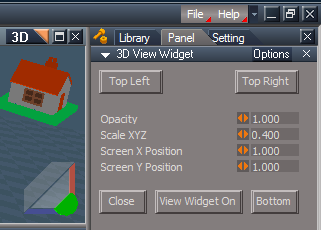
tS761 3D View Widget
Post
by trueBlue » 02 Oct 2012, 21:29
3D View Widget
Capture.PNG (16.11 KiB) Viewed 4292 times
Shift + LMB select the View Widget's green Encircle object opens the 3D View Widget's control panel and loads it if it is not opened.
Ctrl + LMB select the View Widget's green Encircle object opens the current Eye Camera.
MMB select the View Widget's green Encircle object Resets the View.
Here is a video showing the 3D View Widget.
MikomDude
Captain Posts: 1930 Joined: 04 Oct 2010, 11:12Type the number ten into the box: 0Location: The Hague, Netherlands
Re: tS761 3D View Widget
Post
by MikomDude » 03 Oct 2012, 05:59
This looks fantastic! I always wanted such a widget, I didn't know about it until now, but now I want it.
trueBlue
Captain Posts: 5548 Joined: 06 Jul 2009, 22:50Type the number ten into the box: 10
Re: tS761 3D View Widget
Post
by trueBlue » 09 Oct 2012, 01:52
MikomDude:
MikomDude
Captain Posts: 1930 Joined: 04 Oct 2010, 11:12Type the number ten into the box: 0Location: The Hague, Netherlands
Re: tS761 3D View Widget
Post
by MikomDude » 09 Oct 2012, 10:52
Fantastic! works like a charm. One thing though, when you switch from Top view to Bottom view the tS navigation widget becomes invisible, which is fine by me, however it doesn't appear again after you switch to Top view again. Is it supposed to be like that?
trueBlue
Captain Posts: 5548 Joined: 06 Jul 2009, 22:50Type the number ten into the box: 10
Re: tS761 3D View Widget
Post
by trueBlue » 09 Oct 2012, 13:46
Ooops, not really. I only intended that to happen when you switch to the Bottom. I'll have to fix that. In the meantime you can select the View Widget ON/Off button.
Draise
Captain Posts: 3200 Joined: 21 Sep 2009, 19:33Type the number ten into the box: 0Location: Bogota, Colombia
Re: tS761 3D View Widget
Post
by Draise » 10 Nov 2012, 21:22
Wow, what an awesome widget! Just managed to use it now! Very very cool. Thanks trueBlue!
trueBlue
Captain Posts: 5548 Joined: 06 Jul 2009, 22:50Type the number ten into the box: 10
Re: tS761 3D View Widget
Post
by trueBlue » 11 Nov 2012, 00:30
Thanks Draise.