In wire frame I could see the texture on my object when editing an object for a while and then it stopped working and just the wire frame showed minus the texture as before? In their a way to toggle transparent edit to show the texture in edit mode again? Thx, Leroy. Greetings to all btw. I'm using the model tab side btw. Both 7.6 and 7.61 are having the same issue. Does the 7.61 update fix this issue?
FYI, I see the texture on the inside object when I uncheck the visibility option for the cave object in the scene editor.
Transparent edit sort of working?
-
BNG

- Chief Warrant Officer
- Posts: 684
- Joined: 16 Oct 2009, 03:26
- Type the number ten into the box: 0
- Location: Texas
Transparent edit sort of working?
Last edited by BNG on 21 Nov 2016, 16:34, edited 1 time in total.
Casual Truespace 3D modeling hobbyist. My Truespace blog and simple 3d Modeling Tutorials for Casual Model Makers.
-
stan
- Master Chief Petty Officer
- Posts: 584
- Joined: 21 May 2009, 17:20
Re: Transparent edit sort of working?
wire frame doesn't show textures.
wire frame transparent or wire frame solid will.
make sure it's toggled to use textures on display options panel.
wire frame transparent or wire frame solid will.
make sure it's toggled to use textures on display options panel.
-
BNG
- Chief Warrant Officer
- Posts: 684
- Joined: 16 Oct 2009, 03:26
- Type the number ten into the box: 0
- Location: Texas
Re: Transparent edit sort of working?
Actually it did using D3D. Don't know why it was working and then not. I just thought there might have been a toggle or something similar. The object was inside another object. Wireframe was active and the center object was in edit mode showing the object with the texture visible.
Later, when I went to re-edit the object the texture was not visible any more. I was using 7.6 for this model. It did the same thing in 7.61. Don't know why though. Transparent edit is X'ed and I saved the preferences option. Hope I can figure it out as seeing the texture makes editing the object in the other object a lot easier then everything being set to just plain wire frame. I must have activated it somehow originally and then did something to disable it again? I've been making some cave objects lately with a ramp/stairs object inside of the cave; which was made using the shell tool. It has several openings on different sides and levels. Question, is there a way to toggle texture visibility? Thx, Leroy.
Later, when I went to re-edit the object the texture was not visible any more. I was using 7.6 for this model. It did the same thing in 7.61. Don't know why though. Transparent edit is X'ed and I saved the preferences option. Hope I can figure it out as seeing the texture makes editing the object in the other object a lot easier then everything being set to just plain wire frame. I must have activated it somehow originally and then did something to disable it again? I've been making some cave objects lately with a ramp/stairs object inside of the cave; which was made using the shell tool. It has several openings on different sides and levels. Question, is there a way to toggle texture visibility? Thx, Leroy.
Casual Truespace 3D modeling hobbyist. My Truespace blog and simple 3d Modeling Tutorials for Casual Model Makers.
-
stan
- Master Chief Petty Officer
- Posts: 584
- Joined: 21 May 2009, 17:20
Re: Transparent edit sort of working?
the only other setting is on the d3d or openGL panels(right click icon). make sure procedural textures is checked..but plain wire frame it will not show..only with trans or solid wire.
- Attachments
-

-
BNG
- Chief Warrant Officer
- Posts: 684
- Joined: 16 Oct 2009, 03:26
- Type the number ten into the box: 0
- Location: Texas
Re: Transparent edit sort of working?
Thx, Stan. Guess it was an issue maybe with my video card or something don't really know? Bummer, thx bro, Leroy.
Casual Truespace 3D modeling hobbyist. My Truespace blog and simple 3d Modeling Tutorials for Casual Model Makers.
-
stan
- Master Chief Petty Officer
- Posts: 584
- Joined: 21 May 2009, 17:20
Re: Transparent edit sort of working?
Have you tried using openGL?
-
BNG
- Chief Warrant Officer
- Posts: 684
- Joined: 16 Oct 2009, 03:26
- Type the number ten into the box: 0
- Location: Texas
Re: Transparent edit sort of working?
I'll check thx.
Casual Truespace 3D modeling hobbyist. My Truespace blog and simple 3d Modeling Tutorials for Casual Model Makers.
-
BNG
- Chief Warrant Officer
- Posts: 684
- Joined: 16 Oct 2009, 03:26
- Type the number ten into the box: 0
- Location: Texas
Re: Transparent edit sort of working?
It did it again but I'm baffled?

I used the shell tool on the smaller object and wala it shows the material on the object with the other object transparent. Is this a bug in TS model side?
I used the shell tool on the smaller object and wala it shows the material on the object with the other object transparent. Is this a bug in TS model side?
Casual Truespace 3D modeling hobbyist. My Truespace blog and simple 3d Modeling Tutorials for Casual Model Makers.
-
stan
- Master Chief Petty Officer
- Posts: 584
- Joined: 21 May 2009, 17:20
Re: Transparent edit sort of working?
could you post your scene..?
It could be a corrupt config file.
It could be a corrupt config file.
-
BNG
- Chief Warrant Officer
- Posts: 684
- Joined: 16 Oct 2009, 03:26
- Type the number ten into the box: 0
- Location: Texas
Re: Transparent edit sort of working?
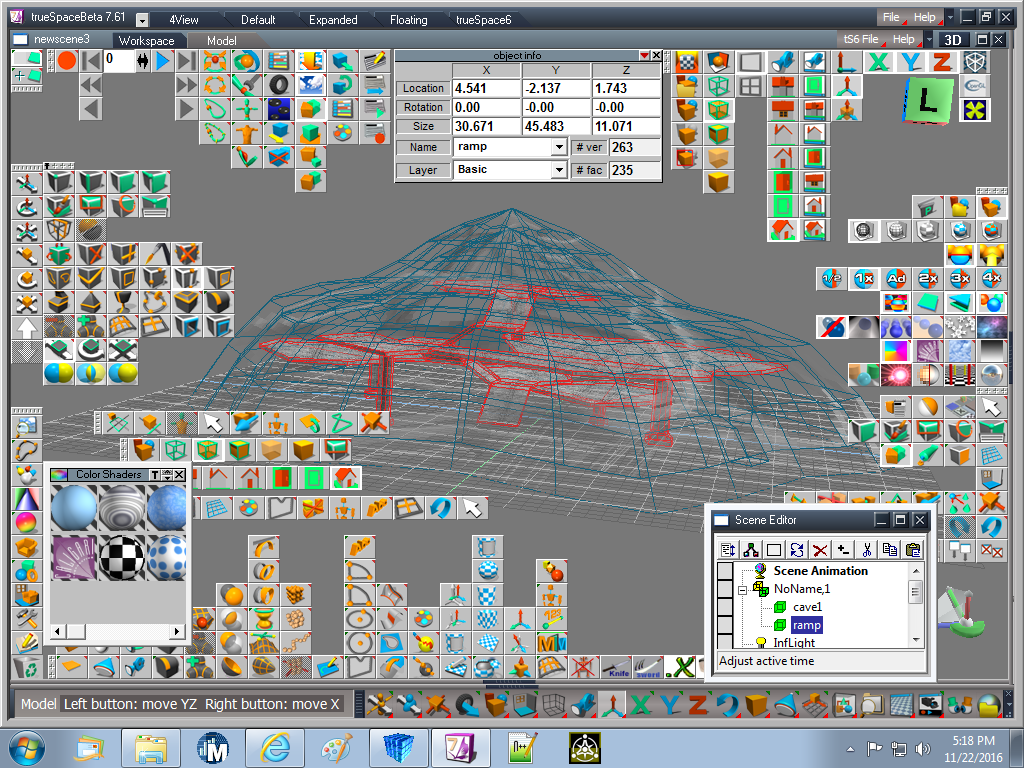
I closed TS and when I opened TS again everything was back to normal again. It must be an issue with TS as it does this on 2 different systems. I zipped the scene file if you want to view it. Leroy.
PS: I used a texture called cracked tile which has a good level of transparency for editing the models ramp object inside of the cave object.
PS: I used a texture called cracked tile which has a good level of transparency for editing the models ramp object inside of the cave object.
- Attachments
-
-
- newscene16.zip
- The ouside object is a shell based cave object and the inner object is a ramp based object.
- (14.35 KiB) Downloaded 281 times
Casual Truespace 3D modeling hobbyist. My Truespace blog and simple 3d Modeling Tutorials for Casual Model Makers.
-
BNG
- Chief Warrant Officer
- Posts: 684
- Joined: 16 Oct 2009, 03:26
- Type the number ten into the box: 0
- Location: Texas
Re: Transparent edit sort of working?
The issue seems to be related to the shell tool but is intermittent?
Casual Truespace 3D modeling hobbyist. My Truespace blog and simple 3d Modeling Tutorials for Casual Model Makers.
-
stan
- Master Chief Petty Officer
- Posts: 584
- Joined: 21 May 2009, 17:20
Re: Transparent edit sort of working?
It maybe your config file.. make a new config and see if it continues.
The scene you posted was not related to your issue, it was some other project ..
The scene you posted was not related to your issue, it was some other project ..
-
BNG
- Chief Warrant Officer
- Posts: 684
- Joined: 16 Oct 2009, 03:26
- Type the number ten into the box: 0
- Location: Texas
Re: Transparent edit sort of working?
How is a new config file done? I hate messing around with program files for obvious reaons. A I said the issue I on and off again.stan wrote:It maybe your config file.. make a new config and see if it continues.
The scene you posted was not related to your issue, it was some other project ..
Casual Truespace 3D modeling hobbyist. My Truespace blog and simple 3d Modeling Tutorials for Casual Model Makers.
-
stan
- Master Chief Petty Officer
- Posts: 584
- Joined: 21 May 2009, 17:20
Re: Transparent edit sort of working?
It's quite easy..go to the toolbar above the trash can. Open the hammer and wrench icon( configuration library). save the one you now have so you can retrieve it. Use the insert method to add it to the library. Start with the default config for a new one, just remember to never overwrite that one. Once created save it to the library.
Actually the default config is missing one of the glue tools so I put two configs with it here. config000 is the best .It was talked about here: vi ... g&start=10"
Actually the default config is missing one of the glue tools so I put two configs with it here. config000 is the best .It was talked about here: vi ... g&start=10"
- Attachments
-
- config.rar
- (95.24 KiB) Downloaded 292 times
-
BNG
- Chief Warrant Officer
- Posts: 684
- Joined: 16 Oct 2009, 03:26
- Type the number ten into the box: 0
- Location: Texas
Re: Transparent edit sort of working?
Thx Stan. Now I remember.
Casual Truespace 3D modeling hobbyist. My Truespace blog and simple 3d Modeling Tutorials for Casual Model Makers.