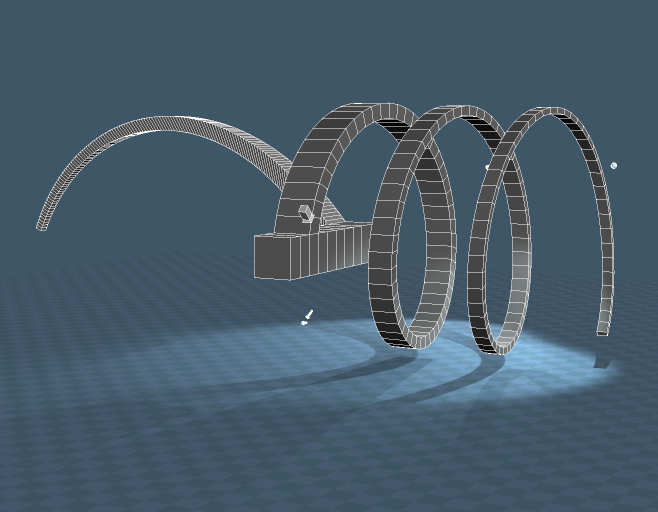
The static sweep plus script replaces my earlier static sweep and lathe scripts.
http://www.clintons3d.com/plugins/trues ... index.html"
One thing to watch out for is when using the mesh editor preserve unwrap the uv's can get too big when sweeping large segment counts. For smaller counts it can work out well though.
Static Sweep Plus script
-
clintonman
- Captain
- Posts: 5659
- Joined: 21 May 2009, 21:08
- Type the number ten into the box: 0
- Location: California
Static Sweep Plus script
-
v3rd3
- Lieutenant Commander
- Posts: 1191
- Joined: 21 May 2009, 20:04
Re: Static Sweep Plus script
Thank you sir! havapop 
-
Steinie
- Captain
- Posts: 2958
- Joined: 21 May 2009, 17:38
- Type the number ten into the box: 10
Re: Static Sweep Plus script
As always another great contribution. This new stuff keeps me very busy! 
-
trueBlue
- Captain
- Posts: 5548
- Joined: 06 Jul 2009, 22:50
- Type the number ten into the box: 10
Re: Static Sweep Plus script
Can you give an explanation of what each of the above options do and an example use?Boolean mode - disable or shell, 1 and 2 behavior is the same as disable
What is the purpose of 1 and 2 if they are the same as Disable?
Also, the steps to create a spiral lathe shown in your picture?
-
clintonman
- Captain
- Posts: 5659
- Joined: 21 May 2009, 21:08
- Type the number ten into the box: 0
- Location: California
Re: Static Sweep Plus script
No purpose. Those modes are the Boolean and Boolean on Release options of the dynamic sweep used when sweeping into an object to make holes. The static sweep only sweeps to the outside of the object, so those options don't do anything.trueBlue wrote: 26 May 2023, 13:38Can you give an explanation of what each of the above options do and an example use?Boolean mode - disable or shell, 1 and 2 behavior is the same as disable
What is the purpose of 1 and 2 if they are the same as Disable?
Also, the steps to create a spiral lathe shown in your picture?
Spiral:
1. set a pivot location away from the face to be swept
2. sweep with many segments
3. r drag rotation surface to rotate the soft selection around the pivot
4. move out perpendicular from the rotation to form a spiral
-
trueBlue
- Captain
- Posts: 5548
- Joined: 06 Jul 2009, 22:50
- Type the number ten into the box: 10
-
clintonman
- Captain
- Posts: 5659
- Joined: 21 May 2009, 21:08
- Type the number ten into the box: 0
- Location: California
Re: Static Sweep Plus script
128 segments takes a long time to runtrueBlue wrote: 30 May 2023, 21:28Test scene
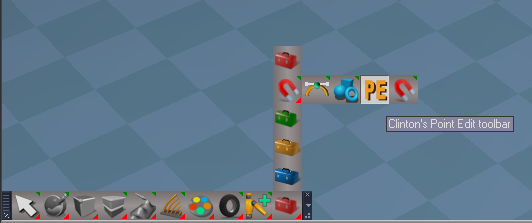
Question, where is the point edit toolbar?
-
trueBlue
- Captain
- Posts: 5548
- Joined: 06 Jul 2009, 22:50
- Type the number ten into the box: 10
Re: Static Sweep Plus script
Okay, this time I waited and it worked
Thanks!
Thanks!
-
clintonman
- Captain
- Posts: 5659
- Joined: 21 May 2009, 21:08
- Type the number ten into the box: 0
- Location: California
Re: Static Sweep Plus script
Thanks I see it now.trueBlue wrote: 30 May 2023, 23:06 Okay, this time I waited and it worked
Thanks!
CPE toolbar.png
I'm making a status feedback for the static sweep now...
-
clintonman
- Captain
- Posts: 5659
- Joined: 21 May 2009, 21:08
- Type the number ten into the box: 0
- Location: California
Re: Static Sweep Plus script
static sweep script with status line feedback
- Attachments
-
- staticSweepPlusScript.RsObj
- (35.43 KiB) Downloaded 87 times
-
trueBlue
- Captain
- Posts: 5548
- Joined: 06 Jul 2009, 22:50
- Type the number ten into the box: 10
Re: Static Sweep Plus script
Nice!
Grid Snapping works really well with your Static Sweep when doing small Sweeps