Apollo 11 Diorama
-
clintonman
- Captain
- Posts: 5659
- Joined: 21 May 2009, 21:08
- Type the number ten into the box: 0
- Location: California
Apollo 11 Diorama
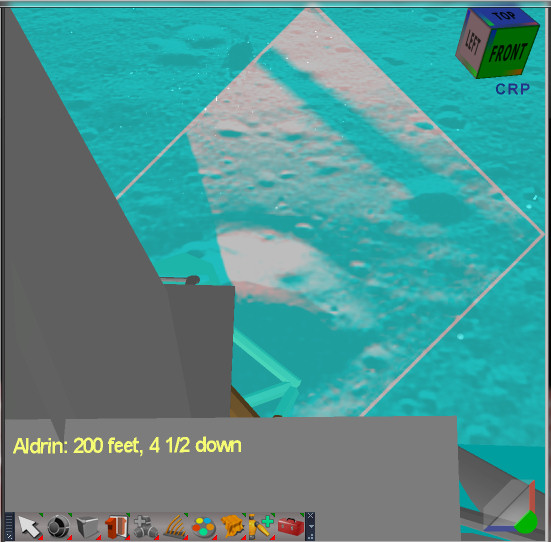
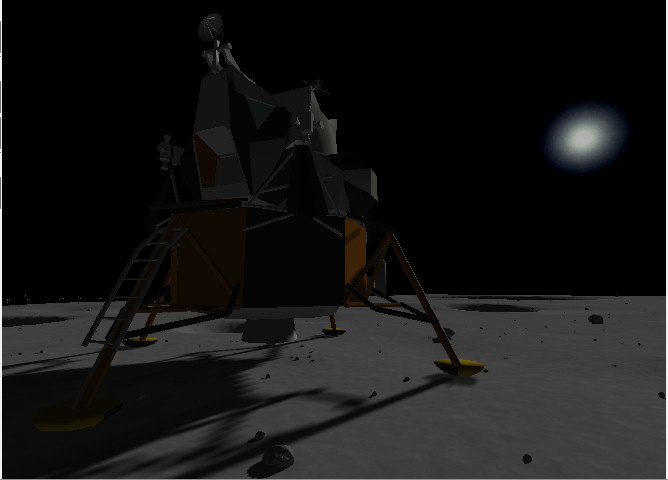
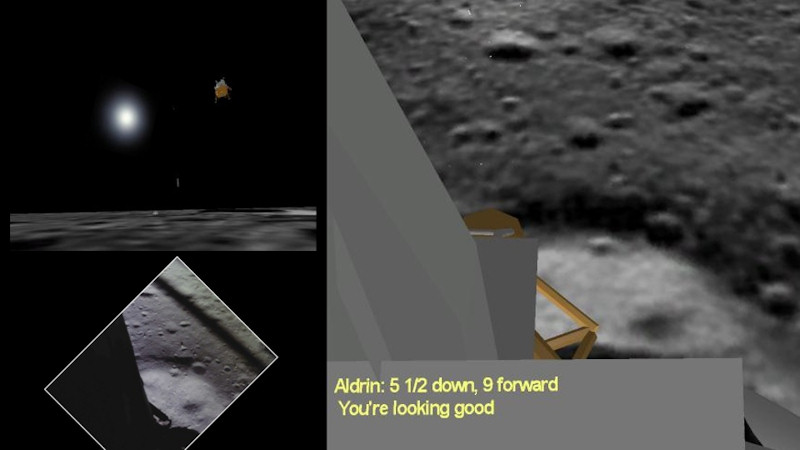
Image shows a frame from the animatic video. The ultimate goal is to recreate the landing on the moon and the EVA activities using the UDK game engine. I just produced the first animatic of the landing using trueSpace, some helper scripts and Sony Vegas. The video and writeup can be found on the WIP page of my website, there is also a youtube link if your browser can't use html5 video tags:
http://www.clintons3d.com/wip/index.html"
A Composite render node with transparency to see ground plane behind it.
The ground plane from the LRO image is red and the video frames of the landing are blue. The lander was animated by trying to match the 2 views through the camera. This was difficult because of the different times of day between the landing and the LRO image and it was just plain difficult to see the 2 images together. At this point the view from the ground should be pretty close to what would be seen.
I'll talk about and attach the scripts used in the next post.
http://www.clintons3d.com/wip/index.html"
A Composite render node with transparency to see ground plane behind it.
The ground plane from the LRO image is red and the video frames of the landing are blue. The lander was animated by trying to match the 2 views through the camera. This was difficult because of the different times of day between the landing and the LRO image and it was just plain difficult to see the 2 images together. At this point the view from the ground should be pretty close to what would be seen.
I'll talk about and attach the scripts used in the next post.
-
clintonman
- Captain
- Posts: 5659
- Joined: 21 May 2009, 21:08
- Type the number ten into the box: 0
- Location: California
Re: Apollo 11 Diorama
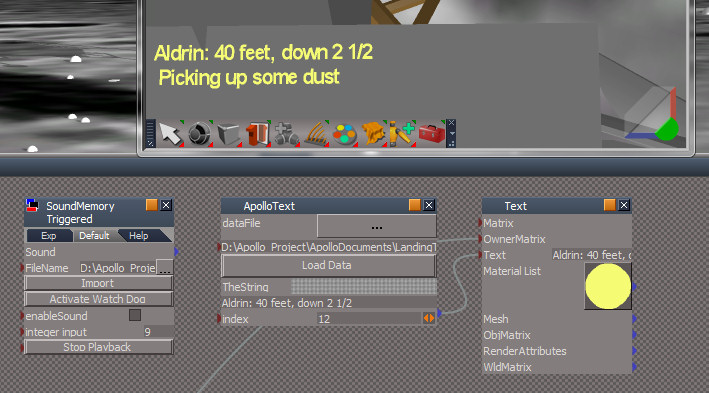
SoundMemory Triggered node has an integer input that is animated. It is a modified version of the Sound Memory included in the trueSpace library. When it changes the playback starts.
"..." to choose the wav file, Import to load it in, Activate Watch Dog and enablesound to wait for the integer input change that starts the playback. It uses a custom made watchdog because I couldn't get the built in one to respond properly.
ApolloText node loads text from a tab delimited file. The index determines which line of text will display and is connected to a tS text object. The text object is connected to the camera so it maintains it's position in the camera view. Keyframes for the index were set through trial and error while listening to the triggered sound from the SoundMemory node. I have an idea to write a plugin that would convert sound to animated color. That should make it easier to line up the text with the audio.
The scripts are attached here for code reference
The (fpn) camera keyframer was used to produce the animated camera view from the ground. It can be found in the Repository section of the forum.
"..." to choose the wav file, Import to load it in, Activate Watch Dog and enablesound to wait for the integer input change that starts the playback. It uses a custom made watchdog because I couldn't get the built in one to respond properly.
ApolloText node loads text from a tab delimited file. The index determines which line of text will display and is connected to a tS text object. The text object is connected to the camera so it maintains it's position in the camera view. Keyframes for the index were set through trial and error while listening to the triggered sound from the SoundMemory node. I have an idea to write a plugin that would convert sound to animated color. That should make it easier to line up the text with the audio.
The scripts are attached here for code reference
The (fpn) camera keyframer was used to produce the animated camera view from the ground. It can be found in the Repository section of the forum.
- Attachments
-
- SoundMemory Triggered.zip
- (42.93 KiB) Downloaded 277 times
-
- ApolloText.zip
- (10.86 KiB) Downloaded 268 times
-
Dragneye
- Lieutenant
- Posts: 906
- Joined: 02 Sep 2009, 22:09
Re: Apollo 11 Diorama
Soooo... you're gonna fake the Moon landing?
-
RAYMAN
- Captain
- Posts: 2547
- Joined: 21 May 2009, 18:56
Re: Apollo 11 Diorama
Moonspace rocks ! 
-
spacekdet
- Captain
- Posts: 1810
- Joined: 27 May 2009, 15:00
- Type the number ten into the box: 10
- Location: On the day shift at the Utility Muffin Research Kitchen
Re: Apollo 11 Diorama
This one sentence should increase the site visitor count astronomically!Dragneye wrote:Soooo... you're gonna fake the Moon landing?
(They'll all be idiots, but hey, a hit is a hit!)
Looking good so far, the flying dust is going to be fun to do.
-
clintonman
- Captain
- Posts: 5659
- Joined: 21 May 2009, 21:08
- Type the number ten into the box: 0
- Location: California
Re: Apollo 11 Diorama
Dragneye wrote:Soooo... you're gonna fake the Moon landing?
-
Dragneye
- Lieutenant
- Posts: 906
- Joined: 02 Sep 2009, 22:09
Re: Apollo 11 Diorama
-
clintonman
- Captain
- Posts: 5659
- Joined: 21 May 2009, 21:08
- Type the number ten into the box: 0
- Location: California
Re: Apollo 11 Diorama
Still going. Images show the original scene in tS and imported to the UDK Editor. The ball bounces between the two blocks. I worked out how to get a complete trueSpace scene into the Unreal game engine. The first part was modifying/fixing the FBX exporter so it would work consistently with the UDK importers by having special modes for staticmeshes and the Unreal Matinee FBX import. The second part was to export an Unreal T3D map file that references the meshes, camera's and lights. The T3D exporter and the old T3D importer were combined with the PSK/PSA import export into a single interface. The T3D is used to transfer the scene layout and fbx is used for the meshes and animations. I don't have a smooth workflow yet and the process is involved, but I'm able to transfer everything I need to continue.
-
clintonman
- Captain
- Posts: 5659
- Joined: 21 May 2009, 21:08
- Type the number ten into the box: 0
- Location: California
Re: Apollo 11 Diorama
Still working on it...
It's been a while since I updated the status of this project, so here goes.
I got the animatic landing imported into the game engine using fbx and special scripts to transfer the scene, mesh and animation. The rocks were modeled in Lightwave and a dust effect was created in truespace then recreated in the UDK editor. I started the menu system so now an introduction screen shows with a start button. When you press the start button a video of a zoom into the landing area plays then the actual game level starts. The WIP page is here:
http://www.clintons3d.com/wip/apollo.html"
There's still plenty to do for the landing sequence, but I think I'd like to start the animatic for astronaut activities. This was I can get a big picture of what will be needed to finish this up.
It's been a while since I updated the status of this project, so here goes.
I got the animatic landing imported into the game engine using fbx and special scripts to transfer the scene, mesh and animation. The rocks were modeled in Lightwave and a dust effect was created in truespace then recreated in the UDK editor. I started the menu system so now an introduction screen shows with a start button. When you press the start button a video of a zoom into the landing area plays then the actual game level starts. The WIP page is here:
http://www.clintons3d.com/wip/apollo.html"
There's still plenty to do for the landing sequence, but I think I'd like to start the animatic for astronaut activities. This was I can get a big picture of what will be needed to finish this up.
-
Dragneye
- Lieutenant
- Posts: 906
- Joined: 02 Sep 2009, 22:09
Re: Apollo 11 Diorama
Hey clintonman this is very nice.
-
clintonman
- Captain
- Posts: 5659
- Joined: 21 May 2009, 21:08
- Type the number ten into the box: 0
- Location: California
Re: Apollo 11 Diorama
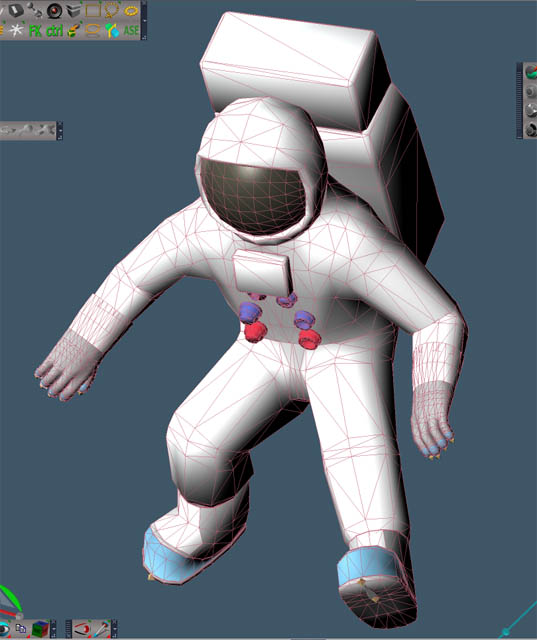
I did the first very rough animatic pass. The astronauts are synchronized as far as their activities, but the timing is really inconsistent. The guys are just floating around the area. I need to get the spacesuit shape down so I can add a skeleton and figure out some basic walk timing. I also had the idea of marking out the distances and simply timing myself walking it. The image shows what I have so far for the spacesuit. The red guy was the animatic version of the suit. The rest of my time on the project has been learning rigging and figuring out what works in trueSpace. I found out that I can avoid exploding skeleton by placing the ik handles directly on the joints and the ik stops on the bones. I was clicking on the bones to place the ik, but that was probably the number one cause of the explosions. It also makes the handles work better.
-
clintonman
- Captain
- Posts: 5659
- Joined: 21 May 2009, 21:08
- Type the number ten into the box: 0
- Location: California
Re: Apollo 11 Diorama
It's been a while.
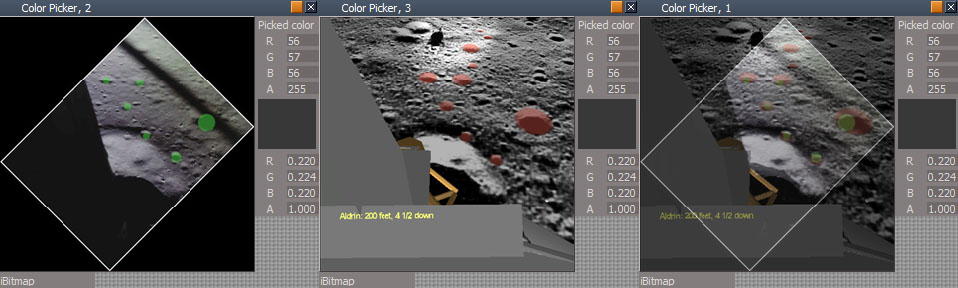
I reanimated the landing sequence using a new technique to combine the camera view of the ground and the video footage of the actual landing. It uses a new composite node that combines every other line of each image. It was much easier to match, but I still needed to stick some colored dots on the images to keep from confusing all the craters. I'm happy with the result so I'm calling that part done.
Refining the LEM model. It has more detail and placeholders for all the textures. After watching a special on TV I noticed that my main reference diagrams were inaccurate on several details like the tank sticking out the left side. The model has skeletons for the front hatch, the MESA to the left of the ladder and the barn doors in back. I wrote a script to copy uv values between identical meshes. The process will be to export a mesh to Blender, create the uv, import to trueSpace and transfer the new uv to the model.
I reanimated the landing sequence using a new technique to combine the camera view of the ground and the video footage of the actual landing. It uses a new composite node that combines every other line of each image. It was much easier to match, but I still needed to stick some colored dots on the images to keep from confusing all the craters. I'm happy with the result so I'm calling that part done.
Refining the LEM model. It has more detail and placeholders for all the textures. After watching a special on TV I noticed that my main reference diagrams were inaccurate on several details like the tank sticking out the left side. The model has skeletons for the front hatch, the MESA to the left of the ladder and the barn doors in back. I wrote a script to copy uv values between identical meshes. The process will be to export a mesh to Blender, create the uv, import to trueSpace and transfer the new uv to the model.
-
Finis
- Captain
- Posts: 5410
- Joined: 21 May 2009, 18:26
- Type the number ten into the box: 0
- Location: America!
Re: Apollo 11 Diorama
An interesting and ambitious project. When you are done you should make a extra rendering that looks like the tilt shift photography technique. That would give it a diorama look and be a technical challenge to devise a rendering method to do it.
I prefer dangerous freedom over peaceful servitude. -- Thomas Jefferson/Jean Jacques Rousseau
-
Draise
- Captain
- Posts: 3200
- Joined: 21 Sep 2009, 19:33
- Type the number ten into the box: 0
- Location: Bogota, Colombia
Re: Apollo 11 Diorama
To help with the diorama, use the depth shader and render another pass and use a compositor that can run the RGB depth values to drive a defocus value! Node! Thing! I like the new textures and HD model, nice.
-
clintonman
- Captain
- Posts: 5659
- Joined: 21 May 2009, 21:08
- Type the number ten into the box: 0
- Location: California
Re: Apollo 11 Diorama
Thanks for the feedback. I like that idea.
-
clintonman
- Captain
- Posts: 5659
- Joined: 21 May 2009, 21:08
- Type the number ten into the box: 0
- Location: California
Re: Apollo 11 Diorama
Just finished the animatic for the eva activities representing the first 20 minutes of the moon walk. The video is about 7 minutes long with the actual time frame being closer to 20 minutes.
-
Draise
- Captain
- Posts: 3200
- Joined: 21 Sep 2009, 19:33
- Type the number ten into the box: 0
- Location: Bogota, Colombia
Re: Apollo 11 Diorama
Nice! Actually I saw an Nvidia showcase with the unreal engine to prove realtime GI illumination in the engine with the exact apollo replicas. Your project reminds me of something very similar! Will be great to see it finally done - and.. I would love to see you document your process in Unreal, I really want to get into that engine, it looks great.
-
clintonman
- Captain
- Posts: 5659
- Joined: 21 May 2009, 21:08
- Type the number ten into the box: 0
- Location: California
Re: Apollo 11 Diorama
I think I got the skeleton the way I want it. Now to figure out the rigging.
-
Draise
- Captain
- Posts: 3200
- Joined: 21 Sep 2009, 19:33
- Type the number ten into the box: 0
- Location: Bogota, Colombia
Re: Apollo 11 Diorama
Looking good! Bare in mind that when you do the skinning, or enveloping, it helps to predefine the bones influence, and the joint - or when you weight paint - heal often.
-
clintonman
- Captain
- Posts: 5659
- Joined: 21 May 2009, 21:08
- Type the number ten into the box: 0
- Location: California
Re: Apollo 11 Diorama
Thanks for the tip, I'll keep it in mind.Draise wrote:Looking good! Bare in mind that when you do the skinning, or enveloping, it helps to predefine the bones influence, and the joint - or when you weight paint - heal often.
-
clintonman
- Captain
- Posts: 5659
- Joined: 21 May 2009, 21:08
- Type the number ten into the box: 0
- Location: California
Re: Apollo 11 Diorama
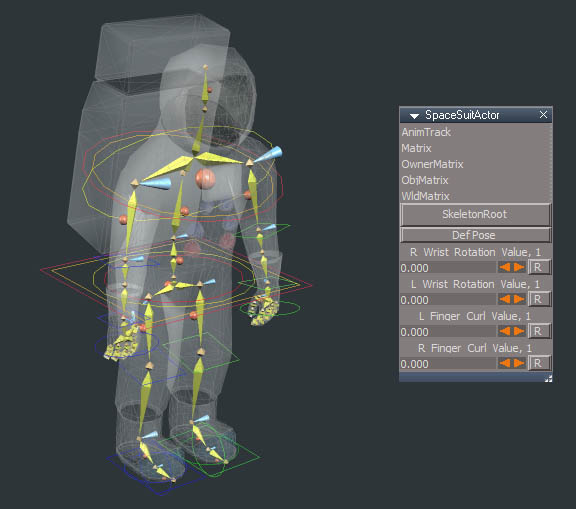
Named all the joints and oriented them with x axis aligned to the world as much as possible. X seems to be the dominant axis, so I think that's the way to go with the actor facing in the positive Y direction the joint angles are as close to zero as I can get them and still have Z going down the bone.
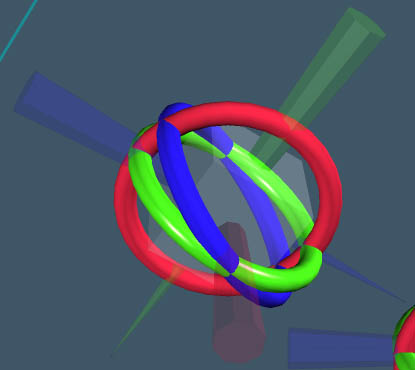
The rotation indicators are from a helper script I use to visualize the orientations.
The bones in the fingers are small compared to the joints, hopefully that won't be a problem when skinning.
Next I'll add the joint limits and finally some animation handles and locks.
The rotation indicators are from a helper script I use to visualize the orientations.
The bones in the fingers are small compared to the joints, hopefully that won't be a problem when skinning.
Next I'll add the joint limits and finally some animation handles and locks.
-
Draise
- Captain
- Posts: 3200
- Joined: 21 Sep 2009, 19:33
- Type the number ten into the box: 0
- Location: Bogota, Colombia
Re: Apollo 11 Diorama
Cool script! Is this one shared? I can't recall.
Ah, just a tip when skinning, try to freeze and flatten history of your skin before enveloping, it helps some exploding meshes later on in the animation game.
-
clintonman
- Captain
- Posts: 5659
- Joined: 21 May 2009, 21:08
- Type the number ten into the box: 0
- Location: California
Re: Apollo 11 Diorama
A closeup of the indicator. The cones show the orientation of the axes with each pointing in the positive XYZ direction. The rings were my attempt to try to understand rotation problems in truespace. In a way they kind of show gimbal lock and I think the rotation flipping thing can happen when the rings line up in the same direction.
Usage:
select the skeleton node and press "create fake skeleton" button
the size can be controlled with the radius and thickness
Usage:
select the skeleton node and press "create fake skeleton" button
the size can be controlled with the radius and thickness
- Attachments
-
- controlSkeletonScript.zip
- (60.64 KiB) Downloaded 281 times
-
clintonman
- Captain
- Posts: 5659
- Joined: 21 May 2009, 21:08
- Type the number ten into the box: 0
- Location: California
Re: Apollo 11 Diorama
Skinning is going well. Just need to refine it some more, do the fingers and it'll be good enough to start the animation controls.
-
clintonman
- Captain
- Posts: 5659
- Joined: 21 May 2009, 21:08
- Type the number ten into the box: 0
- Location: California
Re: Apollo 11 Diorama
Skinning is done. The heal tool helped.
It seems like some vertices wanted to be weighted to at least 2 adjacent bones. When removing all the influence of a bone the vertex sometimes moves in crazy directions, like it's influenced by some invisible bone. Running heal skin with normalize selected moves it back to a reasonable position and then adding a little weight from an adjacent bone seems to stabilize it so the bad influence can be removed without messing it up. I'll see if I can reproduce it on simpler geometry. Now it happens on the glove but the geometry becomes too messy to see what's going on.
-
Draise
- Captain
- Posts: 3200
- Joined: 21 Sep 2009, 19:33
- Type the number ten into the box: 0
- Location: Bogota, Colombia
Re: Apollo 11 Diorama
Good work!
Yeah, I think it would need two weight influences. In software like SI, you can't have a vertice with <100% weight. You need a 100% weight. So you either have one bone with 30% weight, and the other with 70% to evaluate the deformer correctly, or suffer errors. If you only have one vertice with influence of 1 bone with 30% weight, the averaging algorithm wouldn't calculate it right, and go all wonky. You'd have to have 100% weight on that vertice from that one bone.
Well that would be my logic to understanding that error.
Yeah, I think it would need two weight influences. In software like SI, you can't have a vertice with <100% weight. You need a 100% weight. So you either have one bone with 30% weight, and the other with 70% to evaluate the deformer correctly, or suffer errors. If you only have one vertice with influence of 1 bone with 30% weight, the averaging algorithm wouldn't calculate it right, and go all wonky. You'd have to have 100% weight on that vertice from that one bone.
Well that would be my logic to understanding that error.
-
clintonman
- Captain
- Posts: 5659
- Joined: 21 May 2009, 21:08
- Type the number ten into the box: 0
- Location: California
Re: Apollo 11 Diorama
Yep. I did a test and found that if the weight is less than 100% the vertex might move to it's original mesh position.
This is my workflow for removing the influence on a stubborn set of vertices.
Weight paint appearance option I set skin opacity to 1.0 to make it easier to see the low weight values. I also set point size to large value and point opacity to 1
Heal options are set to normalize skin, prune small weights and remove negative values
To remove a bad influence use set mode with a value 0f -1.0 and flow set to 100. Then run the heal tool. If the vertex ends up with no weight then use the grow mode to give it some value. Grow prevents any nearby vertices from being affected. Finally run the heal tool again.
This is my workflow for removing the influence on a stubborn set of vertices.
Weight paint appearance option I set skin opacity to 1.0 to make it easier to see the low weight values. I also set point size to large value and point opacity to 1
Heal options are set to normalize skin, prune small weights and remove negative values
To remove a bad influence use set mode with a value 0f -1.0 and flow set to 100. Then run the heal tool. If the vertex ends up with no weight then use the grow mode to give it some value. Grow prevents any nearby vertices from being affected. Finally run the heal tool again.
-
clintonman
- Captain
- Posts: 5659
- Joined: 21 May 2009, 21:08
- Type the number ten into the box: 0
- Location: California
Re: Apollo 11 Diorama
truespace rigging done. Next will be the basic animation. I didn't get all the control I would want for the final animation so I think the plan will be to start the animation in truespace and finish it in lightwave.
-
clintonman
- Captain
- Posts: 5659
- Joined: 21 May 2009, 21:08
- Type the number ten into the box: 0
- Location: California
Re: Apollo 11 Diorama
rigging done (for real this time).
I added bones to the forearms to help with wrist rotation and changed some of the controls. Removed some and added some new ones. The whole rig is more stable and added FK controls for finger curl and wrist rotation. Actually, now that I look at it again the circle controls at the hands aren't needed any more. They've been replaced with the wrist rotation controls.
So...
Rigging will be done after I remove the handles at the hands.
The left side controls are blue, right is green, circles are for rotation and rectangles are for position. Down the center red is for complex/less stable controls, orange is more stable and yellow is most stable controls.
Full ik stops are bad so I don't use them. A position and rotation lock work together for the same result. A couple of things I learned is that full locking effect is better when the bone has a rotation lock combined with position locks at each end. The other major thing I learned is that the joint limits tool can mess up the orientation of the joints, so I used the text fields to adjust them instead of the tool's handles. Also setting joint limits makes the ik more stable.
EDIT:
The posing works great, but the thing will not animate properly. Some bones are actually stretching. All in all a bad situation.
Time to choose another program for the character animation. As they say I "gave it the old college try".
EDIT #2:
Forgot to mention the reason for the failure. Looks like tS doesn't like several IK handles assigned to the same bone. You can pose it, but then during animation they fight with each other resulting in odd rotations and stretching effects.
I added bones to the forearms to help with wrist rotation and changed some of the controls. Removed some and added some new ones. The whole rig is more stable and added FK controls for finger curl and wrist rotation. Actually, now that I look at it again the circle controls at the hands aren't needed any more. They've been replaced with the wrist rotation controls.
Rigging will be done after I remove the handles at the hands.
The left side controls are blue, right is green, circles are for rotation and rectangles are for position. Down the center red is for complex/less stable controls, orange is more stable and yellow is most stable controls.
Full ik stops are bad so I don't use them. A position and rotation lock work together for the same result. A couple of things I learned is that full locking effect is better when the bone has a rotation lock combined with position locks at each end. The other major thing I learned is that the joint limits tool can mess up the orientation of the joints, so I used the text fields to adjust them instead of the tool's handles. Also setting joint limits makes the ik more stable.
EDIT:
The posing works great, but the thing will not animate properly. Some bones are actually stretching. All in all a bad situation.
Time to choose another program for the character animation. As they say I "gave it the old college try".
EDIT #2:
Forgot to mention the reason for the failure. Looks like tS doesn't like several IK handles assigned to the same bone. You can pose it, but then during animation they fight with each other resulting in odd rotations and stretching effects.
-
Draise
- Captain
- Posts: 3200
- Joined: 21 Sep 2009, 19:33
- Type the number ten into the box: 0
- Location: Bogota, Colombia
Re: Apollo 11 Diorama
Looking great! Great discoveries, and very nice rig. Can't wait to have you try animate it.... I've only done some rough character animation in TS, but it has been fine.
Yeah, I found the Full Constraints are just troublesome, they even explode! So yeah, I too try put position on joint and rotation on bones like you did.
Concerning the stretching bones, depends on the type of IK control you have, is it hard/soft, IK or FK, and also, is it an animatable one, or not? It is best not to animate the IK handles and just keyframe the joint values of the rig.
Another trick is.. best to put handles on joints, not bones. Bones have a variable center pivot point, so pulling on them will average it's matrix between the joints, but joints are relative to bone position and size.. I'd assume. So better to pull and rotate from joints and let the rest compute nicely without having to re-average pivot points of bones as you pull them.
Curious about the rotation limits. Didn't know. I guess I liked the widget and the ease it is to use them, and yes, you can change the default orientation quite easily - by limiting to a point, pushing the limit, then opening it up again, leaving it where you pushed the origin point as it's new default, etc.
But great stuff.... to be honest I'd love to see you animate your guy. Animation in TS doesn't give you as much control as say Maya or Softimage or Blender, but I can see it being adequate.
Yeah, I found the Full Constraints are just troublesome, they even explode! So yeah, I too try put position on joint and rotation on bones like you did.
Concerning the stretching bones, depends on the type of IK control you have, is it hard/soft, IK or FK, and also, is it an animatable one, or not? It is best not to animate the IK handles and just keyframe the joint values of the rig.
Another trick is.. best to put handles on joints, not bones. Bones have a variable center pivot point, so pulling on them will average it's matrix between the joints, but joints are relative to bone position and size.. I'd assume. So better to pull and rotate from joints and let the rest compute nicely without having to re-average pivot points of bones as you pull them.
Curious about the rotation limits. Didn't know. I guess I liked the widget and the ease it is to use them, and yes, you can change the default orientation quite easily - by limiting to a point, pushing the limit, then opening it up again, leaving it where you pushed the origin point as it's new default, etc.
But great stuff.... to be honest I'd love to see you animate your guy. Animation in TS doesn't give you as much control as say Maya or Softimage or Blender, but I can see it being adequate.
-
clintonman
- Captain
- Posts: 5659
- Joined: 21 May 2009, 21:08
- Type the number ten into the box: 0
- Location: California
Re: Apollo 11 Diorama
How do you keyframe only the joints and wouldn't that bypass the IK system and mess up the animation with sliding problems?
Yep, I also click to put the handles on the joints, but discovered that TS actually places the handles on the bone. You can see the connection in the link editor.
I just did some tests and I was able to transfer the scene to Lightwave. That's where I'll do the character animation. All the non-skeleton animation and non-character skeleton animation will be done in Truespace.
I'll make a video to show the kind of control I was hoping for in truespace.
I also just made another discovery. If you change the name of a joint after it's been animated, the animation is lost. The fix is to rename it back and set a keyframe. Ran into this one because joint names have to match in truespace, lightwave and unreal engine. Spaces in names are not handled the same way by all three so I was trying to remove the space. Might be able to rename and fix by copy and paste keys.
Yep, I also click to put the handles on the joints, but discovered that TS actually places the handles on the bone. You can see the connection in the link editor.
I just did some tests and I was able to transfer the scene to Lightwave. That's where I'll do the character animation. All the non-skeleton animation and non-character skeleton animation will be done in Truespace.
I'll make a video to show the kind of control I was hoping for in truespace.
I also just made another discovery. If you change the name of a joint after it's been animated, the animation is lost. The fix is to rename it back and set a keyframe. Ran into this one because joint names have to match in truespace, lightwave and unreal engine. Spaces in names are not handled the same way by all three so I was trying to remove the space. Might be able to rename and fix by copy and paste keys.
-
Draise
- Captain
- Posts: 3200
- Joined: 21 Sep 2009, 19:33
- Type the number ten into the box: 0
- Location: Bogota, Colombia
Re: Apollo 11 Diorama

Sorry, I mean, turn off all IK attributes, etc etc. I tried out two IK handles on one joint. It's best to have everything off, and make sure the Hard Handle is off also - important. This will avoid future conflicts over IK handles on the joints... Also keeping it IK over FK is a good idea.
And yeah, you are right, the handle is parented by a bone. Hmm.
Concerning animating or not animating the children, scratch that, I wasn't clear on what I was saying.
Concerning the anim clips, yeah, they are relative to the naming system set. Best to do animation AFTER you do the rig and naming.
You can copy and paste keyframes from one clip to another though, I think.
-
clintonman
- Captain
- Posts: 5659
- Joined: 21 May 2009, 21:08
- Type the number ten into the box: 0
- Location: California
Re: Apollo 11 Diorama
Sweet! Found a way around the problem. This version of the skeleton will animate without crumpling up and going crazy.
I got rid of some controls that were just FK controls. Added joints to the spine so that the controls didn't share any joints/bones and moved the heel lift from the ball to the heel. The new joints limits were all set to 0 so they don't add to the IK solution. The foot joint still has 2 controls but it seems to be ok.
I'll show both versions when I get around to making the demo video.
Edit:
One more thing. The lower rotation control on the hips was placed by clicking the joint at the top of the leg and then moving it over to the center line. This works because the handle is really attached to the parent bone not the select joint. There is only one control on the "double" root bone because that bone is the parent of both joints attached to it. One bone, one control.
I got rid of some controls that were just FK controls. Added joints to the spine so that the controls didn't share any joints/bones and moved the heel lift from the ball to the heel. The new joints limits were all set to 0 so they don't add to the IK solution. The foot joint still has 2 controls but it seems to be ok.
I'll show both versions when I get around to making the demo video.
Edit:
One more thing. The lower rotation control on the hips was placed by clicking the joint at the top of the leg and then moving it over to the center line. This works because the handle is really attached to the parent bone not the select joint. There is only one control on the "double" root bone because that bone is the parent of both joints attached to it. One bone, one control.
-
clintonman
- Captain
- Posts: 5659
- Joined: 21 May 2009, 21:08
- Type the number ten into the box: 0
- Location: California
Re: Apollo 11 Diorama
Shows some of the experimental scripts that were written for the rig. The jiggle handles script goes through each IK handle and "touches" it. It moves it with zero distance, but the skeleton still moves. This is used to relax the skeleton into a more stable configuration before keyframing. The bake character script will bake the animation keyframes. While baking it is also an automatic footprint follower. It behaves like the ik footprint script but it's action is keyable.
During testing I timed it to match a real walk on earth, myself in video form, and found that the ik system is more stable when the keys are spread out more. In a lot of my tests the keyframes were close together, increasing the instability of the ik motion. It was times at 18 frames for a step at 30fps. The moon footage shows it to be closer to 30 frames in the low gravity, so that should be even better.
Walk test
Rig overview
During testing I timed it to match a real walk on earth, myself in video form, and found that the ik system is more stable when the keys are spread out more. In a lot of my tests the keyframes were close together, increasing the instability of the ik motion. It was times at 18 frames for a step at 30fps. The moon footage shows it to be closer to 30 frames in the low gravity, so that should be even better.
Walk test
Rig overview
-
Draise
- Captain
- Posts: 3200
- Joined: 21 Sep 2009, 19:33
- Type the number ten into the box: 0
- Location: Bogota, Colombia
Re: Apollo 11 Diorama
Wow, great advice! The double position locks with a rotation lock in between is a great tip. I really should learn how to use your FK control makers, and the foot control system. The IK jitter system seems nice. Maybe you can also make it keyframe the keyset right after a jitter (advanced/safe keyframe!) in one button?
I found a cool way of using RGB color picker RGB gradients to drive shapes/values, maybe they also could drive your FK controls. I found them hard to keyframe (as the keysets are the RGB slots) though, I still am perfecting those drivers system trying to see if I can keyframe using Matrix values only, and considering using child objects as drivers - but not sure how to create movement limits or "reset matrix" scripts.
Another tip, using your Play Audio script you once helped make - and the Cacophony TSX addon to view waveforms, you can create better animation with a visual presentation of the audio files - and even watch playback with the sound - the only think missing being audio scrubbing.
RGB picker controls for X and Y shape drivers (R + G = +Y +X and +Y -X; B-G and B-R = -Y +X and -Y -X)

Here is Cacophony TSX used in a scene for Audio based animation. Papagayo is also handy to help out Lipsyncing animation.

I found a cool way of using RGB color picker RGB gradients to drive shapes/values, maybe they also could drive your FK controls. I found them hard to keyframe (as the keysets are the RGB slots) though, I still am perfecting those drivers system trying to see if I can keyframe using Matrix values only, and considering using child objects as drivers - but not sure how to create movement limits or "reset matrix" scripts.
Another tip, using your Play Audio script you once helped make - and the Cacophony TSX addon to view waveforms, you can create better animation with a visual presentation of the audio files - and even watch playback with the sound - the only think missing being audio scrubbing.
RGB picker controls for X and Y shape drivers (R + G = +Y +X and +Y -X; B-G and B-R = -Y +X and -Y -X)

Here is Cacophony TSX used in a scene for Audio based animation. Papagayo is also handy to help out Lipsyncing animation.

-
Draise
- Captain
- Posts: 3200
- Joined: 21 Sep 2009, 19:33
- Type the number ten into the box: 0
- Location: Bogota, Colombia
Re: Apollo 11 Diorama
Hey there Clinton! I've been playing with your Bake Keyframe script, but I'd like it to only bake, and have a possibility to cancel the bake (instead of baking the whole timeline you set). How goes that script?
-
clintonman
- Captain
- Posts: 5659
- Joined: 21 May 2009, 21:08
- Type the number ten into the box: 0
- Location: California
Re: Apollo 11 Diorama
You'll have to refresh my memory. I've been out of it and just started getting reorganized this last weekend. Are you talking about the bake keframe script that's included with the (Un)Official Update 3 or the experimental one mentioned here. Or maybe you're talking about both?Draise wrote:Hey there Clinton! I've been playing with your Bake Keyframe script, but I'd like it to only bake, and have a possibility to cancel the bake (instead of baking the whole timeline you set). How goes that script?
I've started to review scripts and stuff I was working on in December. I have switched the project to use the Unreal Engine 4 instead of the older UDK. The script changes are working and I updated my notes so I have a blueprint to follow when preparing and transferring a scene from TS to UE4. The only thing I haven't tested is animation from TS applied to the characters included in the game engine and I don't need that to work with the Apollo assets. UE4 isn't as picky as UDK so the process is easier now.
Next up is to start animating the astronaut and seeing where the rig and custom scripts don't work well, then fix the scripts, refine my techniques and document the process.
-
Draise
- Captain
- Posts: 3200
- Joined: 21 Sep 2009, 19:33
- Type the number ten into the box: 0
- Location: Bogota, Colombia
Re: Apollo 11 Diorama
Hmm.. I'm talking about the one on your website (has an Icecream Cookie as the icon). Maybe this is an old version? Which one is in the update? And how do you access it?
Glad to hear you are getting sorted.
I really want to get into UE4 eventually. I hear it's.. VERY GOOD.
Glad to hear you are getting sorted.
I really want to get into UE4 eventually. I hear it's.. VERY GOOD.
-
clintonman
- Captain
- Posts: 5659
- Joined: 21 May 2009, 21:08
- Type the number ten into the box: 0
- Location: California
Re: Apollo 11 Diorama
The "Icecream Cookie" was supposed to be a cake.Draise wrote:Hmm.. I'm talking about the one on your website (has an Icecream Cookie as the icon). Maybe this is an old version? Which one is in the update? And how do you access it?
Glad to hear you are getting sorted.
I really want to get into UE4 eventually. I hear it's.. VERY GOOD.
The version included in update 3 is the newest, but I think the only difference is that it's found in the Anim Prefs dialog instead of having it's own button. Open the settings tab on the right side and open an animation view to see it. I'll look at it when I review the "bake footprints" script. You say ,"... but I'd like it to only bake...". Does the script do something besides baking keyframes?
-
Draise
- Captain
- Posts: 3200
- Joined: 21 Sep 2009, 19:33
- Type the number ten into the box: 0
- Location: Bogota, Colombia
Re: Apollo 11 Diorama
I guess I was talking about a Bake for a period of time, say.. a frame range X frame to X frame, or till I "cancel" from a starting point of choice - not just the timeline limit (start animation to end animation).You say ,"... but I'd like it to only bake...". Does the script do something besides baking keyframes?
I will try look at your Update 3 one again.
-
clintonman
- Captain
- Posts: 5659
- Joined: 21 May 2009, 21:08
- Type the number ten into the box: 0
- Location: California
Re: Apollo 11 Diorama
Here is an update for the bake keyframes script. There is no installer yet. Replace the node "Widgets/Tools/Bake Keyframes"
To cancel press "esc".
Check box for using the timeline range.
Entry for start and end frame when box is not checked.
Also there was a typo that prevented the bake button from working.
If you don't have the unoffical update 3 I think it can replace the old button version script in "Scripts/CustomScripts/...
To cancel press "esc".
Check box for using the timeline range.
Entry for start and end frame when box is not checked.
Also there was a typo that prevented the bake button from working.
If you don't have the unoffical update 3 I think it can replace the old button version script in "Scripts/CustomScripts/...
- Attachments
-
- Bake Keyframes.zip
- (41.03 KiB) Downloaded 220 times
-
clintonman
- Captain
- Posts: 5659
- Joined: 21 May 2009, 21:08
- Type the number ten into the box: 0
- Location: California
Re: Apollo 11 Diorama
Still chugging along. Fixed a couple of problems with the Unreal T3D exporter and worked out a system for coordinating the T3D and the FBX exported files. I just updated the Unreal exporter to include a batch export process that ties into the FBX exporter. This will make it easier to manage the whole process. Also did a test with Lightwave/Truespace/UE4 to see if I can use Lightwave for the animations. Now if needed I can transfer the entire scene to Lightwave and do the animations there.
The animation is all blocked in. The hatch opens, the astronaut comes down the ladder, opens the equipment bay(MESA) and goes through the basic motions of taking pictures and collecting the first sample. After that it skips to the end for the takeoff. The astronaut moves as a single piece without any animation on the hands and feet.
Next up is try to do some actual character animation.
The animation is all blocked in. The hatch opens, the astronaut comes down the ladder, opens the equipment bay(MESA) and goes through the basic motions of taking pictures and collecting the first sample. After that it skips to the end for the takeoff. The astronaut moves as a single piece without any animation on the hands and feet.
Next up is try to do some actual character animation.
-
Draise
- Captain
- Posts: 3200
- Joined: 21 Sep 2009, 19:33
- Type the number ten into the box: 0
- Location: Bogota, Colombia
Re: Apollo 11 Diorama
Right now I'm animating in trueSpace, and I'd REALLY love that jiggle script or a button that does exactly what I need! Can I use it? Pwetty pwease?clintonman wrote: Shows some of the experimental scripts that were written for the rig. The jiggle handles script goes through each IK handle and "touches" it. It moves it with zero distance, but the skeleton still moves. This is used to relax the skeleton into a more stable configuration before keyframing. The bake character script will bake the animation keyframes. While baking it is also an automatic footprint follower. It behaves like the ik footprint script but it's action is keyable.
During testing I timed it to match a real walk on earth, myself in video form, and found that the ik system is more stable when the keys are spread out more. In a lot of my tests the keyframes were close together, increasing the instability of the ik motion. It was times at 18 frames for a step at 30fps. The moon footage shows it to be closer to 30 frames in the low gravity, so that should be even better.
Walk test
Rig overview
-
clintonman
- Captain
- Posts: 5659
- Joined: 21 May 2009, 21:08
- Type the number ten into the box: 0
- Location: California
Re: Apollo 11 Diorama
Enjoy
Note that it doesn't work with limbs, so you will have to unencapsulate them before using it.
- Attachments
-
- Jiggle Handles Script.zip
- (16.72 KiB) Downloaded 219 times
-
Draise
- Captain
- Posts: 3200
- Joined: 21 Sep 2009, 19:33
- Type the number ten into the box: 0
- Location: Bogota, Colombia
Re: Apollo 11 Diorama
Thank you thank you thank you thank you thank you!!!!!
-
clintonman
- Captain
- Posts: 5659
- Joined: 21 May 2009, 21:08
- Type the number ten into the box: 0
- Location: California
Re: Apollo 11 Diorama
You're welcome.Draise wrote:Thank you thank you thank you thank you thank you!!!!!
I need a better way to animate the astronauts. Doing it purely by hand will take forever. So I borrowed a friends Kinect and teamed it up with Brekel software http://brekel.com/kinect-3d-scanner/" to try some motion capture. It has a limited capture area. I can stand from 70 to 160 inches from the sensor which is barely enough room to take 3 or 4 steps. You can't cross your limbs or it looses track. meaning you have to remain facing the camera to get a good capture. I won't be posting any pictures of my capture session since I was wearing very little clothing.
The next test will be simple rotoscoping (rotomation, matchamation?) a video of myself going through the motions. I have highest hopes for this technique.
Brekel tips:
wear skin tight clothing, don't touch your head, don't bring your hands together, face the camera, don't cross your legs
write positions bvh option works with truespace and blender but not lightwave. not sure if option is better or not.
NITE skeleton smoothing: 0=more responsive and noisy motion, 1=less responsive and less noise and harder to initialize
-
Draise
- Captain
- Posts: 3200
- Joined: 21 Sep 2009, 19:33
- Type the number ten into the box: 0
- Location: Bogota, Colombia
Re: Apollo 11 Diorama
Wow! Motion capture!!!
I always was curious to know how people do it.
The "don't do this" "don't do that" sounds very prude of the sensor I must admit.
I always was curious to know how people do it.
The "don't do this" "don't do that" sounds very prude of the sensor I must admit.