Script or method to Autokeyframe/Autorecord
-
Draise

- Captain
- Posts: 3200
- Joined: 21 Sep 2009, 19:33
- Type the number ten into the box: 0
- Location: Bogota, Colombia
Script or method to Autokeyframe/Autorecord
Does anyone have a method/script to auto keyframe/record keys in WS of trueSpace?
-
trueBlue

- Captain
- Posts: 5548
- Joined: 06 Jul 2009, 22:50
- Type the number ten into the box: 10
Re: Script or method to Autokeyframe/Autorecord
Yes, here is one that uses FPN as a camera:
viewtopic.php?p=13972#p13972"
viewtopic.php?p=13972#p13972"
-
Draise
- Captain
- Posts: 3200
- Joined: 21 Sep 2009, 19:33
- Type the number ten into the box: 0
- Location: Bogota, Colombia
Re: Script or method to Autokeyframe/Autorecord
Sorry to bring this back up, but I still haven't found something that will auto keyframe anything on the timeline, other than the FPN camera.
It would be awesome that everytime I move the timeline, it would create a keyframe of the selected key attributes, without having to kit "record keyframe".
What is the keyframe bit of code? And how can I get another bit of code to read the timeline frame, do an "if changed" action to then activate the "record keyframe" action?
It would be awesome that everytime I move the timeline, it would create a keyframe of the selected key attributes, without having to kit "record keyframe".
What is the keyframe bit of code? And how can I get another bit of code to read the timeline frame, do an "if changed" action to then activate the "record keyframe" action?
-
trueBlue
- Captain
- Posts: 5548
- Joined: 06 Jul 2009, 22:50
- Type the number ten into the box: 10
Re: Script or method to Autokeyframe/Autorecord
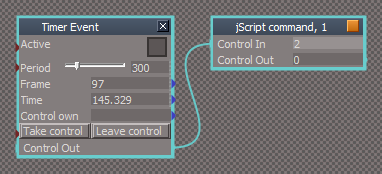
Here you go. I took out the Camera and commands that activated FPN. I recomend you set your Animation - Play Range "End" to a very larger number. IE 3000 or more as it will not record beyond that value. Timer set at 300 and a Mutiplier of 5 seems the best for me.
After reading your post again, you could do this too.
Hook a Timer to a script with this command:
RsAnim.SetKeyFrame("", RsTime.CurrentTime())
Hook a Timer to a script with this command:
RsAnim.SetKeyFrame("", RsTime.CurrentTime())
- Attachments
-
- Capture.PNG (10.06 KiB) Viewed 4860 times
-
Draise
- Captain
- Posts: 3200
- Joined: 21 Sep 2009, 19:33
- Type the number ten into the box: 0
- Location: Bogota, Colombia
Re: Script or method to Autokeyframe/Autorecord
Thanks trueBlue! It's nearrrrrly the weekend so I can experiment with it!
So the current script has an auto keyframe for every keyframe? Dammit, I'm too curious, I'm gonna experiment with it now.
Thanks. Where do you learn or find all these commands?
So the current script has an auto keyframe for every keyframe? Dammit, I'm too curious, I'm gonna experiment with it now.
Thanks. Where do you learn or find all these commands?
-
trueBlue
- Captain
- Posts: 5548
- Joined: 06 Jul 2009, 22:50
- Type the number ten into the box: 10
Re: Script or method to Autokeyframe/Autorecord
Here:
 LE.OpenLocation("/Toolbar Prototypes Encapsulator")
LE.OpenLocation("/Toolbar Prototypes Encapsulator")-
Draise
- Captain
- Posts: 3200
- Joined: 21 Sep 2009, 19:33
- Type the number ten into the box: 0
- Location: Bogota, Colombia
Re: Script or method to Autokeyframe/Autorecord
Thanks trueblue!
I'll be trying it out today, now that I have some time to myself!
You must think I'm dumb or something, but learning how to find these commands and script them is theoretically easy, but.. ehm....... not.. for me.
I'll be trying it out today, now that I have some time to myself!
You must think I'm dumb or something, but learning how to find these commands and script them is theoretically easy, but.. ehm.......
not.. for me. -
trueBlue
- Captain
- Posts: 5548
- Joined: 06 Jul 2009, 22:50
- Type the number ten into the box: 10
Re: Script or method to Autokeyframe/Autorecord
I do not think your are dumb at all, but I do think you really cleaver. I've followed your progress with tS7 and I am impressed with what you have acomplished and your art. My last statement is true. Anytime I need to find a command, I look in the toolbars.
-
stan
- Master Chief Petty Officer
- Posts: 584
- Joined: 21 May 2009, 17:20
Re: Script or method to Autokeyframe/Autorecord
is the ts 7.6sdk class list not posted anywhere? That is where most commands and data classes are with examples by Norm. Some classes not listed as it was not finished. run RsApp.Help(); to generate the command and node xmls in the ts folder if you what to use the runcmd versions.