Attachments for WIP posts

User avatar
carlpatti
Chief Petty Officer
Posts: 130
Joined: 01 Aug 2009, 21:10

Attachments for WIP posts

Post by carlpatti »

Good Morning! :bananahi: (or afternoon or evening - depends where you are in the world, doesn't it? ;) )

I am getting ready to enter the Futuristic Bicycle Race contest. I need to start a WIP post. I am going to need LOTS of help.

My first problem: I am not sure about how to post the jpegs of my model. Other forum members post a small jpeg that links to a larger jpeg on another page. Do I save 2 versions of each picture of my model - one small one and a larger one that it links to? How does the link get created? I looked at the forum FAQ for answers but found none.

I have no clue... as usual. But I am learning! :bananatyping:

Thanks in advance for the help,
patti :D
User avatar
LeonRegis
Captain
Posts: 1946
Joined: 18 Aug 2009, 17:36
Type the number ten into the box: 0
Location: Brazil/Earth/Orion Arm/Milky Way/4th Dimension/This Universe/Multiverse???/Singularity???

Re: Attachments for WIP posts

Post by LeonRegis »

The reason of the 2 versions is that the maximum size of image that people can post here is 1024x768 and it isn't the best quality, so in some work that have many small details they put an link to the full quality image (In some image hosting like image shack), myself never used it since I think that the 1024x768 do their job.

HTH
Be the change you want to see in the world. - Mohandas Gandhi
User avatar
spacekdet
Captain
Posts: 1810
Joined: 27 May 2009, 15:00
Type the number ten into the box: 10
Location: On the day shift at the Utility Muffin Research Kitchen

Re: Attachments for WIP posts

Post by spacekdet »

Nope, no need to make two versions, it's automagic.

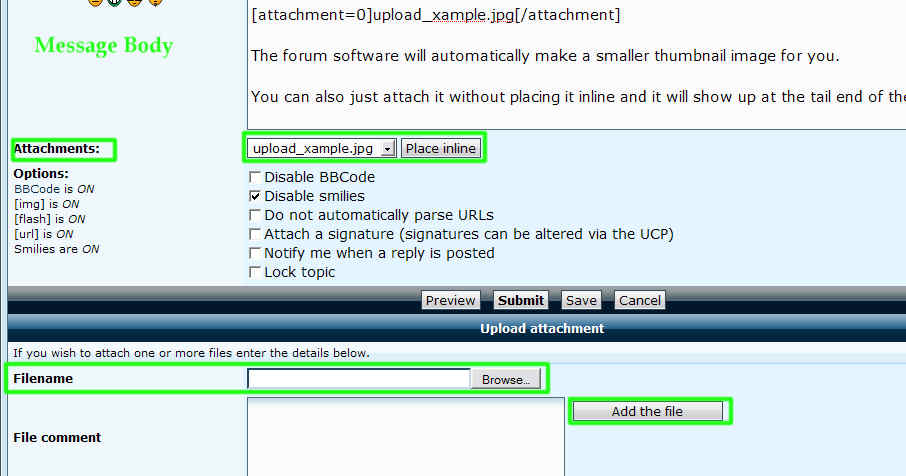
To attach an image to a post, look below for the 'upload attachment' section.
Next to 'Filename', click the browse button.
Locate and select the image file.
Click 'Add the file'
A progress window will pop up as it uploads.

After it's uploaded you'll note an additional box just below this one with a drop down list of all attached images and a 'Place Inline' box.

Select the desired image with the dropdown, click here in the message body text box where you want the image to show up, and then click the 'Place inline' box.
upload_example.jpg
The forum software will automatically make a smaller thumbnail image for you.

You can also just attach it without placing it inline and it will show up at the tail end of the post.
User avatar
Finis
Captain
Posts: 5410
Joined: 21 May 2009, 18:26
Type the number ten into the box: 0
Location: America!

Re: Attachments for WIP posts

Post by Finis »

I think you are referring to the normal forum post and not to links to large pictures elsewhere.

For normal forum post: when you attach an image the forum software will show a smaller scaled down version which links the to the one you loaded. You just upload the large one and the forum software takes care of the rest.

I you want to make a giant image available then link to one hosted elsewhere like Leon said.

Edit: yeah what Spacekdet said.
I prefer dangerous freedom over peaceful servitude. -- Thomas Jefferson/Jean Jacques Rousseau
User avatar
carlpatti
Chief Petty Officer
Posts: 130
Joined: 01 Aug 2009, 21:10

Re: Attachments for WIP posts

Post by carlpatti »

thanks so much leonRegis, spaceKdet, and Finis! :bananacool2:

that was a speedy response from all of you. i am working on the WIP post now and it should be ready to go later today unless i run into more roadblocks. problems come up all the time as a new user of trueSpace (and the forum). we are all lucky to have such a great user forum!

thanks again,
patti :D

Return to “New Users”