linear gradients for soft selection

free scripts, plugins, models, textures
User avatar
clintonman
Captain
Posts: 5659
Joined: 21 May 2009, 21:08
Type the number ten into the box: 0
Location: California

linear gradients for soft selection

Post by clintonman »

I just discovered the Custom Profile image control in the Soft Selection panel. It's the same color as the background so it's invisible. I also discovered that there is a bug. The custom profile only reads the alpha of an image not the color, so I made some profile images so I could get smooth but linear deformations.
linearGradientResults.jpg
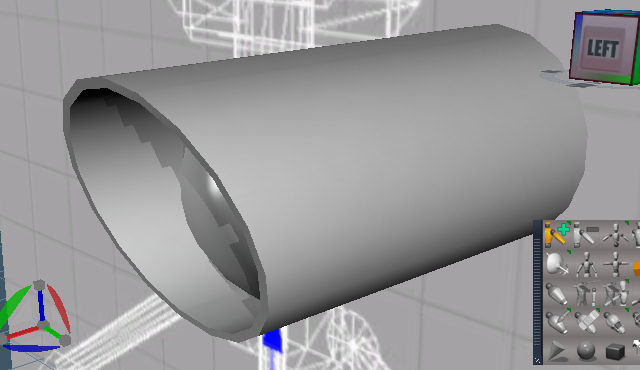
The original mesh is on the right side. Others deformed with straight edges.
linearGradientsImage.jpg
The custom profiles used.

To make the images I started in photoshop with a transparent image. Then used the gradient tool with the transparent values matching the gray color values and smoothing set to zero to keep the change linear. Next I used the Select-Load Selection-from transparency inverted and saved the selection as a channel. Finally, save as a 32bit bmp file.

The same result in paint shop pro via paint bucket using a gradient, layer mask from image-source luminance, save mask to alpha channel and turn off the mask layer for a better preview. PSP can't save 32bit bmp so save as png or tga.

The bmp files are attached.

Edit: I forgot to mention some tips for using them in truespace:

Don't use object space since it makes it difficult to line up the selection.
Several widget outlines makes it easier to see where the selection will occur.
Smoothness should be set to a very low value or zero if the profile already matches the orientation of the desired selection.
Magnitude should be set to 1.0 or less otherwise the low and high ends of the selection will flatten out. 1.0 is the ideal value but close is usually good enough.
Sharpness has no effect on custom profiles.
Attachments
linearGradients.zip
(231.42 KiB) Downloaded 243 times
Clinton Reese

http://clintons3d.com
User avatar
clintonman
Captain
Posts: 5659
Joined: 21 May 2009, 21:08
Type the number ten into the box: 0
Location: California

Re: linear gradients for soft selection

Post by clintonman »

Here's a sample of how I used it.
startingPoint.jpg
I pull the top front section forward.
softSelection.jpg
I hide all the geometry except for the part I want to move so nothing else is selected. The selection is in the side view and the widget outlines can be seen. The selection is green on top and yellow on the bottom.
Clinton Reese

http://clintons3d.com
User avatar
clintonman
Captain
Posts: 5659
Joined: 21 May 2009, 21:08
Type the number ten into the box: 0
Location: California

Re: linear gradients for soft selection

Post by clintonman »

unhideAndMove.jpg
Unhide the hidden geometry and move the soft selected points. When unhiding the selection looks like it disappears but it's still there. If you don't unhide first the points will become separated from the rest of the mesh.
finalResult.jpg
The final result.

I originally modeled the shape by adding a slanted plane to the mesh and point snapping to the plane. The soft selection is much faster.
Clinton Reese

http://clintons3d.com
v3rd3
Lieutenant Commander
Posts: 1191
Joined: 21 May 2009, 20:04

Re: linear gradients for soft selection

Post by v3rd3 »

I guess the crazy question I have is whether or not we can find a way to change the colour of the hidden buttons.

Also, this condition applies to 7.61 only.

Return to “Repositorium”