Materials List for Workspace

free scripts, plugins, models, textures
User avatar
clintonman
Captain
Posts: 5659
Joined: 21 May 2009, 21:08
Type the number ten into the box: 0
Location: California

Materials List for Workspace

Post by clintonman »

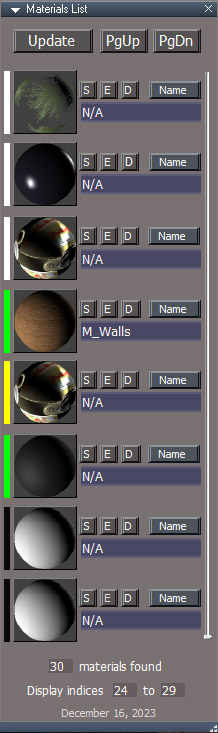
MaterialsListPanel.jpg

Inspired by the modelspace Material List tool

Displays a list of D3D materials with controls for naming and editing the material and selecting the objects that use the material
Naming the materials is useful for exporting out of trueSpace
The list is most useful for scene instanced materials and scenes that don't have a large number of renderable objects. It can be used to manually delete orphaned scene instanced materials or load them into the material editor to be assigned to an object.
Color coding is white=not instanced, green=scene instanced, yellow=instanced orphaned and black is no material.


http://clintons3d.com/plugins/truespace ... slist.html
Clinton Reese

http://clintons3d.com
User avatar
trueBlue
Captain
Posts: 5548
Joined: 06 Jul 2009, 22:50
Type the number ten into the box: 10

Re: Materials List for Workspace

Post by trueBlue »

Any idea how to stop these errors?
Steps:
Add 3 Cubes
Open Material List
Use [ S ] to Select
Delete it
Use [ S ] to Select will throw an error
ERR Source object: Error: Unspecified script error Line: 59, Char: 1 Script text:
Same with [ E ] ] D] and [ Name ]
User avatar
clintonman
Captain
Posts: 5659
Joined: 21 May 2009, 21:08
Type the number ten into the box: 0
Location: California

Re: Materials List for Workspace

Post by clintonman »

trueBlue wrote: 19 Dec 2023, 20:27 Any idea how to stop these errors?
Steps:
Add 3 Cubes
Open Material List
Use [ S ] to Select
Delete it
Use [ S ] to Select will throw an error
ERR Source object: Error: Unspecified script error Line: 59, Char: 1 Script text:
Same with [ E ] ] D] and [ Name ]
Thanks,

Dec 19 updated with node exists checks, new installer uploaded.
Clinton Reese

http://clintons3d.com
User avatar
trueBlue
Captain
Posts: 5548
Joined: 06 Jul 2009, 22:50
Type the number ten into the box: 10

Re: Materials List for Workspace

Post by trueBlue »

I think you forgot a return
ERR Source object: Error: Unspecified script error Line: 63, Char: 1 Script text:

Code: Select all

	if(!Node.Exists(allMaterials[index + MaterialsListStartIndex])) {
		System.Alert("The Materials List is out of sync. Press the Update button");
	}

Why not run the update and no Alert?

Code: Select all

	if(!Node.Exists(allMaterials[index + MaterialsListStartIndex])) {
		//System.Alert("The Materials List is out of sync. Press the Update button");
Activity.Run('Scripts/CustomCommands/Materials List/update')
return
	}
User avatar
clintonman
Captain
Posts: 5659
Joined: 21 May 2009, 21:08
Type the number ten into the box: 0
Location: California

Re: Materials List for Workspace

Post by clintonman »

trueBlue wrote: 20 Dec 2023, 02:52 I think you forgot a return
ERR Source object: Error: Unspecified script error Line: 63, Char: 1 Script text:

Code: Select all

	if(!Node.Exists(allMaterials[index + MaterialsListStartIndex])) {
		System.Alert("The Materials List is out of sync. Press the Update button");
	}

Why not run the update and no Alert?

Code: Select all

	if(!Node.Exists(allMaterials[index + MaterialsListStartIndex])) {
		//System.Alert("The Materials List is out of sync. Press the Update button");
Activity.Run('Scripts/CustomCommands/Materials List/update')
return
	}
Oops, added returns and uploaded new installer.
Clinton Reese

http://clintons3d.com
User avatar
trueBlue
Captain
Posts: 5548
Joined: 06 Jul 2009, 22:50
Type the number ten into the box: 10

Re: Materials List for Workspace

Post by trueBlue »

I think the E, D, and Name buttons should select the object first
First slot

Code: Select all

matsFS.SelectMaterialItems(0);
User avatar
clintonman
Captain
Posts: 5659
Joined: 21 May 2009, 21:08
Type the number ten into the box: 0
Location: California

Re: Materials List for Workspace

Post by clintonman »

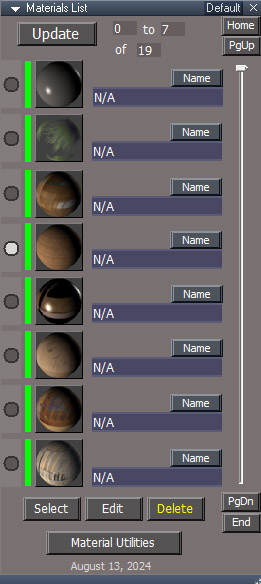
Update August 2024
MaterialsListPanel.jpg

uses "standard" floating panel
load on demand install type
forces panel view open and if nothing selected selects the first item in the scene - all required for the panel to update
open panel resets to the top of the list
home and end buttons adapted from UU version
smaller material preview and fewer buttons - not so busy
new materials utilities button - requires separate install of the new Material Utilities scripts
"no undo" script commands to update the panel
auto press update button adapted from the UU version - updates automatically if needed and tells you to "try again"
Page Up and Page Down buttons may have been reversed in previous version
Clinton Reese

http://clintons3d.com
User avatar
clintonman
Captain
Posts: 5659
Joined: 21 May 2009, 21:08
Type the number ten into the box: 0
Location: California

Re: Materials List for Workspace

Post by clintonman »

Update 2 August

bug fix release


Material Utilities button was not working - fixed
Allowed opening multiple panels - fixed to not allow more than one
Installer fixed Scripts Manager not loading or unloading, CCFunctionSet updated with correct path to the script
Clinton Reese

http://clintons3d.com
User avatar
clintonman
Captain
Posts: 5659
Joined: 21 May 2009, 21:08
Type the number ten into the box: 0
Location: California

Re: Materials List for Workspace

Post by clintonman »

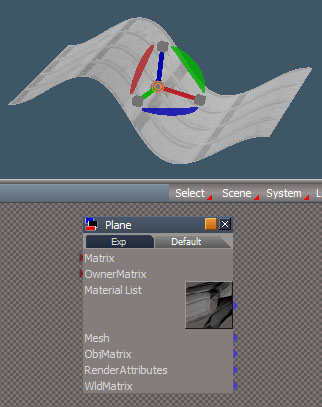
While working on the Materials List I found this.

VertexShaderPreview.jpg

I thought something was broken because the material preview is a flat square instead of the normal sphere shape. Then I realized the material had a vertex shader. It looks like vertex shader deformation will change it's appearance(surprised emoji).
Clinton Reese

http://clintons3d.com
User avatar
clintonman
Captain
Posts: 5659
Joined: 21 May 2009, 21:08
Type the number ten into the box: 0
Location: California

Re: Materials List for Workspace

Post by clintonman »

Update August 28 2024

requires new rsx plugin, v1638456
no longer requires any selection to work
no longer requires the open stack view to update the panel
Clinton Reese

http://clintons3d.com
User avatar
clintonman
Captain
Posts: 5659
Joined: 21 May 2009, 21:08
Type the number ten into the box: 0
Location: California

Re: Materials List for Workspace

Post by clintonman »

Update November 16

The main motivation for this update was that I had a scene with about 100 curves so the script found over a hundred materials. The second was that I wanted to be able to only look at and work with a selected object's materials.

changes:
remove curve objects from the display
option only display for selected objects
option copy material to be edited
option include dimension objects material
option scene instanced


https://clintons3d.com/plugins/truespac ... slist.html
Clinton Reese

http://clintons3d.com

Return to “Repositorium”