IES Light for workspace

free scripts, plugins, models, textures
User avatar
clintonman
Captain
Posts: 5659
Joined: 21 May 2009, 21:08
Type the number ten into the box: 0
Location: California

IES Light for workspace

Post by clintonman »

spotToIES.jpg
This is an update to an old script that reads and ies light profile and simulates it in workspace by altering the spotlight mask image.

Improvements:

Auto installer and button instead of a script node in the scene
Better error checking = fewer script crashes
Works with spotlights and projector lights
Option to make the light compatible with the Indigo Renderer export script(update coming soon)

Find it near the bottom of the page here:
http://www.clintons3d.com/plugins/trues ... index.html"
Clinton Reese

http://clintons3d.com
User avatar
Draise
Captain
Posts: 3200
Joined: 21 Sep 2009, 19:33
Type the number ten into the box: 0
Location: Bogota, Colombia

Re: IES Light for workspace

Post by Draise »

Wow awesome! Thanks! Looks very nice indeed. Need to get back into trueSpace to test out the lighting! Cool!
User avatar
clintonman
Captain
Posts: 5659
Joined: 21 May 2009, 21:08
Type the number ten into the box: 0
Location: California

Re: IES Light for workspace

Post by clintonman »

Update.

The spot cone generator script is now part of the ies light generator.
new falloff exponent for spot cone generator
height and width inputs for spot cone generator

cleaner node connections for the ies generator - more reliable
set ies spotlight near clip value to a small value for better lighting of nearby surfaces
ies added a mask so don't see the square image artifacts

http://clintons3d.com/plugins/truespace ... light.html"
Clinton Reese

http://clintons3d.com
User avatar
Draise
Captain
Posts: 3200
Joined: 21 Sep 2009, 19:33
Type the number ten into the box: 0
Location: Bogota, Colombia

Re: IES Light for workspace

Post by Draise »

Very nice updates.
User avatar
seppgirty
Master Chief Petty Officer
Posts: 354
Joined: 22 May 2009, 03:34
Type the number ten into the box: 0
Location: pittsburgh Pa.

Re: IES Light for workspace

Post by seppgirty »

Great job Clinton. Glad to see you updating your pluggins.
truespace 3.2, 5.2, 6.6, ani-pack, flash plugin,........ you can check out my films athttp://www.chaosbrosfilms.com
User avatar
trueBlue
Captain
Posts: 5548
Joined: 06 Jul 2009, 22:50
Type the number ten into the box: 10

Re: IES Light for workspace

Post by trueBlue »

It's me AGAIN :(
Can you take a peak at your genericSpot script?
Getting an error when using Generate Spotlight Falloff for a UU Projector light
Line 73

Also, if you have not noticed, the UU Projector light has the SpotCone exported out
UU Projector.png
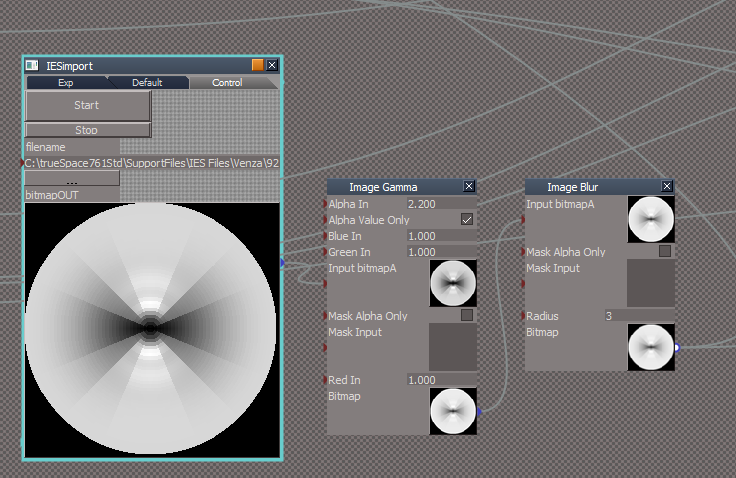
And...I was comparing your YafaRay IES Spot with your use of the Image Gamma and Image Blur
Is this something you could also include, replacement for the Post Process, or is this specific to the YafaRay4tS
YafarayIESSpot.png
Edit: Unless I am missing something, IES should only be used on Spot lights
Is there a way to exclude everything except Spot lights?

Edit2: After working with your IES Light for Workspace script, I think it would be best if I make the following changes to the Unofficial Updates:
For the Projector I am going to move the Square bitmap inside the Projector Preferences, un export the SpotCone attribute, and Copy the Square bitmap to the SpotCone verses Connecting/Disconnecting
Still do not see any value in using the IES profiles for the Projector though.
Also plan on adding your IES profiles script to the Lights toolbars
User avatar
clintonman
Captain
Posts: 5659
Joined: 21 May 2009, 21:08
Type the number ten into the box: 0
Location: California

Re: IES Light for workspace

Post by clintonman »

trueBlue wrote: 07 Jul 2020, 21:55 It's me AGAIN :(
...
:lol:
That trueBlue guy, always causing trouble.
trueBlue wrote: 07 Jul 2020, 21:55 ...
Can you take a peak at your genericSpot script?
...
I'll see what I can find out.
Clinton Reese

http://clintons3d.com
User avatar
trueBlue
Captain
Posts: 5548
Joined: 06 Jul 2009, 22:50
Type the number ten into the box: 10

Re: IES Light for workspace

Post by trueBlue »

ME ?
No
Never!
Finally figured out what was not working.

Code: Select all

shadowmap = sel + "/SpotlightShader/ShadowMap";
if(!Node.Exists(shadowmap))
shadowmap = sel + "/Spot Preferences/ShadowMap"
The above existing code does not work as you would think.
In making a Reset script, I had to do this.

Code: Select all

	var SpotAngle = params.ConValue('SpotAngle');
	if(!Node.IsLight(Node.Selection())) return;
	var sel = Node.Selection()

	var shadowmap = sel + "/SpotlightShader/ShadowMap";
	if(Node.Exists(shadowmap)) {
	Node.ConReset(shadowmap,"SpotCone");
	Node.Value(sel,"Angle") = SpotAngle
	}
	if(!Node.Exists(shadowmap)) {
	var shadowmap1 = sel + "/Spot Preferences/ShadowMap";
	Node.ConReset(shadowmap1,"SpotCone");
	Node.Value(sel,"Angle") = SpotAngle
	}
	if(!Node.Exists(shadowmap)) {
	var shadowmap2 = sel + "/Projector Preferences/ShadowMap";
	Node.ConReset(shadowmap2,"SpotCone");
	Node.Value(sel,"Angle") = SpotAngle
	}
This is what I have come up with, by a different name, and there is still a problem with the genericSpot script
Edit: I got it:

Code: Select all

	var shadowmap = sel + "/SpotlightShader/ShadowMap";
	if(Node.Exists(shadowmap)) 
	Node.Value(shadowmap,"SpotCone") = cbitmap;

	if(!Node.Exists(shadowmap)) 
	var shadowmap1 = sel + "/Spot Preferences/ShadowMap";
	if(Node.Exists(shadowmap1))
	Node.Value(shadowmap1,"SpotCone") = cbitmap;

	if(!Node.Exists(shadowmap)) 
	var shadowmap2 = sel + "/Projector Preferences/ShadowMap";
	if(Node.Exists(shadowmap2))
	Node.Value(shadowmap2,"SpotCone") = cbitmap;
	}
IES Profiles.png
IES Profiles.png (27.18 KiB) Viewed 3711 times
Removed due to update
User avatar
clintonman
Captain
Posts: 5659
Joined: 21 May 2009, 21:08
Type the number ten into the box: 0
Location: California

Re: IES Light for workspace

Post by clintonman »

Autoload attached is old style pre-persistent.

Added changes for the latest UU version of projector light.
Put same light tests in both generic and ies light generators.
Bitmap connector reset uses simple reset command

This code already tests for spot and projector lights.
I don't know why you want to remove it from projector lights.

I haven't looked at the yafaray ies yet.
Attachments
IESConverterAutoload03.RsObj
(370.18 KiB) Downloaded 188 times
Clinton Reese

http://clintons3d.com
User avatar
clintonman
Captain
Posts: 5659
Joined: 21 May 2009, 21:08
Type the number ten into the box: 0
Location: California

Re: IES Light for workspace

Post by clintonman »

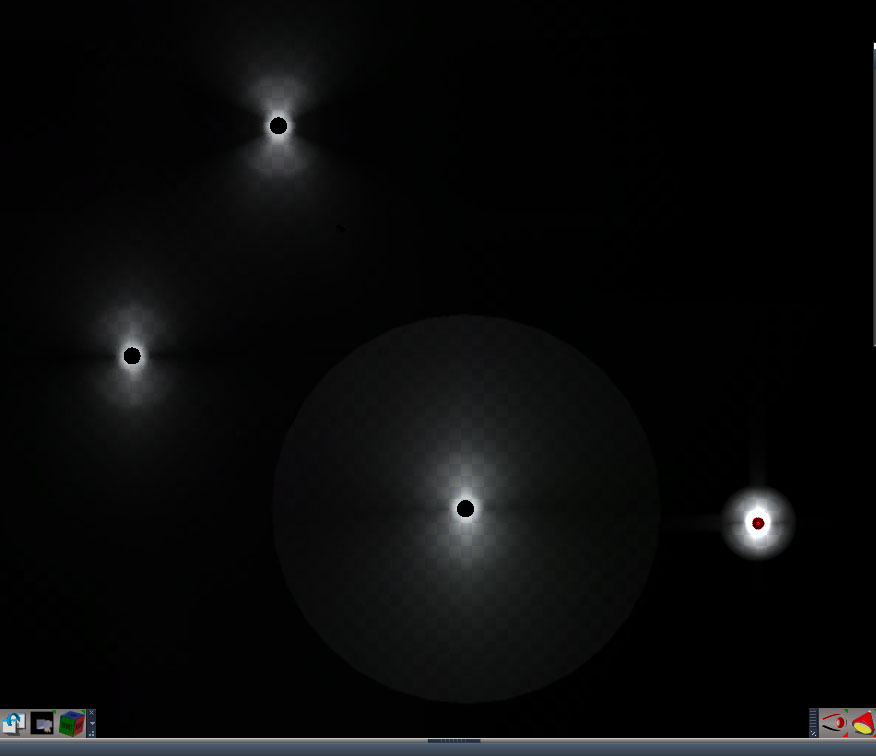
iesCompare.jpg
yafaray top left, ies script top right, unreal engine bottom left, blender cycles bottom right


Looking at the Yafaray IES light shows that it is a better representation than the ies converter script. It looks better and it is closer in appearance to a Blender and Unreal Engine render for the same ies file.

I think this comment note inside the yafaray code is the reason the black streaks don't go as far in as the others.

Code: Select all

	//
	//NOTE - values are not projected from 3D sphere to 2D circle
	//
Clinton Reese

http://clintons3d.com
User avatar
trueBlue
Captain
Posts: 5548
Joined: 06 Jul 2009, 22:50
Type the number ten into the box: 10

Re: IES Light for workspace

Post by trueBlue »

clintonman wrote: 09 Jul 2020, 04:31 Autoload attached is old style pre-persistent.

Added changes for the latest UU version of projector light.
Put same light tests in both generic and ies light generators.
Bitmap connector reset uses simple reset command

This code already tests for spot and projector lights.
I don't know why you want to remove it from projector lights.

I haven't looked at the yafaray ies yet.
Tested your changes and it works great!
Are you planning any updates?
I would suggest that you modify your ies script to run only if a light is selected!
Add
if(!Node.IsLight(firstSel)) return;

Change the toolbar button's LMB and RMB commands to only open if a light is selected.
Add
if(!Node.IsLight(Node.Selection())) return;

Also the copyBitmap and genericSpot scripts will need to account for the up coming unofficial update(s)
For the Projector I am going to move the Square bitmap inside the Projector Preferences, un export the SpotCone attribute, and Copy the Square bitmap to the SpotCone verses Connecting/Disconnecting in the Square/Spot button script
User avatar
clintonman
Captain
Posts: 5659
Joined: 21 May 2009, 21:08
Type the number ten into the box: 0
Location: California

Re: IES Light for workspace

Post by clintonman »

if(!Node.IsLight(Node.Selection())) return;
Won't work if more than 1 light is selected.

I'm not going to worry about fixing it to work with the UU lights until you're done making changes. Want to avoid chasing a moving target.

I will likely make a change to the generator script. For example the ies data I was testing defines values at 0 and 90 degrees. The script copies the values to 0,90,180 and 270 degrees for a full circle. The change would fill the in between values so it's not so blocky. Nothing planned for the yafaray ies because it's close to what it should be and because of math.
Clinton Reese

http://clintons3d.com
User avatar
trueBlue
Captain
Posts: 5548
Joined: 06 Jul 2009, 22:50
Type the number ten into the box: 10

Re: IES Light for workspace

Post by trueBlue »

clintonman wrote: 09 Jul 2020, 14:48 if(!Node.IsLight(Node.Selection())) return;
Won't work if more than 1 light is selected.
Confirmed.
Is that a bad thang?
Once the panel is up you can apply the generated ies bitmap to more then one selected light.
Is there a command that would work with multiple selected lights?

I do like the simplicity of the incorporated IES in the YafaRay IES Spot light.
There is the possibility that a user could have the R2Texture running if it is not used correctly!

When I first looked into incorporating your IES Profiles, I started out using what you have in the YafaRay IES Spot light.
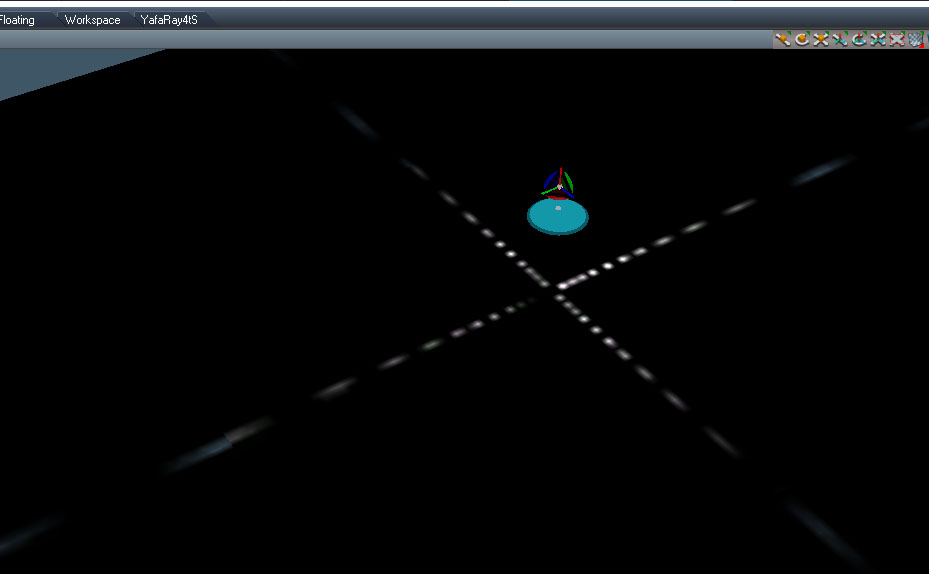
What causes this banding?
If I uncheck Alpha Value Only there is less to no banding on a few test that I have run.
YafaRay IES.png
On another note, I think the YafaRay IES Spot light needs to be updated.
As it is the IES bitmap is hooked up to the SpotCone, so there is no bitmap until you load a IES file
Probably should fix it to copy the bitmap instead of hooking it up.
Node.Value(System.ThisOwner() + "/IES Spot Preferences/ShadowMap", "SpotCone") = Node.Value(System.ThisOwner() + "/Image Blur", "Bitmap")
User avatar
trueBlue
Captain
Posts: 5548
Joined: 06 Jul 2009, 22:50
Type the number ten into the box: 10

Re: IES Light for workspace

Post by trueBlue »

I do not know if you can do this in your code, but if you could create a black or transparent border (3 pixels) around the image, the banding is eliminated.
Before
Before.png
Before.png (17.49 KiB) Viewed 3102 times
After
After.png
After.png (17.83 KiB) Viewed 3102 times
Spot light with IES Import
Spot with IES Import.png
Also there is a partial solution using an InputBitmap's Border
Seems to only remove the banding on the right and bottom of the bitmap by adding a 3 pixel Border Color (Black) to the bitmap
Using Border in the V_AddressMode does not seem to do anything.
Border.png
Border.png (23.48 KiB) Viewed 3088 times
User avatar
clintonman
Captain
Posts: 5659
Joined: 21 May 2009, 21:08
Type the number ten into the box: 0
Location: California

Re: IES Light for workspace

Post by clintonman »

The blur maybe the most likely culprit. 3 pixel blur needs a 3 pixel border and I suspect the blur affects the top and left less than the bottom and right.
Clinton Reese

http://clintons3d.com
User avatar
trueBlue
Captain
Posts: 5548
Joined: 06 Jul 2009, 22:50
Type the number ten into the box: 10

Re: IES Light for workspace

Post by trueBlue »

Yes the Blur is the only thing that I could not get to work with this HACK :mrgreen:
Hack.png
Reading your genericSpot script:

var halfWidthMinusBuffer = halfWidth - 3;//keep away from image edges
var halfHeightMinusBuffer = halfHeight - 3;//keep away from image edges

Is this the missing code needed for the IESImport script?
User avatar
clintonman
Captain
Posts: 5659
Joined: 21 May 2009, 21:08
Type the number ten into the box: 0
Location: California

Re: IES Light for workspace

Post by clintonman »

iesImprovement.jpg
left is new improved and right is the original

First refinement of the ies projection. The dark bands are much thinner now. Next is improve the direction going in and out of the center.
Clinton Reese

http://clintons3d.com
User avatar
clintonman
Captain
Posts: 5659
Joined: 21 May 2009, 21:08
Type the number ten into the box: 0
Location: California

Re: IES Light for workspace

Post by clintonman »

iesActual.jpg
actual ies data


The image shows the data that comes from the ies file. What I'm doing now is filling up all the in between parts of the lighting.
Clinton Reese

http://clintons3d.com
User avatar
clintonman
Captain
Posts: 5659
Joined: 21 May 2009, 21:08
Type the number ten into the box: 0
Location: California

Re: IES Light for workspace

Post by clintonman »

iesImprovement2.jpg
top left to bottom right - original, interpolated horizontal, interpolated both directions, yafaray

Added a gamma control and full interpolation to the ies data values.

It looks fuzzier now, but that could be due to the much increased size of the effect.

While working on the interpolated values version I ran into some problems and ended up moving things around in the ies scripts. I changed the projection sphere geometry and uv mapping and moved the camera. I need to figure out the ideal look for the ies lights so I know what direction to take it or if it's ok as is now.
Attachments
ConvertSpotToIES12.RsObj
(304.17 KiB) Downloaded 182 times
Clinton Reese

http://clintons3d.com
User avatar
clintonman
Captain
Posts: 5659
Joined: 21 May 2009, 21:08
Type the number ten into the box: 0
Location: California

Re: IES Light for workspace

Post by clintonman »

trueBlue wrote: 10 Jul 2020, 14:21 Yes the Blur is the only thing that I could not get to work with this HACK :mrgreen:
Hack.png

Reading your genericSpot script:

var halfWidthMinusBuffer = halfWidth - 3;//keep away from image edges
var halfHeightMinusBuffer = halfHeight - 3;//keep away from image edges

Is this the missing code needed for the IESImport script?
You can get rid of the lines in the yafaray ies light with the following change.

Code: Select all

			//allow for blur line 175 IESimport
			//if(dist > 126)
			if(dist > 122)
				val = 0.0;
			else {
				//var angdist = 127*Math.acos(dist/127);
				angdist = dist;
				lumvalIndex = Math.floor(angdist/126*(numVert-1));
				val0 = vertdata0[lumvalIndex];
				val0 = val0/maxval;
				val1 = vertdata1[lumvalIndex];
				val1 = val1/maxval;
				val = val0*(1-angleScaled) + val1*angleScaled;
			}
Clinton Reese

http://clintons3d.com
User avatar
trueBlue
Captain
Posts: 5548
Joined: 06 Jul 2009, 22:50
Type the number ten into the box: 10

Re: IES Light for workspace

Post by trueBlue »

clintonman wrote: 11 Jul 2020, 05:07
trueBlue wrote: 10 Jul 2020, 14:21 Yes the Blur is the only thing that I could not get to work with this HACK :mrgreen:
Hack.png

Reading your genericSpot script:

var halfWidthMinusBuffer = halfWidth - 3;//keep away from image edges
var halfHeightMinusBuffer = halfHeight - 3;//keep away from image edges

Is this the missing code needed for the IESImport script?
You can get rid of the lines in the yafaray ies light with the following change.

Code: Select all

			//allow for blur line 175 IESimport
			//if(dist > 126)
			if(dist > 122)
				val = 0.0;
			else {
				//var angdist = 127*Math.acos(dist/127);
				angdist = dist;
				lumvalIndex = Math.floor(angdist/126*(numVert-1));
				val0 = vertdata0[lumvalIndex];
				val0 = val0/maxval;
				val1 = vertdata1[lumvalIndex];
				val1 = val1/maxval;
				val = val0*(1-angleScaled) + val1*angleScaled;
			}
Awesome!
Works great!
Thank you!
User avatar
trueBlue
Captain
Posts: 5548
Joined: 06 Jul 2009, 22:50
Type the number ten into the box: 10

Re: IES Light for workspace

Post by trueBlue »

clintonman wrote: 11 Jul 2020, 03:31 iesImprovement2.jpg
top left to bottom right - original, interpolated horizontal, interpolated both directions, yafaray

Added a gamma control and full interpolation to the ies data values.

It looks fuzzier now, but that could be due to the much increased size of the effect.

While working on the interpolated values version I ran into some problems and ended up moving things around in the ies scripts. I changed the projection sphere geometry and uv mapping and moved the camera. I need to figure out the ideal look for the ies lights so I know what direction to take it or if it's ok as is now.
After I made the following corrections to the ies script, because of a couple of errors, this works great!

Code: Select all

	//hres = 360; Error Undefined
	var hres = 360;

	//mybitmap = System.CreateDO("Common Data Package/Bitmap Data");
	var mybitmap = System.CreateDO("Common Data Package/Bitmap Data");
	BFMT_UNKNOWN	= 0;
	BFMT_A8R8G8B8	= 1;
	BFMT_A16B16G16R16	= 2;
	BFMT_A32fB32fG32fR32f	= 3;
	BFMT_R8	= 4;
	BFMT_R16	= 5;
	BFMT_R32f	= 6;
	BFMT_FORCE_DWORD	= -1;

//	System.Trace(hres);
//	System.Trace(vertnum);

	//mybitmap.Create(hres,vertnum*2,BFMT_A32fB32fG32fR32f);
	//assume vertical always 90 degrees
//	mybitmap.Create(hres,90,BFMT_A32fB32fG32fR32f); Error Invalid
	mybitmap.Create(360,90,BFMT_A32fB32fG32fR32f);
Also...
Add to the top of the script else it runs on anything selected

Code: Select all

if(!Node.IsLight(firstSel)) return;
Question?
Is it really necessary to set:

Code: Select all

Node.Value(firstSel, "Angle") = 2.9;
And

Code: Select all

Node.Value(firstSel, "Near_clip_plane") = 0.01;
User avatar
clintonman
Captain
Posts: 5659
Joined: 21 May 2009, 21:08
Type the number ten into the box: 0
Location: California

Re: IES Light for workspace

Post by clintonman »

trueBlue wrote: 11 Jul 2020, 13:24 Question?
Is it really necessary to set:

Code: Select all

Node.Value(firstSel, "Angle") = 2.9;
And

Code: Select all

Node.Value(firstSel, "Near_clip_plane") = 0.01;
IES lights are defined by a sphere shape or in many cases half a sphere. Only half sphere types work in tS because a spotlight can only open about that far. Having a low angle means you see the light half sphere squashed into a narrow angle far less than a half sphere.

From website release note for June 28 2015, "set ies spotlight near clip value to a small value for better lighting of nearby surfaces parallel to the light orientation"

Here's a couple of links for more info on how ies works and a program I'm about to try out.

https://docs.unrealengine.com/en-US/Eng ... index.html

http://photometricviewer.com/
Clinton Reese

http://clintons3d.com
User avatar
trueBlue
Captain
Posts: 5548
Joined: 06 Jul 2009, 22:50
Type the number ten into the box: 10

Re: IES Light for workspace

Post by trueBlue »

Thanks, I actually read those links before posting.
Also the link supplied in your code.
http://lumen.iee.put.poznan.pl/kw/iesna.txt

Lots to consider for sure!
Have no idea how you are able to read a text file and make a bitmap out of numbers!
But i am super appreciative!
So again, many thanks!

I do suspect now, from reading your post about adjusting the Camera how you were able to remove the white gradient from the edges of bitmap though.
By moving the camera away from the Sphere?
User avatar
clintonman
Captain
Posts: 5659
Joined: 21 May 2009, 21:08
Type the number ten into the box: 0
Location: California

Re: IES Light for workspace

Post by clintonman »

trueBlue wrote: 11 Jul 2020, 18:48 ...

I do suspect now, from reading your post about adjusting the Camera how you were able to remove the white gradient from the edges of bitmap though.
By moving the camera away from the Sphere?
By chopping the sphere in half, adjusting the uv and moving the camera back so sphere fills but not overfills the view.
there is also a circular mask that's added at the end of the process that's not needed anymore because of those changes.
Clinton Reese

http://clintons3d.com
User avatar
trueBlue
Captain
Posts: 5548
Joined: 06 Jul 2009, 22:50
Type the number ten into the box: 10

Re: IES Light for workspace

Post by trueBlue »

With regards to the "Near Clip Plane"

Spot light with no IES bitmap, Near Clip Plane = 0.500 the default
Note: The shadow of the Infinity object is not in the view of the Spot light's (Rear) projection :o
Near Clip Plane Default.png
Next image:
Spot light with no IES bitmap, Near Clip Plane = 0.001
Note: No Shadow
Not sure if this is a good thing or a bad thing
After.png
trueSpace's Spot lights are odd.
The Spot light widget's design (Halfway) tries to project in one direction.
I am aware of the Hardware setting, BTW.

I guess where I am leading to is there should be a way to restore the Angle, Near Clip Plane, and SpotCone that is being changed by the IES Profiles.
I am able to capture the Angle value and restore it, but only for the first selected light, and only after the first IES Bitmap is applied with the Cancel script.
Of course this would not work on multiple selected lights either.
The only thing I can think of is have a script that restores those settings to their Default values, for a single selected light.
You could modify (or modify the code with a Bool/Check for multiple selected lights) to only work on the first selected light.
The Angle is not such a big deal but I think changing the Near Clip Plane might be.
Sorry to be a pain!
User avatar
trueBlue
Captain
Posts: 5548
Joined: 06 Jul 2009, 22:50
Type the number ten into the box: 10

Re: IES Light for workspace

Post by trueBlue »

trueBlue wrote: 11 Jul 2020, 13:24
clintonman wrote: 11 Jul 2020, 03:31 iesImprovement2.jpg
top left to bottom right - original, interpolated horizontal, interpolated both directions, yafaray

Added a gamma control and full interpolation to the ies data values.

It looks fuzzier now, but that could be due to the much increased size of the effect.

While working on the interpolated values version I ran into some problems and ended up moving things around in the ies scripts. I changed the projection sphere geometry and uv mapping and moved the camera. I need to figure out the ideal look for the ies lights so I know what direction to take it or if it's ok as is now.
After I made the following corrections to the ies script, because of a couple of errors, this works great!

Code: Select all

	//hres = 360; Error Undefined
	var hres = 360;

	//mybitmap = System.CreateDO("Common Data Package/Bitmap Data");
	var mybitmap = System.CreateDO("Common Data Package/Bitmap Data");
	BFMT_UNKNOWN	= 0;
	BFMT_A8R8G8B8	= 1;
	BFMT_A16B16G16R16	= 2;
	BFMT_A32fB32fG32fR32f	= 3;
	BFMT_R8	= 4;
	BFMT_R16	= 5;
	BFMT_R32f	= 6;
	BFMT_FORCE_DWORD	= -1;

//	System.Trace(hres);
//	System.Trace(vertnum);

	//mybitmap.Create(hres,vertnum*2,BFMT_A32fB32fG32fR32f);
	//assume vertical always 90 degrees
//	mybitmap.Create(hres,90,BFMT_A32fB32fG32fR32f); Error Invalid
	mybitmap.Create(360,90,BFMT_A32fB32fG32fR32f);
Also...
Add to the top of the script else it runs on anything selected

Code: Select all

if(!Node.IsLight(firstSel)) return;
Question?
Is it really necessary to set:

Code: Select all

Node.Value(firstSel, "Angle") = 2.9;
And

Code: Select all

Node.Value(firstSel, "Near_clip_plane") = 0.01;
As noted above, in the ies script, I had to exchange hres with 360 as shown below
// mybitmap.Create(hres,90,BFMT_A32fB32fG32fR32f); Error Invalid
mybitmap.Create(360,90,BFMT_A32fB32fG32fR32f);

It has been working for several days, now I am getting an invalid error with the above and the following
mybitmap.SetPixel(u,j,color);

Are units suppose to be integers?
SetPixel(unit, unit, obj)
User avatar
clintonman
Captain
Posts: 5659
Joined: 21 May 2009, 21:08
Type the number ten into the box: 0
Location: California

Re: IES Light for workspace

Post by clintonman »

trueBlue wrote: 15 Jul 2020, 17:11
It has been working for several days, now I am getting an invalid error with the above and the following
mybitmap.SetPixel(u,j,color);

Are units suppose to be integers?
SetPixel(unit, unit, obj)
probably

you can try something like below to see what values you're feeding it and make sure they make sense

Code: Select all

try {
   mybitmap.SetPixel(u,j,color);
} catch(e) {
   System.Trace(u)
   System.Trace(j)
} 
Clinton Reese

http://clintons3d.com
User avatar
trueBlue
Captain
Posts: 5548
Joined: 06 Jul 2009, 22:50
Type the number ten into the box: 10

Re: IES Light for workspace

Post by trueBlue »

I had to add the try & catch to every line that included mybitmap
The log ran for a couple of minutes showing different integers, nothing else.
No additional errors and the bitmap was not created.
User avatar
clintonman
Captain
Posts: 5659
Joined: 21 May 2009, 21:08
Type the number ten into the box: 0
Location: California

Re: IES Light for workspace

Post by clintonman »

maybe the problem is the color part
Clinton Reese

http://clintons3d.com
User avatar
clintonman
Captain
Posts: 5659
Joined: 21 May 2009, 21:08
Type the number ten into the box: 0
Location: California

Re: IES Light for workspace

Post by clintonman »

July 16 2020 Update


persistent install
bug - properly use data from files that occupy the 90 to 180 degree vertical region
changed projection camera and sphere geometry and removed masking code
removed post process and other unneeded elements
added a brightness control
interpolated data for a smoother result

http://clintons3d.com/plugins/truespace ... light.html
Clinton Reese

http://clintons3d.com
User avatar
trueBlue
Captain
Posts: 5548
Joined: 06 Jul 2009, 22:50
Type the number ten into the box: 10

Re: IES Light for workspace

Post by trueBlue »

Update is looking good! :worship:
I confirmed why I was getting errors with the ies script and it is very bizarre! :shock:

First off let me explain
In tS761, I commented all of the //System.Trace() lines
No problem so far in tS761 :D
In tS761Std, I was getting the error with
mybitmap = System.CreateDO("Common Data Package/Bitmap Data"); :(
I removed the comments from the System.Trace() lines
No errors :D
Seriously? :shock:

I noticed a few other things...
ConvertSpotToIES July 16, 2020

1) copyBitmap script does not support new Projector in UU6
I added one line

Code: Select all

		if(Node.Exists(firstSel + "/Projector Preferences/ShadowMap")) {
Node.Value(firstSel + "/Projector Preferences/ShadowMap", "SpotCone") = thebitmap; //UU6
			if(Node.Exists(firstSel + "/Square"))
			Node.Value(firstSel + "/Square", "Bitmap") = thebitmap;
		}
2) genericSpot script does not support new Projector in UU6
I added one line

Code: Select all

		if(Node.Exists(sel + "/Projector Preferences/ShadowMap")) {
Node.Value(sel + "/Projector Preferences/ShadowMap", "SpotCone") = cbitmap;
			if(Node.Exists(sel + "/Square"))
			Node.Value(sel + "/Square", "Bitmap") = cbitmap;
		}
3) copy indigo nodes script is looking for these removed nodes:
radiusToSquare
radiusToSquare3
Plane primitive


4) Regenerating the IES Bitmap is inconsistent
I have been testing running the ies script twice and it seems promising, albeit a tiny bit slower.
Activity.Run('%THIS_NAME%' + "/ies");
User avatar
clintonman
Captain
Posts: 5659
Joined: 21 May 2009, 21:08
Type the number ten into the box: 0
Location: California

Re: IES Light for workspace

Post by clintonman »

Thanks, a lot of good info there. Forgot about your latest changes and never tested the indigo portion.
Clinton Reese

http://clintons3d.com
User avatar
trueBlue
Captain
Posts: 5548
Joined: 06 Jul 2009, 22:50
Type the number ten into the box: 10

Re: IES Light for workspace

Post by trueBlue »

Ugh back to errors in tS761
Hope you can understand my notes:

ies script
comment
//System.Trace()
error "mybitmap"
mybitmap is undefined.png
mybitmap is undefined.png (11.27 KiB) Viewed 2392 times
comment
//SystemTrace
Add var
var mybitmap
error "undefined"
undefined is null or not an object.png
undefined is null or not an object.png (11.37 KiB) Viewed 2392 times
Do not comment ANY System.Trace()
var mybitmap
No errors

Still testing...
User avatar
clintonman
Captain
Posts: 5659
Joined: 21 May 2009, 21:08
Type the number ten into the box: 0
Location: California

Re: IES Light for workspace

Post by clintonman »

Nope, can't tell from this. Depends what your code looks like. I'll look at the UU release version when I'm at my test machine.
Clinton Reese

http://clintons3d.com
User avatar
clintonman
Captain
Posts: 5659
Joined: 21 May 2009, 21:08
Type the number ten into the box: 0
Location: California

Re: IES Light for workspace

Post by clintonman »

July 17 2020 Update
Replaced missing indigo nodes
fixed to work with new unofficial update projector lights
Clinton Reese

http://clintons3d.com
User avatar
trueBlue
Captain
Posts: 5548
Joined: 06 Jul 2009, 22:50
Type the number ten into the box: 10

Re: IES Light for workspace

Post by trueBlue »

trueBlue wrote: 17 Jul 2020, 17:58 Ugh back to errors in tS761
Hope you can understand my notes:

ies script
comment
//System.Trace()
error "mybitmap"
mybitmap is undefined.png
comment
//SystemTrace
Add var
var mybitmap
error "undefined"
undefined is null or not an object.png
Do not comment ANY System.Trace()
var mybitmap
No errors

Still testing...
I forgot to mention the first step, which may be a clue.
The ies script worked before I applied the UUpdate
Edit: Cross post
Can you upload those missing files so I do not have to go through the whole process again?
User avatar
clintonman
Captain
Posts: 5659
Joined: 21 May 2009, 21:08
Type the number ten into the box: 0
Location: California

Re: IES Light for workspace

Post by clintonman »

Here are the missing Indigo nodes for the ies light scripts.
Attachments
radiusToSquare3.RsObj
(7.04 KiB) Downloaded 163 times
radiusToSquare.RsObj
(7.03 KiB) Downloaded 200 times
Plane primitive.RsObj
(26.01 KiB) Downloaded 204 times
Clinton Reese

http://clintons3d.com

Return to “Repositorium”