Final trueSpace7.61 Beta 8 Std Unofficial Update
-
trueBlue
- Captain
- Posts: 5548
- Joined: 06 Jul 2009, 22:50
- Type the number ten into the box: 10
Re: Final trueSpace7.61 Beta 8 Std Unofficial Update
You can if you rename the Area Shape
Do you have an idea how to do it without renaming it?
Vray scene
Two Area lights, one white, one blueish
Area Shape1 and Area Shape
Do you have an idea how to do it without renaming it?
Vray scene
Two Area lights, one white, one blueish
Area Shape1 and Area Shape
-
clintonman
- Captain
- Posts: 5659
- Joined: 21 May 2009, 21:08
- Type the number ten into the box: 0
- Location: California
Re: Final trueSpace7.61 Beta 8 Std Unofficial Update
Give them unique names matched to the light that creates them.trueBlue wrote: 04 Feb 2024, 03:50 You can if you rename the Area Shape
Do you have an idea how to do it without renaming it?
Vray scene
Two Area lights, one white, one blueish
Area Shape1 and Area Shape
untitled.png
- Attachments
-
- Area.RsObj
- (194.42 KiB) Downloaded 90 times
-
trueBlue
- Captain
- Posts: 5548
- Joined: 06 Jul 2009, 22:50
- Type the number ten into the box: 10
Re: Final trueSpace7.61 Beta 8 Std Unofficial Update
Brillant, thanks!
I made some additional additions
Changed the Rename to Area_Geometry
Remove the LE2Data connector
Connect Light's WldMatrix to Area_Geometry's Matrix, so it moves, rotates, and scales with the light
Set Light and Area_Geometry ORA's Object_Name(s)
Add Reset Scale button
lClick - Normalize Scale
RClick - Normalize Rotation
.
I made some additional additions
Changed the Rename to Area_Geometry
Remove the LE2Data connector
Connect Light's WldMatrix to Area_Geometry's Matrix, so it moves, rotates, and scales with the light
Set Light and Area_Geometry ORA's Object_Name(s)
Add Reset Scale button
lClick - Normalize Scale
RClick - Normalize Rotation
.
- Attachments
-
- Area4f36.RsObj
- (195.45 KiB) Downloaded 96 times
-
trueBlue
- Captain
- Posts: 5548
- Joined: 06 Jul 2009, 22:50
- Type the number ten into the box: 10
Re: Final trueSpace7.61 Beta 8 Std Unofficial Update
trueSpace7.61 Beta 8 Standalone Unofficial Update Version 10
Pre-Release 4/5/2024
It is recommended that you completely Uninstall and Install trueSpace7.61 Beta 8 to a clean directory
Open the Task Manager
If you find any Standalone Runner (32 bit) or trueSpace (32 bit) programs open, Select each one and RClick - End task
Close the Task Manager
viewtopic.php?t=4247
Updates:
YafaRay4tS Help.pdf Author - Clinton Reese
preobjects
Updates:
Toolbars - TODO: List updates and additions
Widgets - TODO: List updates
Lights - TODO: List updates
Cameras - TODO: List updates
CustomCommands
Yafaray Folder - v1.0.0 - TODO: List updates
Save As Object
C3DReset
MaterialEditor - TODO: List updates
Status Message
CustomScriptsStore
Updates:
YafarayScripts - v8
Copy Attributes
ConvertSpotToIES
Add:
OpenFloatingPanel Author - Clinton Reese
HDRI to Lights Author - Clinton Reese
Rs Main Libraries
Components - Compositing
Updates:
Image Convolve
Image Perlin
Image Cloud
Image Wood
Image Marble
Image Voronoi
tif image loader
Tiff Loader
Tiff Loader Single Instance
YafaRay4tS Setup - TODO: List updates
YafaRay Lights
YafaRay Materials
YafaRay Scenes TODO Update: All scenes
Removed due to update
Pre-Release 4/5/2024
It is recommended that you completely Uninstall and Install trueSpace7.61 Beta 8 to a clean directory
Open the Task Manager
If you find any Standalone Runner (32 bit) or trueSpace (32 bit) programs open, Select each one and RClick - End task
Close the Task Manager
viewtopic.php?t=4247
Updates:
YafaRay4tS Help.pdf Author - Clinton Reese
preobjects
Updates:
Toolbars - TODO: List updates and additions
Widgets - TODO: List updates
Lights - TODO: List updates
Cameras - TODO: List updates
CustomCommands
Yafaray Folder - v1.0.0 - TODO: List updates
Save As Object
C3DReset
MaterialEditor - TODO: List updates
Status Message
CustomScriptsStore
Updates:
YafarayScripts - v8
Copy Attributes
ConvertSpotToIES
Add:
OpenFloatingPanel Author - Clinton Reese
HDRI to Lights Author - Clinton Reese
Rs Main Libraries
Components - Compositing
Updates:
Image Convolve
Image Perlin
Image Cloud
Image Wood
Image Marble
Image Voronoi
tif image loader
Tiff Loader
Tiff Loader Single Instance
YafaRay4tS Setup - TODO: List updates
YafaRay Lights
YafaRay Materials
YafaRay Scenes TODO Update: All scenes
Removed due to update
-
trueBlue
- Captain
- Posts: 5548
- Joined: 06 Jul 2009, 22:50
- Type the number ten into the box: 10
Re: Final trueSpace7.61 Beta 8 Std Unofficial Update
trueSpace7.61 Beta 8 Standalone Unofficial Update Version 10
Pre-Release 4/9/2024
It is recommended that you completely Uninstall and Install trueSpace7.61 Beta 8 to a clean directory
Open the Task Manager
If you find any Standalone Runner (32 bit) or trueSpace (32 bit) programs open, Select each one and RClick - End task
Close the Task Manager
viewtopic.php?t=4247
Updates:
YafaRay4tS Help.pdf Author - Clinton Reese
CustomScriptsStore
YafarayScripts Author - Clinton Reese
preobjects
CustomCommands Author - Clinton Reese
Widgets
Yafaray Folder
YafaRay4tS
Background Type; Constant, Gradient, Image, Sun Sky, and Darktide Sun Sky have their own panel aspect (Tab)
Constant is the Default
Select one of the Background Types in the Combo Control list to switch panel aspects
RClick Background Type - Reset to switch to Constant Removed due to update
Pre-Release 4/9/2024
It is recommended that you completely Uninstall and Install trueSpace7.61 Beta 8 to a clean directory
Open the Task Manager
If you find any Standalone Runner (32 bit) or trueSpace (32 bit) programs open, Select each one and RClick - End task
Close the Task Manager
viewtopic.php?t=4247
Updates:
YafaRay4tS Help.pdf Author - Clinton Reese
CustomScriptsStore
YafarayScripts Author - Clinton Reese
preobjects
CustomCommands Author - Clinton Reese
Widgets
Yafaray Folder
YafaRay4tS
Background Type; Constant, Gradient, Image, Sun Sky, and Darktide Sun Sky have their own panel aspect (Tab)
Constant is the Default
Select one of the Background Types in the Combo Control list to switch panel aspects
RClick Background Type - Reset to switch to Constant Removed due to update
-
trueBlue
- Captain
- Posts: 5548
- Joined: 06 Jul 2009, 22:50
- Type the number ten into the box: 10
Re: Final trueSpace7.61 Beta 8 Std Unofficial Update
trueSpace7.61 Beta 8 Standalone Unofficial Update Version 10
Pre-Release 4/11/2024
It is recommended that you completely Uninstall and Install trueSpace7.61 Beta 8 to a clean directory
Open the Task Manager
If you find any Standalone Runner (32 bit) or trueSpace (32 bit) programs open, Select each one and RClick - End task
Close the Task Manager
viewtopic.php?t=4247
Updates:
CustomScriptsStore
YafarayScripts 'version 10'
preobjects
CustomCommands - Author - Clinton Reese
Yafaray Folder:
YafaRay4tS
Background Type; Constant, Gradient, Image, Sun Sky, and Darktide Sun Sky have their own panel aspect (Tab)
Constant is the Default
Add gray button to the right of the Combo Control that intializes the Watch Dog Event BG
Select one of the Background Types in the Combo Control list and press the gray button .
RClick the Background Type - Reset to switch to the default "Constant"
Tip: Use your MM Wheel in the Combo Control list to switch Background Types
Also works in the Direct Lighting methods
Camera aspect
Set Camera button updated with three options to Open the selected Camera in a 3D Window, with the Grid set to None, and update to a Yafaray Camera
Uses the current Output - Render File - Width and Height to set the 3D Window - Width and Height
YafaRay4tS Scene Utilities
Update the YafaRay4tS Panel button script 'Fix for deprecated "DarkTides SunSky" background type'
Update the D3D Materials button script 'Loads the Material Editor if it does not exist'
Update the YafaRay Cameras button script 'Avoids Camera's Material List'
Reset Default Settings 'Update BG type and other attributes by Clinton Reese
Update Render Pass panel Removed due to update
Pre-Release 4/11/2024
It is recommended that you completely Uninstall and Install trueSpace7.61 Beta 8 to a clean directory
Open the Task Manager
If you find any Standalone Runner (32 bit) or trueSpace (32 bit) programs open, Select each one and RClick - End task
Close the Task Manager
viewtopic.php?t=4247
Updates:
CustomScriptsStore
YafarayScripts 'version 10'
preobjects
CustomCommands - Author - Clinton Reese
Yafaray Folder:
YafaRay4tS
Background Type; Constant, Gradient, Image, Sun Sky, and Darktide Sun Sky have their own panel aspect (Tab)
Constant is the Default
Add gray button to the right of the Combo Control that intializes the Watch Dog Event BG
Select one of the Background Types in the Combo Control list and press the gray button .
RClick the Background Type - Reset to switch to the default "Constant"
Tip: Use your MM Wheel in the Combo Control list to switch Background Types
Also works in the Direct Lighting methods
Camera aspect
Set Camera button updated with three options to Open the selected Camera in a 3D Window, with the Grid set to None, and update to a Yafaray Camera
Uses the current Output - Render File - Width and Height to set the 3D Window - Width and Height
YafaRay4tS Scene Utilities
Update the YafaRay4tS Panel button script 'Fix for deprecated "DarkTides SunSky" background type'
Update the D3D Materials button script 'Loads the Material Editor if it does not exist'
Update the YafaRay Cameras button script 'Avoids Camera's Material List'
Reset Default Settings 'Update BG type and other attributes by Clinton Reese
Update Render Pass panel Removed due to update
-
trueBlue
- Captain
- Posts: 5548
- Joined: 06 Jul 2009, 22:50
- Type the number ten into the box: 10
Re: Final trueSpace7.61 Beta 8 Std Unofficial Update
trueSpace7.61 Beta 8 Standalone Unofficial Update Version 10
Pre-Release 4/16/2024
It is recommended that you completely Uninstall and Install trueSpace7.61 Beta 8 to a clean directory
Open the Task Manager
If you find any Standalone Runner (32 bit) or trueSpace (32 bit) programs open, Select each one and RClick - End task
Close the Task Manager
viewtopic.php?t=4247
Updates:
YafaRay4S
Camera aspect .
Set Camera button renamed to Set to make more room for the Camera name
Use:
A Camera must be selected first
Sets the Output - Render File to Camera
Updated to four dialog options:
Convert Camera to Yafaray Camera? 'Default is Yes' (This dialog runs only if the selected camera is not a Yafaray Camera)
Set Camera to D3D View? 'Default is No'
Open Camera in 3D Window? 'Default is No'
If Yes, Set Ground to None? 'Default is Yes'
Uses the current Output - Render File - Width and Height to set the 3D Window - Width and Height
Tip: Use your keyboard Enter key to run all of the dialogs Defaults
Add [>] button that cycle selects all cameras in the scene
Perspective/Architect
Add Set DOF Distance button
Use:
Press the [Set DOF Distance] button and select a 3D Object
Sets the Camera Type to Perspective and DOF 'Distance from the camera'
A Camera must be selected first and the main view must be Perspective
Also works from the Camera View
Tip:
To use DOF in View mode:
Set the Output - Render File to View
Additional general settings
Set the Aperture: The size of the aperture determines how blurred the out-of-focus objects will be
A rule of thumb is to keep it between 0.100 and 0.500 (0 disables DOF)
Lighting Method
Anti-Aliasing Settings
Set the Min Sample = 10
Rs Main Libraries:
YafaRay Scenes
Updated all scenes
Add:
YafaRay DOF.RsScn
orco_mapping.RsScn
Moonlight.RsScn
YafaRay Setup
Updated YafaRay4tS.RsScn, Yafaray Camera.RsObj, and EntryPoint.RsObj
preobjects
Cameras
Updated Yafaray Camera.RsObj
All yafaray cameras have an updated Set DOF Distance script
Checks that the selected object has a WldMatrix connector
Use plugin utility commands
Removed due to update
Pre-Release 4/16/2024
It is recommended that you completely Uninstall and Install trueSpace7.61 Beta 8 to a clean directory
Open the Task Manager
If you find any Standalone Runner (32 bit) or trueSpace (32 bit) programs open, Select each one and RClick - End task
Close the Task Manager
viewtopic.php?t=4247
Updates:
YafaRay4S
Camera aspect .
Set Camera button renamed to Set to make more room for the Camera name
Use:
A Camera must be selected first
Sets the Output - Render File to Camera
Updated to four dialog options:
Convert Camera to Yafaray Camera? 'Default is Yes' (This dialog runs only if the selected camera is not a Yafaray Camera)
Set Camera to D3D View? 'Default is No'
Open Camera in 3D Window? 'Default is No'
If Yes, Set Ground to None? 'Default is Yes'
Uses the current Output - Render File - Width and Height to set the 3D Window - Width and Height
Tip: Use your keyboard Enter key to run all of the dialogs Defaults
Add [>] button that cycle selects all cameras in the scene
Perspective/Architect
Add Set DOF Distance button
Use:
Press the [Set DOF Distance] button and select a 3D Object
Sets the Camera Type to Perspective and DOF 'Distance from the camera'
A Camera must be selected first and the main view must be Perspective
Also works from the Camera View
Tip:
To use DOF in View mode:
Set the Output - Render File to View
Additional general settings
Set the Aperture: The size of the aperture determines how blurred the out-of-focus objects will be
A rule of thumb is to keep it between 0.100 and 0.500 (0 disables DOF)
Lighting Method
Anti-Aliasing Settings
Set the Min Sample = 10
Rs Main Libraries:
YafaRay Scenes
Updated all scenes
Add:
YafaRay DOF.RsScn
orco_mapping.RsScn
Moonlight.RsScn
YafaRay Setup
Updated YafaRay4tS.RsScn, Yafaray Camera.RsObj, and EntryPoint.RsObj
preobjects
Cameras
Updated Yafaray Camera.RsObj
All yafaray cameras have an updated Set DOF Distance script
Checks that the selected object has a WldMatrix connector
Use plugin utility commands
Removed due to update
-
trueBlue
- Captain
- Posts: 5548
- Joined: 06 Jul 2009, 22:50
- Type the number ten into the box: 10
Re: Final trueSpace7.61 Beta 8 Std Unofficial Update
trueSpace7.61 Beta 8 Standalone Unofficial Update Version 10
Pre-Release 4/22/2024
It is recommended that you completely Uninstall and Install trueSpace7.61 Beta 8 to a clean directory
Open the Task Manager
If you find any Standalone Runner (32 bit) or trueSpace (32 bit) programs open, Select each one and RClick - End task
Close the Task Manager
viewtopic.php?t=4247
Updates:
Clintons3dPlugin.dll 'version: 1638451'
Widgets:
Default context
Add Gestures:
P + Move Mouse - Open Panel 'First selected item'
B + Move Mouse - Open Background Color
Background
I + Move Mouse - Open Background and Default Context widget Help
Replaces previous B + I + Move Mouse gesture
CustomCommands
Open Floating Panel - Update: 'Open floating panel at mouse location option'
UUCommands
Add: Background Color .
Toolbars
Several toolbars LMB & RMB commands were updated to Load - Custom Commands scripts if they do not exist within trueSpace, and then run the command
These scripts have been removed in the backup CustomCommands.RsObj
This reduces the size of the default.ctx from 39.2 MB to about 28.1 MB
When you use one of these scripts, the default.ctx will increase in size, until you Reset to Default Context
The idea is to save space until the Custom Command script is used
You can also reload all of these scripts by using the Restore - Custom Scripts icon
Note: Update - YafaRay4tS/ImagePreview script
trueSpace's Pause Activity logs activity in the Console for every Iteration
Replacing the Pause Activity with Debounce Time span script does not log any entries
Replaced the Pause Activity with Debounce Time span script list:
Activities - Base library
truePause
CustomCommands
D3D_Render_Grp
UUCommands
D3D Render to File
Vray Render to File
preobjects
Status Message/Clear Status
Removed due to update
Pre-Release 4/22/2024
It is recommended that you completely Uninstall and Install trueSpace7.61 Beta 8 to a clean directory
Open the Task Manager
If you find any Standalone Runner (32 bit) or trueSpace (32 bit) programs open, Select each one and RClick - End task
Close the Task Manager
viewtopic.php?t=4247
Updates:
Clintons3dPlugin.dll 'version: 1638451'
Widgets:
Default context
Add Gestures:
P + Move Mouse - Open Panel 'First selected item'
B + Move Mouse - Open Background Color
Background
I + Move Mouse - Open Background and Default Context widget Help
Replaces previous B + I + Move Mouse gesture
CustomCommands
Open Floating Panel - Update: 'Open floating panel at mouse location option'
UUCommands
Add: Background Color .
Toolbars
Several toolbars LMB & RMB commands were updated to Load - Custom Commands scripts if they do not exist within trueSpace, and then run the command
These scripts have been removed in the backup CustomCommands.RsObj
This reduces the size of the default.ctx from 39.2 MB to about 28.1 MB
When you use one of these scripts, the default.ctx will increase in size, until you Reset to Default Context
The idea is to save space until the Custom Command script is used
You can also reload all of these scripts by using the Restore - Custom Scripts icon
Note: Update - YafaRay4tS/ImagePreview script
trueSpace's Pause Activity logs activity in the Console for every Iteration
Replacing the Pause Activity with Debounce Time span script does not log any entries
Replaced the Pause Activity with Debounce Time span script list:
Activities - Base library
truePause
CustomCommands
D3D_Render_Grp
UUCommands
D3D Render to File
Vray Render to File
preobjects
Status Message/Clear Status
Removed due to update
-
trueBlue
- Captain
- Posts: 5548
- Joined: 06 Jul 2009, 22:50
- Type the number ten into the box: 10
Re: Final trueSpace7.61 Beta 8 Std Unofficial Update
trueSpace7.61 Beta 8 Standalone Unofficial Update Version 10
Pre-Release 4/29/2024
It is recommended that you completely Uninstall and Install trueSpace7.61 Beta 8 to a clean directory
Open the Task Manager
If you find any Standalone Runner (32 bit) or trueSpace (32 bit) programs open, Select each one and RClick - End task
Close the Task Manager
viewtopic.php?t=4247
Updates:
CustomCommands
Add: CCFunctionSet
Update: YafarayScripts 'Version 1.0.0'
The Yafaray Folder is no longer loaded into trueSpace (3.55 MB)
New reset.js
This restores the default trueSpace Offline Renderers behavoir
To set Yafaray as the offline renderer, RClick any of the Offline Render icons, and Press the Yafaray button in the Offline Renderers panel
The YafarayScripts load the Yafaray Folder inside trueSpace (System)
This panel has a new Yafaray aspect where you can Remove YafaRay4tS, from inside trueSpace (System) .
Toolbars
Several toolbars LMB & RMB commands were updated to Load - Custom Commands scripts if they do not exist within trueSpace, and then run the command
These commands run from the CCFunctionSet that has been added to CustomCommands
These scripts have been removed in the backup CustomCommands.RsObj
This reduces the size of the default.ctx from 39.7 MB to about 22.7 MB
When you use one of these scripts, the default.ctx will increase in size, until you Reset to Default Context
The idea is to save space until the Custom Command script is used
You can reload all of these scripts by using the Restore - Custom Scripts icon (17.9 MB)
RClick to Restore - Custom Commands (3.97 MB) .
The D3D and Vray Render to File panels have a new option the Start and Stop a Timer Event .
Widgets
The CubeWidget.RsObj was removed from Widgets/Tools and added to the clintonobjects folder
The 3D View Widget.RsObj was removed from Widgets/Tools and added to the the preobjects folder
Toolbar commands run from the CCFunctionSet and UUFunctionSet load these items into Widgets/Tools and run the script
The Video iOpt Player has been updated to include a Sound Player with an option to Play Video and Sound at the same time
There is no Pause, only Start and Stop or Reset
Fixed an error when playing an AVI file that froze trueSpace viewtopic.php?p=63694#p63694
.
All Lights that have a Shadow option have been updated showing the Shadow option in the Default aspect Removed due to update
Pre-Release 4/29/2024
It is recommended that you completely Uninstall and Install trueSpace7.61 Beta 8 to a clean directory
Open the Task Manager
If you find any Standalone Runner (32 bit) or trueSpace (32 bit) programs open, Select each one and RClick - End task
Close the Task Manager
viewtopic.php?t=4247
Updates:
CustomCommands
Add: CCFunctionSet
Update: YafarayScripts 'Version 1.0.0'
The Yafaray Folder is no longer loaded into trueSpace (3.55 MB)
New reset.js
This restores the default trueSpace Offline Renderers behavoir
To set Yafaray as the offline renderer, RClick any of the Offline Render icons, and Press the Yafaray button in the Offline Renderers panel
The YafarayScripts load the Yafaray Folder inside trueSpace (System)
This panel has a new Yafaray aspect where you can Remove YafaRay4tS, from inside trueSpace (System) .
Toolbars
Several toolbars LMB & RMB commands were updated to Load - Custom Commands scripts if they do not exist within trueSpace, and then run the command
These commands run from the CCFunctionSet that has been added to CustomCommands
These scripts have been removed in the backup CustomCommands.RsObj
This reduces the size of the default.ctx from 39.7 MB to about 22.7 MB
When you use one of these scripts, the default.ctx will increase in size, until you Reset to Default Context
The idea is to save space until the Custom Command script is used
You can reload all of these scripts by using the Restore - Custom Scripts icon (17.9 MB)
RClick to Restore - Custom Commands (3.97 MB) .
The D3D and Vray Render to File panels have a new option the Start and Stop a Timer Event .
Widgets
The CubeWidget.RsObj was removed from Widgets/Tools and added to the clintonobjects folder
The 3D View Widget.RsObj was removed from Widgets/Tools and added to the the preobjects folder
Toolbar commands run from the CCFunctionSet and UUFunctionSet load these items into Widgets/Tools and run the script
The Video iOpt Player has been updated to include a Sound Player with an option to Play Video and Sound at the same time
There is no Pause, only Start and Stop or Reset
Fixed an error when playing an AVI file that froze trueSpace viewtopic.php?p=63694#p63694
.
All Lights that have a Shadow option have been updated showing the Shadow option in the Default aspect Removed due to update
-
trueBlue
- Captain
- Posts: 5548
- Joined: 06 Jul 2009, 22:50
- Type the number ten into the box: 10
Re: Final trueSpace7.61 Beta 8 Std Unofficial Update
trueSpace7.61 Beta 8 Standalone Unofficial Update Version 10
Release 5/5/2024
viewtopic.php?t=3731
It is recommended that you completely Uninstall and Install trueSpace7.61 Beta 8 to a clean directory
Open the Task Manager
If you find any Standalone Runner (32 bit) or trueSpace (32 bit) programs open, Select each one and RClick - End task
Close the Task Manager
Updates after the Pre-Release 4/29/2024
YafarayScripts 'Version 1.0.0'
YafaRay4tS 'Moved the "Reset Default Settings" to the Setup aspect'
YafaRay toolbar commands
The Yafaray Folder in no longer loaded into trueSpace (3.55 MB)
This restores the default trueSpace Offline Renderers behavoir
To set Yafaray as the offline renderer, RClick any of the Offline Render icons, and Press the Yafaray button in the Offline Renderers panel
The YafarayScripts load the Yafaray Folder inside trueSpace (System)
This panel has a new Yafaray aspect where you can Remove YafaRay4tS, from inside trueSpace (System)
Toolbars
Several toolbars LMB & RMB commands were updated to Load - Custom Commands scripts if they do not exist within trueSpace, and then run the command
These commands run from the CCFunctionSet that has been added to CustomCommands
These scripts have been removed in the backup CustomCommands.RsObj
This reduces the size of the default.ctx from 39.7 MB to about 22.7 MB
When you use one of these scripts, the default.ctx will increase in size, until you Reset to Default Context
The idea is to save space until the Custom Command script is used
You can reload all of these scripts by using the Restore - Custom Scripts icon (17.9 MB)
RClick to Restore - Custom Commands (3.97 MB)
Release 5/5/2024
viewtopic.php?t=3731
It is recommended that you completely Uninstall and Install trueSpace7.61 Beta 8 to a clean directory
Open the Task Manager
If you find any Standalone Runner (32 bit) or trueSpace (32 bit) programs open, Select each one and RClick - End task
Close the Task Manager
Updates after the Pre-Release 4/29/2024
YafarayScripts 'Version 1.0.0'
YafaRay4tS 'Moved the "Reset Default Settings" to the Setup aspect'
YafaRay toolbar commands
The Yafaray Folder in no longer loaded into trueSpace (3.55 MB)
This restores the default trueSpace Offline Renderers behavoir
To set Yafaray as the offline renderer, RClick any of the Offline Render icons, and Press the Yafaray button in the Offline Renderers panel
The YafarayScripts load the Yafaray Folder inside trueSpace (System)
This panel has a new Yafaray aspect where you can Remove YafaRay4tS, from inside trueSpace (System)
Toolbars
Several toolbars LMB & RMB commands were updated to Load - Custom Commands scripts if they do not exist within trueSpace, and then run the command
These commands run from the CCFunctionSet that has been added to CustomCommands
These scripts have been removed in the backup CustomCommands.RsObj
This reduces the size of the default.ctx from 39.7 MB to about 22.7 MB
When you use one of these scripts, the default.ctx will increase in size, until you Reset to Default Context
The idea is to save space until the Custom Command script is used
You can reload all of these scripts by using the Restore - Custom Scripts icon (17.9 MB)
RClick to Restore - Custom Commands (3.97 MB)
-
trueBlue
- Captain
- Posts: 5548
- Joined: 06 Jul 2009, 22:50
- Type the number ten into the box: 10
Re: Final trueSpace7.61 Beta 8 Std Unofficial Update
trueSpace7.61 Beta 8 Standalone Unofficial Update Version 10
Release 5/7/2024
viewtopic.php?t=3731
It is recommended that you completely Uninstall and Install trueSpace7.61 Beta 8 to a clean directory
Open the Task Manager
If you find any Standalone Runner (32 bit) or trueSpace (32 bit) programs open, Select each one and RClick - End task
Close the Task Manager
Update CCFunctionSet in Custom Commands
Updates after the Pre-Release 4/29/2024
YafarayScripts 'Version 1.0.0'
YafaRay4tS 'Moved the "Reset Default Settings" to the Setup aspect'
YafaRay toolbar commands
The Yafaray Folder in no longer loaded into trueSpace (3.55 MB)
This restores the default trueSpace Offline Renderers behavoir
To set Yafaray as the offline renderer, RClick any of the Offline Render icons, and Press the Yafaray button in the Offline Renderers panel
The YafarayScripts load the Yafaray Folder inside trueSpace (System)
This panel has a new Yafaray aspect where you can Remove YafaRay4tS, from inside trueSpace (System)
Toolbars
Several toolbars LMB & RMB commands were updated to Load - Custom Commands scripts if they do not exist within trueSpace, and then run the command
These commands run from the CCFunctionSet that has been added to CustomCommands
These scripts have been removed in the backup CustomCommands.RsObj
This reduces the size of the default.ctx from 39.7 MB to about 22.7 MB
When you use one of these scripts, the default.ctx will increase in size, until you Reset to Default Context
The idea is to save space until the Custom Command script is used
You can reload all of these scripts by using the Restore - Custom Scripts icon (Full Context 17.9 MB)
RClick to Reset - Custom Commands (Default Context 3.95 MB)
LMB .
RMB
Release 5/7/2024
viewtopic.php?t=3731
It is recommended that you completely Uninstall and Install trueSpace7.61 Beta 8 to a clean directory
Open the Task Manager
If you find any Standalone Runner (32 bit) or trueSpace (32 bit) programs open, Select each one and RClick - End task
Close the Task Manager
Update CCFunctionSet in Custom Commands
Updates after the Pre-Release 4/29/2024
YafarayScripts 'Version 1.0.0'
YafaRay4tS 'Moved the "Reset Default Settings" to the Setup aspect'
YafaRay toolbar commands
The Yafaray Folder in no longer loaded into trueSpace (3.55 MB)
This restores the default trueSpace Offline Renderers behavoir
To set Yafaray as the offline renderer, RClick any of the Offline Render icons, and Press the Yafaray button in the Offline Renderers panel
The YafarayScripts load the Yafaray Folder inside trueSpace (System)
This panel has a new Yafaray aspect where you can Remove YafaRay4tS, from inside trueSpace (System)
Toolbars
Several toolbars LMB & RMB commands were updated to Load - Custom Commands scripts if they do not exist within trueSpace, and then run the command
These commands run from the CCFunctionSet that has been added to CustomCommands
These scripts have been removed in the backup CustomCommands.RsObj
This reduces the size of the default.ctx from 39.7 MB to about 22.7 MB
When you use one of these scripts, the default.ctx will increase in size, until you Reset to Default Context
The idea is to save space until the Custom Command script is used
You can reload all of these scripts by using the Restore - Custom Scripts icon (Full Context 17.9 MB)
RClick to Reset - Custom Commands (Default Context 3.95 MB)
LMB .
RMB
-
trueBlue
- Captain
- Posts: 5548
- Joined: 06 Jul 2009, 22:50
- Type the number ten into the box: 10
Re: Final trueSpace7.61 Beta 8 Std Unofficial Update
trueSpace7.61 Beta 8 Standalone Unofficial Update Version 10
Release 5/12/2024
viewtopic.php?t=3731
It is recommended that you completely Uninstall and Install trueSpace7.61 Beta 8 to a clean directory
Open the Task Manager
If you find any Standalone Runner (32 bit) or trueSpace (32 bit) programs open, Select each one and RClick - End task
Close the Task Manager
Updates:
Toolbars
WorkspaceNav
HairToolbar2
Update Hair tool(s) LMB Command with optional Apply Hair?
Window.Shortcuts.xml
Updates:
F5 - Cancel Current Widget
F6 - Close All Windows
F7 - Close All Panels
Workspace layout
Add: Workspace Layout library
Remove Workspace Layout and Toolbars script
Description:
WARNING
Loading this script will remove the
Workspace Layout and the
Expanded Toolbars
Run the
Unofficial Update version 10
to Restore the
Workspace Layout and the
Expanded Toolbars
Background Image Camera
Background Image
Add: Blur Radius '0 = No Blur' No Blur Blur = 23
Release 5/12/2024
viewtopic.php?t=3731
It is recommended that you completely Uninstall and Install trueSpace7.61 Beta 8 to a clean directory
Open the Task Manager
If you find any Standalone Runner (32 bit) or trueSpace (32 bit) programs open, Select each one and RClick - End task
Close the Task Manager
Updates:
Toolbars
WorkspaceNav
HairToolbar2
Update Hair tool(s) LMB Command with optional Apply Hair?
Window.Shortcuts.xml
Updates:
F5 - Cancel Current Widget
F6 - Close All Windows
F7 - Close All Panels
Workspace layout
Add: Workspace Layout library
Remove Workspace Layout and Toolbars script
Description:
WARNING
Loading this script will remove the
Workspace Layout and the
Expanded Toolbars
Run the
Unofficial Update version 10
to Restore the
Workspace Layout and the
Expanded Toolbars
Background Image Camera
Background Image
Add: Blur Radius '0 = No Blur' No Blur Blur = 23
-
trueBlue
- Captain
- Posts: 5548
- Joined: 06 Jul 2009, 22:50
- Type the number ten into the box: 10
Re: Final trueSpace7.61 Beta 8 Std Unofficial Update
trueSpace7.61 Beta 8 Standalone Unofficial Update Version 10
Release 5/13/2024
viewtopic.php?t=3731
It is recommended that you completely Uninstall and Install trueSpace7.61 Beta 8 to a clean directory
Open the Task Manager
If you find any Standalone Runner (32 bit) or trueSpace (32 bit) programs open, Select each one and RClick - End task
Close the Task Manager
Updates:
Widgets
Default context
Add: G Move Mouse - Postprocess Glow Color
CustomCommands
Add: Postprocess script
Preobjects
Update: PostProcess.RsObj .
Layouts - Configurations
Update all layouts with new Postprocess
Glow_Color connector
Note: Pick Color is not used and is only a place holder for the Glow_Color
Use:
Select the 3D Window
G Move Mouse - Opens the Postprocess Glow Color script .
Use the Glow Color's Color Picker to select the desired color and press Set
Release 5/13/2024
viewtopic.php?t=3731
It is recommended that you completely Uninstall and Install trueSpace7.61 Beta 8 to a clean directory
Open the Task Manager
If you find any Standalone Runner (32 bit) or trueSpace (32 bit) programs open, Select each one and RClick - End task
Close the Task Manager
Updates:
Widgets
Default context
Add: G Move Mouse - Postprocess Glow Color
CustomCommands
Add: Postprocess script
Preobjects
Update: PostProcess.RsObj .
Layouts - Configurations
Update all layouts with new Postprocess
Glow_Color connector
Note: Pick Color is not used and is only a place holder for the Glow_Color
Use:
Select the 3D Window
G Move Mouse - Opens the Postprocess Glow Color script .
Use the Glow Color's Color Picker to select the desired color and press Set
-
trueBlue
- Captain
- Posts: 5548
- Joined: 06 Jul 2009, 22:50
- Type the number ten into the box: 10
Re: Final trueSpace7.61 Beta 8 Std Unofficial Update
trueSpace7.61 Beta 8 Standalone Unofficial Update Version 10
Release 5/15/2024
viewtopic.php?t=3731
It is recommended that you completely Uninstall and Install trueSpace7.61 Beta 8 to a clean directory
Open the Task Manager
If you find any Standalone Runner (32 bit) or trueSpace (32 bit) programs open, Select each one and RClick - End task
Close the Task Manager
Updates:
Toolbars
WorkspaceMainMenu/Help/Shortcuts
RMB - Opens UU Shortcuts List .
.
Window.Shortcuts.xml
Link Editor
CTRL SHIFT HOME - Switch to Animation Editor
Animation Editor
CTRL SHIFT HOME - Switch to Link Editor
Release 5/15/2024
viewtopic.php?t=3731
It is recommended that you completely Uninstall and Install trueSpace7.61 Beta 8 to a clean directory
Open the Task Manager
If you find any Standalone Runner (32 bit) or trueSpace (32 bit) programs open, Select each one and RClick - End task
Close the Task Manager
Updates:
Toolbars
WorkspaceMainMenu/Help/Shortcuts
RMB - Opens UU Shortcuts List .
Code: Select all
Global Shortcuts
CTRL F1 3D Window
CTRL F2 Link Editor
CTRL F3 Command Prompt
CTRL F4 Command History
CTRL F5 Output Console
CTRL F6 Status View
CTRL F7 Animation View
CTRL F8 Package Manager
CTRL F9 Scene View
CTRL F11 Library Browser
CTRL F12 Shared Space
CTRL SHIFT R Reset to Default Context
CTRL SHIFT N Generate New Space
SHIFT F Shortcuts
SHIFT C Color Picker
LEFT Select Previous object
RIGHT Select Next object
DOWN Select first Child object
UP Select Parent object
CTRL SHIFT LEFT Select Previous object & Look At
CTRL SHIFT RIGHT Select Next object & Look At
A Camera Move
S Camera Rotate
D Camera FOV
Z Object Move
X Object Rotate
C Object Scale
SHIFT X X Lock | Unlock
SHIFT Y Y Lock | Unlock
SHIFT Z Z Lock | Unlock
F1 World Coordinates
F2 Object Coordinates
F3 Screen Coordinates
F4 Tangent Coordinates
F5 Cancel Current Widget
F6 CLose All Windows
F7 Close All Panels
F8 Reset View
3D Window Shortcuts
CTRL ~ Set the selected camera as active
CTRL 1 Switch to Perspective view
CTRL 2 Switch to Top orthogonal view
CTRL 3 Switch to Bottom orthogonal view
CTRL 4 Switch to Front orthogonal view
CTRL 5 Switch to Back orthogonal view
CTRL 6 Switch to Left orthogonal view
CTRL 7 Switch to Right orthogonal view
CTRL 8 Switch to Nearest Orthogonal view
CTRL 9 Switch to Isometric view
CTRL 0 Reset View
CTRL Z Undo
CTRL SHIFT Z Redo
CTRL C Copy selection
DELETE Delete selection
CTRL K Delete selection
CTRL R Render to file
CTRL O Render Animation
CTRL I Inspect Material
I Move Mouse Inspect Material shortcuts
P Move Mouse Open Panel
B Move Mouse Background Colors
G Move Mouse Postprocess Glow Color
I Move Mouse Background Widget shortcuts
L Lock selection
U Unlock selection
ESC Unselect and Pause Animation
SHIFT L Workspace Layers
SPACEBAR Point Edit Toolbars
SHIFT SPACEBAR Point Edit Toolbars - Offset
CTRL SPACEBAR Popup Toolbars
CTRL SHIFT V View toolbar
CTRL SHIFT O Object Navigation toolbar
CTRL SHIFT L Light toolbar
TAB Object Navigation Widget - Toggle
Point Edit Shortcuts
~ Default selection settings
1 Select by Painting
2 Select by Rectangle
3 Select by Lasso
4 Select by Move
5 Soft Selection
6 Select by Material
7 Select Edge Loops
8 Select Face Loops
9 Select Visible Geometry
0 Select All Geometry
- Shrink selection
+ Grow selection
ESC Clear selection
DELETE Delete selection
CTRL K Delete selection
SHIFT DELETE Collapse Loop
CTRL C Copy selection
CTRL F Form Face
V Select Vertices
F Select Faces
E Select Edges
L Select Face Loops
T Select Context
SHIFT I Invert Selection
SHIFT A Select Connected
SHIFT C Convert Selection
SHIFT S Smooth Selection
SHIFT O Outline Selection
Q Quad Divide Selection
SHIFT Q Smooth Quad Divide
CTRL Q Quadrify Selected polygons
M Mirror Selection
CTRL M Mirror Modeler
SHIFT B Form Polygonal Bridge
/ Split polygons
SHIFT / Merge polygons
H Hide Selected geometry
SHIFT H Hide Unselected geometry
U Show All hidden geometry
NUM + Add SDS to selection
NUM - Remove SDS to selection
CTRL D Dynamic Sweep
CTRL S Sweep selected Face
CTRL B Bevel tool
CTRL T Tip selected Face
CTRL P Add Polygons
CTRL E Add Edges
CTRL V Add Vertices
CTRL L Add Loop
CTRL W Weld geometry together
CTRL H Heal Vertices
CTRL O Optimize Triangulation
CTRL SHIFT P Point Edit Widget toolbar
TAB Point Edit Widget - Toggle
Animation Editor Shortcuts
DELETE Delete Keyframe or Clip selection
CTRL C Copy Keyframe or Clip selection
CTRL X Cut Keyframe or Clip selection
CTRL V Paste the Cut selection
CTRL A Select All
CTRL U Clear Selection
CTRL Z Undo
CTRL SHIFT Z Redo
SHIFT LEFT Previous Keyframe
SHIFT RIGHT Next Keyframe
K Set Keyframe
CTRL LEFT Previous Frame
CTRL RIGHT Next Frame
SHIFT HOME Start Frame
SHIFT END End Frame
CTRL HOME Play
CTRL END Pause
CTRL SHIFT HOME Switch to Link Editor
Link Editor Shortcuts
SHIFT S DX Shaders toolbar
SHIFT C DX Components toolbar
DELETE Delete selection
CTRL Z Undo
CTRL SHIFT Z Redo
CTRL L_Drag Copy first selected
LEFT Select Previous object
RIGHT Select Next object
DOWN Select first Child
UP Select Parent
CTRL SHIFT LEFT Select Previous & Center
CTRL SHIFT RIGHT Select Next & Center
HOME Current scene in Link Editor
NUM 5 Center selection
NUM 1 Zoom All
NUM * Iconize All
NUM - Minimize All
NUM + Maximize All
R_Click Zoom ALL Move to Top Left | Center
R_Drag Zoom In Out
M_Click Center selection
M_Drag Move
CTRL M_Click Up one level
M_Wheel Scroll Up and Down
CTRL SHIFT HOME Switch to Animation Editor
Animation Editor and 3D Window Shortcuts
Num 4 Object Move -X 0.1
NUM 6 Object Move +X 0.1
NUM 8 Object Move -Y 0.1
NUM 2 Object Move +Y 0.1
PAGE UP Object Move +Z 0.1
PAGE DOWN Object Move -Z 0.1
CTRL 4 Object Move -X 1.000
CTRL 6 Object Move +X 1.000
CTRL 8 Object Move -Y 1.000
CTRL 2 Object Move +Y 1.000
CTRL PAGE UP Object Move +Z 1.000
CTRL PAGE DOWN Object Move +Z 1.000
HOME Object Normalize Location
NUM 7 Object Rotate -X 1.000
NUM 9 Object Rotate +X 1.000
NUM 1 Object Rotate +Y 1.000
NUM 3 Object Rotate -Y 1.000
NUM 0 Object Rotate -Z 1.000
DECIMAL Object Rotate +Z 1.000
CTRL 7 Object Rotate -X 45
CTRL 9 Object Rotate +X 45
CTRL 1 Object Rotate -Y 45
CTRL 3 Object Rotate +Y 45
CTRL 0 Object Rotate -Z 45
CTRL DECIMAL Object Rotate +Z 45
NUM 5 Object Normalize Rotation
Window.Shortcuts.xml
Link Editor
CTRL SHIFT HOME - Switch to Animation Editor
Animation Editor
CTRL SHIFT HOME - Switch to Link Editor
-
trueBlue
- Captain
- Posts: 5548
- Joined: 06 Jul 2009, 22:50
- Type the number ten into the box: 10
Re: Final trueSpace7.61 Beta 8 Std Unofficial Update
trueSpace7.61 Beta 8 Standalone Unofficial Update Version 10
Release 5/16/2024
viewtopic.php?t=3731
It is recommended that you completely Uninstall and Install trueSpace7.61 Beta 8 to a clean directory
Open the Task Manager
If you find any Standalone Runner (32 bit) or trueSpace (32 bit) programs open, Select each one and RClick - End task
Close the Task Manager
Updates:
CustomCommands
Update: Deformers
Add: Flatten History button
Widgets
Object Navigation Widget/Enter edit mode/Uneditable script
Add check, return, and Alert"Deform object detected! Flatten History first"
Release 5/16/2024
viewtopic.php?t=3731
It is recommended that you completely Uninstall and Install trueSpace7.61 Beta 8 to a clean directory
Open the Task Manager
If you find any Standalone Runner (32 bit) or trueSpace (32 bit) programs open, Select each one and RClick - End task
Close the Task Manager
Updates:
CustomCommands
Update: Deformers
Add: Flatten History button
Widgets
Object Navigation Widget/Enter edit mode/Uneditable script
Add check, return, and Alert"Deform object detected! Flatten History first"
-
trueBlue
- Captain
- Posts: 5548
- Joined: 06 Jul 2009, 22:50
- Type the number ten into the box: 10
Re: Final trueSpace7.61 Beta 8 Std Unofficial Update
trueSpace7.61 Beta 8 Standalone Unofficial Update Version 10
Release 5/17/2024
viewtopic.php?t=3731
It is recommended that you completely Uninstall and Install trueSpace7.61 Beta 8 to a clean directory
Open the Task Manager
If you find any Standalone Runner (32 bit) or trueSpace (32 bit) programs open, Select each one and RClick - End task
Close the Task Manager
Updates:
The previous update did not include the updated Deformers
CustomCommands
Update: Deformers
Add: Flatten History button .
Widgets
Object Navigation Widget/Enter edit mode/Uneditable script
Add check, return, and Alert"Deform object detected! Flatten History first"
Release 5/17/2024
viewtopic.php?t=3731
It is recommended that you completely Uninstall and Install trueSpace7.61 Beta 8 to a clean directory
Open the Task Manager
If you find any Standalone Runner (32 bit) or trueSpace (32 bit) programs open, Select each one and RClick - End task
Close the Task Manager
Updates:
The previous update did not include the updated Deformers
CustomCommands
Update: Deformers
Add: Flatten History button .
Widgets
Object Navigation Widget/Enter edit mode/Uneditable script
Add check, return, and Alert"Deform object detected! Flatten History first"
-
trueBlue
- Captain
- Posts: 5548
- Joined: 06 Jul 2009, 22:50
- Type the number ten into the box: 10
Re: Final trueSpace7.61 Beta 8 Std Unofficial Update
trueSpace7.61 Beta 8 Standalone Unofficial Update Version 10
Release 5/18/2024
viewtopic.php?t=3731
It is recommended that you completely Uninstall and Install trueSpace7.61 Beta 8 to a clean directory
Open the Task Manager
If you find any Standalone Runner (32 bit) or trueSpace (32 bit) programs open, Select each one and RClick - End task
Close the Task Manager
Updates:
YafaRay Scenes
UUCommands
Add: Zoom to Face Selection scripts
Shortcuts
Point Edit Mode
CTRL ALT F Zoom to Face selection
CTRL ALT V Previous Face selection View
Release 5/18/2024
viewtopic.php?t=3731
It is recommended that you completely Uninstall and Install trueSpace7.61 Beta 8 to a clean directory
Open the Task Manager
If you find any Standalone Runner (32 bit) or trueSpace (32 bit) programs open, Select each one and RClick - End task
Close the Task Manager
Updates:
YafaRay Scenes
UUCommands
Add: Zoom to Face Selection scripts
Shortcuts
Point Edit Mode
CTRL ALT F Zoom to Face selection
CTRL ALT V Previous Face selection View
-
trueBlue
- Captain
- Posts: 5548
- Joined: 06 Jul 2009, 22:50
- Type the number ten into the box: 10
Re: Final trueSpace7.61 Beta 8 Std Unofficial Update
trueSpace7.61 Beta 8 Standalone Unofficial Update Version 10
Release 5/20/2024
viewtopic.php?t=3731
It is recommended that you completely Uninstall and Install trueSpace7.61 Beta 8 to a clean directory
Open the Task Manager
If you find any Standalone Runner (32 bit) or trueSpace (32 bit) programs open, Select each one and RClick - End task
Close the Task Manager
Unless there is any reported issues, this is the Final Release
Updates:
Widgets
Update all widgets Simple Script Command AutoKey command
Object Move, Rotate, Scale 'RClick Cancel'
Camera Move, Rotate, FOV 'RClick Cancel and Add Cursor'
Rectangle Zoom 'RClick Cancel and Add Cursor'
Rectangle Select 'Add Cursor'
Shortcuts
Global
R Rectangle Zoom
SHIFT R Rectangle Select
3D Window
CTRL SHIFT S Zoom to selection
Point Edit Mode
CTRL NUM - Reset SDS settings
CTRL ALT F Aling View Zoom to selection
CTRL ALT V Previous View
Animation Editor
CTRL T Animation toolbar
CTRL SHIFT HOME Switch to Link Editor
Link Editor
CTRL SHIFT HOME Switch to Animation Editor
Release 5/20/2024
viewtopic.php?t=3731
It is recommended that you completely Uninstall and Install trueSpace7.61 Beta 8 to a clean directory
Open the Task Manager
If you find any Standalone Runner (32 bit) or trueSpace (32 bit) programs open, Select each one and RClick - End task
Close the Task Manager
Unless there is any reported issues, this is the Final Release
Updates:
Widgets
Update all widgets Simple Script Command AutoKey command
Object Move, Rotate, Scale 'RClick Cancel'
Camera Move, Rotate, FOV 'RClick Cancel and Add Cursor'
Rectangle Zoom 'RClick Cancel and Add Cursor'
Rectangle Select 'Add Cursor'
Shortcuts
Global
R Rectangle Zoom
SHIFT R Rectangle Select
3D Window
CTRL SHIFT S Zoom to selection
Point Edit Mode
CTRL NUM - Reset SDS settings
CTRL ALT F Aling View Zoom to selection
CTRL ALT V Previous View
Animation Editor
CTRL T Animation toolbar
CTRL SHIFT HOME Switch to Link Editor
Link Editor
CTRL SHIFT HOME Switch to Animation Editor
-
clintonman
- Captain
- Posts: 5659
- Joined: 21 May 2009, 21:08
- Type the number ten into the box: 0
- Location: California
Re: Final trueSpace7.61 Beta 8 Std Unofficial Update
This script will modify UU10 so that the installers from my website will work again.
Drag into the link editor and run then wait, it takes some time.
CHANGES
reset.js file:
removed the CustomCommands load
C3dReset :
restored so it loads CustomCommands using ReloadCustomScripts again
CCFunctionSet :
will load scripts from the new CustomScriptsStore2 folder
move lazy load scripts from CustomScriptsStore to CustomScriptsStore2 folder
save CCFunctionSet to CustomScriptsStore so it always loads
remove CustomCommands from the preobjects folder
ToolbarManager script was not moved from CustomScriptsStore to CustomScriptsStore2 for lazy loading because other scripts depend on it
Drag into the link editor and run then wait, it takes some time.
CHANGES
reset.js file:
removed the CustomCommands load
C3dReset :
restored so it loads CustomCommands using ReloadCustomScripts again
CCFunctionSet :
will load scripts from the new CustomScriptsStore2 folder
move lazy load scripts from CustomScriptsStore to CustomScriptsStore2 folder
save CCFunctionSet to CustomScriptsStore so it always loads
remove CustomCommands from the preobjects folder
ToolbarManager script was not moved from CustomScriptsStore to CustomScriptsStore2 for lazy loading because other scripts depend on it
- Attachments
-
- Repair For C3D Installers13.RsObj
- (22.16 KiB) Downloaded 95 times
-
trueBlue
- Captain
- Posts: 5548
- Joined: 06 Jul 2009, 22:50
- Type the number ten into the box: 10
Re: Final trueSpace7.61 Beta 8 Std Unofficial Update
Thanks, this is so much better! 
-
trueBlue
- Captain
- Posts: 5548
- Joined: 06 Jul 2009, 22:50
- Type the number ten into the box: 10
Re: Final trueSpace7.61 Beta 8 Std Unofficial Update
trueSpace7.61 Beta 8 Standalone Unofficial Update Version 10
Release 5/27/2024
viewtopic.php?t=3731
It is recommended that you completely Uninstall and Install trueSpace7.61 Beta 8 to a clean directory
Open the Task Manager
If you find any Standalone Runner (32 bit) or trueSpace (32 bit) programs open, Select each one and RClick - End task
Close the Task Manager
Unless there is any reported issues, this is the Final Release
Updates:
CustomScriptsStore
Update:
CCFunctionSet
Toolbars
CameraToolbar
Add:
Convert Camera
LMB - Opens the Convert Camera Type floating panel
Convert Selection button
Note Status Message: "SHIFT LClick Camera to switch Camera Widget"
CustomCommands
Update:
Add Deformer widget - Author Clinton Reese
XYZ widgets
Volune, Min, and Max widgets 'Mouse Wheel Speed = 1.000 LDrag Speed = 0.010'
SHIFT - Cycle Deformers
Center NAV widget
Add: Close sphere
Bars, Ars, and Triangles
SHIFT - Switch widget colors 3D Standard | trueSpace
Release 5/27/2024
viewtopic.php?t=3731
It is recommended that you completely Uninstall and Install trueSpace7.61 Beta 8 to a clean directory
Open the Task Manager
If you find any Standalone Runner (32 bit) or trueSpace (32 bit) programs open, Select each one and RClick - End task
Close the Task Manager
Unless there is any reported issues, this is the Final Release
Updates:
CustomScriptsStore
Update:
CCFunctionSet
Toolbars
CameraToolbar
Add:
Convert Camera
LMB - Opens the Convert Camera Type floating panel
Convert Selection button
Note Status Message: "SHIFT LClick Camera to switch Camera Widget"
CustomCommands
Update:
Add Deformer widget - Author Clinton Reese
XYZ widgets
Volune, Min, and Max widgets 'Mouse Wheel Speed = 1.000 LDrag Speed = 0.010'
SHIFT - Cycle Deformers
Center NAV widget
Add: Close sphere
Bars, Ars, and Triangles
SHIFT - Switch widget colors 3D Standard | trueSpace
-
trueBlue
- Captain
- Posts: 5548
- Joined: 06 Jul 2009, 22:50
- Type the number ten into the box: 10
Re: Final trueSpace7.61 Beta 8 Std Unofficial Update
trueSpace7.61 Beta 8 Standalone Unofficial Update Version 10
Release 5/28/2024
viewtopic.php?t=3731
It is recommended that you completely Uninstall and Install trueSpace7.61 Beta 8 to a clean directory
Open the Task Manager
If you find any Standalone Runner (32 bit) or trueSpace (32 bit) programs open, Select each one and RClick - End task
Close the Task Manager
Unless there is any reported issues, this is the Final Release
Updates:
CustomScriptsStore
Update:
YafarayScripts
Add missing YafaRay4tSHelp script
Release 5/28/2024
viewtopic.php?t=3731
It is recommended that you completely Uninstall and Install trueSpace7.61 Beta 8 to a clean directory
Open the Task Manager
If you find any Standalone Runner (32 bit) or trueSpace (32 bit) programs open, Select each one and RClick - End task
Close the Task Manager
Unless there is any reported issues, this is the Final Release
Updates:
CustomScriptsStore
Update:
YafarayScripts
Add missing YafaRay4tSHelp script
-
clintonman
- Captain
- Posts: 5659
- Joined: 21 May 2009, 21:08
- Type the number ten into the box: 0
- Location: California
Re: Final trueSpace7.61 Beta 8 Std Unofficial Update
Some bug fixes for the UU Deform script
Deformer node, "Remove" button - now selects the owner node after removal
Deformer node, "up / down" buttons - now work properly if the deformer node is selected, internal connections no longer messed up
Add Deformer node, "Remove" button - will also work if a deformer is selected
replace the ProcessDeformers node
Deformer node, "Remove" button - now selects the owner node after removal
Deformer node, "up / down" buttons - now work properly if the deformer node is selected, internal connections no longer messed up
Add Deformer node, "Remove" button - will also work if a deformer is selected
replace the ProcessDeformers node
- Attachments
-
- ProcessDeformers8607.RsObj
- (29.99 KiB) Downloaded 78 times
-
clintonman
- Captain
- Posts: 5659
- Joined: 21 May 2009, 21:08
- Type the number ten into the box: 0
- Location: California
Re: Final trueSpace7.61 Beta 8 Std Unofficial Update
Uneditable node from the Default object navigation widget/Enter edit mode
Adds warning if try to enter point edit mode with an object that has SDS and connected Deform node.
- Attachments
-
- Uneditable26bf.RsObj
- (14.46 KiB) Downloaded 90 times
-
trueBlue
- Captain
- Posts: 5548
- Joined: 06 Jul 2009, 22:50
- Type the number ten into the box: 10
Re: Final trueSpace7.61 Beta 8 Std Unofficial Update
Got the updates, thanks!
Uneditable script
Will it be okay to change all of the System.Question(s) to Question?
I change the included Question function's title to Question
LOL, that is a lot of Questions
Uneditable script
Will it be okay to change all of the System.Question(s) to Question?
I change the included Question function's title to Question
LOL, that is a lot of Questions
-
clintonman
- Captain
- Posts: 5659
- Joined: 21 May 2009, 21:08
- Type the number ten into the box: 0
- Location: California
Re: Final trueSpace7.61 Beta 8 Std Unofficial Update
Sure, and yes, that is a lot of questions!trueBlue wrote: 28 May 2024, 19:25 Got the updates, thanks!
Uneditable script
Will it be okay to change all of the System.Question(s) to Question?
I change the included Question function's title to Question
LOL, that is a lot of Questions![]()
-
trueBlue
- Captain
- Posts: 5548
- Joined: 06 Jul 2009, 22:50
- Type the number ten into the box: 10
Re: Final trueSpace7.61 Beta 8 Std Unofficial Update
Okay, thanks!
The Uneditable seems to be working
I notice though, if you have an object with SDS before applying a Deformer, your presented with the Question
Not a big deal, I guess, but I also notice you can Disconnect the Deformer first before Adding, Subtracting, and or Removing SDS
What about changing the Question to more reflect this?
Current question:
Deform object detected
If you point edit this item that has SDS, the deform may be damaged and trueSpace may crash!
Proceed anyway?
Replace question:
Deform object detected
It is recommended that you first Disconnect the Deformer before using SDS
Proceed anyway?
Even better, if possible, would be to actually Disconnect the Deformers, with an Alert
The Uneditable seems to be working
I notice though, if you have an object with SDS before applying a Deformer, your presented with the Question
Not a big deal, I guess, but I also notice you can Disconnect the Deformer first before Adding, Subtracting, and or Removing SDS
What about changing the Question to more reflect this?
Current question:
Deform object detected
If you point edit this item that has SDS, the deform may be damaged and trueSpace may crash!
Proceed anyway?
Replace question:
Deform object detected
It is recommended that you first Disconnect the Deformer before using SDS
Proceed anyway?
Even better, if possible, would be to actually Disconnect the Deformers, with an Alert
-
clintonman
- Captain
- Posts: 5659
- Joined: 21 May 2009, 21:08
- Type the number ten into the box: 0
- Location: California
Re: Final trueSpace7.61 Beta 8 Std Unofficial Update
It's 2 different questions. There is a question when you add the deformer to SDS mesh and another question when you try to point edit an object that has sds and connected deform nodes. The second point edit question will never be asked on non-UU tS version.trueBlue wrote: 28 May 2024, 20:17 Okay, thanks!
The Uneditable seems to be working
I notice though, if you have an object with SDS before applying a Deformer, your presented with the Question
Not a big deal, I guess, but I also notice you can Disconnect the Deformer first before Adding, Subtracting, and or Removing SDS
What about changing the Question to more reflect this?
Current question:
Deform object detected
If you point edit this item that has SDS, the deform may be damaged and trueSpace may crash!
Proceed anyway?
Replace question:
Deform object detected
It is recommended that you first Disconnect the Deformer before using SDS
Proceed anyway?
Even better, if possible, would be to actually Disconnect the Deformers, with an Alert
-
trueBlue
- Captain
- Posts: 5548
- Joined: 06 Jul 2009, 22:50
- Type the number ten into the box: 10
Re: Final trueSpace7.61 Beta 8 Std Unofficial Update
trueSpace7.61 Beta 8 Standalone Unofficial Update Version 10
Release 5/29/2024
viewtopic.php?t=3731
It is recommended that you completely Uninstall and Install trueSpace7.61 Beta 8 to a clean directory
Open the Task Manager
If you find any Standalone Runner (32 bit) or trueSpace (32 bit) programs open, Select each one and RClick - End task
Close the Task Manager
Unless there is any reported issues, this is the Final Release
.
Updates:
CustomScriptsStore
Update:
CCFunctionSet
Guard 'If Deformer exist return Not compatible with current tool' SDS+ and SDS-
CustomScriptsStore2
Update:
DeformScripts - Author Clinton Reese
Modifications:
Disconnect script 'Add var lines 77, 78, 79, 80'
Deformer
Incorporate Mesh Normals node in Deformer
CycleDeformer script 'If no DeformScripts, Load into trueSpace'
Widgets
Default object navigation widget
Enter edit mode
Update:
Uneditable - Author Clinton Reese
Modifications Add:
Release 5/29/2024
viewtopic.php?t=3731
It is recommended that you completely Uninstall and Install trueSpace7.61 Beta 8 to a clean directory
Open the Task Manager
If you find any Standalone Runner (32 bit) or trueSpace (32 bit) programs open, Select each one and RClick - End task
Close the Task Manager
Unless there is any reported issues, this is the Final Release
.
Updates:
CustomScriptsStore
Update:
CCFunctionSet
Guard 'If Deformer exist return Not compatible with current tool' SDS+ and SDS-
CustomScriptsStore2
Update:
DeformScripts - Author Clinton Reese
Modifications:
Disconnect script 'Add var lines 77, 78, 79, 80'
Deformer
Incorporate Mesh Normals node in Deformer
CycleDeformer script 'If no DeformScripts, Load into trueSpace'
Widgets
Default object navigation widget
Enter edit mode
Update:
Uneditable - Author Clinton Reese
Modifications Add:
Code: Select all
if(Node.Exists(Node.FirstSelected() + '/Deformer')) {
if(!Node.Exists('Scripts/CustomCommands/DeformScripts'))
Node.AccessFnSet("Scripts/CustomCommands/CCFunctionSet").AddDeformer()
Activity.Run('Scripts/CustomCommands/DeformScripts/Disconnect')
System.Alert('Deformer has been Disconnected!\n\nUse - Reconnect')
Activity.Run('Scripts/CustomCommands/DeformScripts/openPanelFrame')
}-
trueBlue
- Captain
- Posts: 5548
- Joined: 06 Jul 2009, 22:50
- Type the number ten into the box: 10
Re: Final trueSpace7.61 Beta 8 Std Unofficial Update
trueSpace7.61 Beta 8 Standalone Unofficial Update Version 10
Release 5/31/2024
viewtopic.php?t=3731
It is recommended that you completely Uninstall and Install trueSpace7.61 Beta 8 to a clean directory
Open the Task Manager
If you find any Standalone Runner (32 bit) or trueSpace (32 bit) programs open, Select each one and RClick - End task
Close the Task Manager
Unless there is any reported issues, this is the Final Release
Updates:
CustomScriptsStore2
Update:
DeformScripts - Author Clinton Reese
Modification:
openPanelFrame script
Widgets
Default object navigation widget
Enter edit mode
Update:
Uneditable - Author Clinton Reese
Release 5/31/2024
viewtopic.php?t=3731
It is recommended that you completely Uninstall and Install trueSpace7.61 Beta 8 to a clean directory
Open the Task Manager
If you find any Standalone Runner (32 bit) or trueSpace (32 bit) programs open, Select each one and RClick - End task
Close the Task Manager
Unless there is any reported issues, this is the Final Release
Updates:
CustomScriptsStore2
Update:
DeformScripts - Author Clinton Reese
Modification:
openPanelFrame script
Widgets
Default object navigation widget
Enter edit mode
Update:
Uneditable - Author Clinton Reese
-
clintonman
- Captain
- Posts: 5659
- Joined: 21 May 2009, 21:08
- Type the number ten into the box: 0
- Location: California
Re: Final trueSpace7.61 Beta 8 Std Unofficial Update
Replacement Guard node for SDS commands used on Deformed objects.
- Attachments
-
- Guard01.RsObj
- (21.18 KiB) Downloaded 75 times
-
clintonman
- Captain
- Posts: 5659
- Joined: 21 May 2009, 21:08
- Type the number ten into the box: 0
- Location: California
Re: Final trueSpace7.61 Beta 8 Std Unofficial Update
Updated Guard for SDS objects
Only the AllDeformsAreConnected was updated.
Code: Select all
function AllDeformsAreConnected(sel)
{
for(var i=0;i<Node.SubObjectCount(sel);i++) {
var subobj = sel + "/" + Node.SubObject(sel, i);
if(Node.ConExists(subobj, "DeformerX")) {
if(Node.LinkedOutputNodeCount(subobj, "MeshOut") == 0) {
return false;
}
}
if(Node.ConExists(subobj, "DeformerY")) {
if(Node.LinkedOutputNodeCount(subobj, "MeshOut") == 0) {
return false;
}
}
if(Node.ConExists(subobj, "DeformerZ")) {
if(Node.LinkedOutputNodeCount(subobj, "MeshOut") == 0) {
return false;
}
}
if(Node.SubObject(sel, i) == "Mesh Normals") {
if(Node.LinkedOutputNodeCount(subobj, "Mesh") == 0) {
return false;
}
}
}
return true;
}- Attachments
-
- Guard02.RsObj
- (21.45 KiB) Downloaded 73 times
-
trueBlue
- Captain
- Posts: 5548
- Joined: 06 Jul 2009, 22:50
- Type the number ten into the box: 10
Re: Final trueSpace7.61 Beta 8 Std Unofficial Update
trueSpace7.61 Beta 8 Standalone Unofficial Update Version 10
Release 6/3/2024
viewtopic.php?t=3731
It is recommended that you completely Uninstall and Install trueSpace7.61 Beta 8 to a clean directory
Open the Task Manager
If you find any Standalone Runner (32 bit) or trueSpace (32 bit) programs open, Select each one and RClick - End task
Close the Task Manager
Unless there is any reported issues, this is the Final Release
Updates:
CustomScriptsStore2
Update:
DeformScripts - Author Clinton Reese
Modifications:
Flatten button 'Fix for error when nothing selected'
Disconnect script 'Add additional disconnect'
Reconnect script 'Add additional disconnect'
Deform widget X 'Min, Max, and Volume - RClick Reset Matrix'
Deform widget Y 'Min, Max, and Volume - RClick Reset Matrix'
Deform widget Z 'Min, Max, and Volume - RClick Reset Matrix'
Widgets
Default object navigation widget
Enter edit mode
Update:
Uneditable 'Deformers with SDS will Disconnect first'
CustomScriptsStore
Update:
Guard
preobjects
Update:
MeshEditorSettings - Reset SDS aspect
Reset SDS button
Remove SDS button
Release 6/3/2024
viewtopic.php?t=3731
It is recommended that you completely Uninstall and Install trueSpace7.61 Beta 8 to a clean directory
Open the Task Manager
If you find any Standalone Runner (32 bit) or trueSpace (32 bit) programs open, Select each one and RClick - End task
Close the Task Manager
Unless there is any reported issues, this is the Final Release
Updates:
CustomScriptsStore2
Update:
DeformScripts - Author Clinton Reese
Modifications:
Flatten button 'Fix for error when nothing selected'
Disconnect script 'Add additional disconnect'
Reconnect script 'Add additional disconnect'
Deform widget X 'Min, Max, and Volume - RClick Reset Matrix'
Deform widget Y 'Min, Max, and Volume - RClick Reset Matrix'
Deform widget Z 'Min, Max, and Volume - RClick Reset Matrix'
Widgets
Default object navigation widget
Enter edit mode
Update:
Uneditable 'Deformers with SDS will Disconnect first'
CustomScriptsStore
Update:
Guard
preobjects
Update:
MeshEditorSettings - Reset SDS aspect
Reset SDS button
Remove SDS button
-
trueBlue
- Captain
- Posts: 5548
- Joined: 06 Jul 2009, 22:50
- Type the number ten into the box: 10
Re: Final trueSpace7.61 Beta 8 Std Unofficial Update
trueSpace7.61 Beta 8 Standalone Unofficial Update Version 10
Release 6/4/2024
viewtopic.php?t=3731
It is recommended that you completely Uninstall and Install trueSpace7.61 Beta 8 to a clean directory
Open the Task Manager
If you find any Standalone Runner (32 bit) or trueSpace (32 bit) programs open, Select each one and RClick - End task
Close the Task Manager
Unless there is any reported issues, this is the Final Release
Updates:
Toolbars
WorkspaceNav
CustomScriptsStore
Update:
ToolbarManager
preobjects
Update:
UUCommands
Release 6/4/2024
viewtopic.php?t=3731
It is recommended that you completely Uninstall and Install trueSpace7.61 Beta 8 to a clean directory
Open the Task Manager
If you find any Standalone Runner (32 bit) or trueSpace (32 bit) programs open, Select each one and RClick - End task
Close the Task Manager
Unless there is any reported issues, this is the Final Release
Updates:
Toolbars
WorkspaceNav
CustomScriptsStore
Update:
ToolbarManager
preobjects
Update:
UUCommands
-
clintonman
- Captain
- Posts: 5659
- Joined: 21 May 2009, 21:08
- Type the number ten into the box: 0
- Location: California
Re: Final trueSpace7.61 Beta 8 Std Unofficial Update
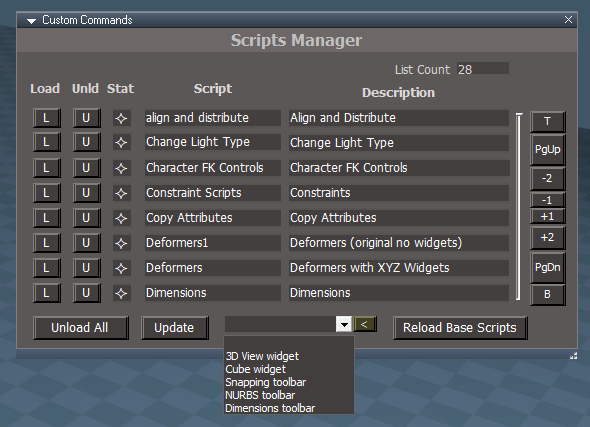
Proposed Script Manager for the UU
Image shows WebServer fully loaded. wsLayersGroup4 is not loaded but shows as partially loaded because it uses the Webserver
Status Indicators from left to right: Not Loaded, Partially Loaded, Fully Loaded
Controls:
L - load the scripts and widgets
U - unload the scripts and widgets and close the toolbar
Status Indicator, Name and Description
Scroll buttons - the slider is only an indicator
Unload All - unload all load on demand scripts and widgets and close any open toolbars
Update - update the list and status indicators
Reload Base Scripts - reloads all the custom scripts that are not a part of the load on demand system
to try it:
update CCFunctionSet
add ScriptManager to /Scripts
use "Test Open ScriptManager" to open the panel
for actual installation there is also a replacement C3DReset.RsObj that uses the ScriptsManager instead of the ReloadCustomScripts
The CCFunctionSet is based on the latest UU release version and adds the following lines used by the script manager
Image shows WebServer fully loaded. wsLayersGroup4 is not loaded but shows as partially loaded because it uses the Webserver
Status Indicators from left to right: Not Loaded, Partially Loaded, Fully Loaded
Controls:
L - load the scripts and widgets
U - unload the scripts and widgets and close the toolbar
Status Indicator, Name and Description
Scroll buttons - the slider is only an indicator
Unload All - unload all load on demand scripts and widgets and close any open toolbars
Update - update the list and status indicators
Reload Base Scripts - reloads all the custom scripts that are not a part of the load on demand system
to try it:
update CCFunctionSet
add ScriptManager to /Scripts
use "Test Open ScriptManager" to open the panel
for actual installation there is also a replacement C3DReset.RsObj that uses the ScriptsManager instead of the ReloadCustomScripts
The CCFunctionSet is based on the latest UU release version and adds the following lines used by the script manager
Code: Select all
var ScriptsData = [
{"name":"Deformers", "desc": "Deform scripts", "toolbar": "", "scriptnodes" :["/Scripts/CustomCommands/DeformScripts", "/Widgets/Select/Deform widget X", "/Widgets/Select/Deform widget Y", "/Widgets/Select/Deform widget Z"]},
{"name":"Snapping", "desc": "Snapping", "toolbar": "SnappingToolbar", "scriptnodes" :["/Scripts/CustomCommands/SnappingScripts"]},
{"name":"NURBS", "desc": "NURBS", "toolbar": "NURBSToolbar", "scriptnodes" :["/Scripts/CustomCommands/NURBSScripts"]},
{"name":"Vertex Texture Animation", "desc": "Vertex Texture Animation", "toolbar": "", "scriptnodes" :["/Scripts/CustomCommands/Vertex Texture Animation"]},
{"name":"OD_CopyPaste", "desc": "OD_CopyPaste", "toolbar": "", "scriptnodes" :["/Scripts/CustomCommands/OD_CopyPaste"]},
{"name":"FixBitmapsForExport", "desc": "FixBitmapsForExport", "toolbar": "", "scriptnodes" :["/Scripts/CustomCommands/FixBitmapsForExport"]},
{"name":"fbxgroup2", "desc": "fbxgroup2", "toolbar": "", "scriptnodes" :["/Scripts/CustomCommands/fbxgroup2"]},
{"name":"Change Light Type", "desc": "Change Light Type", "toolbar": "", "scriptnodes" :["/Scripts/CustomCommands/Change Light Type"]},
{"name":"GLTFgroup", "desc": "GLTFgroup", "toolbar": "", "scriptnodes" :["/Scripts/CustomCommands/GLTFgroup"]},
{"name":"Character FK Controls", "desc": "Character FK Controls", "toolbar": "","scriptnodes" :["/Scripts/CustomCommands/Character FK Controls"]},
{"name":"PaintVertexColor", "desc": "PaintVertexColor", "toolbar": "", "scriptnodes" :["/Scripts/CustomCommands/PaintVertexColor"]},
{"name":"HDRI to Lights", "desc": "HDRI to Lights", "toolbar": "", "scriptnodes" :["/Scripts/CustomCommands/HDRI to Lights"]},
{"name":"View Controls", "desc": "View Controls", "toolbar": "", "scriptnodes" :["/Scripts/CustomCommands/View Controls"]},
{"name":"Copy Attributes", "desc": "Copy Attributes", "toolbar": "", "scriptnodes" :["/Scripts/CustomCommands/Copy Attributes"]},
{"name":"CubeWidget", "desc": "CubeWidget", "toolbar": "", "scriptnodes" :["/Widgets/Tools/CubeWidget"]},
{"name":"align and distribute", "desc": "align and distribute", "toolbar": "", "scriptnodes" :["/Scripts/CustomCommands/align and distribute"]},
{"name":"gridArray2Script", "desc": "gridArray2Script", "toolbar": "", "scriptnodes" :["/Scripts/CustomCommands/gridArray2Script"]},
{"name":"radialArray2Script", "desc": "radialArray2Script", "toolbar": "", "scriptnodes" :["/Scripts/CustomCommands/radialArray2Script"]},
{"name":"pointCloneScript", "desc": "pointCloneScript", "toolbar": "", "scriptnodes" :["/Scripts/CustomCommands/pointCloneScript"]},
{"name":"ParticleScripts", "desc": "ParticleScripts", "toolbar": "", "scriptnodes" :["/Scripts/CustomCommands/ParticleScripts"]},
{"name":"Constraint Scripts", "desc": "Constraint Scripts", "toolbar": "", "scriptnodes" :["/Scripts/CustomCommands/Constraint Scripts"]},
{"name":"Dimensions", "desc": "Dimensions", "toolbar": "DimensionsToolbar", "scriptnodes" :["/Scripts/CustomCommands/Dimensions"]},
{"name":"Deformers1", "desc": "Deform scripts1", "toolbar": "", "scriptnodes" :["/Scripts/CustomCommands/DeformScripts1"]},
{"name":"Radial Modeler", "desc": "Radial Modeler", "toolbar": "", "scriptnodes" :["/Scripts/CustomCommands/Radial Modeler"]},
{"name":"MirrorMatrix", "desc": "MirrorMatrix", "toolbar": "", "scriptnodes" :["/Scripts/CustomCommands/MirrorMatrix"]},
{"name":"WebServer", "desc": "WebServer", "toolbar": "", "scriptnodes" :["/Scripts/CustomCommands/WebServer"]},
{"name":"wsLayersGroup4", "desc": "wsLayersGroup4", "toolbar": "", "scriptnodes" :["/Scripts/CustomCommands/wsLayersGroup4", "/Scripts/CustomCommands/WebServer"]},
{"name":"objectStats", "desc": "objectStats", "toolbar": "", "scriptnodes" :["/Scripts/CustomCommands/WebServer", "/Scripts/CustomCommands/objectStats"]}
];- Attachments
-
- ScriptManagerforUU.zip
- (68.25 KiB) Downloaded 41 times
-
trueBlue
- Captain
- Posts: 5548
- Joined: 06 Jul 2009, 22:50
- Type the number ten into the box: 10
Re: Final trueSpace7.61 Beta 8 Std Unofficial Update
trueSpace7.61 Beta 8 Standalone Unofficial Update Version 10
Release 6/7/2024
viewtopic.php?t=3731
It is recommended that you completely Uninstall and Install trueSpace7.61 Beta 8 to a clean directory
Open the Task Manager
If you find any Standalone Runner (32 bit) or trueSpace (32 bit) programs open, Select each one and RClick - End task
Close the Task Manager
Unless there is any reported issues, this is the Final Release
Updates:
Window.Shortcuts.xml
Update: NUM Subtract & NUM Add 'Use Guard command' PE Mode
Window.Shortcuts_BACKUP.xml
UU Shortcut List.txt
Toolbars
Update:
ClintonToolbar/C3D icon 'LMB - Scripts Manager'
PopupButtonsToolbar 'Removed shortcuts from HelpText'
PEModelingToolbar 'Add: Booleans toolbar and SDS toolbar'
PointEditToolbar 'Add: Axis Snap'
Note: Pivot to Selection still exist, the other two were removed
Widgets
Object Navigation Widget
Update:
Add - MClick - Object Navigation Widget Toolbar
Point Edit Widget
Update:
Add - MClick - Point Edit Widget Toolbar
Add - SHIFT RClick - Point Edit Toolbars - Offset
WidgetScripts
Update: CycleObjectNavigationWidget & CyclePointEditNavigationWidget scripts
preobjects
Update: C3DReset.RsObj
CustomScriptsStore
Update: CCFunctionSet 'Add: Scripts Manager code'
clintonobjects
Remove: ReloadCustomScripts.RsObj
Add: ScriptManager.RsObj 'Author Clinton Reese'
Modifications:
Open Panel script
Reload Base Scripts button 'Run CCFunctionSet - RestoreC3DBackup()'
Remove: Cube Widget
Modified: Descriptions .
Scripts Manager is a tool that can give you a snapshot of the current loaded On-Demand Custom Commands scripts
You can manually Load and Unload any of the On-Demand Custom Commands scripts
It will not Load any toolbars associated with the Custom Commands script, but Unload will close the toolbars
When you are not using any of the On-Demand Custom Commands scripts, it is recommended that you UnLoad them or use Unload All Status Indicators from left to right: Not Loaded, Partially Loaded, Fully Loaded
In the Unofficial Update, the toolbars commands associated with the Custom Command script will load the toolbar, including the On-Demand Custom Commands scripts (Preferred method)
Release 6/7/2024
viewtopic.php?t=3731
It is recommended that you completely Uninstall and Install trueSpace7.61 Beta 8 to a clean directory
Open the Task Manager
If you find any Standalone Runner (32 bit) or trueSpace (32 bit) programs open, Select each one and RClick - End task
Close the Task Manager
Unless there is any reported issues, this is the Final Release
Updates:
Window.Shortcuts.xml
Update: NUM Subtract & NUM Add 'Use Guard command' PE Mode
Window.Shortcuts_BACKUP.xml
UU Shortcut List.txt
Toolbars
Update:
ClintonToolbar/C3D icon 'LMB - Scripts Manager'
PopupButtonsToolbar 'Removed shortcuts from HelpText'
PEModelingToolbar 'Add: Booleans toolbar and SDS toolbar'
PointEditToolbar 'Add: Axis Snap'
Note: Pivot to Selection still exist, the other two were removed
Widgets
Object Navigation Widget
Update:
Add - MClick - Object Navigation Widget Toolbar
Point Edit Widget
Update:
Add - MClick - Point Edit Widget Toolbar
Add - SHIFT RClick - Point Edit Toolbars - Offset
WidgetScripts
Update: CycleObjectNavigationWidget & CyclePointEditNavigationWidget scripts
preobjects
Update: C3DReset.RsObj
CustomScriptsStore
Update: CCFunctionSet 'Add: Scripts Manager code'
clintonobjects
Remove: ReloadCustomScripts.RsObj
Add: ScriptManager.RsObj 'Author Clinton Reese'
Modifications:
Open Panel script
Reload Base Scripts button 'Run CCFunctionSet - RestoreC3DBackup()'
Remove: Cube Widget
Modified: Descriptions .
Scripts Manager is a tool that can give you a snapshot of the current loaded On-Demand Custom Commands scripts
You can manually Load and Unload any of the On-Demand Custom Commands scripts
It will not Load any toolbars associated with the Custom Commands script, but Unload will close the toolbars
When you are not using any of the On-Demand Custom Commands scripts, it is recommended that you UnLoad them or use Unload All Status Indicators from left to right: Not Loaded, Partially Loaded, Fully Loaded
In the Unofficial Update, the toolbars commands associated with the Custom Command script will load the toolbar, including the On-Demand Custom Commands scripts (Preferred method)
-
trueBlue
- Captain
- Posts: 5548
- Joined: 06 Jul 2009, 22:50
- Type the number ten into the box: 10
Re: Final trueSpace7.61 Beta 8 Std Unofficial Update
trueSpace7.61 Beta 8 Standalone Unofficial Update Version 10
Release 6/8/2024
viewtopic.php?t=3731
It is recommended that you completely Uninstall and Install trueSpace7.61 Beta 8 to a clean directory
Open the Task Manager
If you find any Standalone Runner (32 bit) or trueSpace (32 bit) programs open, Select each one and RClick - End task
Close the Task Manager
Unless there is any reported issues, this is the Final Release
Updates:
DeformScripts 'Update Remove, Up, and Down button code'
Deformers XYZ Widgets 'Update MIN & MAX Cone'
CCFunctionSet 'Update Cube Widget'
clintonobjects 'Remove CubeWidget.RsObj' 'Update ScriptManager.RsObj'
CustomScriptsStore2 'Add CubeWidget.RsObj'
Toolbars - Object and Camera transform widgets - 'Remove RMB Cancel'
C3DReset 'Remove CubeWidget.RsObj'
Release 6/8/2024
viewtopic.php?t=3731
It is recommended that you completely Uninstall and Install trueSpace7.61 Beta 8 to a clean directory
Open the Task Manager
If you find any Standalone Runner (32 bit) or trueSpace (32 bit) programs open, Select each one and RClick - End task
Close the Task Manager
Unless there is any reported issues, this is the Final Release
Updates:
DeformScripts 'Update Remove, Up, and Down button code'
Deformers XYZ Widgets 'Update MIN & MAX Cone'
CCFunctionSet 'Update Cube Widget'
clintonobjects 'Remove CubeWidget.RsObj' 'Update ScriptManager.RsObj'
CustomScriptsStore2 'Add CubeWidget.RsObj'
Toolbars - Object and Camera transform widgets - 'Remove RMB Cancel'
C3DReset 'Remove CubeWidget.RsObj'
-
trueBlue
- Captain
- Posts: 5548
- Joined: 06 Jul 2009, 22:50
- Type the number ten into the box: 10
Re: Final trueSpace7.61 Beta 8 Std Unofficial Update
trueSpace7.61 Beta 8 Standalone Unofficial Update Version 10
Release 6/10/2024
viewtopic.php?t=3731
It is recommended that you completely Uninstall and Install trueSpace7.61 Beta 8 to a clean directory
Open the Task Manager
If you find any Standalone Runner (32 bit) or trueSpace (32 bit) programs open, Select each one and RClick - End task
Close the Task Manager
Unless there is any reported issues, this is the Final Release
Updates:
Toolbars
Update:
Toolbar Manager 'LMB abd RMB command'
Add Deformers 'LMB abd RMB command'
LMB 'Opens the Add Deformer panel in the 3D View'
RMB 'Opens the Widgets panel in the stack'
CustomScriptsStore2
Add Deformers 'Add: Widgets aspect'
Axis Color
trueSpace
Standard
Coordinate System
Static
Dynamic
Note: Sets and Saves the XYZ widgets
Deformer XYZ widgets 'Removed: Switch - Axis Color gesture'
CustomScriptsStore
Update:
CCFunctionSet
Guard
Release 6/10/2024
viewtopic.php?t=3731
It is recommended that you completely Uninstall and Install trueSpace7.61 Beta 8 to a clean directory
Open the Task Manager
If you find any Standalone Runner (32 bit) or trueSpace (32 bit) programs open, Select each one and RClick - End task
Close the Task Manager
Unless there is any reported issues, this is the Final Release
Updates:
Toolbars
Update:
Toolbar Manager 'LMB abd RMB command'
Add Deformers 'LMB abd RMB command'
LMB 'Opens the Add Deformer panel in the 3D View'
RMB 'Opens the Widgets panel in the stack'
CustomScriptsStore2
Add Deformers 'Add: Widgets aspect'
Axis Color
trueSpace
Standard
Coordinate System
Static
Dynamic
Note: Sets and Saves the XYZ widgets
Deformer XYZ widgets 'Removed: Switch - Axis Color gesture'
CustomScriptsStore
Update:
CCFunctionSet
Guard
-
trueBlue
- Captain
- Posts: 5548
- Joined: 06 Jul 2009, 22:50
- Type the number ten into the box: 10
Re: Final trueSpace7.61 Beta 8 Std Unofficial Update
trueSpace7.61 Beta 8 Standalone Unofficial Update Version 10
Release 6/12/2024
viewtopic.php?t=3731
It is recommended that you completely Uninstall and Install trueSpace7.61 Beta 8 to a clean directory
Open the Task Manager
If you find any Standalone Runner (32 bit) or trueSpace (32 bit) programs open, Select each one and RClick - End task
Close the Task Manager
Unless there is any reported issues, this is the Final Release
Updates:
Toolbars
ViewToolbar
Scripts Manager .
Add: Combo Control and [<] button
Opens the selected item and updates the Scripts Manager status
This would be the preferred method to open Dimensions, Snapping and NURBS using the Scripts Manager
Release 6/12/2024
viewtopic.php?t=3731
It is recommended that you completely Uninstall and Install trueSpace7.61 Beta 8 to a clean directory
Open the Task Manager
If you find any Standalone Runner (32 bit) or trueSpace (32 bit) programs open, Select each one and RClick - End task
Close the Task Manager
Unless there is any reported issues, this is the Final Release
Updates:
Toolbars
ViewToolbar
Scripts Manager .
Add: Combo Control and [<] button
Opens the selected item and updates the Scripts Manager status
This would be the preferred method to open Dimensions, Snapping and NURBS using the Scripts Manager
-
trueBlue
- Captain
- Posts: 5548
- Joined: 06 Jul 2009, 22:50
- Type the number ten into the box: 10
Re: Final trueSpace7.61 Beta 8 Std Unofficial Update
trueSpace7.61 Beta 8 Standalone Unofficial Update Version 10
Release 6/19/2024
viewtopic.php?t=3731
It is recommended that you completely Uninstall and Install trueSpace7.61 Beta 8 to a clean directory
Open the Task Manager
If you find any Standalone Runner (32 bit) or trueSpace (32 bit) programs open, Select each one and RClick - End task
Close the Task Manager
Unless there is any reported issues, this is the Final Release
Updates:
CustomScriptsStore2
DeformScripts
Add: Fix Displacement Mapper script to Disconnect and Reconnect scripts
CustomScriptsStore
Guard
Changed Alerts to Info dialogs that auto close in 5 seconds
Add: Deformer Alert and return if Displacement Mapper detected to Flatten History first
cutPlane
Add: Alert and return if Deformer detected
preobjects
Toolbars 'WorkspaceNav, PointEditToolsBar2, PointEditSelectionBar2, PEElementToolbar, PESelectionToolbar, Q_PEElementToolbar, and Q_PESelectionToolbar
Change PE selection types to Guard cmds
Widgets
Status Message 'version 6/5/2024'
UUCommands/UUShortcutsFunctionSet
Add: OpenAE(), OpenLE(), and PE selection types to use Guard cmds
DisplacementMapperTemplate 'Add: Brush button'
Scripts
Window.Shortcuts.xml
Window.Shortcuts_BACKUP.xml
Changed PE selection types to use Guard cmds from UUShortcutsFunctionSet
On-Demand System for Custom Commands
"Default Context"
By Default, 28 Scripts are not Loaded into trueSpace until user envokes the toolbar command or is Loaded from the Scripts Manager
Scripts Manager
Displays the current state of any Loaded Scripts
Enables user to manually Load, Unload, and Unload All - Scripts
Loading, Scripts into trueSpace increases the size of the trueSpace default.ctx
This includes Loading Workspace Plugins and Offline Renderers like Vray and YafaRay4tS
Recommended Use:
C3D toolbar icon .
RClick - Reset Custom Commands
"Reset Custom Commands to the Default Context", before closing trueSpace
Best practice, if you are not using it, do not Load it
"Reset Custom Commands to the Default Context", before closing trueSpace
Release 6/19/2024
viewtopic.php?t=3731
It is recommended that you completely Uninstall and Install trueSpace7.61 Beta 8 to a clean directory
Open the Task Manager
If you find any Standalone Runner (32 bit) or trueSpace (32 bit) programs open, Select each one and RClick - End task
Close the Task Manager
Unless there is any reported issues, this is the Final Release
Updates:
CustomScriptsStore2
DeformScripts
Add: Fix Displacement Mapper script to Disconnect and Reconnect scripts
CustomScriptsStore
Guard
Changed Alerts to Info dialogs that auto close in 5 seconds
Add: Deformer Alert and return if Displacement Mapper detected to Flatten History first
cutPlane
Add: Alert and return if Deformer detected
preobjects
Toolbars 'WorkspaceNav, PointEditToolsBar2, PointEditSelectionBar2, PEElementToolbar, PESelectionToolbar, Q_PEElementToolbar, and Q_PESelectionToolbar
Change PE selection types to Guard cmds
Widgets
Status Message 'version 6/5/2024'
UUCommands/UUShortcutsFunctionSet
Add: OpenAE(), OpenLE(), and PE selection types to use Guard cmds
DisplacementMapperTemplate 'Add: Brush button'
Scripts
Window.Shortcuts.xml
Window.Shortcuts_BACKUP.xml
Changed PE selection types to use Guard cmds from UUShortcutsFunctionSet
On-Demand System for Custom Commands
"Default Context"
By Default, 28 Scripts are not Loaded into trueSpace until user envokes the toolbar command or is Loaded from the Scripts Manager
Scripts Manager
Displays the current state of any Loaded Scripts
Enables user to manually Load, Unload, and Unload All - Scripts
Loading, Scripts into trueSpace increases the size of the trueSpace default.ctx
This includes Loading Workspace Plugins and Offline Renderers like Vray and YafaRay4tS
Recommended Use:
C3D toolbar icon .
RClick - Reset Custom Commands
"Reset Custom Commands to the Default Context", before closing trueSpace
Best practice, if you are not using it, do not Load it
"Reset Custom Commands to the Default Context", before closing trueSpace
-
trueBlue
- Captain
- Posts: 5548
- Joined: 06 Jul 2009, 22:50
- Type the number ten into the box: 10
Re: Final trueSpace7.61 Beta 8 Std Unofficial Update
trueSpace7.61 Beta 8 Standalone Unofficial Update Version 10
Release 6/22/2024
viewtopic.php?t=3731
It is recommended that you completely Uninstall and Install trueSpace7.61 Beta 8 to a clean directory
Open the Task Manager
If you find any Standalone Runner (32 bit) or trueSpace (32 bit) programs open, Select each one and RClick - End task
Close the Task Manager
Unless there is any reported issues, this is the Final Release
Updates:
D3D
RsD3DBloomFilter
Author - Clinton Reese
Replacement for the RsD3DBloomFilter that includes Blur, Alpha, Glow, Pixelate, Tint, Vignette 1, Vignette 2, and Vignette 3
preobjects
PostProcess
Layouts - Configurations
Updated all layouts with new Postprocess panel .
LClick - Open Postprocess floating panel
RClick - Open Postprocess in the Stack/Panel .
Switch Postprocess mode using the aspect tab
Use: Press the Setup button and enable Blur, Alpha, Glow, Pixelate, Tint, Vignette 1, Vignette 2, or Vignette 3
Default aspect is the original trueSpace Postprocess 'Bloom'
Press the Reset button to restore all default settings
Release 6/22/2024
viewtopic.php?t=3731
It is recommended that you completely Uninstall and Install trueSpace7.61 Beta 8 to a clean directory
Open the Task Manager
If you find any Standalone Runner (32 bit) or trueSpace (32 bit) programs open, Select each one and RClick - End task
Close the Task Manager
Unless there is any reported issues, this is the Final Release
Updates:
D3D
RsD3DBloomFilter
Author - Clinton Reese
Replacement for the RsD3DBloomFilter that includes Blur, Alpha, Glow, Pixelate, Tint, Vignette 1, Vignette 2, and Vignette 3
preobjects
PostProcess
Layouts - Configurations
Updated all layouts with new Postprocess panel .
LClick - Open Postprocess floating panel
RClick - Open Postprocess in the Stack/Panel .
Switch Postprocess mode using the aspect tab
Use: Press the Setup button and enable Blur, Alpha, Glow, Pixelate, Tint, Vignette 1, Vignette 2, or Vignette 3
Default aspect is the original trueSpace Postprocess 'Bloom'
Press the Reset button to restore all default settings
-
trueBlue
- Captain
- Posts: 5548
- Joined: 06 Jul 2009, 22:50
- Type the number ten into the box: 10
Re: Final trueSpace7.61 Beta 8 Std Unofficial Update
trueSpace7.61 Beta 8 Standalone Unofficial Update Version 10
Release 6/24/2024
viewtopic.php?t=3731
It is recommended that you completely Uninstall and Install trueSpace7.61 Beta 8 to a clean directory
Open the Task Manager
If you find any Standalone Runner (32 bit) or trueSpace (32 bit) programs open, Select each one and RClick - End task
Close the Task Manager
Unless there is any reported issues, this is the Final Release
Updates:
Rs Main Libraries\Postprocess library
R2TexturePostProcessing
Scene Animator FX .
Open from the Blue Custom Toolbar
Switch Postprocess mode using the aspect tab
Use: Press the Setup button and enable Blur, Alpha, Glow, Pixelate, Tint, Vignette 1, Vignette 2, or Vignette 3
Default aspect is the original trueSpace Postprocess 'Bloom'
Press the Reset button to restore all default settings
Release 6/24/2024
viewtopic.php?t=3731
It is recommended that you completely Uninstall and Install trueSpace7.61 Beta 8 to a clean directory
Open the Task Manager
If you find any Standalone Runner (32 bit) or trueSpace (32 bit) programs open, Select each one and RClick - End task
Close the Task Manager
Unless there is any reported issues, this is the Final Release
Updates:
Rs Main Libraries\Postprocess library
R2TexturePostProcessing
Scene Animator FX .
Open from the Blue Custom Toolbar
Switch Postprocess mode using the aspect tab
Use: Press the Setup button and enable Blur, Alpha, Glow, Pixelate, Tint, Vignette 1, Vignette 2, or Vignette 3
Default aspect is the original trueSpace Postprocess 'Bloom'
Press the Reset button to restore all default settings
-
trueBlue
- Captain
- Posts: 5548
- Joined: 06 Jul 2009, 22:50
- Type the number ten into the box: 10
Re: Final trueSpace7.61 Beta 8 Std Unofficial Update
trueSpace7.61 Beta 8 Standalone Unofficial Update Version 10
Release 6/27/2024
viewtopic.php?t=3731
It is recommended that you completely Uninstall and Install trueSpace7.61 Beta 8 to a clean directory
Open the Task Manager
If you find any Standalone Runner (32 bit) or trueSpace (32 bit) programs open, Select each one and RClick - End task
Close the Task Manager
Unless there is any reported issues, this is the Final Release
Updates:
Rs Main Libraries\Postprocess library
Scene Animator FX
AlphaSphere
Scripts
PostProcess
Rs Main Libraries\Layouts - Configurations
Update layouts Postprocess .
Add: Reset button to all aspects
Restores Postprocess default settings and Color
Update: Setup buttons enable Bloom
Release 6/27/2024
viewtopic.php?t=3731
It is recommended that you completely Uninstall and Install trueSpace7.61 Beta 8 to a clean directory
Open the Task Manager
If you find any Standalone Runner (32 bit) or trueSpace (32 bit) programs open, Select each one and RClick - End task
Close the Task Manager
Unless there is any reported issues, this is the Final Release
Updates:
Rs Main Libraries\Postprocess library
Scene Animator FX
AlphaSphere
Scripts
PostProcess
Rs Main Libraries\Layouts - Configurations
Update layouts Postprocess .
Add: Reset button to all aspects
Restores Postprocess default settings and Color
Update: Setup buttons enable Bloom
-
trueBlue
- Captain
- Posts: 5548
- Joined: 06 Jul 2009, 22:50
- Type the number ten into the box: 10
Re: Final trueSpace7.61 Beta 8 Std Unofficial Update
trueSpace7.61 Beta 8 Standalone Unofficial Update Version 10
Release 6/28/2024
viewtopic.php?t=3731
It is recommended that you completely Uninstall and Install trueSpace7.61 Beta 8 to a clean directory
Open the Task Manager
If you find any Standalone Runner (32 bit) or trueSpace (32 bit) programs open, Select each one and RClick - End task
Close the Task Manager
Unless there is any reported issues, this is the Final Release
Updates:
Toolbars
ToolbarsBACKUP
Release 6/28/2024
viewtopic.php?t=3731
It is recommended that you completely Uninstall and Install trueSpace7.61 Beta 8 to a clean directory
Open the Task Manager
If you find any Standalone Runner (32 bit) or trueSpace (32 bit) programs open, Select each one and RClick - End task
Close the Task Manager
Unless there is any reported issues, this is the Final Release
Updates:
Toolbars
ToolbarsBACKUP
-
trueBlue
- Captain
- Posts: 5548
- Joined: 06 Jul 2009, 22:50
- Type the number ten into the box: 10
Re: Final trueSpace7.61 Beta 8 Std Unofficial Update
trueSpace7.61 Beta 8 Standalone Unofficial Update Version 10
Release 6/28/2024
viewtopic.php?t=3731
It is recommended that you completely Uninstall and Install trueSpace7.61 Beta 8 to a clean directory
Open the Task Manager
If you find any Standalone Runner (32 bit) or trueSpace (32 bit) programs open, Select each one and RClick - End task
Close the Task Manager
Unless there is any reported issues, this is the Final Release
Updates:
Toolbars
ToolbarsBACKUP
PEModelingToolbar
Popups
CCFunctionSet
Release 6/28/2024
viewtopic.php?t=3731
It is recommended that you completely Uninstall and Install trueSpace7.61 Beta 8 to a clean directory
Open the Task Manager
If you find any Standalone Runner (32 bit) or trueSpace (32 bit) programs open, Select each one and RClick - End task
Close the Task Manager
Unless there is any reported issues, this is the Final Release
Updates:
Toolbars
ToolbarsBACKUP
PEModelingToolbar
Popups
CCFunctionSet
-
trueBlue
- Captain
- Posts: 5548
- Joined: 06 Jul 2009, 22:50
- Type the number ten into the box: 10
Re: Final trueSpace7.61 Beta 8 Std Unofficial Update
trueSpace7.61 Beta 8 Standalone Unofficial Update Version 10
Release 6/28/2024
viewtopic.php?t=3731
It is recommended that you completely Uninstall and Install trueSpace7.61 Beta 8 to a clean directory
Open the Task Manager
If you find any Standalone Runner (32 bit) or trueSpace (32 bit) programs open, Select each one and RClick - End task
Close the Task Manager
Unless there is any reported issues, this is the Final Release
Updates:
Clintons3dPlugin.dll v.1638452
Widgets
PickSelect
Release 6/28/2024
viewtopic.php?t=3731
It is recommended that you completely Uninstall and Install trueSpace7.61 Beta 8 to a clean directory
Open the Task Manager
If you find any Standalone Runner (32 bit) or trueSpace (32 bit) programs open, Select each one and RClick - End task
Close the Task Manager
Unless there is any reported issues, this is the Final Release
Updates:
Clintons3dPlugin.dll v.1638452
Widgets
PickSelect
-
trueBlue
- Captain
- Posts: 5548
- Joined: 06 Jul 2009, 22:50
- Type the number ten into the box: 10
Re: Final trueSpace7.61 Beta 8 Std Unofficial Update
trueSpace7.61 Beta 8 Standalone Unofficial Update Version 10
Release 6/29/2024
viewtopic.php?t=3731
It is recommended that you completely Uninstall and Install trueSpace7.61 Beta 8 to a clean directory
Open the Task Manager
If you find any Standalone Runner (32 bit) or trueSpace (32 bit) programs open, Select each one and RClick - End task
Close the Task Manager
Unless there is any reported issues, this is the Final Release
Updates:
Clintons3dPlugin.dll v.1638452
Widgets
PickSelect
SnappingScripts
Release 6/29/2024
viewtopic.php?t=3731
It is recommended that you completely Uninstall and Install trueSpace7.61 Beta 8 to a clean directory
Open the Task Manager
If you find any Standalone Runner (32 bit) or trueSpace (32 bit) programs open, Select each one and RClick - End task
Close the Task Manager
Unless there is any reported issues, this is the Final Release
Updates:
Clintons3dPlugin.dll v.1638452
Widgets
PickSelect
SnappingScripts
-
trueBlue
- Captain
- Posts: 5548
- Joined: 06 Jul 2009, 22:50
- Type the number ten into the box: 10
Re: Final trueSpace7.61 Beta 8 Std Unofficial Update
trueSpace7.61 Beta 8 Standalone Unofficial Update Version 10
Release 6/30/2024
viewtopic.php?t=3731
It is recommended that you completely Uninstall and Install trueSpace7.61 Beta 8 to a clean directory
Open the Task Manager
If you find any Standalone Runner (32 bit) or trueSpace (32 bit) programs open, Select each one and RClick - End task
Close the Task Manager
Unless there is any reported issues, this is the Final Release
Updates:
Toolbars
ObjectNavToolbar 'Add: Shear Settings' Shortcuts:
Ctrl Shift O
Object Navigation Widget
MMBClick
Release 6/30/2024
viewtopic.php?t=3731
It is recommended that you completely Uninstall and Install trueSpace7.61 Beta 8 to a clean directory
Open the Task Manager
If you find any Standalone Runner (32 bit) or trueSpace (32 bit) programs open, Select each one and RClick - End task
Close the Task Manager
Unless there is any reported issues, this is the Final Release
Updates:
Toolbars
ObjectNavToolbar 'Add: Shear Settings' Shortcuts:
Ctrl Shift O
Object Navigation Widget
MMBClick
-
trueBlue
- Captain
- Posts: 5548
- Joined: 06 Jul 2009, 22:50
- Type the number ten into the box: 10
Re: Final trueSpace7.61 Beta 8 Std Unofficial Update
trueSpace7.61 Beta 8 Standalone Unofficial Update Version 10
Release 7/1/2024
viewtopic.php?t=3731
It is recommended that you completely Uninstall and Install trueSpace7.61 Beta 8 to a clean directory
Open the Task Manager
If you find any Standalone Runner (32 bit) or trueSpace (32 bit) programs open, Select each one and RClick - End task
Close the Task Manager
Unless there is any reported issues, this is the Final Release
New: NURBS support Hair - Author Clinton Reese
Updates:
Guard - Author Clinton Reese
"A more complete solution"
Widgets
Default context/Select
Auto Select NURBS
Release 7/1/2024
viewtopic.php?t=3731
It is recommended that you completely Uninstall and Install trueSpace7.61 Beta 8 to a clean directory
Open the Task Manager
If you find any Standalone Runner (32 bit) or trueSpace (32 bit) programs open, Select each one and RClick - End task
Close the Task Manager
Unless there is any reported issues, this is the Final Release
New: NURBS support Hair - Author Clinton Reese
Updates:
Guard - Author Clinton Reese
"A more complete solution"
Widgets
Default context/Select
Auto Select NURBS
-
trueBlue
- Captain
- Posts: 5548
- Joined: 06 Jul 2009, 22:50
- Type the number ten into the box: 10
Re: Final trueSpace7.61 Beta 8 Std Unofficial Update
trueSpace7.61 Beta 8 Standalone Unofficial Update Version 10
Release 7/3/2024
viewtopic.php?t=3731
It is recommended that you completely Uninstall and Install trueSpace7.61 Beta 8 to a clean directory
Open the Task Manager
If you find any Standalone Runner (32 bit) or trueSpace (32 bit) programs open, Select each one and RClick - End task
Close the Task Manager
Unless there is any reported issues, this is the Final Release
Updates:
Widgets
Zoom to Selections - Author Clinton Reese
CustomScriptsStore
OpenFloatingPanel - Author Clinton Reese
Toolbars
WorkspaceNav
HairToolbar2
Note: Hair Tools no longer run on unsupported objects
For 3D Grouped objects, each 3D child object must be selected first before applying/using Hair tools
Old way would apply hair to all objects in the Group, but the Hair widget tool would not run
You had to select a 3D child object first
Release 7/3/2024
viewtopic.php?t=3731
It is recommended that you completely Uninstall and Install trueSpace7.61 Beta 8 to a clean directory
Open the Task Manager
If you find any Standalone Runner (32 bit) or trueSpace (32 bit) programs open, Select each one and RClick - End task
Close the Task Manager
Unless there is any reported issues, this is the Final Release
Updates:
Widgets
Zoom to Selections - Author Clinton Reese
CustomScriptsStore
OpenFloatingPanel - Author Clinton Reese
Toolbars
WorkspaceNav
HairToolbar2
Note: Hair Tools no longer run on unsupported objects
For 3D Grouped objects, each 3D child object must be selected first before applying/using Hair tools
Old way would apply hair to all objects in the Group, but the Hair widget tool would not run
You had to select a 3D child object first
-
trueBlue
- Captain
- Posts: 5548
- Joined: 06 Jul 2009, 22:50
- Type the number ten into the box: 10
Re: Final trueSpace7.61 Beta 8 Std Unofficial Update
trueSpace7.61 Beta 8 Standalone Unofficial Update Version 10
Release 7/3/2024
viewtopic.php?t=3731
It is recommended that you completely Uninstall and Install trueSpace7.61 Beta 8 to a clean directory
Open the Task Manager
If you find any Standalone Runner (32 bit) or trueSpace (32 bit) programs open, Select each one and RClick - End task
Close the Task Manager
Unless there is any reported issues, this is the Final Release
Updates:
Widgets
Primitives - Light, Camera, and Primitive 'Add: Alt and or Shift to Snap'
Note: Using the Alt or Shift(preferred) key overrides Snap
Zoom to Selections - Author Clinton Reese
CustomScriptsStore
OpenFloatingPanel - Author Clinton Reese
Toolbars
WorkspaceNav
HairToolbar2
Note: Hair Tools no longer run on unsupported objects
For 3D Grouped objects, each 3D child object must be selected first before applying/using Hair tools
Old way would apply hair to all objects in the Group, but the Hair widget tool would not run
You had to select a 3D child object first
Release 7/3/2024
viewtopic.php?t=3731
It is recommended that you completely Uninstall and Install trueSpace7.61 Beta 8 to a clean directory
Open the Task Manager
If you find any Standalone Runner (32 bit) or trueSpace (32 bit) programs open, Select each one and RClick - End task
Close the Task Manager
Unless there is any reported issues, this is the Final Release
Updates:
Widgets
Primitives - Light, Camera, and Primitive 'Add: Alt and or Shift to Snap'
Note: Using the Alt or Shift(preferred) key overrides Snap
Zoom to Selections - Author Clinton Reese
CustomScriptsStore
OpenFloatingPanel - Author Clinton Reese
Toolbars
WorkspaceNav
HairToolbar2
Note: Hair Tools no longer run on unsupported objects
For 3D Grouped objects, each 3D child object must be selected first before applying/using Hair tools
Old way would apply hair to all objects in the Group, but the Hair widget tool would not run
You had to select a 3D child object first
-
trueBlue
- Captain
- Posts: 5548
- Joined: 06 Jul 2009, 22:50
- Type the number ten into the box: 10
Re: Final trueSpace7.61 Beta 8 Std Unofficial Update
trueSpace7.61 Beta 8 Standalone Unofficial Update Version 10
Release 7/5/2024
viewtopic.php?t=3731
It is recommended that you completely Uninstall and Install trueSpace7.61 Beta 8 to a clean directory
Open the Task Manager
If you find any Standalone Runner (32 bit) or trueSpace (32 bit) programs open, Select each one and RClick - End task
Close the Task Manager
Unless there is any reported issues, this is the Final Release
Updates:
Widgets
PE MakeCurve - Author Clinton Reese
Note: Did not implement Load on Demand
Primitives - Light, Camera, and Primitive 'Add: Alt and or Shift to Snap'
Note: Using the Alt or Shift(preferred) key overrides Snap
Reinstate "Point edit snapping" for Light and Camera
Note: I cannot recommend using this feature, especially when the object has more than a few Points/Edges
Zoom to Selections - Author Clinton Reese
clintonobjects
ScriptManager
CustomScriptsStore
OpenFloatingPanel - Author Clinton Reese 7/5/20244
Guard - Author Clinton Reese 7/5/20244
CCFunctionSet - Author Clinton Reese 'Modified Export - Curve & Patch'
CustomScriptsStore2
NURBSScripts - Author Clinton Reese 7/5/2024
Toolbars
NURBSToolbar - Author Clinton Reese
WorkspaceMainMenu 'Import & Export commands'
WorkspaceNav
HairToolbar2
Note: Hair Tools no longer run on unsupported objects
For 3D Grouped objects, each 3D child object must be selected first before applying/using Hair tools
Old way would apply hair to all objects in the Group, but the Hair widget tool would not run
You had to select a 3D child object first
Release 7/5/2024
viewtopic.php?t=3731
It is recommended that you completely Uninstall and Install trueSpace7.61 Beta 8 to a clean directory
Open the Task Manager
If you find any Standalone Runner (32 bit) or trueSpace (32 bit) programs open, Select each one and RClick - End task
Close the Task Manager
Unless there is any reported issues, this is the Final Release
Updates:
Widgets
PE MakeCurve - Author Clinton Reese
Note: Did not implement Load on Demand
Primitives - Light, Camera, and Primitive 'Add: Alt and or Shift to Snap'
Note: Using the Alt or Shift(preferred) key overrides Snap
Reinstate "Point edit snapping" for Light and Camera
Note: I cannot recommend using this feature, especially when the object has more than a few Points/Edges
Zoom to Selections - Author Clinton Reese
clintonobjects
ScriptManager
CustomScriptsStore
OpenFloatingPanel - Author Clinton Reese 7/5/20244
Guard - Author Clinton Reese 7/5/20244
CCFunctionSet - Author Clinton Reese 'Modified Export - Curve & Patch'
CustomScriptsStore2
NURBSScripts - Author Clinton Reese 7/5/2024
Toolbars
NURBSToolbar - Author Clinton Reese
WorkspaceMainMenu 'Import & Export commands'
WorkspaceNav
HairToolbar2
Note: Hair Tools no longer run on unsupported objects
For 3D Grouped objects, each 3D child object must be selected first before applying/using Hair tools
Old way would apply hair to all objects in the Group, but the Hair widget tool would not run
You had to select a 3D child object first
-
trueBlue
- Captain
- Posts: 5548
- Joined: 06 Jul 2009, 22:50
- Type the number ten into the box: 10
Re: Final trueSpace7.61 Beta 8 Std Unofficial Update
trueSpace7.61 Beta 8 Standalone Unofficial Update Version 10
Release 7/6/2024
viewtopic.php?t=3731
It is recommended that you completely Uninstall and Install trueSpace7.61 Beta 8 to a clean directory
Open the Task Manager
If you find any Standalone Runner (32 bit) or trueSpace (32 bit) programs open, Select each one and RClick - End task
Close the Task Manager
Unless there is any reported issues, this is the Final Release
Updates:
Toolbars
Widgets
Offline renderers
ScriptManager
Guard Author - Clinton Reese
Light tools and Camera tools toolbar commands run through the Guard
If a known Background Sphere is detected, it will be set to Invisible so that tool can work properly
Release 7/6/2024
viewtopic.php?t=3731
It is recommended that you completely Uninstall and Install trueSpace7.61 Beta 8 to a clean directory
Open the Task Manager
If you find any Standalone Runner (32 bit) or trueSpace (32 bit) programs open, Select each one and RClick - End task
Close the Task Manager
Unless there is any reported issues, this is the Final Release
Updates:
Toolbars
Widgets
Offline renderers
ScriptManager
Guard Author - Clinton Reese
Light tools and Camera tools toolbar commands run through the Guard
If a known Background Sphere is detected, it will be set to Invisible so that tool can work properly
-
trueBlue
- Captain
- Posts: 5548
- Joined: 06 Jul 2009, 22:50
- Type the number ten into the box: 10
Re: Final trueSpace7.61 Beta 8 Std Unofficial Update
trueSpace7.61 Beta 8 Standalone Unofficial Update Version 10
Release 7/8/2024
viewtopic.php?t=3731
It is recommended that you completely Uninstall and Install trueSpace7.61 Beta 8 to a clean directory
Open the Task Manager
If you find any Standalone Runner (32 bit) or trueSpace (32 bit) programs open, Select each one and RClick - End task
Close the Task Manager
Unless there is any reported issues, this is the Final Release
Updates:
YafarayScripts 'Update: Smooth Normals: Author - Clinton Reese'
Yafaray Folder 'Update: Render Settings panel'
Release 7/8/2024
viewtopic.php?t=3731
It is recommended that you completely Uninstall and Install trueSpace7.61 Beta 8 to a clean directory
Open the Task Manager
If you find any Standalone Runner (32 bit) or trueSpace (32 bit) programs open, Select each one and RClick - End task
Close the Task Manager
Unless there is any reported issues, this is the Final Release
Updates:
YafarayScripts 'Update: Smooth Normals: Author - Clinton Reese'
Yafaray Folder 'Update: Render Settings panel'
-
trueBlue
- Captain
- Posts: 5548
- Joined: 06 Jul 2009, 22:50
- Type the number ten into the box: 10
Re: Final trueSpace7.61 Beta 8 Std Unofficial Update
trueSpace7.61 Beta 8 Standalone Unofficial Update Version 10
Release 7/9/2024
viewtopic.php?t=3731
It is recommended that you completely Uninstall and Install trueSpace7.61 Beta 8 to a clean directory
Open the Task Manager
If you find any Standalone Runner (32 bit) or trueSpace (32 bit) programs open, Select each one and RClick - End task
Close the Task Manager
Unless there is any reported issues, this is the Final Release
Updates:
YafarayScripts 'Update: Smooth Normals: Author - Clinton Reese'
Rs Main Libraries
YafaRay4tS Setup
YafaRay Scenes
preobjects
Toolbars
Cameras
Yafaray Folder 'Update: YafaRay4tS panel: Author - Clinton Reese'
Release 7/9/2024
viewtopic.php?t=3731
It is recommended that you completely Uninstall and Install trueSpace7.61 Beta 8 to a clean directory
Open the Task Manager
If you find any Standalone Runner (32 bit) or trueSpace (32 bit) programs open, Select each one and RClick - End task
Close the Task Manager
Unless there is any reported issues, this is the Final Release
Updates:
YafarayScripts 'Update: Smooth Normals: Author - Clinton Reese'
Rs Main Libraries
YafaRay4tS Setup
YafaRay Scenes
preobjects
Toolbars
Cameras
Yafaray Folder 'Update: YafaRay4tS panel: Author - Clinton Reese'
-
trueBlue
- Captain
- Posts: 5548
- Joined: 06 Jul 2009, 22:50
- Type the number ten into the box: 10
Re: Final trueSpace7.61 Beta 8 Std Unofficial Update
trueSpace7.61 Beta 8 Standalone Unofficial Update Version 10
Release 7/10/2024
viewtopic.php?t=3731
It is recommended that you completely Uninstall and Install trueSpace7.61 Beta 8 to a clean directory
Open the Task Manager
If you find any Standalone Runner (32 bit) or trueSpace (32 bit) programs open, Select each one and RClick - End task
Close the Task Manager
Unless there is any reported issues, this is the Final Release
Updates:
Yafaray Folder 'Update: YafaRay4tS panel: Author - Clinton Reese'
Offline renderers
Toolbars
Release 7/10/2024
viewtopic.php?t=3731
It is recommended that you completely Uninstall and Install trueSpace7.61 Beta 8 to a clean directory
Open the Task Manager
If you find any Standalone Runner (32 bit) or trueSpace (32 bit) programs open, Select each one and RClick - End task
Close the Task Manager
Unless there is any reported issues, this is the Final Release
Updates:
Yafaray Folder 'Update: YafaRay4tS panel: Author - Clinton Reese'
Offline renderers
Toolbars
-
trueBlue
- Captain
- Posts: 5548
- Joined: 06 Jul 2009, 22:50
- Type the number ten into the box: 10
Re: Final trueSpace7.61 Beta 8 Std Unofficial Update
trueSpace7.61 Beta 8 Standalone Unofficial Update Version 10
Release 7/11/2024
viewtopic.php?t=3731
It is recommended that you completely Uninstall and Install trueSpace7.61 Beta 8 to a clean directory
Open the Task Manager
If you find any Standalone Runner (32 bit) or trueSpace (32 bit) programs open, Select each one and RClick - End task
Close the Task Manager
Unless there is any reported issues, this is the Final Release
Updates:
YafaRa4tS Setup library
Remove:
MoonSkySphere
MoonSkyLight
SunSkySphere
Image Viewer
Add Refresh script
YafaRay4tS.rsl
YafaRay4tS Help
YafaRay toolbar
Moved Volume to first column
Release 7/11/2024
viewtopic.php?t=3731
It is recommended that you completely Uninstall and Install trueSpace7.61 Beta 8 to a clean directory
Open the Task Manager
If you find any Standalone Runner (32 bit) or trueSpace (32 bit) programs open, Select each one and RClick - End task
Close the Task Manager
Unless there is any reported issues, this is the Final Release
Updates:
YafaRa4tS Setup library
Remove:
MoonSkySphere
MoonSkyLight
SunSkySphere
Image Viewer
Add Refresh script
YafaRay4tS.rsl
YafaRay4tS Help
YafaRay toolbar
Moved Volume to first column
-
clintonman
- Captain
- Posts: 5659
- Joined: 21 May 2009, 21:08
- Type the number ten into the box: 0
- Location: California
Re: Final trueSpace7.61 Beta 8 Std Unofficial Update
Original on the right, converted on the left don't match
There are a couple of errors in the "D3D Material Converter"
In the "convert compiled to d3d" script, line 264 copies the diffuse color into the specular color.
SolidVertexColorShader node, math for the conversion is incorrect. The image shows only the specific nodes that show the corrected math. All the other nodes are still in place.
With these 2 changes conversion of the Solid material matches the D3D material.
Base materials don't have a constant shader. I didn't touch the constant shader part though.
Attached is the D3D Material Converter with the fixes.
There are a couple of errors in the "D3D Material Converter"
In the "convert compiled to d3d" script, line 264 copies the diffuse color into the specular color.
Code: Select all
function processShininess(currentNode, d3dmat)
{
shin = Node.Value(currentNode,"Shininess")
Node.Value(d3dmat + "/DefaultModelShader","Shininess") = shin;
specstrength = Node.Value(currentNode,"SpecularStrength")
Node.Value(d3dmat + "/DefaultModelShader","SpecularStrength") = specstrength
//if(Node.ConExists(currentNode, "DiffuseColor")) {
// Node.Value(d3dmat + "/DefaultModelShader","SpecularColor") = Node.Value(currentNode, "DiffuseColor")
//}
}SolidVertexColorShader node, math for the conversion is incorrect. The image shows only the specific nodes that show the corrected math. All the other nodes are still in place.
With these 2 changes conversion of the Solid material matches the D3D material.
Base materials don't have a constant shader. I didn't touch the constant shader part though.
Attached is the D3D Material Converter with the fixes.
- Attachments
-
- D3D Material Converter02.RsObj
- (478.59 KiB) Downloaded 44 times
-
trueBlue
- Captain
- Posts: 5548
- Joined: 06 Jul 2009, 22:50
- Type the number ten into the box: 10
Re: Final trueSpace7.61 Beta 8 Std Unofficial Update
Got it, thank you!Attached is the D3D Material Converter with the fixes
-
trueBlue
- Captain
- Posts: 5548
- Joined: 06 Jul 2009, 22:50
- Type the number ten into the box: 10
Re: Final trueSpace7.61 Beta 8 Std Unofficial Update
trueSpace7.61 Beta 8 Standalone Unofficial Update Version 10
Release 7/13/2024
viewtopic.php?t=3731
It is recommended that you completely Uninstall and Install trueSpace7.61 Beta 8 to a clean directory
Open the Task Manager
If you find any Standalone Runner (32 bit) or trueSpace (32 bit) programs open, Select each one and RClick - End task
Close the Task Manager
Unless there is any reported issues, this is the Final Release
Updates:
Material Editor - 'Removed: D3D Material Converter and Update: Convert D3D materials icon'
Yafaray Folder - 'Update: YafaRay4tS Scene Utilities - D3D Materials button'
Toolbars/ExportUtilities - 'Update: Convert D3D materials toolbar icon'
YafaRay Materials - 'Update: YafaRay Portal_Material'
CustomScriptsStore2
Add: D3D Material Converter
CustomScriptsStore
CCFunctionSet - 'Add: D3D Material Converter function'
D3D Material Converter - Load on demand process - Author Clinton Reese
Release 7/13/2024
viewtopic.php?t=3731
It is recommended that you completely Uninstall and Install trueSpace7.61 Beta 8 to a clean directory
Open the Task Manager
If you find any Standalone Runner (32 bit) or trueSpace (32 bit) programs open, Select each one and RClick - End task
Close the Task Manager
Unless there is any reported issues, this is the Final Release
Updates:
Material Editor - 'Removed: D3D Material Converter and Update: Convert D3D materials icon'
Yafaray Folder - 'Update: YafaRay4tS Scene Utilities - D3D Materials button'
Toolbars/ExportUtilities - 'Update: Convert D3D materials toolbar icon'
YafaRay Materials - 'Update: YafaRay Portal_Material'
CustomScriptsStore2
Add: D3D Material Converter
CustomScriptsStore
CCFunctionSet - 'Add: D3D Material Converter function'
D3D Material Converter - Load on demand process - Author Clinton Reese
-
trueBlue
- Captain
- Posts: 5548
- Joined: 06 Jul 2009, 22:50
- Type the number ten into the box: 10
Re: Final trueSpace7.61 Beta 8 Std Unofficial Update
trueSpace7.61 Beta 8 Standalone Unofficial Update Version 10
Release 7/15/2024
viewtopic.php?t=3731
It is recommended that you completely Uninstall and Install trueSpace7.61 Beta 8 to a clean directory
Open the Task Manager
If you find any Standalone Runner (32 bit) or trueSpace (32 bit) programs open, Select each one and RClick - End task
Close the Task Manager
Unless there is any reported issues, this is the Final Release
Updates:
Postprocess - Update: Options aspect
D3D Material Converter - 'Removed OpenPanel script and PanelFrame'
NURBSScripts - Update 7/14/2024: Author Clinton Reese'
Yafaray Folder - Update: YafaRay4tS Scene Utilities - 'D3D Materials button code'
Note: Opens the D3D Material Converter's YafaRay4tS aspect
Release 7/15/2024
viewtopic.php?t=3731
It is recommended that you completely Uninstall and Install trueSpace7.61 Beta 8 to a clean directory
Open the Task Manager
If you find any Standalone Runner (32 bit) or trueSpace (32 bit) programs open, Select each one and RClick - End task
Close the Task Manager
Unless there is any reported issues, this is the Final Release
Updates:
Postprocess - Update: Options aspect
D3D Material Converter - 'Removed OpenPanel script and PanelFrame'
NURBSScripts - Update 7/14/2024: Author Clinton Reese'
Yafaray Folder - Update: YafaRay4tS Scene Utilities - 'D3D Materials button code'
Note: Opens the D3D Material Converter's YafaRay4tS aspect
-
trueBlue
- Captain
- Posts: 5548
- Joined: 06 Jul 2009, 22:50
- Type the number ten into the box: 10
Re: Final trueSpace7.61 Beta 8 Std Unofficial Update
trueSpace7.61 Beta 8 Standalone Unofficial Update Version 10
Release 8/5/2024
viewtopic.php?t=3731
It is recommended that you completely Uninstall and Install trueSpace7.61 Beta 8 to a clean directory
Open the Task Manager
If you find any Standalone Runner (32 bit) or trueSpace (32 bit) programs open, Select each one and RClick - End task
Close the Task Manager
Unless there is any reported issues, this is the Final Release
Updates:
Clintons3dPlugin.dll
July 21, 2024
Clintons3D Package (v.1638453)
MaterialLookupTable commands for scripting
MaterialList commands exposed for scripting
new commands are used in the new unreal t3d import
Materials - DX9 library
Updated: Material node in all materials
D3D Material Converter
Updated: Material node
Updated: convert compiled to d3d script
Release 8/5/2024
viewtopic.php?t=3731
It is recommended that you completely Uninstall and Install trueSpace7.61 Beta 8 to a clean directory
Open the Task Manager
If you find any Standalone Runner (32 bit) or trueSpace (32 bit) programs open, Select each one and RClick - End task
Close the Task Manager
Unless there is any reported issues, this is the Final Release
Updates:
Clintons3dPlugin.dll
July 21, 2024
Clintons3D Package (v.1638453)
MaterialLookupTable commands for scripting
MaterialList commands exposed for scripting
new commands are used in the new unreal t3d import
Materials - DX9 library
Updated: Material node in all materials
D3D Material Converter
Updated: Material node
Updated: convert compiled to d3d script
-
trueBlue
- Captain
- Posts: 5548
- Joined: 06 Jul 2009, 22:50
- Type the number ten into the box: 10
Re: Final trueSpace7.61 Beta 8 Std Unofficial Update
trueSpace7.61 Beta 8 Standalone Unofficial Update Version 10
Release 8/6/2024
viewtopic.php?t=3731
It is recommended that you completely Uninstall and Install trueSpace7.61 Beta 8 to a clean directory
Open the Task Manager
If you find any Standalone Runner (32 bit) or trueSpace (32 bit) programs open, Select each one and RClick - End task
Close the Task Manager
Unless there is any reported issues, this is the Final Release
Updates:
CustomCommands
colladagroup/fix_shaders
Update: Support for Material node
ColladaPostProcessor/Texture Function Set
Update: Support for Material node
preobjects
Update:
C3DReset
Release 8/6/2024
viewtopic.php?t=3731
It is recommended that you completely Uninstall and Install trueSpace7.61 Beta 8 to a clean directory
Open the Task Manager
If you find any Standalone Runner (32 bit) or trueSpace (32 bit) programs open, Select each one and RClick - End task
Close the Task Manager
Unless there is any reported issues, this is the Final Release
Updates:
CustomCommands
colladagroup/fix_shaders
Update: Support for Material node
ColladaPostProcessor/Texture Function Set
Update: Support for Material node
preobjects
Update:
C3DReset
-
trueBlue
- Captain
- Posts: 5548
- Joined: 06 Jul 2009, 22:50
- Type the number ten into the box: 10
Re: Final trueSpace7.61 Beta 8 Std Unofficial Update
trueSpace7.61 Beta 8 Standalone Unofficial Update Version 10
Release 8/9/2024
viewtopic.php?t=3731
It is recommended that you completely Uninstall and Install trueSpace7.61 Beta 8 to a clean directory
Open the Task Manager
If you find any Standalone Runner (32 bit) or trueSpace (32 bit) programs open, Select each one and RClick - End task
Close the Task Manager
Unless there are any reported issues, this is the Final Release
Updates:
Widgets
DeformScripts
NURBS
Release 8/9/2024
viewtopic.php?t=3731
It is recommended that you completely Uninstall and Install trueSpace7.61 Beta 8 to a clean directory
Open the Task Manager
If you find any Standalone Runner (32 bit) or trueSpace (32 bit) programs open, Select each one and RClick - End task
Close the Task Manager
Unless there are any reported issues, this is the Final Release
Updates:
Widgets
DeformScripts
NURBS
-
trueBlue
- Captain
- Posts: 5548
- Joined: 06 Jul 2009, 22:50
- Type the number ten into the box: 10
Re: Final trueSpace7.61 Beta 8 Std Unofficial Update
trueSpace7.61 Beta 8 Standalone Unofficial Update Version 10
Release 8/10/2024
viewtopic.php?t=3731
It is recommended that you completely Uninstall and Install trueSpace7.61 Beta 8 to a clean directory
Open the Task Manager
If you find any Standalone Runner (32 bit) or trueSpace (32 bit) programs open, Select each one and RClick - End task
Close the Task Manager
Unless there are any reported issues, this is the Final Release
Updates:
Color Picker
NURBS 8/9/2024: Author Clinton Reese'
Release 8/10/2024
viewtopic.php?t=3731
It is recommended that you completely Uninstall and Install trueSpace7.61 Beta 8 to a clean directory
Open the Task Manager
If you find any Standalone Runner (32 bit) or trueSpace (32 bit) programs open, Select each one and RClick - End task
Close the Task Manager
Unless there are any reported issues, this is the Final Release
Updates:
Color Picker
NURBS 8/9/2024: Author Clinton Reese'
-
trueBlue
- Captain
- Posts: 5548
- Joined: 06 Jul 2009, 22:50
- Type the number ten into the box: 10
Re: Final trueSpace7.61 Beta 8 Std Unofficial Update
trueSpace7.61 Beta 8 Standalone Unofficial Update Version 10
Release 8/15/2024
viewtopic.php?t=3731
It is recommended that you completely Uninstall and Install trueSpace7.61 Beta 8 to a clean directory
Open the Task Manager
If you find any Standalone Runner (32 bit) or trueSpace (32 bit) programs open, Select each one and RClick - End task
Close the Task Manager
Unless there are any reported issues, this is the Final Release
Updates:
preobjects
MaterialEditor
Toolbars/ExportUtilities 'Add: Material Utilities icon'
CustomScriptsStore
CCFunctionSet 'Add: Materials List, Material Utilities, and D3D Material Converter'
Nulls
CustomScriptsStore2
Materials List
Material Utilities
D3D Material Converter
.
Release 8/15/2024
viewtopic.php?t=3731
It is recommended that you completely Uninstall and Install trueSpace7.61 Beta 8 to a clean directory
Open the Task Manager
If you find any Standalone Runner (32 bit) or trueSpace (32 bit) programs open, Select each one and RClick - End task
Close the Task Manager
Unless there are any reported issues, this is the Final Release
Updates:
preobjects
MaterialEditor
Toolbars/ExportUtilities 'Add: Material Utilities icon'
CustomScriptsStore
CCFunctionSet 'Add: Materials List, Material Utilities, and D3D Material Converter'
Nulls
CustomScriptsStore2
Materials List
Material Utilities
D3D Material Converter
.
-
trueBlue
- Captain
- Posts: 5548
- Joined: 06 Jul 2009, 22:50
- Type the number ten into the box: 10
Re: Final trueSpace7.61 Beta 8 Std Unofficial Update
trueSpace7.61 Beta 8 Standalone Unofficial Update Version 10
Release 8/15/2024
viewtopic.php?t=3731
It is recommended that you completely Uninstall and Install trueSpace7.61 Beta 8 to a clean directory
Open the Task Manager
If you find any Standalone Runner (32 bit) or trueSpace (32 bit) programs open, Select each one and RClick - End task
Close the Task Manager
Unless there are any reported issues, this is the Final Release
Updates:
preobjects
Widgets
Release 8/15/2024
viewtopic.php?t=3731
It is recommended that you completely Uninstall and Install trueSpace7.61 Beta 8 to a clean directory
Open the Task Manager
If you find any Standalone Runner (32 bit) or trueSpace (32 bit) programs open, Select each one and RClick - End task
Close the Task Manager
Unless there are any reported issues, this is the Final Release
Updates:
preobjects
Widgets
-
trueBlue
- Captain
- Posts: 5548
- Joined: 06 Jul 2009, 22:50
- Type the number ten into the box: 10
Re: Final trueSpace7.61 Beta 8 Std Unofficial Update
trueSpace7.61 Beta 8 Standalone Unofficial Update Version 10
Release 8/18/2024
viewtopic.php?t=3731
It is recommended that you completely Uninstall and Install trueSpace7.61 Beta 8 to a clean directory
Open the Task Manager
If you find any Standalone Runner (32 bit) or trueSpace (32 bit) programs open, Select each one and RClick - End task
Close the Task Manager
Unless there are any reported issues, this is the Final Release
Updates:
preobjects
Widgets
PE Rect select - Unchecked "Connected"
Release 8/18/2024
viewtopic.php?t=3731
It is recommended that you completely Uninstall and Install trueSpace7.61 Beta 8 to a clean directory
Open the Task Manager
If you find any Standalone Runner (32 bit) or trueSpace (32 bit) programs open, Select each one and RClick - End task
Close the Task Manager
Unless there are any reported issues, this is the Final Release
Updates:
preobjects
Widgets
PE Rect select - Unchecked "Connected"
-
trueBlue
- Captain
- Posts: 5548
- Joined: 06 Jul 2009, 22:50
- Type the number ten into the box: 10
Re: Final trueSpace7.61 Beta 8 Std Unofficial Update
trueSpace7.61 Beta 8 Standalone Unofficial Update Version 10
Release 8/25/2024
viewtopic.php?t=3731
It is recommended that you completely Uninstall and Install trueSpace7.61 Beta 8 to a clean directory
Open the Task Manager
If you find any Standalone Runner (32 bit) or trueSpace (32 bit) programs open, Select each one and RClick - End task
Close the Task Manager
Unless there are any reported issues, this is the Final Release
Updates:
RsGLTFPlugin.rsx version 1638409
Material Utilities
D3D Material Converter
Release 8/25/2024
viewtopic.php?t=3731
It is recommended that you completely Uninstall and Install trueSpace7.61 Beta 8 to a clean directory
Open the Task Manager
If you find any Standalone Runner (32 bit) or trueSpace (32 bit) programs open, Select each one and RClick - End task
Close the Task Manager
Unless there are any reported issues, this is the Final Release
Updates:
RsGLTFPlugin.rsx version 1638409
Material Utilities
D3D Material Converter
-
trueBlue
- Captain
- Posts: 5548
- Joined: 06 Jul 2009, 22:50
- Type the number ten into the box: 10
Re: Final trueSpace7.61 Beta 8 Std Unofficial Update
trueSpace7.61 Beta 8 Standalone Unofficial Update Version 10
Release 8/29/2024
viewtopic.php?t=3731
It is recommended that you completely Uninstall and Install trueSpace7.61 Beta 8 to a clean directory
Open the Task Manager
If you find any Standalone Runner (32 bit) or trueSpace (32 bit) programs open, Select each one and RClick - End task
Close the Task Manager
Unless there are any reported issues, this is the Final Release
Updates:
Widgets - Add Auto Keyframing to the original Object Navigation Widget
UUCommands/3D Unencapsulate - Author Clinton Reese
D3D Material Converter - Author Clinton Reese
Material Utilities - Author Clinton Reese
Materials List - Author Clinton Reese
Clintons3dPlugin.dll vv.1638456 - Author Clinton Reese
Release 8/29/2024
viewtopic.php?t=3731
It is recommended that you completely Uninstall and Install trueSpace7.61 Beta 8 to a clean directory
Open the Task Manager
If you find any Standalone Runner (32 bit) or trueSpace (32 bit) programs open, Select each one and RClick - End task
Close the Task Manager
Unless there are any reported issues, this is the Final Release
Updates:
Widgets - Add Auto Keyframing to the original Object Navigation Widget
UUCommands/3D Unencapsulate - Author Clinton Reese
D3D Material Converter - Author Clinton Reese
Material Utilities - Author Clinton Reese
Materials List - Author Clinton Reese
Clintons3dPlugin.dll vv.1638456 - Author Clinton Reese
-
trueBlue
- Captain
- Posts: 5548
- Joined: 06 Jul 2009, 22:50
- Type the number ten into the box: 10
Re: Final trueSpace7.61 Beta 8 Std Unofficial Update
b]trueSpace7.61 Beta 8 Standalone Unofficial Update Version 10[/b]
Release 9/1/2024
viewtopic.php?t=3731
It is recommended that you completely Uninstall and Install trueSpace7.61 Beta 8 to a clean directory
Open the Task Manager
If you find any Standalone Runner (32 bit) or trueSpace (32 bit) programs open, Select each one and RClick - End task
Close the Task Manager
Unless there are any reported issues, this is the Final Release
Updates:
D3D Material Converter - Author Clinton Reese
Widgets/WidgetScripts/CycleObjectNavigationWidget script - Author Clinton Reese
Primitives/Text Material 0, Material 1, and Material 2 buttons - Author Clinton Reese
Clintons3dPlugin.dll v.1638457 - Author Clinton Reese
Release 9/1/2024
viewtopic.php?t=3731
It is recommended that you completely Uninstall and Install trueSpace7.61 Beta 8 to a clean directory
Open the Task Manager
If you find any Standalone Runner (32 bit) or trueSpace (32 bit) programs open, Select each one and RClick - End task
Close the Task Manager
Unless there are any reported issues, this is the Final Release
Updates:
D3D Material Converter - Author Clinton Reese
Widgets/WidgetScripts/CycleObjectNavigationWidget script - Author Clinton Reese
Primitives/Text Material 0, Material 1, and Material 2 buttons - Author Clinton Reese
Clintons3dPlugin.dll v.1638457 - Author Clinton Reese
-
trueBlue
- Captain
- Posts: 5548
- Joined: 06 Jul 2009, 22:50
- Type the number ten into the box: 10
Re: Final trueSpace7.61 Beta 8 Std Unofficial Update
trueSpace7.61 Beta 8 Standalone Unofficial Update Version 10
Release 9/2/2024
viewtopic.php?t=3731
It is recommended that you completely Uninstall and Install trueSpace7.61 Beta 8 to a clean directory
Open the Task Manager
If you find any Standalone Runner (32 bit) or trueSpace (32 bit) programs open, Select each one and RClick - End task
Close the Task Manager
Unless there are any reported issues, this is the Final Release
Updates:
Select - Author Clinton Reese 'Cycle Select - Do not close floating panel if items do not exist'
Release 9/2/2024
viewtopic.php?t=3731
It is recommended that you completely Uninstall and Install trueSpace7.61 Beta 8 to a clean directory
Open the Task Manager
If you find any Standalone Runner (32 bit) or trueSpace (32 bit) programs open, Select each one and RClick - End task
Close the Task Manager
Unless there are any reported issues, this is the Final Release
Updates:
Select - Author Clinton Reese 'Cycle Select - Do not close floating panel if items do not exist'
-
trueBlue
- Captain
- Posts: 5548
- Joined: 06 Jul 2009, 22:50
- Type the number ten into the box: 10
Re: Final trueSpace7.61 Beta 8 Std Unofficial Update
trueSpace7.61 Beta 8 Standalone Unofficial Update Version 10
Release 9/3/2024
viewtopic.php?t=3731
It is recommended that you completely Uninstall and Install trueSpace7.61 Beta 8 to a clean directory
Open the Task Manager
If you find any Standalone Runner (32 bit) or trueSpace (32 bit) programs open, Select each one and RClick - End task
Close the Task Manager
Unless there are any reported issues, this is the Final Release
Updates:
Widgets:
Background/Ortho Pan speed
Node.Value("/Widgets/Tools/Background/Ortho/Linear move action", "SpeedX") = -0.01
Node.Value("/Widgets/Tools/Background/Ortho/Linear move action", "SpeedY") = -0.01
PE lasso select/Lasso select 'Add Selection Style options'
Release 9/3/2024
viewtopic.php?t=3731
It is recommended that you completely Uninstall and Install trueSpace7.61 Beta 8 to a clean directory
Open the Task Manager
If you find any Standalone Runner (32 bit) or trueSpace (32 bit) programs open, Select each one and RClick - End task
Close the Task Manager
Unless there are any reported issues, this is the Final Release
Updates:
Widgets:
Background/Ortho Pan speed
Node.Value("/Widgets/Tools/Background/Ortho/Linear move action", "SpeedX") = -0.01
Node.Value("/Widgets/Tools/Background/Ortho/Linear move action", "SpeedY") = -0.01
PE lasso select/Lasso select 'Add Selection Style options'
-
trueBlue
- Captain
- Posts: 5548
- Joined: 06 Jul 2009, 22:50
- Type the number ten into the box: 10
Re: Final trueSpace7.61 Beta 8 Std Unofficial Update
trueSpace7.61 Beta 8 Standalone Unofficial Update Version 10
Release 9/15/2024
viewtopic.php?t=3731
It is recommended that you completely Uninstall and Install trueSpace7.61 Beta 8 to a clean directory
Open the Task Manager
If you find any Standalone Runner (32 bit) or trueSpace (32 bit) programs open, Select each one and RClick - End task
Close the Task Manager
Updates:
Widgets 'Removed: PickOriginWidget'
Toolbars 'Updated: MeshOriginToolbar, Booleans, and WorkspaceNav'
BooleansTemplate 'Add Flatten History button'
UUCommands 'Fixed typo, add Flatten Axis command to the Remove Pivot function, and update Flatten History function' - Author Clinton Reese
Scripts Manager - Author Clinton Reese 'Update Open Panel script'
FBX Import/Export - Author Clinton Reese 8/20/2024 'Update glTF Conversion panel'
MeshOrigin - Author Clinton Reese 9/7/2024
Guard - Author Clinton Reese 'Add additional support for Deformers and Booleans 9/9/2024'
Add: Poly Combine - Author Clinton Reese 9/12/2024
Release 9/15/2024
viewtopic.php?t=3731
It is recommended that you completely Uninstall and Install trueSpace7.61 Beta 8 to a clean directory
Open the Task Manager
If you find any Standalone Runner (32 bit) or trueSpace (32 bit) programs open, Select each one and RClick - End task
Close the Task Manager
Updates:
Widgets 'Removed: PickOriginWidget'
Toolbars 'Updated: MeshOriginToolbar, Booleans, and WorkspaceNav'
BooleansTemplate 'Add Flatten History button'
UUCommands 'Fixed typo, add Flatten Axis command to the Remove Pivot function, and update Flatten History function' - Author Clinton Reese
Scripts Manager - Author Clinton Reese 'Update Open Panel script'
FBX Import/Export - Author Clinton Reese 8/20/2024 'Update glTF Conversion panel'
MeshOrigin - Author Clinton Reese 9/7/2024
Guard - Author Clinton Reese 'Add additional support for Deformers and Booleans 9/9/2024'
Add: Poly Combine - Author Clinton Reese 9/12/2024
-
trueBlue
- Captain
- Posts: 5548
- Joined: 06 Jul 2009, 22:50
- Type the number ten into the box: 10
Re: Final trueSpace7.61 Beta 8 Std Unofficial Update
trueSpace7.61 Beta 8 Standalone Unofficial Update Version 10
Release 9/27/2024
viewtopic.php?t=3731
It is recommended that you completely Uninstall and Install trueSpace7.61 Beta 8 to a clean directory
Open the Task Manager
If you find any Standalone Runner (32 bit) or trueSpace (32 bit) programs open, Select each one and RClick - End task
Close the Task Manager
Updates:
preobjects
UUCommands.RsObj
Update LookAtSelection function
Update Shear
Update Copy Attributes and toolbar LMB command
Rs Main Libraries\Objects - tS7.6 Update objects library
tS76 Animation Panel.RsObj 'Add util commands'
Release 9/27/2024
viewtopic.php?t=3731
It is recommended that you completely Uninstall and Install trueSpace7.61 Beta 8 to a clean directory
Open the Task Manager
If you find any Standalone Runner (32 bit) or trueSpace (32 bit) programs open, Select each one and RClick - End task
Close the Task Manager
Updates:
preobjects
UUCommands.RsObj
Update LookAtSelection function
Update Shear
Update Copy Attributes and toolbar LMB command
Rs Main Libraries\Objects - tS7.6 Update objects library
tS76 Animation Panel.RsObj 'Add util commands'
-
trueBlue
- Captain
- Posts: 5548
- Joined: 06 Jul 2009, 22:50
- Type the number ten into the box: 10
Re: Final trueSpace7.61 Beta 8 Std Unofficial Update
trueSpace7.61 Beta 8 Standalone Unofficial Update Version 10
Release 10/2/2024
viewtopic.php?t=3731
It is recommended that you completely Uninstall and Install trueSpace7.61 Beta 8 to a clean directory
Open the Task Manager
If you find any Standalone Runner (32 bit) or trueSpace (32 bit) programs open, Select each one and RClick - End task
Close the Task Manager
Updates:
FBX Import / Export 'Author - Clinton Reese'
Clintons3DFBX2019.rsx Version 1638427
Release 10/2/2024
viewtopic.php?t=3731
It is recommended that you completely Uninstall and Install trueSpace7.61 Beta 8 to a clean directory
Open the Task Manager
If you find any Standalone Runner (32 bit) or trueSpace (32 bit) programs open, Select each one and RClick - End task
Close the Task Manager
Updates:
FBX Import / Export 'Author - Clinton Reese'
Clintons3DFBX2019.rsx Version 1638427
-
trueBlue
- Captain
- Posts: 5548
- Joined: 06 Jul 2009, 22:50
- Type the number ten into the box: 10
Re: Final trueSpace7.61 Beta 8 Std Unofficial Update
trueSpace7.61 Beta 8 Standalone Unofficial Update Version 10
Release 10/3/2024
viewtopic.php?t=3731
It is recommended that you completely Uninstall and Install trueSpace7.61 Beta 8 to a clean directory
Open the Task Manager
If you find any Standalone Runner (32 bit) or trueSpace (32 bit) programs open, Select each one and RClick - End task
Close the Task Manager
Updates:
PaintVertexColor 'Author - Clinton Reese'
CCFunctionSet 'Author - Clinton Reese'
Release 10/3/2024
viewtopic.php?t=3731
It is recommended that you completely Uninstall and Install trueSpace7.61 Beta 8 to a clean directory
Open the Task Manager
If you find any Standalone Runner (32 bit) or trueSpace (32 bit) programs open, Select each one and RClick - End task
Close the Task Manager
Updates:
PaintVertexColor 'Author - Clinton Reese'
CCFunctionSet 'Author - Clinton Reese'
-
trueBlue
- Captain
- Posts: 5548
- Joined: 06 Jul 2009, 22:50
- Type the number ten into the box: 10
Re: Final trueSpace7.61 Beta 8 Std Unofficial Update
trueSpace7.61 Beta 8 Standalone Unofficial Update Version 10
Release 10/7/2024
viewtopic.php?t=3731
It is recommended that you completely Uninstall and Install trueSpace7.61 Beta 8 to a clean directory
Open the Task Manager
If you find any Standalone Runner (32 bit) or trueSpace (32 bit) programs open, Select each one and RClick - End task
Close the Task Manager
Updates:
Clintons3dPlugin.dll v1638459 'Author - Clinton Reese'
PaintVertexColor 'Author - Clinton Reese'
CCFunctionSet 'Author - Clinton Reese'
ScriptManager 'Author - Clinton Reese' Add: Close SceneView2 & Close WebServer View scripts
Object Statistics 'Author - Clinton Reese' - Convert to Utility Commands
Toolbars
Camera2 'Encapsulate RenderToFile & OpenWindow scripts'
Cameras
Release 10/7/2024
viewtopic.php?t=3731
It is recommended that you completely Uninstall and Install trueSpace7.61 Beta 8 to a clean directory
Open the Task Manager
If you find any Standalone Runner (32 bit) or trueSpace (32 bit) programs open, Select each one and RClick - End task
Close the Task Manager
Updates:
Clintons3dPlugin.dll v1638459 'Author - Clinton Reese'
PaintVertexColor 'Author - Clinton Reese'
CCFunctionSet 'Author - Clinton Reese'
ScriptManager 'Author - Clinton Reese' Add: Close SceneView2 & Close WebServer View scripts
Object Statistics 'Author - Clinton Reese' - Convert to Utility Commands
Toolbars
Camera2 'Encapsulate RenderToFile & OpenWindow scripts'
Cameras
-
trueBlue
- Captain
- Posts: 5548
- Joined: 06 Jul 2009, 22:50
- Type the number ten into the box: 10
Re: Final trueSpace7.61 Beta 8 Std Unofficial Update
trueSpace7.61 Beta 8 Standalone Unofficial Update Version 10
Release 10/10/2024
viewtopic.php?t=3731
It is recommended that you completely Uninstall and Install trueSpace7.61 Beta 8 to a clean directory
Open the Task Manager
If you find any Standalone Runner (32 bit) or trueSpace (32 bit) programs open, Select each one and RClick - End task
Close the Task Manager
Updates:
Toolbars
UUCommands Update: Reset Toolbars 'syncPrototype list'
ScriptManager 'Author - Clinton Reese' Update: Unload All
CCFunctionSet 'Author - Clinton Reese'
OD_CopyPaste 'Author - Clinton Reese'
Object Statistics 'Author - Clinton Reese' Opens Scene View 2 via CCFunctionSet
SceneView 'Author - Clinton Reese' Add: Update SceneView2
Clintons3dView Function Set
Ungroup 'Avoid Lights & Cameras'
Copy & Cut 'Add Status Message'
Several functions 'Add: Update Scene View 2'
Release 10/10/2024
viewtopic.php?t=3731
It is recommended that you completely Uninstall and Install trueSpace7.61 Beta 8 to a clean directory
Open the Task Manager
If you find any Standalone Runner (32 bit) or trueSpace (32 bit) programs open, Select each one and RClick - End task
Close the Task Manager
Updates:
Toolbars
UUCommands Update: Reset Toolbars 'syncPrototype list'
ScriptManager 'Author - Clinton Reese' Update: Unload All
CCFunctionSet 'Author - Clinton Reese'
OD_CopyPaste 'Author - Clinton Reese'
Object Statistics 'Author - Clinton Reese' Opens Scene View 2 via CCFunctionSet
SceneView 'Author - Clinton Reese' Add: Update SceneView2
Clintons3dView Function Set
Ungroup 'Avoid Lights & Cameras'
Copy & Cut 'Add Status Message'
Several functions 'Add: Update Scene View 2'
-
trueBlue
- Captain
- Posts: 5548
- Joined: 06 Jul 2009, 22:50
- Type the number ten into the box: 10
Re: Final trueSpace7.61 Beta 8 Std Unofficial Update
trueSpace7.61 Beta 8 Standalone Unofficial Update Version 10
Release 10/12/2024
viewtopic.php?t=3731
It is recommended that you completely Uninstall and Install trueSpace7.61 Beta 8 to a clean directory
Open the Task Manager
If you find any Standalone Runner (32 bit) or trueSpace (32 bit) programs open, Select each one and RClick - End task
Close the Task Manager
Updates:
wsLayersGroup4 'Author - Clinton Reese' Update: preferences panel
workspacelayers4 'Update: Popup Panel script (Load Workspace Layers and Web Server)'
ScriptManager 'Author - Clinton Reese'
Add: Close Scene Graph Utilities script
Update: Unload All
Option to remove Workspace Layers from current scene
Release 10/12/2024
viewtopic.php?t=3731
It is recommended that you completely Uninstall and Install trueSpace7.61 Beta 8 to a clean directory
Open the Task Manager
If you find any Standalone Runner (32 bit) or trueSpace (32 bit) programs open, Select each one and RClick - End task
Close the Task Manager
Updates:
wsLayersGroup4 'Author - Clinton Reese' Update: preferences panel
workspacelayers4 'Update: Popup Panel script (Load Workspace Layers and Web Server)'
ScriptManager 'Author - Clinton Reese'
Add: Close Scene Graph Utilities script
Update: Unload All
Option to remove Workspace Layers from current scene