Did not try it and seems like bad moveclintonman wrote: 18 Dec 2022, 17:45Was there a reason you didn't try moving CustomCommands into preobjects?trueBlue wrote: 18 Dec 2022, 17:36This what happens...clintonman wrote: 18 Dec 2022, 16:59
I don't know how to reproduce this problem, so I can't say for sure but,
I'm pretty sure you would still have the same problem if you moved it into UUFunctionSet. There only way to find out is to move it in and see if the problem goes away. If that doesn't work you can try moving reset context into a Scripts/Commands node that includes model question code. Another option would be to update the button command to match the new shortcut.
Like I said I couldn't reproduce it so these are all my guesses.
The init.js file Loads UUCommands so UUCommands exist when trueSpace starts up
So, putting the Modal Question in UUCommands makes the Reset to Default Context always work
CustomCommands Loads from the reset,js file
So, if you cannot Reset to Default Context, CustomCommands does not Load
This is the biggest issue because many toolbar commands and scripts rely on the Global Function Set now that we made the switch to one Global Function Set in CustomCommands
I just added the Modal Question in UUFunctionSet, adjusted SetPose and ResetDefault to use it, changed the Windows.Shortcut.xml, toolbar commands that does not use the Global Function Set
Everything is working as expected including Shortcuts
Awhile back I tried Loading CustomCommands from the init.js file
It did not work, and I have a hunch it was not working because CustomCommands is not in the preobjects folder
I read in one of the documents that the preobjects folder was the preferred method for Loading objects
Final trueSpace 7.61 Beta 8 Unofficial Update
-
trueBlue

- Captain
- Posts: 5548
- Joined: 06 Jul 2009, 22:50
- Type the number ten into the box: 10
Re: Final trueSpace 7.61 Beta 8 Unofficial Update
-
clintonman

- Captain
- Posts: 5659
- Joined: 21 May 2009, 21:08
- Type the number ten into the box: 0
- Location: California
Re: Final trueSpace 7.61 Beta 8 Unofficial Update
I think it's an idea worth trying. I'll let you know if I find anything.trueBlue wrote: 18 Dec 2022, 18:10Did not try it and seems like bad moveclintonman wrote: 18 Dec 2022, 17:45Was there a reason you didn't try moving CustomCommands into preobjects?trueBlue wrote: 18 Dec 2022, 17:36
This what happens...
The init.js file Loads UUCommands so UUCommands exist when trueSpace starts up
So, putting the Modal Question in UUCommands makes the Reset to Default Context always work
CustomCommands Loads from the reset,js file
So, if you cannot Reset to Default Context, CustomCommands does not Load
This is the biggest issue because many toolbar commands and scripts rely on the Global Function Set now that we made the switch to one Global Function Set in CustomCommands
I just added the Modal Question in UUFunctionSet, adjusted SetPose and ResetDefault to use it, changed the Windows.Shortcut.xml, toolbar commands that does not use the Global Function Set
Everything is working as expected including Shortcuts
Awhile back I tried Loading CustomCommands from the init.js file
It did not work, and I have a hunch it was not working because CustomCommands is not in the preobjects folder
I read in one of the documents that the preobjects folder was the preferred method for Loading objects
-
trueBlue
- Captain
- Posts: 5548
- Joined: 06 Jul 2009, 22:50
- Type the number ten into the box: 10
Re: Final trueSpace 7.61 Beta 8 Unofficial Update
Just noticed something...clintonman wrote: 18 Dec 2022, 18:17I think it's an idea worth trying. I'll let you know if I find anything.trueBlue wrote: 18 Dec 2022, 18:10Did not try it and seems like bad moveclintonman wrote: 18 Dec 2022, 17:45
Was there a reason you didn't try moving CustomCommands into preobjects?
I have been installing, uninstalling, installing trueSpace this morning
Noticed the file associations

- Win10 File association.png (6.98 KiB) Viewed 1090 times
rsobj is associated with Standalone Runner

- Standalone Runner.png (11.96 KiB) Viewed 1090 times
RsObj is associated with nothing
init.js and reset.js files all use lower case: rsobj
Now I am wondering if this is an issue because I have some lines that use RsObj
Do you know what Standalone Runner is?
Not verified but I think if you open two instances of trueSpace it uses the Standalone Runner
-
clintonman
- Captain
- Posts: 5659
- Joined: 21 May 2009, 21:08
- Type the number ten into the box: 0
- Location: California
Re: Final trueSpace 7.61 Beta 8 Unofficial Update
If you rclick properties on tS7.exe it shows description of "trueSpace".trueBlue wrote: 18 Dec 2022, 18:27Just noticed something...clintonman wrote: 18 Dec 2022, 18:17I think it's an idea worth trying. I'll let you know if I find anything.trueBlue wrote: 18 Dec 2022, 18:10
Did not try it and seems like bad move
I have been installing, uninstalling, installing trueSpace this morning
Noticed the file associations
Win10 File association.png
.
rsobj is associated with Standalone Runner
Standalone Runner.png
.
RsObj is associated with nothing
init.js and reset.js files all use lower case: rsobj
Now I am wondering if this is an issue because I have some lines that use RsObj
Do you know what Standalone Runner is?
Not verified but I think if you open two instances of trueSpace it uses the Standalone Runner
If you rclick Rosetta.exe it show description of "Standalone Runner."
-
trueBlue
- Captain
- Posts: 5548
- Joined: 06 Jul 2009, 22:50
- Type the number ten into the box: 10
Re: Final trueSpace 7.61 Beta 8 Unofficial Update
clintonman wrote: 18 Dec 2022, 18:36If you rclick properties on tS7.exe it shows description of "trueSpace".trueBlue wrote: 18 Dec 2022, 18:27Just noticed something...clintonman wrote: 18 Dec 2022, 18:17
I think it's an idea worth trying. I'll let you know if I find anything.
I have been installing, uninstalling, installing trueSpace this morning
Noticed the file associations
Win10 File association.png
.
rsobj is associated with Standalone Runner
Standalone Runner.png
.
RsObj is associated with nothing
init.js and reset.js files all use lower case: rsobj
Now I am wondering if this is an issue because I have some lines that use RsObj
Do you know what Standalone Runner is?
Not verified but I think if you open two instances of trueSpace it uses the Standalone Runner
If you rclick Rosetta.exe it show description of "Standalone Runner."
Same for tS7.6 & tS7.61If you rclick properties on tS7.exe it shows description of "trueSpace".
-
clintonman
- Captain
- Posts: 5659
- Joined: 21 May 2009, 21:08
- Type the number ten into the box: 0
- Location: California
Re: Final trueSpace 7.61 Beta 8 Unofficial Update
I saved CustomCommands.RsObj into preobjects and altered the init.js and reset.js files to load it.clintonman wrote: 18 Dec 2022, 18:17I think it's an idea worth trying. I'll let you know if I find anything.trueBlue wrote: 18 Dec 2022, 18:10Did not try it and seems like bad moveclintonman wrote: 18 Dec 2022, 17:45
Was there a reason you didn't try moving CustomCommands into preobjects?
Also removed the lines
RsFileIO.LoadObject( rosDir + '\\scripts\\preObjects\\C3DReset.RsObj', scene);
Activity.Run("Project/Space 3D/C3DReset");
from the reset.js
Then removed the CustomScriptsStore folder. Did not see any issues while testing, so something to keep in mind.
-
trueBlue
- Captain
- Posts: 5548
- Joined: 06 Jul 2009, 22:50
- Type the number ten into the box: 10
Re: Final trueSpace 7.61 Beta 8 Unofficial Update
Sounds like you also need to add ReloadCustomScripts to Scripts, test on a fresh install, and lots of testingclintonman wrote: 18 Dec 2022, 19:58I saved CustomCommands.RsObj into preobjects and altered the init.js and reset.js files to load it.clintonman wrote: 18 Dec 2022, 18:17I think it's an idea worth trying. I'll let you know if I find anything.trueBlue wrote: 18 Dec 2022, 18:10
Did not try it and seems like bad move
Also removed the lines
RsFileIO.LoadObject( rosDir + '\\scripts\\preObjects\\C3DReset.RsObj', scene);
Activity.Run("Project/Space 3D/C3DReset");
from the reset.js
Then removed the CustomScriptsStore folder. Did not see any issues while testing, so something to keep in mind.
-
clintonman
- Captain
- Posts: 5659
- Joined: 21 May 2009, 21:08
- Type the number ten into the box: 0
- Location: California
Re: Final trueSpace 7.61 Beta 8 Unofficial Update
ReloadCustomScripts isn't needed if CustomCommands is loaded from the js files. The c3dc button and the code that goes with it are also not needed. I tested on a fresh UU install. On top of that all the recent problems with the reset context buttons would never have been an issue and there would be no need to repeat the question dialog code to make it work.trueBlue wrote: 18 Dec 2022, 20:18Sounds like you also need to add ReloadCustomScripts to Scripts, test on a fresh install, and lots of testingclintonman wrote: 18 Dec 2022, 19:58I saved CustomCommands.RsObj into preobjects and altered the init.js and reset.js files to load it.clintonman wrote: 18 Dec 2022, 18:17
I think it's an idea worth trying. I'll let you know if I find anything.
Also removed the lines
RsFileIO.LoadObject( rosDir + '\\scripts\\preObjects\\C3DReset.RsObj', scene);
Activity.Run("Project/Space 3D/C3DReset");
from the reset.js
Then removed the CustomScriptsStore folder. Did not see any issues while testing, so something to keep in mind.
I'm not insisting that you change anything, it works as is, but in my opinion it is a better way to do it.
-
trueBlue
- Captain
- Posts: 5548
- Joined: 06 Jul 2009, 22:50
- Type the number ten into the box: 10
Re: Final trueSpace 7.61 Beta 8 Unofficial Update
trueSpace7.61 Beta 8 Unofficial Update Version 9
Please test this RC9 12/18/2022
New Unofficial Update Instructions:
It is Required that you completely Uninstall and Install trueSpace7.61 Beta 8 to a clean directory
Install the PDF Manual for trueSpace (Optional but required before installing the Update)
Install the tS76_Vray1_54B8.exe (Optional but required before installing the Update)
If trueSpace is open, Close trueSpace
1.) Install the YafaRay v3.3.0 render engine
2.) Install the tS76PDF 'Manual for Caligari trueSpace' & tS76Video (Optional but required before installing the Update)
3.) Install tS76_Vray1_54B8.exe to C:\trueSpace761 (Optional but required before installing the Update)
4.) Install tS7.61B8.9.exe to C:\trueSpace761
Browse [...] to where you installed C:\trueSpace761, select its folder and then the [Extract] button
Select the [Yes to All] button
5.) Open trueSpace
6.) Select the [OK] button in the OptDetectors plugin Information dialog
7.) Press your keyboard's SHIFT CTRL R keys to Reset to Default Context
When trueSpace opens, select one of the layout tabs at the top
If Vray is installed:
8.) Press your keyboard's CTRL + F8 keys to open the Package Manager
Right click in the Package Manager and select Install New...
Open C:\trueSpace761\Vray_ts.rsx
Right click in the Package Manager's Vray Package and select Load
Close the Package Manager
9.) Close trueSpace
The included Clintons3dPlugin.dll v.1638433, Clintons3dPluginExt.dll v.1638413, Clintons3dRsView.dll v.1638409 and the OptDetectors.dll Author - Vladimir Sisolak, are in: C:\trueSpace761
WARNING: The init.js file Imports the above 4 plugins and should not be Installed from the Package Manager, including any other plugins with the same name that have the rsx extension
All scripts that check for these plugins with the rsx extension have been removed!
Unofficial Update Version 9
Started on Fri Sep 02, 2022
Commands
Removed all of the discontinued xml scripts
Plugins Author - Clinton Reese
Renamed from rsx to dll:
Clintons3dPlugin.dll
Clintons3dRsView.dll
Clintons3dPluginExt.dll
Add
OptDetectors.dll Author - Vladimir Sisolak
Library
Add
OptDetectors
OptDetectors - Help objects
OptDetectors - Samples
Scripts
Update
init.js 'Loads the above 4 plugins'
Window.Shortcuts.xml
tS761 Workspace Shortcut List.rtf
Widget.Shortcuts.xml
CustomCommands Author - Clinton Reese
Add
JSON Function Set
Global Function Set
Dimensions
Hierarchy
Toolbar Manager
ShortcutRunner
preobjects
Add
UUCommands
Add
Commands
Uneditable
12/18/2022 - Fixed Reset to Default Context shortcut & toolbar commands
If the plugins do not Load, Download and Install the Microsoft Visual C++ 2008 Service Pack 1 Redistributable Package
https://www.microsoft.com/en-us/downloa ... x?id=26368
Note: When downloading the Microsoft Visual C++ 2008 Service Pack 1 Redistributable Package you are given 3 choices
Choose the 32-bit version; vcredist_x86.exe
Removed due to update
Please test this RC9 12/18/2022
New Unofficial Update Instructions:
It is Required that you completely Uninstall and Install trueSpace7.61 Beta 8 to a clean directory
Install the PDF Manual for trueSpace (Optional but required before installing the Update)
Install the tS76_Vray1_54B8.exe (Optional but required before installing the Update)
If trueSpace is open, Close trueSpace
1.) Install the YafaRay v3.3.0 render engine
2.) Install the tS76PDF 'Manual for Caligari trueSpace' & tS76Video (Optional but required before installing the Update)
3.) Install tS76_Vray1_54B8.exe to C:\trueSpace761 (Optional but required before installing the Update)
4.) Install tS7.61B8.9.exe to C:\trueSpace761
Browse [...] to where you installed C:\trueSpace761, select its folder and then the [Extract] button
Select the [Yes to All] button
5.) Open trueSpace
6.) Select the [OK] button in the OptDetectors plugin Information dialog
7.) Press your keyboard's SHIFT CTRL R keys to Reset to Default Context
When trueSpace opens, select one of the layout tabs at the top
If Vray is installed:
8.) Press your keyboard's CTRL + F8 keys to open the Package Manager
Right click in the Package Manager and select Install New...
Open C:\trueSpace761\Vray_ts.rsx
Right click in the Package Manager's Vray Package and select Load
Close the Package Manager
9.) Close trueSpace
The included Clintons3dPlugin.dll v.1638433, Clintons3dPluginExt.dll v.1638413, Clintons3dRsView.dll v.1638409 and the OptDetectors.dll Author - Vladimir Sisolak, are in: C:\trueSpace761
WARNING: The init.js file Imports the above 4 plugins and should not be Installed from the Package Manager, including any other plugins with the same name that have the rsx extension
All scripts that check for these plugins with the rsx extension have been removed!
Unofficial Update Version 9
Started on Fri Sep 02, 2022
Commands
Removed all of the discontinued xml scripts
Plugins Author - Clinton Reese
Renamed from rsx to dll:
Clintons3dPlugin.dll
Clintons3dRsView.dll
Clintons3dPluginExt.dll
Add
OptDetectors.dll Author - Vladimir Sisolak
Library
Add
OptDetectors
OptDetectors - Help objects
OptDetectors - Samples
Scripts
Update
init.js 'Loads the above 4 plugins'
Window.Shortcuts.xml
tS761 Workspace Shortcut List.rtf
Widget.Shortcuts.xml
CustomCommands Author - Clinton Reese
Add
JSON Function Set
Global Function Set
Dimensions
Hierarchy
Toolbar Manager
ShortcutRunner
preobjects
Add
UUCommands
Add
Commands
Uneditable
12/18/2022 - Fixed Reset to Default Context shortcut & toolbar commands
If the plugins do not Load, Download and Install the Microsoft Visual C++ 2008 Service Pack 1 Redistributable Package
https://www.microsoft.com/en-us/downloa ... x?id=26368
Note: When downloading the Microsoft Visual C++ 2008 Service Pack 1 Redistributable Package you are given 3 choices
Choose the 32-bit version; vcredist_x86.exe
Removed due to update
-
Saul
- Senior Chief Petty Officer
- Posts: 308
- Joined: 22 May 2009, 16:50
Re: Final trueSpace 7.61 Beta 8 Unofficial Update
Reset to Default works here but optiDetectors is now loaded automatically ie no OK to click on opening tS? Also i get the attached error trying to open any primitive:
Edit: Get the same error selecting camera. How to open the shortcut manager?

-
trueBlue
- Captain
- Posts: 5548
- Joined: 06 Jul 2009, 22:50
- Type the number ten into the box: 10
Re: Final trueSpace 7.61 Beta 8 Unofficial Update
Is this the Alert you are referring to?Saul wrote: 19 Dec 2022, 16:36 Reset to Default works here but optiDetectors is now loaded automatically ie no OK to click on opening tS? Also i get the attached error trying to open any primitive:Screenshot 2022-12-19 163404.jpg
Edit: Get the same error selecting camera. How to open the shortcut manager?
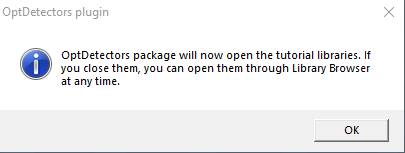
- iOpt plugin Alert.png (7.44 KiB) Viewed 1096 times
You can open Shortcuts from Workspace's File menu in Help
@Clinton
Any ideas on this undefined error?
-
clintonman
- Captain
- Posts: 5659
- Joined: 21 May 2009, 21:08
- Type the number ten into the box: 0
- Location: California
Re: Final trueSpace 7.61 Beta 8 Unofficial Update
Not even a clue. I tried bunch of random stuff to try to break it, but no go. I was hoping you could see the error.trueBlue wrote: 19 Dec 2022, 18:23Is this the Alert you are referring to?Saul wrote: 19 Dec 2022, 16:36 Reset to Default works here but optiDetectors is now loaded automatically ie no OK to click on opening tS? Also i get the attached error trying to open any primitive:Screenshot 2022-12-19 163404.jpg
Edit: Get the same error selecting camera. How to open the shortcut manager?
iOpt plugin Alert.png
You should only get this Alert once
You can open Shortcuts from Workspace's File menu in Help
@Clinton
Any ideas on this undefined error?
Maybe Saul can save a context file [System files (*.ctx)] and upload it. Maybe then can see what's up.
Last edited by clintonman on 19 Dec 2022, 19:22, edited 1 time in total.
-
trueBlue
- Captain
- Posts: 5548
- Joined: 06 Jul 2009, 22:50
- Type the number ten into the box: 10
Re: Final trueSpace 7.61 Beta 8 Unofficial Update
The only thing I see that maybe makes a difference is:clintonman wrote: 19 Dec 2022, 19:02Not even a clue. I tried bunch of random stuff to try to break it, but no go. I was hoping you could see the error.trueBlue wrote: 19 Dec 2022, 18:23Is this the Alert you are referring to?Saul wrote: 19 Dec 2022, 16:36 Reset to Default works here but optiDetectors is now loaded automatically ie no OK to click on opening tS? Also i get the attached error trying to open any primitive:Screenshot 2022-12-19 163404.jpg
Edit: Get the same error selecting camera. How to open the shortcut manager?
iOpt plugin Alert.png
You should only get this Alert once
You can open Shortcuts from Workspace's File menu in Help
@Clinton
Any ideas on this undefined error?
Maybe Saul can save a context file [System files (*.ctx)], zip it up and upload it. Maybe then can see what's up.
I'll see if I can add the ctx type to the server so zip is not required. Also see about adding any other missing file types.
var util = System.CreateDO("Clintons3D Package/Utility functions");
Still removing the var, I cannot replicate the error
-
Saul
- Senior Chief Petty Officer
- Posts: 308
- Joined: 22 May 2009, 16:50
Re: Final trueSpace 7.61 Beta 8 Unofficial Update
[/quote]
Is this the Alert you are referring to?
iOpt plugin Alert.png
You should only get this Alert once
[/quote]
That's the one, following trueBlue instructions for clean install, i do not get the iOpt plugin alert, opening plug manager i find its already loaded.
Is this the Alert you are referring to?
iOpt plugin Alert.png
You should only get this Alert once
[/quote]
That's the one, following trueBlue instructions for clean install, i do not get the iOpt plugin alert, opening plug manager i find its already loaded.
-
clintonman
- Captain
- Posts: 5659
- Joined: 21 May 2009, 21:08
- Type the number ten into the box: 0
- Location: California
Re: Final trueSpace 7.61 Beta 8 Unofficial Update
@Saul, If you're able to save and upload a ctx file, just a heads up that it takes a few moments to finish saving from trueSpace.
-
trueBlue
- Captain
- Posts: 5548
- Joined: 06 Jul 2009, 22:50
- Type the number ten into the box: 10
Re: Final trueSpace 7.61 Beta 8 Unofficial Update
@Saul
What is your process installing trueSpace with the installer?
Are you using any of these options?
.
.
Install Notes:
Install trueSpace761
tS761B8.exe
trueSpace761 Installed and not opened
tS
There is no default.ctx
Scripts
There is no init.js or reset.js files
Open and Close trueSpace
tS
Now there is a default.ctx Size: 6.58 MB (6,901,167 bytes)
Scripts
Now there is a init.js file
// THIS FILE WAS AUTOMATICALLY CREATED BY ROSETTA RUNNER
Still no reset.js file
Open trueSpace and Reset to Default Context
Scripts
Now there is a reset.js file
Close trueSpace install Vray and run UU9
tS76_Vray1_54B8.exe
tS7.61B8.9.exe
Open trueSpace
OptDetectors plugin dialog shows
.
Press OK
Install and Load the Vray_ts.rsx using Package Manager
Ctrl Shift R
Press Default tab layout
Close trueSpace
What is your process installing trueSpace with the installer?
Are you using any of these options?


Install Notes:
Install trueSpace761
tS761B8.exe
trueSpace761 Installed and not opened
tS
There is no default.ctx
Scripts
There is no init.js or reset.js files
Open and Close trueSpace
tS
Now there is a default.ctx Size: 6.58 MB (6,901,167 bytes)
Scripts
Now there is a init.js file
// THIS FILE WAS AUTOMATICALLY CREATED BY ROSETTA RUNNER
Still no reset.js file
Open trueSpace and Reset to Default Context
Scripts
Now there is a reset.js file
Close trueSpace install Vray and run UU9
tS76_Vray1_54B8.exe
tS7.61B8.9.exe
Open trueSpace
OptDetectors plugin dialog shows

- iOpt plugin Alert.png (7.44 KiB) Viewed 1070 times
Press OK
Install and Load the Vray_ts.rsx using Package Manager
Ctrl Shift R
Press Default tab layout
Close trueSpace
-
Saul
- Senior Chief Petty Officer
- Posts: 308
- Joined: 22 May 2009, 16:50
Re: Final trueSpace 7.61 Beta 8 Unofficial Update
Uninstall tS761,vRay and delete container directory.
Reboot computer (just in case)
Implement the following instructions after installing tS761B8:
1.) Install the YafaRay v3.3.0 render engine
2.) Install the tS76PDF 'Manual for Caligari trueSpace' & tS76Video (Optional but required before installing the Update)
3.) Install tS76_Vray1_54B8.exe to C:\trueSpace761 (Optional but required before installing the Update)
4.) Install tS7.61B8.9.exe to C:\trueSpace761
Browse [...] to where you installed C:\trueSpace761, select its folder and then the [Extract] button
Select the [Yes to All] button
5.) Open trueSpace
6.) Select the [OK] button in the OptDetectors plugin Information dialog
7.) Press your keyboard's SHIFT CTRL R keys to Reset to Default Context
When trueSpace opens, select one of the layout tabs at the top
If Vray is installed:
8.) Press your keyboard's CTRL + F8 keys to open the Package Manager
Right click in the Package Manager and select Install New...
Open C:\trueSpace761\Vray_ts.rsx
Right click in the Package Manager's Vray Package and select Load
Close the Package Manager
9.) Close trueSpace
tS761 is not opened, all additional tasks are unchecked and no manuals are opened during install process.
Item 6.) does not occur, opening plug manager shows iOpt loaded.
@clintonMan - The resulting default.ctx is 31.2 mb, you still want it?
Reboot computer (just in case)
Implement the following instructions after installing tS761B8:
1.) Install the YafaRay v3.3.0 render engine
2.) Install the tS76PDF 'Manual for Caligari trueSpace' & tS76Video (Optional but required before installing the Update)
3.) Install tS76_Vray1_54B8.exe to C:\trueSpace761 (Optional but required before installing the Update)
4.) Install tS7.61B8.9.exe to C:\trueSpace761
Browse [...] to where you installed C:\trueSpace761, select its folder and then the [Extract] button
Select the [Yes to All] button
5.) Open trueSpace
6.) Select the [OK] button in the OptDetectors plugin Information dialog
7.) Press your keyboard's SHIFT CTRL R keys to Reset to Default Context
When trueSpace opens, select one of the layout tabs at the top
If Vray is installed:
8.) Press your keyboard's CTRL + F8 keys to open the Package Manager
Right click in the Package Manager and select Install New...
Open C:\trueSpace761\Vray_ts.rsx
Right click in the Package Manager's Vray Package and select Load
Close the Package Manager
9.) Close trueSpace
tS761 is not opened, all additional tasks are unchecked and no manuals are opened during install process.
Item 6.) does not occur, opening plug manager shows iOpt loaded.
@clintonMan - The resulting default.ctx is 31.2 mb, you still want it?
-
Saul
- Senior Chief Petty Officer
- Posts: 308
- Joined: 22 May 2009, 16:50
Re: Final trueSpace 7.61 Beta 8 Unofficial Update
And as for this:
It has something to do with R-Click - calling up preferences - on the workspace NAV toolbar, Red Toolbar:


- Screenshot 2022-12-20 001133.jpg (9.96 KiB) Viewed 1065 times
-
Saul
- Senior Chief Petty Officer
- Posts: 308
- Joined: 22 May 2009, 16:50
Re: Final trueSpace 7.61 Beta 8 Unofficial Update
I think maybe it's R-Click on this Red Toolbar, not the base but the one at the top:
Or maybe this one:


- Screenshot 2022-12-20 004304.jpg (8.69 KiB) Viewed 1059 times
-
clintonman
- Captain
- Posts: 5659
- Joined: 21 May 2009, 21:08
- Type the number ten into the box: 0
- Location: California
Re: Final trueSpace 7.61 Beta 8 Unofficial Update
Sure, if you don't mind uploading.Saul wrote: 19 Dec 2022, 23:57 Uninstall tS761,vRay and delete container directory.
Reboot computer (just in case)
Implement the following instructions after installing tS761B8:
1.) Install the YafaRay v3.3.0 render engine
2.) Install the tS76PDF 'Manual for Caligari trueSpace' & tS76Video (Optional but required before installing the Update)
3.) Install tS76_Vray1_54B8.exe to C:\trueSpace761 (Optional but required before installing the Update)
4.) Install tS7.61B8.9.exe to C:\trueSpace761
Browse [...] to where you installed C:\trueSpace761, select its folder and then the [Extract] button
Select the [Yes to All] button
5.) Open trueSpace
6.) Select the [OK] button in the OptDetectors plugin Information dialog
7.) Press your keyboard's SHIFT CTRL R keys to Reset to Default Context
When trueSpace opens, select one of the layout tabs at the top
If Vray is installed:
8.) Press your keyboard's CTRL + F8 keys to open the Package Manager
Right click in the Package Manager and select Install New...
Open C:\trueSpace761\Vray_ts.rsx
Right click in the Package Manager's Vray Package and select Load
Close the Package Manager
9.) Close trueSpace
tS761 is not opened, all additional tasks are unchecked and no manuals are opened during install process.
Item 6.) does not occur, opening plug manager shows iOpt loaded.
@clintonMan - The resulting default.ctx is 31.2 mb, you still want it?
-
clintonman
- Captain
- Posts: 5659
- Joined: 21 May 2009, 21:08
- Type the number ten into the box: 0
- Location: California
Re: Final trueSpace 7.61 Beta 8 Unofficial Update
Thanks, got the context file via pm.
Still can't see any errors.
Also tried randomly right and left clicking on the various red toolbox icons.
I forgot to mention before, you can disable the Guard by click 3D view, go to Desktop settings and press the Guard button then uncheck Active. This should make the script return before it gets to the line that's causing trouble. If it still fails that could be a clue.
Still can't see any errors.
Also tried randomly right and left clicking on the various red toolbox icons.
I forgot to mention before, you can disable the Guard by click 3D view, go to Desktop settings and press the Guard button then uncheck Active. This should make the script return before it gets to the line that's causing trouble. If it still fails that could be a clue.
-
Saul
- Senior Chief Petty Officer
- Posts: 308
- Joined: 22 May 2009, 16:50
Re: Final trueSpace 7.61 Beta 8 Unofficial Update
'Also tried randomly right and left clicking on the various red toolbox icons.'
After the random right left clicking try to create a cube....
After the random right left clicking try to create a cube....
-
clintonman
- Captain
- Posts: 5659
- Joined: 21 May 2009, 21:08
- Type the number ten into the box: 0
- Location: California
Re: Final trueSpace 7.61 Beta 8 Unofficial Update
I did. Also tried other primitives.Saul wrote: 20 Dec 2022, 01:31 'Also tried randomly right and left clicking on the various red toolbox icons.'
After the random right left clicking try to create a cube....
The issue you're having is super weird. I'm going to make a special Guard script with some extra reporting. Hopefully we can see where the mystery undefined value is coming from.
-
trueBlue
- Captain
- Posts: 5548
- Joined: 06 Jul 2009, 22:50
- Type the number ten into the box: 10
Re: Final trueSpace 7.61 Beta 8 Unofficial Update
If you RClick the Cube primitive, it should show its preferences in the Stack
Does yours look something like this?
Does yours look something like this?

- Primitive preferences.png (11.93 KiB) Viewed 1135 times
-
Saul
- Senior Chief Petty Officer
- Posts: 308
- Joined: 22 May 2009, 16:50
Re: Final trueSpace 7.61 Beta 8 Unofficial Update
OK try this:
Reset the default context
Close tS
Open tS
On the workspace NAV toolbar, L-Click and hold the Red Toolbar icon, roll up and select the Red Toolbar at top of stack:
This opens another toolbar containing Red Briefcase labelled 'trueSpace toolbars/close all toolbars and windows':
R - Click on this Red Briefcase
Toolbar closes
Create Cube:
Reset the default context
Close tS
Open tS
On the workspace NAV toolbar, L-Click and hold the Red Toolbar icon, roll up and select the Red Toolbar at top of stack:


- Screenshot 2022-12-20 004304.jpg (8.69 KiB) Viewed 1140 times
R - Click on this Red Briefcase
Toolbar closes
Create Cube:

- Screenshot 2022-12-20 014400.jpg (8.61 KiB) Viewed 1140 times

- Screenshot 2022-12-20 014949.jpg (23.07 KiB) Viewed 1140 times
-
trueBlue
- Captain
- Posts: 5548
- Joined: 06 Jul 2009, 22:50
- Type the number ten into the box: 10
Re: Final trueSpace 7.61 Beta 8 Unofficial Update
Yep, I get the same thing
Rosetta.Log
Rosetta.Log
Code: Select all
Activity.Run('Scripts/UUCommands/Close All Toolbars Windows and Panels');D3DView.CreateNavToolbar('{2C152F81-45A2-4035-8896-9E49D60C8A7A}');Activity.Run('Scripts/UUCommands/CreateNavToolbar');Activity.Run('Scripts/UUCommands/CreateNavToolbar') - 46 ms 0x00000000  [RsSysCore.cpp(700)]
18:00:32.542 INFO  RsApp.SendCustomEvent("Scripts/CustomCommands/Guard", {Cmd:"RsTool.AddPrimitive('/Widgets/Tools/Primitives/Primitive tool','{EEC8FEE8-EB12-4e12-8ED0-D71CAA2886FD}(/Preferences/Primitives/Matrix manager){C89E0C6B-3F82-4fe2-A232-FB1A7B7F6190}(/Preferences/Primitives/Factory preferences){/Preferences/Primitives/Preferences}','/Preferences/Primitives/Cube');"});Activity.Run("Scripts/CustomCommands/Guard");
-
trueBlue
- Captain
- Posts: 5548
- Joined: 06 Jul 2009, 22:50
- Type the number ten into the box: 10
Re: Final trueSpace 7.61 Beta 8 Unofficial Update
So, this is my bad
There are two things wrong with this
Activity.Run('Scripts/UUCommands/CreateNavToolbar')
Is running twice
Activity.Run('Scripts/UUCommands/Close All Toolbars Windows and Panels')
Is selecting the panels and closing them
I need to add:
Space.Unselect() to the Remove panels in the Stack_Panel script
When Saul did this there was a selection which made the Guard run when using the Cube primitive
There are two things wrong with this
Activity.Run('Scripts/UUCommands/CreateNavToolbar')
Is running twice
Activity.Run('Scripts/UUCommands/Close All Toolbars Windows and Panels')
Is selecting the panels and closing them
I need to add:
Space.Unselect() to the Remove panels in the Stack_Panel script
When Saul did this there was a selection which made the Guard run when using the Cube primitive
-
clintonman
- Captain
- Posts: 5659
- Joined: 21 May 2009, 21:08
- Type the number ten into the box: 0
- Location: California
Re: Final trueSpace 7.61 Beta 8 Unofficial Update
There also seems to be a tS scripting bug.trueBlue wrote: 20 Dec 2022, 02:21 So, this is my bad
There are two things wrong with this
Activity.Run('Scripts/UUCommands/CreateNavToolbar')
Is running twice
Activity.Run('Scripts/UUCommands/Close All Toolbars Windows and Panels')
Is selecting the panels and closing them
I need to add:
Space.Unselect() to the Remove panels in the Stack_Panel script
When Saul did this there was a selection which made the Guard run when using the Cube primitive
I finished my test report version of Guard at the same time Saul got the steps to reproduce the error.
Here is the interesting part of the report:
Code: Select all
19:01:52.275 INFO  selectionRequired #false#                                                                            0x00000000  [RiSystemCommand.cpp(77)]
19:01:52.275 INFO  selCount #4#                                                                                         0x00000000  [RiSystemCommand.cpp(77)]
19:01:52.275 INFO  selection #Frame Window, 1; CustomRedBarFrame;  Frame, 1#                                            0x00000000  [RiSystemCommand.cpp(77)]
19:01:52.275 INFO selectionArray.length #3# 0x00000000 [RiSystemCommand.cpp(77)]Both values are wrong as we know from the main deselect/delete bug in tS. They both should have been a value of 0. Another thing new to me is that the selection, "Frame Window, 1; CustomRedBarFrame; Frame, 1" are not valid paths, they should each have at least "Project/Windows Manager Space/" in front of them.
Another fix for the problem would be to add a single line of code just above the line with the error:
Code: Select all
if(!selectionArray[i]) continue;-
clintonman
- Captain
- Posts: 5659
- Joined: 21 May 2009, 21:08
- Type the number ten into the box: 0
- Location: California
Re: Final trueSpace 7.61 Beta 8 Unofficial Update
Oh, one more thing. we could have found the issue earlier if we had just asked for the Rosetta log file.
"Guard start" at the end is from my report version, it would have been the error in the actual Guard script.
Code: Select all
19:39:52.897 INFO  Activity.Run('Scripts/UUCommands/Red Toolbar') - 16 ms                                               0x00000000  [RsSysCore.cpp(700)]
19:39:54.378 INFO  Activity.Run('Scripts/UUCommands/Close All Toolbars Windows and Panels');D3DView.CreateNavToolbar('{2C152F81-45A2-4035-8896-9E49D60C8A7A}');Activity.Run('Scripts/UUCommands/CreateNavToolbar');Activity.Run('Scripts/UUCommands/CreateNavToolbar') - 63 ms 0x00000000  [RsSysCore.cpp(700)]
19:40:00.282 INFO Guard start 0x00000000 [RiSystemCommand.cpp(77)]-
trueBlue
- Captain
- Posts: 5548
- Joined: 06 Jul 2009, 22:50
- Type the number ten into the box: 10
Re: Final trueSpace 7.61 Beta 8 Unofficial Update
@Saul
Thanks for your help!
@Clinton
Thanks for your help!
What is the plan of attack for any scripts that need to be fixed?
Thanks for your help!
@Clinton
Thanks for your help!
What is the plan of attack for any scripts that need to be fixed?
-
clintonman
- Captain
- Posts: 5659
- Joined: 21 May 2009, 21:08
- Type the number ten into the box: 0
- Location: California
Re: Final trueSpace 7.61 Beta 8 Unofficial Update
I'll get back to you on that. Probably start by doing a search on the script code. See if there's anything practical that can be done.trueBlue wrote: 20 Dec 2022, 04:08 @Saul
Thanks for your help!
@Clinton
Thanks for your help!
What is the plan of attack for any scripts that need to be fixed?
-
trueBlue
- Captain
- Posts: 5548
- Joined: 06 Jul 2009, 22:50
- Type the number ten into the box: 10
Re: Final trueSpace 7.61 Beta 8 Unofficial Update
trueSpace7.61 Beta 8 Unofficial Update Version 9
Please test this RC10 12/20/2022
New Unofficial Update Instructions:
It is Required that you completely Uninstall and Install trueSpace7.61 Beta 8 to a clean directory
Install the PDF Manual for trueSpace (Optional but required before installing the Update)
Install the tS76_Vray1_54B8.exe (Optional but required before installing the Update)
If trueSpace is open, Close trueSpace
1.) Install the YafaRay v3.3.0 render engine
2.) Install the tS76PDF 'Manual for Caligari trueSpace' & tS76Video (Optional but required before installing the Update)
3.) Install tS76_Vray1_54B8.exe to C:\trueSpace761 (Optional but required before installing the Update)
4.) Install tS7.61B8.9.exe to C:\trueSpace761
Browse [...] to where you installed C:\trueSpace761, select its folder and then the [Extract] button
Select the [Yes to All] button
5.) Open trueSpace
6.) Select the [OK] button in the OptDetectors plugin Information dialog
7.) Press your keyboard's SHIFT CTRL R keys to Reset to Default Context
When trueSpace opens, select one of the layout tabs at the top
If Vray is installed:
8.) Press your keyboard's CTRL + F8 keys to open the Package Manager
Right click in the Package Manager and select Install New...
Open C:\trueSpace761\Vray_ts.rsx
Right click in the Package Manager's Vray Package and select Load
Close the Package Manager
9.) Close trueSpace
The included Clintons3dPlugin.dll v.1638433, Clintons3dPluginExt.dll v.1638413, Clintons3dRsView.dll v.1638409 and the OptDetectors.dll Author - Vladimir Sisolak, are in: C:\trueSpace761
WARNING: The init.js file Imports the above 4 plugins and should not be Installed from the Package Manager, including any other plugins with the same name that have the rsx extension
All scripts that check for these plugins with the rsx extension have been removed!
Unofficial Update Version 9
Started on Fri Sep 02, 2022
Commands
Removed all of the discontinued xml scripts
Plugins Author - Clinton Reese
Renamed from rsx to dll:
Clintons3dPlugin.dll
Clintons3dRsView.dll
Clintons3dPluginExt.dll
Add
OptDetectors.dll Author - Vladimir Sisolak
Library
Add
OptDetectors
OptDetectors - Help objects
OptDetectors - Samples
Scripts
Update
init.js 'Loads the above 4 plugins'
Window.Shortcuts.xml
tS761 Workspace Shortcut List.rtf
Widget.Shortcuts.xml
CustomCommands Author - Clinton Reese
Add
JSON Function Set
Global Function Set
Dimensions
Hierarchy
Toolbar Manager
ShortcutRunner
preobjects
Add
UUCommands
Add
Commands
Uneditable
12/20/2022 - Fixed UUCommands, trueSpace Toolbars RClick command, and updated Window.Shortcuts.xml 'NumPad shortcuts sync with Model'
If the plugins do not Load, Download and Install the Microsoft Visual C++ 2008 Service Pack 1 Redistributable Package
https://www.microsoft.com/en-us/downloa ... x?id=26368
Note: When downloading the Microsoft Visual C++ 2008 Service Pack 1 Redistributable Package you are given 3 choices
Choose the 32-bit version; vcredist_x86.exe
Removed due to update
Please test this RC10 12/20/2022
New Unofficial Update Instructions:
It is Required that you completely Uninstall and Install trueSpace7.61 Beta 8 to a clean directory
Install the PDF Manual for trueSpace (Optional but required before installing the Update)
Install the tS76_Vray1_54B8.exe (Optional but required before installing the Update)
If trueSpace is open, Close trueSpace
1.) Install the YafaRay v3.3.0 render engine
2.) Install the tS76PDF 'Manual for Caligari trueSpace' & tS76Video (Optional but required before installing the Update)
3.) Install tS76_Vray1_54B8.exe to C:\trueSpace761 (Optional but required before installing the Update)
4.) Install tS7.61B8.9.exe to C:\trueSpace761
Browse [...] to where you installed C:\trueSpace761, select its folder and then the [Extract] button
Select the [Yes to All] button
5.) Open trueSpace
6.) Select the [OK] button in the OptDetectors plugin Information dialog
7.) Press your keyboard's SHIFT CTRL R keys to Reset to Default Context
When trueSpace opens, select one of the layout tabs at the top
If Vray is installed:
8.) Press your keyboard's CTRL + F8 keys to open the Package Manager
Right click in the Package Manager and select Install New...
Open C:\trueSpace761\Vray_ts.rsx
Right click in the Package Manager's Vray Package and select Load
Close the Package Manager
9.) Close trueSpace
The included Clintons3dPlugin.dll v.1638433, Clintons3dPluginExt.dll v.1638413, Clintons3dRsView.dll v.1638409 and the OptDetectors.dll Author - Vladimir Sisolak, are in: C:\trueSpace761
WARNING: The init.js file Imports the above 4 plugins and should not be Installed from the Package Manager, including any other plugins with the same name that have the rsx extension
All scripts that check for these plugins with the rsx extension have been removed!
Unofficial Update Version 9
Started on Fri Sep 02, 2022
Commands
Removed all of the discontinued xml scripts
Plugins Author - Clinton Reese
Renamed from rsx to dll:
Clintons3dPlugin.dll
Clintons3dRsView.dll
Clintons3dPluginExt.dll
Add
OptDetectors.dll Author - Vladimir Sisolak
Library
Add
OptDetectors
OptDetectors - Help objects
OptDetectors - Samples
Scripts
Update
init.js 'Loads the above 4 plugins'
Window.Shortcuts.xml
tS761 Workspace Shortcut List.rtf
Widget.Shortcuts.xml
CustomCommands Author - Clinton Reese
Add
JSON Function Set
Global Function Set
Dimensions
Hierarchy
Toolbar Manager
ShortcutRunner
preobjects
Add
UUCommands
Add
Commands
Uneditable
12/20/2022 - Fixed UUCommands, trueSpace Toolbars RClick command, and updated Window.Shortcuts.xml 'NumPad shortcuts sync with Model'
If the plugins do not Load, Download and Install the Microsoft Visual C++ 2008 Service Pack 1 Redistributable Package
https://www.microsoft.com/en-us/downloa ... x?id=26368
Note: When downloading the Microsoft Visual C++ 2008 Service Pack 1 Redistributable Package you are given 3 choices
Choose the 32-bit version; vcredist_x86.exe
Removed due to update
-
clintonman
- Captain
- Posts: 5659
- Joined: 21 May 2009, 21:08
- Type the number ten into the box: 0
- Location: California
Re: Final trueSpace 7.61 Beta 8 Unofficial Update
I looked through the code but didn't find anything that would cause the same issue. It wasn't an exhaustive search since that would mean reading and understanding several thousands lines of code around every delete command used. There's over 500 deletes, but you have to read lines above and below it to find the error. I quickly looked through it to see if anything stuck out.trueBlue wrote: 20 Dec 2022, 04:08 @Saul
Thanks for your help!
@Clinton
Thanks for your help!
What is the plan of attack for any scripts that need to be fixed?
The only oddball I found was the "Close All Toolbars Windows and Panels". There is a fix for the error a couple of nodes down the line, but if this one was ever copied on it's own or a change was made to terminate execution before getting to the fix, the error would return.
Attached is a version that works more like the "Close All Panels" script. It does not change the selection. So the selection cannot become invalid when closing windows, panels and toolbars.
I also recommend removing the Space.Unselect from the last node since it's not needed anymore and it's better to preserve the selection.
- Attachments
-
- Close All Toolbars Windows and Panels.RsObj
- (6.52 KiB) Downloaded 78 times
-
trueBlue
- Captain
- Posts: 5548
- Joined: 06 Jul 2009, 22:50
- Type the number ten into the box: 10
Re: Final trueSpace 7.61 Beta 8 Unofficial Update
Thanks, I will replace the codeclintonman wrote: 21 Dec 2022, 00:14I looked through the code but didn't find anything that would cause the same issue. It wasn't an exhaustive search since that would mean reading and understanding several thousands lines of code around every delete command used. There's over 500 deletes, but you have to read lines above and below it to find the error. I quickly looked through it to see if anything stuck out.trueBlue wrote: 20 Dec 2022, 04:08 @Saul
Thanks for your help!
@Clinton
Thanks for your help!
What is the plan of attack for any scripts that need to be fixed?
The only oddball I found was the "Close All Toolbars Windows and Panels". There is a fix for the error a couple of nodes down the line, but if this one was ever copied on it's own or a change was made to terminate execution before getting to the fix, the error would return.
Attached is a version that works more like the "Close All Panels" script. It does not change the selection. So the selection cannot become invalid when closing windows, panels and toolbars.
Off subject, I dug through your YafaRay4tS code and have come up with a script to fix an issue with YafaRay4tS when loading and rendering an unsupported scene
It is not complete because I believe there is other possible render paths
Also not sure how to implement into the YafaRay4tS UI
Code: Select all
	var fso = new ActiveXObject("Scripting.FileSystemObject");
	var renderpath = Node.Value(Space.CurrentScene() + '/YafaRay4tS', 'Yaf_RenderFilename')

	var file, dir
		dir = StripPath(renderpath);
		file = dir + 'yaf_temp.xml';

	if(!fso.FileExists(file)) return

	try{
		if(fso.FileExists(file)) {
		fso.DeleteFile(file)
		}
	}catch(e){
		System.Alert('File is in use\n\nClose trueSpace and try again')
	}

	if(Node.Exists(Space.CurrentScene() + '/YafaRay4tS')) {
		Activity.Run(Space.CurrentScene() + '/YafaRay4tS/ClearStatus')
	}
}

function StripPath(Str) {
	var pos = Str.lastIndexOf('\\');
	if (pos > 0) {
		return Str.substring(0, pos + 1);
	}
	return Str;
-
trueBlue
- Captain
- Posts: 5548
- Joined: 06 Jul 2009, 22:50
- Type the number ten into the box: 10
Re: Final trueSpace 7.61 Beta 8 Unofficial Update
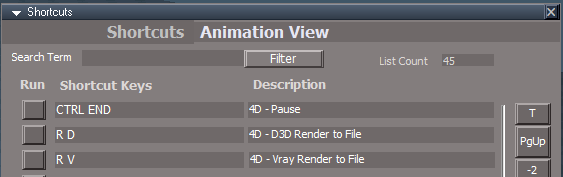
I am adding two shortcuts to the Animation View:
R D = D3D Render to File
R V = Vray Render to File
Edit Turns out using two letters does not work as expected. Only the last letter is used
Changed to:
Animation View
CTRL R = Render to File
CTRL O = Render Animation
.
.
Can you think of any other shortcuts to add?
R D = D3D Render to File
R V = Vray Render to File
Edit Turns out using two letters does not work as expected. Only the last letter is used
Changed to:
Animation View
CTRL R = Render to File
CTRL O = Render Animation
.
Can you think of any other shortcuts to add?
-
clintonman
- Captain
- Posts: 5659
- Joined: 21 May 2009, 21:08
- Type the number ten into the box: 0
- Location: California
Re: Final trueSpace 7.61 Beta 8 Unofficial Update
Nope, nothing comes to mind.trueBlue wrote: 21 Dec 2022, 04:02 I am adding two shortcuts to the Animation View:
R D = D3D Render to File
R V = Vray Render to File
Shortcuts.png
.
Can you think of any other shortcuts to add?
-
trueBlue
- Captain
- Posts: 5548
- Joined: 06 Jul 2009, 22:50
- Type the number ten into the box: 10
Re: Final trueSpace 7.61 Beta 8 Unofficial Update
trueSpace7.61 Beta 8 Unofficial Update Version 9
Please test this RC11 12/21/2022
New Unofficial Update Instructions:
It is Required that you completely Uninstall and Install trueSpace7.61 Beta 8 to a clean directory
You can keep your Rs Main Libraries folder, but all other folders and files should be removed
Install the PDF Manual for trueSpace (Optional but required before installing the Update)
Install the tS76_Vray1_54B8.exe (Optional but required before installing the Update)
If trueSpace is open, Close trueSpace
1.) Install the YafaRay v3.3.0 render engine
2.) Install the tS76PDF 'Manual for Caligari trueSpace' & tS76Video (Optional but required before installing the Update)
3.) Install tS76_Vray1_54B8.exe to C:\trueSpace761 (Optional but required before installing the Update)
4.) Install tS7.61B8.9.exe to C:\trueSpace761
Browse [...] to where you installed C:\trueSpace761, select its folder and then the [Extract] button
Select the [Yes to All] button
5.) Open trueSpace
6.) Select the [OK] button in the OptDetectors plugin Information dialog
7.) Press your keyboard's SHIFT CTRL R keys to Reset to Default Context
When trueSpace opens, select one of the layout tabs at the top
If Vray is installed:
8.) Press your keyboard's CTRL + F8 keys to open the Package Manager
Right click in the Package Manager and select Install New...
Open C:\trueSpace761\Vray_ts.rsx
Right click in the Package Manager's Vray Package and select Load
Close the Package Manager
9.) Close trueSpace
The included Clintons3dPlugin.dll v.1638433, Clintons3dPluginExt.dll v.1638413, Clintons3dRsView.dll v.1638409 and the OptDetectors.dll Author - Vladimir Sisolak, are in: C:\trueSpace761
WARNING: The init.js file Imports the above 4 plugins and should not be Installed from the Package Manager, including any other plugins with the same name that have the rsx extension
All scripts that check for these plugins with the rsx extension have been removed!
Unofficial Update Version 9
Started on Fri Sep 02, 2022
Commands
Removed all of the discontinued xml scripts
Plugins Author - Clinton Reese
Renamed from rsx to dll:
Clintons3dPlugin.dll
Clintons3dRsView.dll
Clintons3dPluginExt.dll
Add
OptDetectors.dll Author - Vladimir Sisolak
Library
Add
OptDetectors
OptDetectors - Help objects
OptDetectors - Samples
Scripts
Update
init.js 'Loads the above 4 plugins'
Window.Shortcuts.xml
tS761 Workspace Shortcut List.rtf
Widget.Shortcuts.xml
CustomCommands Author - Clinton Reese
Add
JSON Function Set
Global Function Set
Dimensions
Hierarchy
Toolbar Manager
ShortcutRunner
preobjects
Add
UUCommands
Add
Commands
Uneditable
12/21/2022 - Update UUCommands, Widget.Shortcuts.xml, update and add two shortcuts to Window.Shortcuts.xml and tS761 Workspace Shortcut List.rtf
Animation View
CTRL R = Render to File
CTRL O = Render Animation
If the plugins do not Load, Download and Install the Microsoft Visual C++ 2008 Service Pack 1 Redistributable Package
https://www.microsoft.com/en-us/downloa ... x?id=26368
Note: When downloading the Microsoft Visual C++ 2008 Service Pack 1 Redistributable Package you are given 3 choices
Choose the 32-bit version; vcredist_x86.exe
Removed due to update
Please test this RC11 12/21/2022
New Unofficial Update Instructions:
It is Required that you completely Uninstall and Install trueSpace7.61 Beta 8 to a clean directory
You can keep your Rs Main Libraries folder, but all other folders and files should be removed
Install the PDF Manual for trueSpace (Optional but required before installing the Update)
Install the tS76_Vray1_54B8.exe (Optional but required before installing the Update)
If trueSpace is open, Close trueSpace
1.) Install the YafaRay v3.3.0 render engine
2.) Install the tS76PDF 'Manual for Caligari trueSpace' & tS76Video (Optional but required before installing the Update)
3.) Install tS76_Vray1_54B8.exe to C:\trueSpace761 (Optional but required before installing the Update)
4.) Install tS7.61B8.9.exe to C:\trueSpace761
Browse [...] to where you installed C:\trueSpace761, select its folder and then the [Extract] button
Select the [Yes to All] button
5.) Open trueSpace
6.) Select the [OK] button in the OptDetectors plugin Information dialog
7.) Press your keyboard's SHIFT CTRL R keys to Reset to Default Context
When trueSpace opens, select one of the layout tabs at the top
If Vray is installed:
8.) Press your keyboard's CTRL + F8 keys to open the Package Manager
Right click in the Package Manager and select Install New...
Open C:\trueSpace761\Vray_ts.rsx
Right click in the Package Manager's Vray Package and select Load
Close the Package Manager
9.) Close trueSpace
The included Clintons3dPlugin.dll v.1638433, Clintons3dPluginExt.dll v.1638413, Clintons3dRsView.dll v.1638409 and the OptDetectors.dll Author - Vladimir Sisolak, are in: C:\trueSpace761
WARNING: The init.js file Imports the above 4 plugins and should not be Installed from the Package Manager, including any other plugins with the same name that have the rsx extension
All scripts that check for these plugins with the rsx extension have been removed!
Unofficial Update Version 9
Started on Fri Sep 02, 2022
Commands
Removed all of the discontinued xml scripts
Plugins Author - Clinton Reese
Renamed from rsx to dll:
Clintons3dPlugin.dll
Clintons3dRsView.dll
Clintons3dPluginExt.dll
Add
OptDetectors.dll Author - Vladimir Sisolak
Library
Add
OptDetectors
OptDetectors - Help objects
OptDetectors - Samples
Scripts
Update
init.js 'Loads the above 4 plugins'
Window.Shortcuts.xml
tS761 Workspace Shortcut List.rtf
Widget.Shortcuts.xml
CustomCommands Author - Clinton Reese
Add
JSON Function Set
Global Function Set
Dimensions
Hierarchy
Toolbar Manager
ShortcutRunner
preobjects
Add
UUCommands
Add
Commands
Uneditable
12/21/2022 - Update UUCommands, Widget.Shortcuts.xml, update and add two shortcuts to Window.Shortcuts.xml and tS761 Workspace Shortcut List.rtf
Animation View
CTRL R = Render to File
CTRL O = Render Animation
If the plugins do not Load, Download and Install the Microsoft Visual C++ 2008 Service Pack 1 Redistributable Package
https://www.microsoft.com/en-us/downloa ... x?id=26368
Note: When downloading the Microsoft Visual C++ 2008 Service Pack 1 Redistributable Package you are given 3 choices
Choose the 32-bit version; vcredist_x86.exe
Removed due to update
-
Saul
- Senior Chief Petty Officer
- Posts: 308
- Joined: 22 May 2009, 16:50
Re: Final trueSpace 7.61 Beta 8 Unofficial Update
I don't know if this is some problem with my keyboard or tS:
Item 7.) of install instructions, SHIFT-CTRL-R doesn't work to reset to default, the icon works fine. Once the icon has been used for reset, the SHIFT-CTRL-R works.
In tS most shortcuts are not working, DELETE does not delete, CTRL-Z does not undo. The icons and the shortcut manager perform the correct actions but their use doesn't release the keyboard shortcut.
Item 7.) of install instructions, SHIFT-CTRL-R doesn't work to reset to default, the icon works fine. Once the icon has been used for reset, the SHIFT-CTRL-R works.
In tS most shortcuts are not working, DELETE does not delete, CTRL-Z does not undo. The icons and the shortcut manager perform the correct actions but their use doesn't release the keyboard shortcut.
-
trueBlue
- Captain
- Posts: 5548
- Joined: 06 Jul 2009, 22:50
- Type the number ten into the box: 10
Re: Final trueSpace 7.61 Beta 8 Unofficial Update
Ugh, I see they are not working since those last modificationsSaul wrote: 22 Dec 2022, 13:21 I don't know if this is some problem with my keyboard or tS:
Item 7.) of install instructions, SHIFT-CTRL-R doesn't work to reset to default, the icon works fine. Once the icon has been used for reset, the SHIFT-CTRL-R works.
In tS most shortcuts are not working, DELETE does not delete, CTRL-Z does not undo. The icons and the shortcut manager perform the correct actions but their use doesn't release the keyboard shortcut.
Here is an updated Window.Shortcuts.xml file for tS761 UU9 ONLY
Please do not use with any other version of trueSpace
Replace the C:\trueSpace761\tS\Scripts\Window.Shortcuts.xml with this new one
Restart trueSpace761
Edit: Not sure what this means
Removed due to updateThe icons and the shortcut manager perform the correct actions but their use doesn't release the keyboard shortcut
-
trueBlue
- Captain
- Posts: 5548
- Joined: 06 Jul 2009, 22:50
- Type the number ten into the box: 10
Re: Final trueSpace 7.61 Beta 8 Unofficial Update
trueSpace7.61 Beta 8 Unofficial Update Version 9
Please test this RC12 12/22/2022
New Unofficial Update Instructions:
It is Required that you completely Uninstall and Install trueSpace7.61 Beta 8 to a clean directory
You can keep your Rs Main Libraries folder, but all other folders and files should be removed
Install the PDF Manual for trueSpace (Optional but required before installing the Update)
Install the tS76_Vray1_54B8.exe (Optional but required before installing the Update)
If trueSpace is open, Close trueSpace
1.) Install the YafaRay v3.3.0 render engine
2.) Install the tS76PDF 'Manual for Caligari trueSpace' & tS76Video (Optional but required before installing the Update)
3.) Install tS76_Vray1_54B8.exe to C:\trueSpace761 (Optional but required before installing the Update)
4.) Install tS7.61B8.9.exe to C:\trueSpace761
Browse [...] to where you installed C:\trueSpace761, select its folder and then the [Extract] button
Select the [Yes to All] button
5.) Open trueSpace
6.) Select the [OK] button in the OptDetectors plugin Information dialog
7.) Reset to Default Context
.
When trueSpace opens, select one of the layout tabs at the top
If Vray is installed:
8.) Press your keyboard's CTRL + F8 keys to open the Package Manager
Right click in the Package Manager and select Install New...
Open C:\trueSpace761\Vray_ts.rsx
Right click in the Package Manager's Vray Package and select Load
Close the Package Manager
9.) Close trueSpace
The included Clintons3dPlugin.dll v.1638433, Clintons3dPluginExt.dll v.1638413, Clintons3dRsView.dll v.1638409 and the OptDetectors.dll Author - Vladimir Sisolak, are in: C:\trueSpace761
WARNING: The init.js file Imports the above 4 plugins and should not be Installed from the Package Manager, including any other plugins with the same name that have the rsx extension
All scripts that check for these plugins with the rsx extension have been removed!
Unofficial Update Version 9
Started on Fri Sep 02, 2022
Commands
Removed all of the discontinued xml scripts
Plugins Author - Clinton Reese
Renamed from rsx to dll:
Clintons3dPlugin.dll
Clintons3dRsView.dll
Clintons3dPluginExt.dll
Add
OptDetectors.dll Author - Vladimir Sisolak
Library
Add
OptDetectors
OptDetectors - Help objects
OptDetectors - Samples
Scripts
Update
init.js 'Loads the above 4 plugins'
Window.Shortcuts.xml
tS761 Workspace Shortcut List.rtf
Widget.Shortcuts.xml
CustomCommands Author - Clinton Reese
Add
JSON Function Set
Global Function Set
Dimensions
Hierarchy
Toolbar Manager
ShortcutRunner
preobjects
Add
UUCommands
Add
Commands
Uneditable
12/22/2022 - Update: Window.Shortcuts.xml and tS761 Workspace Shortcut List.rtf
SHIFT CTRL R = Reset to Default Context
CTRL R = Render to File
CTRL O = Render Animation
If the plugins do not Load, Download and Install the Microsoft Visual C++ 2008 Service Pack 1 Redistributable Package
https://www.microsoft.com/en-us/downloa ... x?id=26368
Note: When downloading the Microsoft Visual C++ 2008 Service Pack 1 Redistributable Package you are given 3 choices
Choose the 32-bit version; vcredist_x86.exe
Removed due to update
Please test this RC12 12/22/2022
New Unofficial Update Instructions:
It is Required that you completely Uninstall and Install trueSpace7.61 Beta 8 to a clean directory
You can keep your Rs Main Libraries folder, but all other folders and files should be removed
Install the PDF Manual for trueSpace (Optional but required before installing the Update)
Install the tS76_Vray1_54B8.exe (Optional but required before installing the Update)
If trueSpace is open, Close trueSpace
1.) Install the YafaRay v3.3.0 render engine
2.) Install the tS76PDF 'Manual for Caligari trueSpace' & tS76Video (Optional but required before installing the Update)
3.) Install tS76_Vray1_54B8.exe to C:\trueSpace761 (Optional but required before installing the Update)
4.) Install tS7.61B8.9.exe to C:\trueSpace761
Browse [...] to where you installed C:\trueSpace761, select its folder and then the [Extract] button
Select the [Yes to All] button
5.) Open trueSpace
6.) Select the [OK] button in the OptDetectors plugin Information dialog
7.) Reset to Default Context

When trueSpace opens, select one of the layout tabs at the top
If Vray is installed:
8.) Press your keyboard's CTRL + F8 keys to open the Package Manager
Right click in the Package Manager and select Install New...
Open C:\trueSpace761\Vray_ts.rsx
Right click in the Package Manager's Vray Package and select Load
Close the Package Manager
9.) Close trueSpace
The included Clintons3dPlugin.dll v.1638433, Clintons3dPluginExt.dll v.1638413, Clintons3dRsView.dll v.1638409 and the OptDetectors.dll Author - Vladimir Sisolak, are in: C:\trueSpace761
WARNING: The init.js file Imports the above 4 plugins and should not be Installed from the Package Manager, including any other plugins with the same name that have the rsx extension
All scripts that check for these plugins with the rsx extension have been removed!
Unofficial Update Version 9
Started on Fri Sep 02, 2022
Commands
Removed all of the discontinued xml scripts
Plugins Author - Clinton Reese
Renamed from rsx to dll:
Clintons3dPlugin.dll
Clintons3dRsView.dll
Clintons3dPluginExt.dll
Add
OptDetectors.dll Author - Vladimir Sisolak
Library
Add
OptDetectors
OptDetectors - Help objects
OptDetectors - Samples
Scripts
Update
init.js 'Loads the above 4 plugins'
Window.Shortcuts.xml
tS761 Workspace Shortcut List.rtf
Widget.Shortcuts.xml
CustomCommands Author - Clinton Reese
Add
JSON Function Set
Global Function Set
Dimensions
Hierarchy
Toolbar Manager
ShortcutRunner
preobjects
Add
UUCommands
Add
Commands
Uneditable
12/22/2022 - Update: Window.Shortcuts.xml and tS761 Workspace Shortcut List.rtf
SHIFT CTRL R = Reset to Default Context
CTRL R = Render to File
CTRL O = Render Animation
If the plugins do not Load, Download and Install the Microsoft Visual C++ 2008 Service Pack 1 Redistributable Package
https://www.microsoft.com/en-us/downloa ... x?id=26368
Note: When downloading the Microsoft Visual C++ 2008 Service Pack 1 Redistributable Package you are given 3 choices
Choose the 32-bit version; vcredist_x86.exe
Removed due to update
-
trueBlue
- Captain
- Posts: 5548
- Joined: 06 Jul 2009, 22:50
- Type the number ten into the box: 10
Re: Final trueSpace 7.61 Beta 8 Unofficial Update
trueSpace7.61 Beta 8 Unofficial Update Version 9
Please test this RC13 12/24/2022
New Unofficial Update Instructions:
It is Required that you completely Uninstall and Install trueSpace7.61 Beta 8 to a clean directory
You can keep your Rs Main Libraries folder, but all other folders and files should be removed
Install the PDF Manual for trueSpace (Optional but required before installing the Update)
Install the tS76_Vray1_54B8.exe (Optional but required before installing the Update)
If trueSpace is open, Close trueSpace
1.) Install the YafaRay v3.3.0 render engine
2.) Install the tS76PDF 'Manual for Caligari trueSpace' & tS76Video (Optional but required before installing the Update)
3.) Install tS76_Vray1_54B8.exe to C:\trueSpace761 (Optional but required before installing the Update)
4.) Install tS7.61B8.9.exe to C:\trueSpace761
Browse [...] to where you installed C:\trueSpace761, select its folder and then the [Extract] button
Select the [Yes to All] button
5.) Open trueSpace
6.) Select the [OK] button in the OptDetectors plugin Information dialog
7.) Reset to Default Context
.
When trueSpace opens, select one of the layout tabs at the top
If Vray is installed:
8.) Press your keyboard's CTRL + F8 keys to open the Package Manager
Right click in the Package Manager and select Install New...
Open C:\trueSpace761\Vray_ts.rsx
Right click in the Package Manager's Vray Package and select Load
Close the Package Manager
9.) Close trueSpace
The included Clintons3dPlugin.dll v.1638433, Clintons3dPluginExt.dll v.1638413, Clintons3dRsView.dll v.1638409 and the OptDetectors.dll Author - Vladimir Sisolak, are in: C:\trueSpace761
WARNING: The init.js file Imports the above 4 plugins and should not be Installed from the Package Manager, including any other plugins with the same name that have the rsx extension
All scripts that check for these plugins with the rsx extension have been removed!
Unofficial Update Version 9
Started on Fri Sep 02, 2022
Commands
Removed all of the discontinued xml scripts
Plugins Author - Clinton Reese
Renamed from rsx to dll:
Clintons3dPlugin.dll
Clintons3dRsView.dll
Clintons3dPluginExt.dll
Add
OptDetectors.dll Author - Vladimir Sisolak
Library
Add
OptDetectors
OptDetectors - Help objects
OptDetectors - Samples
Scripts
Update
init.js 'Loads the above 4 plugins'
Window.Shortcuts.xml
tS761 Workspace Shortcut List.rtf
Widget.Shortcuts.xml
CustomCommands Author - Clinton Reese
Add
JSON Function Set
Global Function Set
Dimensions
Hierarchy
Toolbar Manager
ShortcutRunner
preobjects
Add
UUCommands
Add
Commands
Uneditable
12/24/2022 - Update: Yafaray Folder & YafaRay4tS.RsScn Author - Clinton Reese
If the plugins do not Load, Download and Install the Microsoft Visual C++ 2008 Service Pack 1 Redistributable Package
https://www.microsoft.com/en-us/downloa ... x?id=26368
Note: When downloading the Microsoft Visual C++ 2008 Service Pack 1 Redistributable Package you are given 3 choices
Choose the 32-bit version; vcredist_x86.exe
Removed due to update
Please test this RC13 12/24/2022
New Unofficial Update Instructions:
It is Required that you completely Uninstall and Install trueSpace7.61 Beta 8 to a clean directory
You can keep your Rs Main Libraries folder, but all other folders and files should be removed
Install the PDF Manual for trueSpace (Optional but required before installing the Update)
Install the tS76_Vray1_54B8.exe (Optional but required before installing the Update)
If trueSpace is open, Close trueSpace
1.) Install the YafaRay v3.3.0 render engine
2.) Install the tS76PDF 'Manual for Caligari trueSpace' & tS76Video (Optional but required before installing the Update)
3.) Install tS76_Vray1_54B8.exe to C:\trueSpace761 (Optional but required before installing the Update)
4.) Install tS7.61B8.9.exe to C:\trueSpace761
Browse [...] to where you installed C:\trueSpace761, select its folder and then the [Extract] button
Select the [Yes to All] button
5.) Open trueSpace
6.) Select the [OK] button in the OptDetectors plugin Information dialog
7.) Reset to Default Context

When trueSpace opens, select one of the layout tabs at the top
If Vray is installed:
8.) Press your keyboard's CTRL + F8 keys to open the Package Manager
Right click in the Package Manager and select Install New...
Open C:\trueSpace761\Vray_ts.rsx
Right click in the Package Manager's Vray Package and select Load
Close the Package Manager
9.) Close trueSpace
The included Clintons3dPlugin.dll v.1638433, Clintons3dPluginExt.dll v.1638413, Clintons3dRsView.dll v.1638409 and the OptDetectors.dll Author - Vladimir Sisolak, are in: C:\trueSpace761
WARNING: The init.js file Imports the above 4 plugins and should not be Installed from the Package Manager, including any other plugins with the same name that have the rsx extension
All scripts that check for these plugins with the rsx extension have been removed!
Unofficial Update Version 9
Started on Fri Sep 02, 2022
Commands
Removed all of the discontinued xml scripts
Plugins Author - Clinton Reese
Renamed from rsx to dll:
Clintons3dPlugin.dll
Clintons3dRsView.dll
Clintons3dPluginExt.dll
Add
OptDetectors.dll Author - Vladimir Sisolak
Library
Add
OptDetectors
OptDetectors - Help objects
OptDetectors - Samples
Scripts
Update
init.js 'Loads the above 4 plugins'
Window.Shortcuts.xml
tS761 Workspace Shortcut List.rtf
Widget.Shortcuts.xml
CustomCommands Author - Clinton Reese
Add
JSON Function Set
Global Function Set
Dimensions
Hierarchy
Toolbar Manager
ShortcutRunner
preobjects
Add
UUCommands
Add
Commands
Uneditable
12/24/2022 - Update: Yafaray Folder & YafaRay4tS.RsScn Author - Clinton Reese
If the plugins do not Load, Download and Install the Microsoft Visual C++ 2008 Service Pack 1 Redistributable Package
https://www.microsoft.com/en-us/downloa ... x?id=26368
Note: When downloading the Microsoft Visual C++ 2008 Service Pack 1 Redistributable Package you are given 3 choices
Choose the 32-bit version; vcredist_x86.exe
Removed due to update
-
trueBlue
- Captain
- Posts: 5548
- Joined: 06 Jul 2009, 22:50
- Type the number ten into the box: 10
Re: Final trueSpace 7.61 Beta 8 Unofficial Update
trueSpace7.61 Beta 8 Unofficial Update Version 9
Please test this RC14 12/27/2022
New Unofficial Update Instructions:
It is Required that you completely Uninstall and Install trueSpace7.61 Beta 8 to a clean directory
You can keep your Rs Main Libraries folder, but all other folders and files should be removed
Install the PDF Manual for trueSpace (Optional but required before installing the Update)
Install the tS76_Vray1_54B8.exe (Optional but required before installing the Update)
If trueSpace is open, Close trueSpace
1.) Install the YafaRay v3.3.0 render engine
2.) Install the tS76PDF 'Manual for Caligari trueSpace' & tS76Video (Optional but required before installing the Update)
3.) Install tS76_Vray1_54B8.exe to C:\trueSpace761 (Optional but required before installing the Update)
4.) Install tS7.61B8.9.exe to C:\trueSpace761
Browse [...] to where you installed C:\trueSpace761, select its folder and then the [Extract] button
Select the [Yes to All] button
5.) Open trueSpace
6.) Select the [OK] button in the OptDetectors plugin Information dialog
7.) Reset to Default Context
When trueSpace opens, select one of the layout tabs at the top
If Vray is installed:
8.) Press your keyboard's CTRL + F8 keys to open the Package Manager
Right click in the Package Manager and select Install New...
Open C:\trueSpace761\Vray_ts.rsx
Right click in the Package Manager's Vray Package and select Load
Close the Package Manager
9.) Close trueSpace
The included Clintons3dPlugin.dll v.1638433, Clintons3dPluginExt.dll v.1638413, Clintons3dRsView.dll v.1638409 and the OptDetectors.dll Author - Vladimir Sisolak, are in: C:\trueSpace761
WARNING: The init.js file Imports the above 4 plugins and should not be Installed from the Package Manager, including any other plugins with the same name that have the rsx extension
All scripts that check for these plugins with the rsx extension have been removed!
Unofficial Update Version 9
Started on Fri Sep 02, 2022
Commands
Removed all of the discontinued xml scripts
Plugins Author - Clinton Reese
Renamed from rsx to dll:
Clintons3dPlugin.dll
Clintons3dRsView.dll
Clintons3dPluginExt.dll
Add
OptDetectors.dll Author - Vladimir Sisolak
Library
Add
OptDetectors
OptDetectors - Help objects
OptDetectors - Samples
Scripts
Update
init.js 'Loads the above 4 plugins'
Window.Shortcuts.xml
tS761 Workspace Shortcut List.rtf
Widget.Shortcuts.xml
CustomCommands Author - Clinton Reese
Add
JSON Function Set
Global Function Set
Dimensions
Hierarchy
Toolbar Manager
ShortcutRunner
preobjects
Add
UUCommands
Add
Commands
Uneditable
12/27/2022 - Update: YafaRay4tSv0.9.99 Author - Clinton Reese
YafaRay4tS.rsl
Add:
YafaRay Scenes
If the plugins do not Load, Download and Install the Microsoft Visual C++ 2008 Service Pack 1 Redistributable Package
https://www.microsoft.com/en-us/downloa ... x?id=26368
Note: When downloading the Microsoft Visual C++ 2008 Service Pack 1 Redistributable Package you are given 3 choices
Choose the 32-bit version; vcredist_x86.exe
Removed due to Update
Please test this RC14 12/27/2022
New Unofficial Update Instructions:
It is Required that you completely Uninstall and Install trueSpace7.61 Beta 8 to a clean directory
You can keep your Rs Main Libraries folder, but all other folders and files should be removed
Install the PDF Manual for trueSpace (Optional but required before installing the Update)
Install the tS76_Vray1_54B8.exe (Optional but required before installing the Update)
If trueSpace is open, Close trueSpace
1.) Install the YafaRay v3.3.0 render engine
2.) Install the tS76PDF 'Manual for Caligari trueSpace' & tS76Video (Optional but required before installing the Update)
3.) Install tS76_Vray1_54B8.exe to C:\trueSpace761 (Optional but required before installing the Update)
4.) Install tS7.61B8.9.exe to C:\trueSpace761
Browse [...] to where you installed C:\trueSpace761, select its folder and then the [Extract] button
Select the [Yes to All] button
5.) Open trueSpace
6.) Select the [OK] button in the OptDetectors plugin Information dialog
7.) Reset to Default Context
When trueSpace opens, select one of the layout tabs at the top
If Vray is installed:
8.) Press your keyboard's CTRL + F8 keys to open the Package Manager
Right click in the Package Manager and select Install New...
Open C:\trueSpace761\Vray_ts.rsx
Right click in the Package Manager's Vray Package and select Load
Close the Package Manager
9.) Close trueSpace
The included Clintons3dPlugin.dll v.1638433, Clintons3dPluginExt.dll v.1638413, Clintons3dRsView.dll v.1638409 and the OptDetectors.dll Author - Vladimir Sisolak, are in: C:\trueSpace761
WARNING: The init.js file Imports the above 4 plugins and should not be Installed from the Package Manager, including any other plugins with the same name that have the rsx extension
All scripts that check for these plugins with the rsx extension have been removed!
Unofficial Update Version 9
Started on Fri Sep 02, 2022
Commands
Removed all of the discontinued xml scripts
Plugins Author - Clinton Reese
Renamed from rsx to dll:
Clintons3dPlugin.dll
Clintons3dRsView.dll
Clintons3dPluginExt.dll
Add
OptDetectors.dll Author - Vladimir Sisolak
Library
Add
OptDetectors
OptDetectors - Help objects
OptDetectors - Samples
Scripts
Update
init.js 'Loads the above 4 plugins'
Window.Shortcuts.xml
tS761 Workspace Shortcut List.rtf
Widget.Shortcuts.xml
CustomCommands Author - Clinton Reese
Add
JSON Function Set
Global Function Set
Dimensions
Hierarchy
Toolbar Manager
ShortcutRunner
preobjects
Add
UUCommands
Add
Commands
Uneditable
12/27/2022 - Update: YafaRay4tSv0.9.99 Author - Clinton Reese
YafaRay4tS.rsl
Add:
YafaRay Scenes
If the plugins do not Load, Download and Install the Microsoft Visual C++ 2008 Service Pack 1 Redistributable Package
https://www.microsoft.com/en-us/downloa ... x?id=26368
Note: When downloading the Microsoft Visual C++ 2008 Service Pack 1 Redistributable Package you are given 3 choices
Choose the 32-bit version; vcredist_x86.exe
Removed due to Update
-
trueBlue
- Captain
- Posts: 5548
- Joined: 06 Jul 2009, 22:50
- Type the number ten into the box: 10
Re: Final trueSpace 7.61 Beta 8 Unofficial Update
trueSpace7.61 Beta 8 Unofficial Update Version 9
Please test this RC15 1/7/2023
New Unofficial Update Instructions:
It is Required that you completely Uninstall and Install trueSpace7.61 Beta 8 to a clean directory
You can keep your Rs Main Libraries folder, but all other folders and files should be removed
Install the PDF Manual for trueSpace (Optional but required before installing the Update)
Install the tS76_Vray1_54B8.exe (Optional but required before installing the Update)
If trueSpace is open, Close trueSpace
1.) Install the YafaRay v3.3.0 render engine
2.) Install the tS76PDF 'Manual for Caligari trueSpace' & tS76Video (Optional but required before installing the Update)
3.) Install tS76_Vray1_54B8.exe to C:\trueSpace761 (Optional but required before installing the Update)
4.) Install tS7.61B8.9.exe to C:\trueSpace761
Browse [...] to where you installed C:\trueSpace761, select its folder and then the [Extract] button
Select the [Yes to All] button
5.) Open trueSpace
6.) Select the [OK] button in the OptDetectors plugin Information dialog
7.) Reset to Default Context
When trueSpace opens, select one of the layout tabs at the top
If Vray is installed:
8.) Press your keyboard's CTRL + F8 keys to open the Package Manager
Right click in the Package Manager and select Install New...
Open C:\trueSpace761\Vray_ts.rsx
Right click in the Package Manager's Vray Package and select Load
Close the Package Manager
9.) Close trueSpace
The included Clintons3dPlugin.dll v.1638433, Clintons3dPluginExt.dll v.1638413, Clintons3dRsView.dll v.1638409 and the OptDetectors.dll Author - Vladimir Sisolak, are in: C:\trueSpace761
WARNING: The init.js file Imports the above 4 plugins and should not be Installed from the Package Manager, including any other plugins with the same name that have the rsx extension
All scripts that check for these plugins with the rsx extension have been removed!
Unofficial Update Version 9
Started on Fri Sep 02, 2022
Commands
Removed all of the discontinued xml scripts
Plugins Author - Clinton Reese
Renamed from rsx to dll:
Clintons3dPlugin.dll
Clintons3dRsView.dll
Clintons3dPluginExt.dll
Add
OptDetectors.dll Author - Vladimir Sisolak
Library
Add
OptDetectors
OptDetectors - Help objects
OptDetectors - Samples
Scripts
Update
init.js 'Loads the above 4 plugins'
Window.Shortcuts.xml
tS761 Workspace Shortcut List.rtf
Widget.Shortcuts.xml
CustomCommands Author - Clinton Reese
Add
JSON Function Set
Global Function Set
Dimensions
Hierarchy
Toolbar Manager
ShortcutRunner
preobjects
Add
UUCommands
Add
Commands
Uneditable
1/7/2023 - Update: Workspace Layers and Web Server - Author - Clinton Reese
If the plugins do not Load, Download and Install the Microsoft Visual C++ 2008 Service Pack 1 Redistributable Package
https://www.microsoft.com/en-us/downloa ... x?id=26368
Note: When downloading the Microsoft Visual C++ 2008 Service Pack 1 Redistributable Package you are given 3 choices
Choose the 32-bit version; vcredist_x86.exe
Removed due to update
Please test this RC15 1/7/2023
New Unofficial Update Instructions:
It is Required that you completely Uninstall and Install trueSpace7.61 Beta 8 to a clean directory
You can keep your Rs Main Libraries folder, but all other folders and files should be removed
Install the PDF Manual for trueSpace (Optional but required before installing the Update)
Install the tS76_Vray1_54B8.exe (Optional but required before installing the Update)
If trueSpace is open, Close trueSpace
1.) Install the YafaRay v3.3.0 render engine
2.) Install the tS76PDF 'Manual for Caligari trueSpace' & tS76Video (Optional but required before installing the Update)
3.) Install tS76_Vray1_54B8.exe to C:\trueSpace761 (Optional but required before installing the Update)
4.) Install tS7.61B8.9.exe to C:\trueSpace761
Browse [...] to where you installed C:\trueSpace761, select its folder and then the [Extract] button
Select the [Yes to All] button
5.) Open trueSpace
6.) Select the [OK] button in the OptDetectors plugin Information dialog
7.) Reset to Default Context
When trueSpace opens, select one of the layout tabs at the top
If Vray is installed:
8.) Press your keyboard's CTRL + F8 keys to open the Package Manager
Right click in the Package Manager and select Install New...
Open C:\trueSpace761\Vray_ts.rsx
Right click in the Package Manager's Vray Package and select Load
Close the Package Manager
9.) Close trueSpace
The included Clintons3dPlugin.dll v.1638433, Clintons3dPluginExt.dll v.1638413, Clintons3dRsView.dll v.1638409 and the OptDetectors.dll Author - Vladimir Sisolak, are in: C:\trueSpace761
WARNING: The init.js file Imports the above 4 plugins and should not be Installed from the Package Manager, including any other plugins with the same name that have the rsx extension
All scripts that check for these plugins with the rsx extension have been removed!
Unofficial Update Version 9
Started on Fri Sep 02, 2022
Commands
Removed all of the discontinued xml scripts
Plugins Author - Clinton Reese
Renamed from rsx to dll:
Clintons3dPlugin.dll
Clintons3dRsView.dll
Clintons3dPluginExt.dll
Add
OptDetectors.dll Author - Vladimir Sisolak
Library
Add
OptDetectors
OptDetectors - Help objects
OptDetectors - Samples
Scripts
Update
init.js 'Loads the above 4 plugins'
Window.Shortcuts.xml
tS761 Workspace Shortcut List.rtf
Widget.Shortcuts.xml
CustomCommands Author - Clinton Reese
Add
JSON Function Set
Global Function Set
Dimensions
Hierarchy
Toolbar Manager
ShortcutRunner
preobjects
Add
UUCommands
Add
Commands
Uneditable
1/7/2023 - Update: Workspace Layers and Web Server - Author - Clinton Reese
If the plugins do not Load, Download and Install the Microsoft Visual C++ 2008 Service Pack 1 Redistributable Package
https://www.microsoft.com/en-us/downloa ... x?id=26368
Note: When downloading the Microsoft Visual C++ 2008 Service Pack 1 Redistributable Package you are given 3 choices
Choose the 32-bit version; vcredist_x86.exe
Removed due to update
-
Saul
- Senior Chief Petty Officer
- Posts: 308
- Joined: 22 May 2009, 16:50
Re: Final trueSpace 7.61 Beta 8 Unofficial Update
I get invalid file on this download
-
trueBlue
- Captain
- Posts: 5548
- Joined: 06 Jul 2009, 22:50
- Type the number ten into the box: 10
Re: Final trueSpace 7.61 Beta 8 Unofficial Update
I see, not sure what happenedSaul wrote: 08 Jan 2023, 14:43 I get invalid file on this download
The file size was larger than the original
I uploaded it again and tested it to make sure it was okay
-
trueBlue
- Captain
- Posts: 5548
- Joined: 06 Jul 2009, 22:50
- Type the number ten into the box: 10
Re: Final trueSpace 7.61 Beta 8 Unofficial Update
trueSpace7.61 Beta 8 Unofficial Update Version 9
Please test this RC16 1/9/2023
New Unofficial Update Instructions:
It is Required that you completely Uninstall and Install trueSpace7.61 Beta 8 to a clean directory
You can keep your Rs Main Libraries folder, but all other folders and files should be removed
Install the PDF Manual for trueSpace (Optional but required before installing the Update)
Install the tS76_Vray1_54B8.exe (Optional but required before installing the Update)
If trueSpace is open, Close trueSpace
1.) Install the YafaRay v3.3.0 render engine
2.) Install the tS76PDF 'Manual for Caligari trueSpace' & tS76Video (Optional but required before installing the Update)
3.) Install tS76_Vray1_54B8.exe to C:\trueSpace761 (Optional but required before installing the Update)
4.) Install tS7.61B8.9.exe to C:\trueSpace761
Browse [...] to where you installed C:\trueSpace761, select its folder and then the [Extract] button
Select the [Yes to All] button
5.) Open trueSpace
6.) Select the [OK] button in the OptDetectors plugin Information dialog
7.) Reset to Default Context
When trueSpace opens, select one of the layout tabs at the top
If Vray is installed:
8.) Press your keyboard's CTRL + F8 keys to open the Package Manager
Right click in the Package Manager and select Install New...
Open C:\trueSpace761\Vray_ts.rsx
Right click in the Package Manager's Vray Package and select Load
Close the Package Manager
9.) Close trueSpace
The included Clintons3dPlugin.dll v.1638433, Clintons3dPluginExt.dll v.1638413, Clintons3dRsView.dll v.1638409 and the OptDetectors.dll Author - Vladimir Sisolak, are in: C:\trueSpace761
WARNING: The init.js file Imports the above 4 plugins and should not be Installed from the Package Manager, including any other plugins with the same name that have the rsx extension
All scripts that check for these plugins with the rsx extension have been removed!
Unofficial Update Version 9
Started on Fri Sep 02, 2022
Commands
Removed all of the discontinued xml scripts
Plugins Author - Clinton Reese
Renamed from rsx to dll:
Clintons3dPlugin.dll
Clintons3dRsView.dll
Clintons3dPluginExt.dll
Add
OptDetectors.dll Author - Vladimir Sisolak
Library
Add
OptDetectors
OptDetectors - Help objects
OptDetectors - Samples
Scripts
Update
init.js 'Loads the above 4 plugins'
Window.Shortcuts.xml
tS761 Workspace Shortcut List.rtf
Widget.Shortcuts.xml
CustomCommands Author - Clinton Reese
Add
JSON Function Set
Global Function Set
Dimensions
Hierarchy
Toolbar Manager
ShortcutRunner
preobjects
Add
UUCommands
Add
Commands
Uneditable
1/9/2023 - Update: Workspace Layers and Web Server
Author - Clinton Reese
If the plugins do not Load, Download and Install the Microsoft Visual C++ 2008 Service Pack 1 Redistributable Package
https://www.microsoft.com/en-us/downloa ... x?id=26368
Note: When downloading the Microsoft Visual C++ 2008 Service Pack 1 Redistributable Package you are given 3 choices
Choose the 32-bit version; vcredist_x86.exe
Removed due to update
Please test this RC16 1/9/2023
New Unofficial Update Instructions:
It is Required that you completely Uninstall and Install trueSpace7.61 Beta 8 to a clean directory
You can keep your Rs Main Libraries folder, but all other folders and files should be removed
Install the PDF Manual for trueSpace (Optional but required before installing the Update)
Install the tS76_Vray1_54B8.exe (Optional but required before installing the Update)
If trueSpace is open, Close trueSpace
1.) Install the YafaRay v3.3.0 render engine
2.) Install the tS76PDF 'Manual for Caligari trueSpace' & tS76Video (Optional but required before installing the Update)
3.) Install tS76_Vray1_54B8.exe to C:\trueSpace761 (Optional but required before installing the Update)
4.) Install tS7.61B8.9.exe to C:\trueSpace761
Browse [...] to where you installed C:\trueSpace761, select its folder and then the [Extract] button
Select the [Yes to All] button
5.) Open trueSpace
6.) Select the [OK] button in the OptDetectors plugin Information dialog
7.) Reset to Default Context
When trueSpace opens, select one of the layout tabs at the top
If Vray is installed:
8.) Press your keyboard's CTRL + F8 keys to open the Package Manager
Right click in the Package Manager and select Install New...
Open C:\trueSpace761\Vray_ts.rsx
Right click in the Package Manager's Vray Package and select Load
Close the Package Manager
9.) Close trueSpace
The included Clintons3dPlugin.dll v.1638433, Clintons3dPluginExt.dll v.1638413, Clintons3dRsView.dll v.1638409 and the OptDetectors.dll Author - Vladimir Sisolak, are in: C:\trueSpace761
WARNING: The init.js file Imports the above 4 plugins and should not be Installed from the Package Manager, including any other plugins with the same name that have the rsx extension
All scripts that check for these plugins with the rsx extension have been removed!
Unofficial Update Version 9
Started on Fri Sep 02, 2022
Commands
Removed all of the discontinued xml scripts
Plugins Author - Clinton Reese
Renamed from rsx to dll:
Clintons3dPlugin.dll
Clintons3dRsView.dll
Clintons3dPluginExt.dll
Add
OptDetectors.dll Author - Vladimir Sisolak
Library
Add
OptDetectors
OptDetectors - Help objects
OptDetectors - Samples
Scripts
Update
init.js 'Loads the above 4 plugins'
Window.Shortcuts.xml
tS761 Workspace Shortcut List.rtf
Widget.Shortcuts.xml
CustomCommands Author - Clinton Reese
Add
JSON Function Set
Global Function Set
Dimensions
Hierarchy
Toolbar Manager
ShortcutRunner
preobjects
Add
UUCommands
Add
Commands
Uneditable
1/9/2023 - Update: Workspace Layers and Web Server
Author - Clinton Reese
If the plugins do not Load, Download and Install the Microsoft Visual C++ 2008 Service Pack 1 Redistributable Package
https://www.microsoft.com/en-us/downloa ... x?id=26368
Note: When downloading the Microsoft Visual C++ 2008 Service Pack 1 Redistributable Package you are given 3 choices
Choose the 32-bit version; vcredist_x86.exe
Removed due to update
-
trueBlue
- Captain
- Posts: 5548
- Joined: 06 Jul 2009, 22:50
- Type the number ten into the box: 10
Re: Final trueSpace 7.61 Beta 8 Unofficial Update
trueSpace7.61 Beta 8 Unofficial Update Version 9
Please test this RC17 1/10/2023
New Unofficial Update Instructions:
It is Required that you completely Uninstall and Install trueSpace7.61 Beta 8 to a clean directory
You can keep your Rs Main Libraries folder, but all other folders and files should be removed
Install the PDF Manual for trueSpace (Optional but required before installing the Update)
Install the tS76_Vray1_54B8.exe (Optional but required before installing the Update)
If trueSpace is open, Close trueSpace
1.) Install the YafaRay v3.3.0 render engine
2.) Install the tS76PDF 'Manual for Caligari trueSpace' & tS76Video (Optional but required before installing the Update)
3.) Install tS76_Vray1_54B8.exe to C:\trueSpace761 (Optional but required before installing the Update)
4.) Install tS7.61B8.9.exe to C:\trueSpace761
Browse [...] to where you installed C:\trueSpace761, select its folder and then the [Extract] button
Select the [Yes to All] button
5.) Open trueSpace
6.) Select the [OK] button in the OptDetectors plugin Information dialog
7.) Reset to Default Context
When trueSpace opens, select one of the layout tabs at the top
If Vray is installed:
8.) Press your keyboard's CTRL + F8 keys to open the Package Manager
Right click in the Package Manager and select [Install New...]
[Open] C:\trueSpace761\Vray_ts.rsx
Right click in the Package Manager's Vray Package and select [Load]
Close the Package Manager
9.) Close trueSpace
The included Clintons3dPlugin.dll v.1638433, Clintons3dPluginExt.dll v.1638413, Clintons3dRsView.dll v.1638409 and the OptDetectors.dll Author - Vladimir Sisolak, are in: C:\trueSpace761
WARNING: The init.js file Imports the above 4 plugins and should not be Installed from the Package Manager, including any other plugins with the same name that have the rsx extension
All scripts that check for these plugins with the rsx extension have been removed!
Unofficial Update Version 9
Started on Fri Sep 02, 2022
Commands
Removed all of the discontinued xml scripts
Plugins Author - Clinton Reese
Renamed from rsx to dll:
Clintons3dPlugin.dll
Clintons3dRsView.dll
Clintons3dPluginExt.dll
Add
OptDetectors.dll Author - Vladimir Sisolak
Library
Add
OptDetectors
OptDetectors - Help objects
OptDetectors - Samples
Scripts
Update
init.js 'Loads the above 4 plugins'
Window.Shortcuts.xml
tS761 Workspace Shortcut List.rtf
Widget.Shortcuts.xml
CustomCommands Author - Clinton Reese
Add
JSON Function Set
Global Function Set
Dimensions
Hierarchy
Toolbar Manager
ShortcutRunner
preobjects
Add
UUCommands
Add
Commands
Uneditable
1/10/2023 - Add: SHIFT F "Run Shortcuts"
Window.Shortcuts.xml
tS761 Workspace Shortcut List.rtf
If the plugins do not Load, Download and Install the Microsoft Visual C++ 2008 Service Pack 1 Redistributable Package
https://www.microsoft.com/en-us/downloa ... x?id=26368
Note: When downloading the Microsoft Visual C++ 2008 Service Pack 1 Redistributable Package you are given 3 choices
Choose the 32-bit version; vcredist_x86.exe
Removed due to update
Please test this RC17 1/10/2023
New Unofficial Update Instructions:
It is Required that you completely Uninstall and Install trueSpace7.61 Beta 8 to a clean directory
You can keep your Rs Main Libraries folder, but all other folders and files should be removed
Install the PDF Manual for trueSpace (Optional but required before installing the Update)
Install the tS76_Vray1_54B8.exe (Optional but required before installing the Update)
If trueSpace is open, Close trueSpace
1.) Install the YafaRay v3.3.0 render engine
2.) Install the tS76PDF 'Manual for Caligari trueSpace' & tS76Video (Optional but required before installing the Update)
3.) Install tS76_Vray1_54B8.exe to C:\trueSpace761 (Optional but required before installing the Update)
4.) Install tS7.61B8.9.exe to C:\trueSpace761
Browse [...] to where you installed C:\trueSpace761, select its folder and then the [Extract] button
Select the [Yes to All] button
5.) Open trueSpace
6.) Select the [OK] button in the OptDetectors plugin Information dialog
7.) Reset to Default Context
When trueSpace opens, select one of the layout tabs at the top
If Vray is installed:
8.) Press your keyboard's CTRL + F8 keys to open the Package Manager
Right click in the Package Manager and select [Install New...]
[Open] C:\trueSpace761\Vray_ts.rsx
Right click in the Package Manager's Vray Package and select [Load]
Close the Package Manager
9.) Close trueSpace
The included Clintons3dPlugin.dll v.1638433, Clintons3dPluginExt.dll v.1638413, Clintons3dRsView.dll v.1638409 and the OptDetectors.dll Author - Vladimir Sisolak, are in: C:\trueSpace761
WARNING: The init.js file Imports the above 4 plugins and should not be Installed from the Package Manager, including any other plugins with the same name that have the rsx extension
All scripts that check for these plugins with the rsx extension have been removed!
Unofficial Update Version 9
Started on Fri Sep 02, 2022
Commands
Removed all of the discontinued xml scripts
Plugins Author - Clinton Reese
Renamed from rsx to dll:
Clintons3dPlugin.dll
Clintons3dRsView.dll
Clintons3dPluginExt.dll
Add
OptDetectors.dll Author - Vladimir Sisolak
Library
Add
OptDetectors
OptDetectors - Help objects
OptDetectors - Samples
Scripts
Update
init.js 'Loads the above 4 plugins'
Window.Shortcuts.xml
tS761 Workspace Shortcut List.rtf
Widget.Shortcuts.xml
CustomCommands Author - Clinton Reese
Add
JSON Function Set
Global Function Set
Dimensions
Hierarchy
Toolbar Manager
ShortcutRunner
preobjects
Add
UUCommands
Add
Commands
Uneditable
1/10/2023 - Add: SHIFT F "Run Shortcuts"
Window.Shortcuts.xml
tS761 Workspace Shortcut List.rtf
If the plugins do not Load, Download and Install the Microsoft Visual C++ 2008 Service Pack 1 Redistributable Package
https://www.microsoft.com/en-us/downloa ... x?id=26368
Note: When downloading the Microsoft Visual C++ 2008 Service Pack 1 Redistributable Package you are given 3 choices
Choose the 32-bit version; vcredist_x86.exe
Removed due to update
-
trueBlue
- Captain
- Posts: 5548
- Joined: 06 Jul 2009, 22:50
- Type the number ten into the box: 10
Re: Final trueSpace 7.61 Beta 8 Unofficial Update
trueSpace7.61 Beta 8 Unofficial Update Version 9
Please test this RC18 1/13/2023
New Unofficial Update Instructions:
It is Required that you completely Uninstall and Install trueSpace7.61 Beta 8 to a clean directory
You can keep your Rs Main Libraries folder, but all other folders and files should be removed
Install the PDF Manual for trueSpace (Optional but required before installing the Update)
Install the tS76_Vray1_54B8.exe (Optional but required before installing the Update)
If trueSpace is open, Close trueSpace
1.) Install the YafaRay v3.3.0 render engine
2.) Install the tS76PDF 'Manual for Caligari trueSpace' & tS76Video (Optional but required before installing the Update)
3.) Install tS76_Vray1_54B8.exe to C:\trueSpace761 (Optional but required before installing the Update)
4.) Install tS7.61B8.9.exe to C:\trueSpace761
Browse [...] to where you installed C:\trueSpace761, select its folder and then the [Extract] button
Select the [Yes to All] button
5.) Open trueSpace
6.) Select the [OK] button in the OptDetectors plugin Information dialog
7.) Reset to Default Context
When trueSpace opens, select one of the layout tabs at the top
If Vray is installed:
8.) Press your keyboard's CTRL + F8 keys to open the Package Manager
Right click in the Package Manager and select [Install New...]
[Open] C:\trueSpace761\Vray_ts.rsx
Right click in the Package Manager's Vray Package and select [Load]
Close the Package Manager
9.) Close trueSpace
The included Clintons3dPlugin.dll v.1638433, Clintons3dPluginExt.dll v.1638413, Clintons3dRsView.dll v.1638409 and the OptDetectors.dll Author - Vladimir Sisolak, are in: C:\trueSpace761
WARNING: The init.js file Imports the above 4 plugins and should not be Installed from the Package Manager, including any other plugins with the same name that have the rsx extension
All scripts that check for these plugins with the rsx extension have been removed!
Unofficial Update Version 9
Started on Fri Sep 02, 2022
Commands
Removed all of the discontinued xml scripts
Plugins Author - Clinton Reese
Renamed from rsx to dll:
Clintons3dPlugin.dll
Clintons3dRsView.dll
Clintons3dPluginExt.dll
Add
OptDetectors.dll Author - Vladimir Sisolak
Library
Add
OptDetectors
OptDetectors - Help objects
OptDetectors - Samples
Scripts
Update
init.js 'Loads the above 4 plugins'
Window.Shortcuts.xml
tS761 Workspace Shortcut List.rtf
Widget.Shortcuts.xml
CustomCommands Author - Clinton Reese
Add
JSON Function Set
Global Function Set
Dimensions
Hierarchy
Toolbar Manager
ShortcutRunner
preobjects
Add
UUCommands
Add
Commands
Uneditable
1/13/2023 Updates:
UUCommands
YafaRay4tS
If the plugins do not Load, Download and Install the Microsoft Visual C++ 2008 Service Pack 1 Redistributable Package
https://www.microsoft.com/en-us/downloa ... x?id=26368
Note: When downloading the Microsoft Visual C++ 2008 Service Pack 1 Redistributable Package you are given 3 choices
Choose the 32-bit version; vcredist_x86.exe
Removed due to update
Please test this RC18 1/13/2023
New Unofficial Update Instructions:
It is Required that you completely Uninstall and Install trueSpace7.61 Beta 8 to a clean directory
You can keep your Rs Main Libraries folder, but all other folders and files should be removed
Install the PDF Manual for trueSpace (Optional but required before installing the Update)
Install the tS76_Vray1_54B8.exe (Optional but required before installing the Update)
If trueSpace is open, Close trueSpace
1.) Install the YafaRay v3.3.0 render engine
2.) Install the tS76PDF 'Manual for Caligari trueSpace' & tS76Video (Optional but required before installing the Update)
3.) Install tS76_Vray1_54B8.exe to C:\trueSpace761 (Optional but required before installing the Update)
4.) Install tS7.61B8.9.exe to C:\trueSpace761
Browse [...] to where you installed C:\trueSpace761, select its folder and then the [Extract] button
Select the [Yes to All] button
5.) Open trueSpace
6.) Select the [OK] button in the OptDetectors plugin Information dialog
7.) Reset to Default Context
When trueSpace opens, select one of the layout tabs at the top
If Vray is installed:
8.) Press your keyboard's CTRL + F8 keys to open the Package Manager
Right click in the Package Manager and select [Install New...]
[Open] C:\trueSpace761\Vray_ts.rsx
Right click in the Package Manager's Vray Package and select [Load]
Close the Package Manager
9.) Close trueSpace
The included Clintons3dPlugin.dll v.1638433, Clintons3dPluginExt.dll v.1638413, Clintons3dRsView.dll v.1638409 and the OptDetectors.dll Author - Vladimir Sisolak, are in: C:\trueSpace761
WARNING: The init.js file Imports the above 4 plugins and should not be Installed from the Package Manager, including any other plugins with the same name that have the rsx extension
All scripts that check for these plugins with the rsx extension have been removed!
Unofficial Update Version 9
Started on Fri Sep 02, 2022
Commands
Removed all of the discontinued xml scripts
Plugins Author - Clinton Reese
Renamed from rsx to dll:
Clintons3dPlugin.dll
Clintons3dRsView.dll
Clintons3dPluginExt.dll
Add
OptDetectors.dll Author - Vladimir Sisolak
Library
Add
OptDetectors
OptDetectors - Help objects
OptDetectors - Samples
Scripts
Update
init.js 'Loads the above 4 plugins'
Window.Shortcuts.xml
tS761 Workspace Shortcut List.rtf
Widget.Shortcuts.xml
CustomCommands Author - Clinton Reese
Add
JSON Function Set
Global Function Set
Dimensions
Hierarchy
Toolbar Manager
ShortcutRunner
preobjects
Add
UUCommands
Add
Commands
Uneditable
1/13/2023 Updates:
UUCommands
YafaRay4tS
If the plugins do not Load, Download and Install the Microsoft Visual C++ 2008 Service Pack 1 Redistributable Package
https://www.microsoft.com/en-us/downloa ... x?id=26368
Note: When downloading the Microsoft Visual C++ 2008 Service Pack 1 Redistributable Package you are given 3 choices
Choose the 32-bit version; vcredist_x86.exe
Removed due to update
-
trueBlue
- Captain
- Posts: 5548
- Joined: 06 Jul 2009, 22:50
- Type the number ten into the box: 10
Re: Final trueSpace 7.61 Beta 8 Unofficial Update
@Clinton
I think there could be better use using your plugin utility function for the Light(s) Color picker
For instance, in the UpdateFromRGB script
There is other scripts that use:
Node.ConReset(theLight, "lum");
as well (see above)
Also looks like you could add:
RsApp.Undo();
to the first line in the Clickable Bitmap Control
Also the Lum, Sat, Kelvin, and Color button scripts could use using your plugin utility function:
I think there could be better use using your plugin utility function for the Light(s) Color picker
For instance, in the UpdateFromRGB script
Code: Select all
	if(colorType == 3)
//		Node.ConReset(theLight, "lum");
util.SetNodeValueFloat(theLight, 'lum', 0.500)

//	Node.Value(owner + '/HDRColor', 'Red') = color.GetRed();
//	Node.Value(owner + '/HDRColor', 'Green') = color.GetGreen();
//	Node.Value(owner + '/HDRColor', 'Blue') = color.GetBlue();

	util.SetNodeValueFloat(owner + '/HDRColor', 'Red', color.GetRed())
	util.SetNodeValueFloat(owner + '/HDRColor', 'Green', color.GetGreen())
	util.SetNodeValueFloat(owner + '/HDRColor', 'Blue', color.GetBlue())
Node.ConReset(theLight, "lum");
as well (see above)
Also looks like you could add:
RsApp.Undo();
to the first line in the Clickable Bitmap Control
Also the Lum, Sat, Kelvin, and Color button scripts could use using your plugin utility function:
Code: Select all
//Lum
util = System.CreateDO("Clintons3D Package/Utility functions")
util.SetNodeValueInt('%THIS_NAME%/Color Picker/Bitmap2', 'colorType', 0)
util.SetNodeValueFloat('%THIS_NAME%', 'lum', 1.000)
Activity.Run('%THIS_NAME%/Color Picker/Bitmap2')


//Sat
util = System.CreateDO("Clintons3D Package/Utility functions")
util.SetNodeValueInt('%THIS_NAME%/Color Picker/Bitmap2', 'colorType', 1)
util.SetNodeValueFloat('%THIS_NAME%', 'lum', 1.000)
Activity.Run('%THIS_NAME%/Color Picker/Bitmap2')


//Kelvin
util = System.CreateDO("Clintons3D Package/Utility functions")
util.SetNodeValueInt('%THIS_NAME%/Color Picker/Bitmap2', 'colorType', 2)
util.SetNodeValueFloat('%THIS_NAME%', 'lum', 1.000)
Activity.Run('%THIS_NAME%/Color Picker/Bitmap2')


//Color
util = System.CreateDO("Clintons3D Package/Utility functions")
util.SetNodeValueInt('%THIS_NAME%/Color Picker/Bitmap2', 'colorType', 3)
util.SetNodeValueFloat('%THIS_NAME%', 'lum', 0.500)
Activity.Run('%THIS_NAME%/Color Picker/Bitmap2')
-
clintonman
- Captain
- Posts: 5659
- Joined: 21 May 2009, 21:08
- Type the number ten into the box: 0
- Location: California
Re: Final trueSpace 7.61 Beta 8 Unofficial Update
Converting to script buffer form would be better. That way there is 1 undo. The util commands don't have any undos.trueBlue wrote: 15 Jan 2023, 19:20 @Clinton
I think there could be better use using your plugin utility function for the Light(s) Color picker
For instance, in the UpdateFromRGB script
There is other scripts that use:Code: Select all
	if(colorType == 3)
//		Node.ConReset(theLight, "lum");
util.SetNodeValueFloat(theLight, 'lum', 0.500)

//	Node.Value(owner + '/HDRColor', 'Red') = color.GetRed();
//	Node.Value(owner + '/HDRColor', 'Green') = color.GetGreen();
//	Node.Value(owner + '/HDRColor', 'Blue') = color.GetBlue();

	util.SetNodeValueFloat(owner + '/HDRColor', 'Red', color.GetRed())
	util.SetNodeValueFloat(owner + '/HDRColor', 'Green', color.GetGreen())
	util.SetNodeValueFloat(owner + '/HDRColor', 'Blue', color.GetBlue())
Node.ConReset(theLight, "lum");
as well (see above)
Also looks like you could add:
RsApp.Undo();
to the first line in the Clickable Bitmap Control
Also the Lum, Sat, Kelvin, and Color button scripts could use using your plugin utility function:Code: Select all
//Lum
util = System.CreateDO("Clintons3D Package/Utility functions")
util.SetNodeValueInt('%THIS_NAME%/Color Picker/Bitmap2', 'colorType', 0)
util.SetNodeValueFloat('%THIS_NAME%', 'lum', 1.000)
Activity.Run('%THIS_NAME%/Color Picker/Bitmap2')


//Sat
util = System.CreateDO("Clintons3D Package/Utility functions")
util.SetNodeValueInt('%THIS_NAME%/Color Picker/Bitmap2', 'colorType', 1)
util.SetNodeValueFloat('%THIS_NAME%', 'lum', 1.000)
Activity.Run('%THIS_NAME%/Color Picker/Bitmap2')


//Kelvin
util = System.CreateDO("Clintons3D Package/Utility functions")
util.SetNodeValueInt('%THIS_NAME%/Color Picker/Bitmap2', 'colorType', 2)
util.SetNodeValueFloat('%THIS_NAME%', 'lum', 1.000)
Activity.Run('%THIS_NAME%/Color Picker/Bitmap2')


//Color
util = System.CreateDO("Clintons3D Package/Utility functions")
util.SetNodeValueInt('%THIS_NAME%/Color Picker/Bitmap2', 'colorType', 3)
util.SetNodeValueFloat('%THIS_NAME%', 'lum', 0.500)
Activity.Run('%THIS_NAME%/Color Picker/Bitmap2')
-
trueBlue
- Captain
- Posts: 5548
- Joined: 06 Jul 2009, 22:50
- Type the number ten into the box: 10
Re: Final trueSpace 7.61 Beta 8 Unofficial Update
Do not think I would be able to do that, the scripts a little intimidating for meclintonman wrote: 15 Jan 2023, 19:58Converting to script buffer form would be better. That way there is 1 undo. The util commands don't have any undos.trueBlue wrote: 15 Jan 2023, 19:20 @Clinton
I think there could be better use using your plugin utility function for the Light(s) Color picker
For instance, in the UpdateFromRGB script
There is other scripts that use:Code: Select all
	if(colorType == 3)
//		Node.ConReset(theLight, "lum");
util.SetNodeValueFloat(theLight, 'lum', 0.500)

//	Node.Value(owner + '/HDRColor', 'Red') = color.GetRed();
//	Node.Value(owner + '/HDRColor', 'Green') = color.GetGreen();
//	Node.Value(owner + '/HDRColor', 'Blue') = color.GetBlue();

	util.SetNodeValueFloat(owner + '/HDRColor', 'Red', color.GetRed())
	util.SetNodeValueFloat(owner + '/HDRColor', 'Green', color.GetGreen())
	util.SetNodeValueFloat(owner + '/HDRColor', 'Blue', color.GetBlue())
Node.ConReset(theLight, "lum");
as well (see above)
Also looks like you could add:
RsApp.Undo();
to the first line in the Clickable Bitmap Control
Also the Lum, Sat, Kelvin, and Color button scripts could use using your plugin utility function:Code: Select all
//Lum
util = System.CreateDO("Clintons3D Package/Utility functions")
util.SetNodeValueInt('%THIS_NAME%/Color Picker/Bitmap2', 'colorType', 0)
util.SetNodeValueFloat('%THIS_NAME%', 'lum', 1.000)
Activity.Run('%THIS_NAME%/Color Picker/Bitmap2')


//Sat
util = System.CreateDO("Clintons3D Package/Utility functions")
util.SetNodeValueInt('%THIS_NAME%/Color Picker/Bitmap2', 'colorType', 1)
util.SetNodeValueFloat('%THIS_NAME%', 'lum', 1.000)
Activity.Run('%THIS_NAME%/Color Picker/Bitmap2')


//Kelvin
util = System.CreateDO("Clintons3D Package/Utility functions")
util.SetNodeValueInt('%THIS_NAME%/Color Picker/Bitmap2', 'colorType', 2)
util.SetNodeValueFloat('%THIS_NAME%', 'lum', 1.000)
Activity.Run('%THIS_NAME%/Color Picker/Bitmap2')


//Color
util = System.CreateDO("Clintons3D Package/Utility functions")
util.SetNodeValueInt('%THIS_NAME%/Color Picker/Bitmap2', 'colorType', 3)
util.SetNodeValueFloat('%THIS_NAME%', 'lum', 0.500)
Activity.Run('%THIS_NAME%/Color Picker/Bitmap2')
Here is a Spotlight with the changes that I mentioned.
Please compare it with an existing Spotlight with the Command History open
Removed due to update
-
clintonman
- Captain
- Posts: 5659
- Joined: 21 May 2009, 21:08
- Type the number ten into the box: 0
- Location: California
Re: Final trueSpace 7.61 Beta 8 Unofficial Update
Undo messed up.trueBlue wrote: 15 Jan 2023, 20:33Do not think I would be able to do that, the scripts a little intimidating for meclintonman wrote: 15 Jan 2023, 19:58Converting to script buffer form would be better. That way there is 1 undo. The util commands don't have any undos.trueBlue wrote: 15 Jan 2023, 19:20 @Clinton
I think there could be better use using your plugin utility function for the Light(s) Color picker
For instance, in the UpdateFromRGB script
There is other scripts that use:Code: Select all
	if(colorType == 3)
//		Node.ConReset(theLight, "lum");
util.SetNodeValueFloat(theLight, 'lum', 0.500)

//	Node.Value(owner + '/HDRColor', 'Red') = color.GetRed();
//	Node.Value(owner + '/HDRColor', 'Green') = color.GetGreen();
//	Node.Value(owner + '/HDRColor', 'Blue') = color.GetBlue();

	util.SetNodeValueFloat(owner + '/HDRColor', 'Red', color.GetRed())
	util.SetNodeValueFloat(owner + '/HDRColor', 'Green', color.GetGreen())
	util.SetNodeValueFloat(owner + '/HDRColor', 'Blue', color.GetBlue())
Node.ConReset(theLight, "lum");
as well (see above)
Also looks like you could add:
RsApp.Undo();
to the first line in the Clickable Bitmap Control
Also the Lum, Sat, Kelvin, and Color button scripts could use using your plugin utility function:Code: Select all
//Lum
util = System.CreateDO("Clintons3D Package/Utility functions")
util.SetNodeValueInt('%THIS_NAME%/Color Picker/Bitmap2', 'colorType', 0)
util.SetNodeValueFloat('%THIS_NAME%', 'lum', 1.000)
Activity.Run('%THIS_NAME%/Color Picker/Bitmap2')


//Sat
util = System.CreateDO("Clintons3D Package/Utility functions")
util.SetNodeValueInt('%THIS_NAME%/Color Picker/Bitmap2', 'colorType', 1)
util.SetNodeValueFloat('%THIS_NAME%', 'lum', 1.000)
Activity.Run('%THIS_NAME%/Color Picker/Bitmap2')


//Kelvin
util = System.CreateDO("Clintons3D Package/Utility functions")
util.SetNodeValueInt('%THIS_NAME%/Color Picker/Bitmap2', 'colorType', 2)
util.SetNodeValueFloat('%THIS_NAME%', 'lum', 1.000)
Activity.Run('%THIS_NAME%/Color Picker/Bitmap2')


//Color
util = System.CreateDO("Clintons3D Package/Utility functions")
util.SetNodeValueInt('%THIS_NAME%/Color Picker/Bitmap2', 'colorType', 3)
util.SetNodeValueFloat('%THIS_NAME%', 'lum', 0.500)
Activity.Run('%THIS_NAME%/Color Picker/Bitmap2')
Here is a Spotlight with the changes that I mentioned.
Please compare it with an existing Spotlight with the Command History open
Add cube to scene
Move the cube
Press button on Color aspect and the cube moves back. It gets undone.
Changing color also undos the cube movement.
Below is the one undo version of the UpdateFromRGB script.
Code: Select all
// Execute
Last edited by clintonman on 16 Jan 2023, 04:12, edited 1 time in total.
-
trueBlue
- Captain
- Posts: 5548
- Joined: 06 Jul 2009, 22:50
- Type the number ten into the box: 10
Re: Final trueSpace 7.61 Beta 8 Unofficial Update
Yep, not a solution
It was the RsApp.Undo(); on the first line in the Clickable Bitmap Control
Edit: And the button scripts
It was the RsApp.Undo(); on the first line in the Clickable Bitmap Control
Edit: And the button scripts
-
clintonman
- Captain
- Posts: 5659
- Joined: 21 May 2009, 21:08
- Type the number ten into the box: 0
- Location: California
Re: Final trueSpace 7.61 Beta 8 Unofficial Update
Looks like I gave you a bad script there. Let me try again.trueBlue wrote: 16 Jan 2023, 04:00 Yep, not a solution
It was the RsApp.Undo(); on the first line in the Clickable Bitmap Control
-
clintonman
- Captain
- Posts: 5659
- Joined: 21 May 2009, 21:08
- Type the number ten into the box: 0
- Location: California
Re: Final trueSpace 7.61 Beta 8 Unofficial Update
Here is the good replacement for UpdateFromRGB script
Code: Select all
// Execute
// Called to execute the command
function Execute(params)
{
	// var owner = System.ThisOwner();
	// var theLight = Node.Owner(owner);

	// var color = System.CreateDO("Common Data Package/Color Data");

	// color = Node.Value(owner + '/Color Format', 'outColor');

	// Node.Value(theLight, 'Color') = color;


	// var colorType = Node.Value(owner + "/Bitmap2", "colorType");

	// if(colorType == 0)
	// 	Node.Value(theLight, 'lum') = color.GetLum();

	// if(colorType == 1)
	// 	Node.Value(theLight, 'lum') = color.GetSat();

	// if(colorType == 3)
	// 	Node.ConReset(theLight, "lum");

	// Node.Value(owner + '/HDRColor', 'Red') = color.GetRed();
	// Node.Value(owner + '/HDRColor', 'Green') = color.GetGreen();
	// Node.Value(owner + '/HDRColor', 'Blue') = color.GetBlue();

	var cmd = "var owner = '" + System.ThisOwner() + "';"

	cmd += "var theLight = Node.Owner(owner);"

	cmd += "var color = System.CreateDO('Common Data Package/Color Data');"

	cmd += "color = Node.Value(owner + '/Color Format', 'outColor');"

	cmd += "Node.Value(theLight, 'Color') = color;"


	cmd += "var colorType = Node.Value(owner + '/Bitmap2', 'colorType');"

	cmd += "if(colorType == 0) Node.Value(theLight, 'lum') = color.GetLum();"

	cmd += "if(colorType == 1) Node.Value(theLight, 'lum') = color.GetSat();"

	cmd += "if(colorType == 3) Node.ConReset(theLight, 'lum');"

	cmd += "Node.Value(owner + '/HDRColor', 'Red') = color.GetRed();"
	cmd += "Node.Value(owner + '/HDRColor', 'Green') = color.GetGreen();"
	cmd += "Node.Value(owner + '/HDRColor', 'Blue') = color.GetBlue();"

	RsApp.RunScriptBuffer(cmd);
}
-
trueBlue
- Captain
- Posts: 5548
- Joined: 06 Jul 2009, 22:50
- Type the number ten into the box: 10
Re: Final trueSpace 7.61 Beta 8 Unofficial Update
I still think this color picker could use some updates
I am getting unpredictable results with undoing a click in the Clickable Bitmap Control Panel
Seems on first use undoing does not work at all
Then it seems to work by clicking undo twice, first undo does not seem to do anything
By this I mean, only the Color reverts back to the previous color
The Color aspect settings do not change, only the Color Control
I also note that the Red, Green, and Blue scrubbers and fields need to be changed to not Update On Change
It seems to me that more use of your utility functions could be used with the internal scripts and or additional scripts to make it more bio directional
I am getting unpredictable results with undoing a click in the Clickable Bitmap Control Panel
Seems on first use undoing does not work at all
Then it seems to work by clicking undo twice, first undo does not seem to do anything
By this I mean, only the Color reverts back to the previous color
The Color aspect settings do not change, only the Color Control
I also note that the Red, Green, and Blue scrubbers and fields need to be changed to not Update On Change
It seems to me that more use of your utility functions could be used with the internal scripts and or additional scripts to make it more bio directional
-
trueBlue
- Captain
- Posts: 5548
- Joined: 06 Jul 2009, 22:50
- Type the number ten into the box: 10
Re: Final trueSpace 7.61 Beta 8 Unofficial Update
@Clinton
Here is what I am proposing for all Lights
Nothing changed with the existing scripts except for your update
Added a new Set RGB script that is called from the Update button
The Undo button runs RsApp.Undo() twice
I tried to use the colorFS.firstRun function with the undo(s) so that it did not run unless it was true but could not get it to work
.
Edit: Added more utility functions for button scripts
Spot Preferences
Here is what I am proposing for all Lights
Nothing changed with the existing scripts except for your update
Added a new Set RGB script that is called from the Update button
The Undo button runs RsApp.Undo() twice
I tried to use the colorFS.firstRun function with the undo(s) so that it did not run unless it was true but could not get it to work

Edit: Added more utility functions for button scripts
Spot Preferences
-
clintonman
- Captain
- Posts: 5659
- Joined: 21 May 2009, 21:08
- Type the number ten into the box: 0
- Location: California
Re: Final trueSpace 7.61 Beta 8 Unofficial Update
Here is the rsx plugin with the util.ConReset.
I just saw your last 2 posts just now. I'll try to take a look at your spotlight.
I just saw your last 2 posts just now. I'll try to take a look at your spotlight.
- Attachments
-
- Clintons3dPlugindd3e.zip
- (368.54 KiB) Downloaded 82 times
-
trueBlue
- Captain
- Posts: 5548
- Joined: 06 Jul 2009, 22:50
- Type the number ten into the box: 10
Re: Final trueSpace 7.61 Beta 8 Unofficial Update
Thanks, got the ConReset to work but it adds a blank? entry in the Command Historyclintonman wrote: 18 Jan 2023, 16:12 Here is the rsx plugin with the util.ConReset.
I just saw your last 2 posts just now. I'll try to take a look at your spotlight.
Had to add RsApp.Undo() to the end
Code: Select all
thenode = Node.FirstSelected()
util = System.CreateDO("Clintons3D Package/Utility functions")
util.ConReset(thenode, "FOV", thenode + "/Camera", "FOV");
RsApp.Undo()
util.GetPluginState()
util.SetVertexColor()
-
clintonman
- Captain
- Posts: 5659
- Joined: 21 May 2009, 21:08
- Type the number ten into the box: 0
- Location: California
Re: Final trueSpace 7.61 Beta 8 Unofficial Update
I did a bunch of tests with the Clickable Bitmap Control and by multiple clicks and dragging I think I can see what you're seeing now.trueBlue wrote: 16 Jan 2023, 17:50 I still think this color picker could use some updates
I am getting unpredictable results with undoing a click in the Clickable Bitmap Control Panel
Seems on first use undoing does not work at all
Then it seems to work by clicking undo twice, first undo does not seem to do anything
By this I mean, only the Color reverts back to the previous color
The Color aspect settings do not change, only the Color Control
I also note that the Red, Green, and Blue scrubbers and fields need to be changed to not Update On Change
It seems to me that more use of your utility functions could be used with the internal scripts and or additional scripts to make it more bio directional
Question, why "the Red, Green, and Blue scrubbers and fields need to be changed to not Update On Change"
-
clintonman
- Captain
- Posts: 5659
- Joined: 21 May 2009, 21:08
- Type the number ten into the box: 0
- Location: California
Re: Final trueSpace 7.61 Beta 8 Unofficial Update
Blank entry, that's interesting.trueBlue wrote: 18 Jan 2023, 17:36Thanks, got the ConReset to work but it adds a blank? entry in the Command Historyclintonman wrote: 18 Jan 2023, 16:12 Here is the rsx plugin with the util.ConReset.
I just saw your last 2 posts just now. I'll try to take a look at your spotlight.
Had to add RsApp.Undo() to the end
How do use the following?Code: Select all
thenode = Node.FirstSelected()
util = System.CreateDO("Clintons3D Package/Utility functions")
util.ConReset(thenode, "FOV", thenode + "/Camera", "FOV");
RsApp.Undo()
util.GetPluginState()
util.SetVertexColor()
util.GetPluginState() does not work with system loaded dll. it only works with plugin loaded as rsx

add a plane to the scene
point edit the plane so it has an Editable shape
set the material vertex strength to 1
run this to set vertex number 3 to blue
Code: Select all
	util = System.CreateDO("Clintons3D Package/Utility functions")
	mesh = Node.FirstSelected() + "/Editable shape";

	//util.FillVertexColor(mesh,"255,0,0",false);//fill all verts with red color

util.SetVertexColor(mesh, 3, "0,0,255", false);//set vertex #3 to green-
trueBlue
- Captain
- Posts: 5548
- Joined: 06 Jul 2009, 22:50
- Type the number ten into the box: 10
Re: Final trueSpace 7.61 Beta 8 Unofficial Update
Way to go Clinton!clintonman wrote: 18 Jan 2023, 18:24Blank entry, that's interesting.trueBlue wrote: 18 Jan 2023, 17:36Thanks, got the ConReset to work but it adds a blank? entry in the Command Historyclintonman wrote: 18 Jan 2023, 16:12 Here is the rsx plugin with the util.ConReset.
I just saw your last 2 posts just now. I'll try to take a look at your spotlight.
Had to add RsApp.Undo() to the end
How do use the following?Code: Select all
thenode = Node.FirstSelected()
util = System.CreateDO("Clintons3D Package/Utility functions")
util.ConReset(thenode, "FOV", thenode + "/Camera", "FOV");
RsApp.Undo()
util.GetPluginState()
util.SetVertexColor()
util.GetPluginState() does not work with system loaded dll. it only works with plugin loaded as rsx
VertexStrengthOne.jpg
add a plane to the scene
point edit the plane so it has an Editable shape
set the material vertex strength to 1
run this to set vertex number 3 to blue
make the DiffuseColor black to see only the vertex colorCode: Select all
	util = System.CreateDO("Clintons3D Package/Utility functions")
	mesh = Node.FirstSelected() + "/Editable shape";

	//util.FillVertexColor(mesh,"255,0,0",false);//fill all verts with red color

	util.SetVertexColor(mesh, 3, "0,0,255", false);//set vertex #3 to green

Way cool!
Can get some really wild results with the Material settings
- Attachments
-

-
clintonman
- Captain
- Posts: 5659
- Joined: 21 May 2009, 21:08
- Type the number ten into the box: 0
- Location: California
Re: Final trueSpace 7.61 Beta 8 Unofficial Update
I found the reason for the blank undo. Running any script will create the blank.
You can try it with an empty script.
I was wondering why when I put an RsApp.Undo() inside a script all by itself, nothing would happen. It was undoing the blank entry the script created.
You can try it with an empty script.
I was wondering why when I put an RsApp.Undo() inside a script all by itself, nothing would happen. It was undoing the blank entry the script created.
-
clintonman
- Captain
- Posts: 5659
- Joined: 21 May 2009, 21:08
- Type the number ten into the box: 0
- Location: California
Re: Final trueSpace 7.61 Beta 8 Unofficial Update
trueBlue wrote: 18 Jan 2023, 19:06 ...
Way to go Clinton!
Way cool!
Can get some really wild results with the Material settings

Thanks, I think you'll like the upcoming vertex paint tool.
Attached is the rsx that has the new copy value that can be used to copy bitmaps or any other value.
util.CopyNodeValue("sourcenode","sourceconn","destinationnode","destinationconn")
- Attachments
-
- Clintons3dPlugin46e1.zip
- (368.58 KiB) Downloaded 80 times
-
trueBlue
- Captain
- Posts: 5548
- Joined: 06 Jul 2009, 22:50
- Type the number ten into the box: 10
Re: Final trueSpace 7.61 Beta 8 Unofficial Update
I wonder if you could add a RsApp.Undo() to your plugin Utility Function(s) that removes the empty entry?clintonman wrote: 18 Jan 2023, 19:07 I found the reason for the blank undo. Running any script will create the blank.
You can try it with an empty script.
I was wondering why when I put an RsApp.Undo() inside a script all by itself, nothing would happen. It was undoing the blank entry the script created.
-
trueBlue
- Captain
- Posts: 5548
- Joined: 06 Jul 2009, 22:50
- Type the number ten into the box: 10
Re: Final trueSpace 7.61 Beta 8 Unofficial Update
Oh cool!clintonman wrote: 18 Jan 2023, 19:27trueBlue wrote: 18 Jan 2023, 19:06 ...
Way to go Clinton!
Way cool!
Can get some really wild results with the Material settings
PaintVertexColor.jpg
Thanks, I think you'll like the upcoming vertex paint tool.
Attached is the rsx that has the new copy value that can be used to copy bitmaps or any other value.
util.CopyNodeValue("sourcenode","sourceconn","destinationnode","destinationconn")
That was going to be my next question
How do you get the vertices number?
-
trueBlue
- Captain
- Posts: 5548
- Joined: 06 Jul 2009, 22:50
- Type the number ten into the box: 10
Re: Final trueSpace 7.61 Beta 8 Unofficial Update
Missed your question about the need to not use "Update On Change"clintonman wrote: 18 Jan 2023, 18:03I did a bunch of tests with the Clickable Bitmap Control and by multiple clicks and dragging I think I can see what you're seeing now.trueBlue wrote: 16 Jan 2023, 17:50 I still think this color picker could use some updates
I am getting unpredictable results with undoing a click in the Clickable Bitmap Control Panel
Seems on first use undoing does not work at all
Then it seems to work by clicking undo twice, first undo does not seem to do anything
By this I mean, only the Color reverts back to the previous color
The Color aspect settings do not change, only the Color Control
I also note that the Red, Green, and Blue scrubbers and fields need to be changed to not Update On Change
It seems to me that more use of your utility functions could be used with the internal scripts and or additional scripts to make it more bio directional
Question, why "the Red, Green, and Blue scrubbers and fields need to be changed to not Update On Change"
The scrubbers are not really necessary but the fields are
Each number you add to the field, adds an entry in the Command History
-
clintonman
- Captain
- Posts: 5659
- Joined: 21 May 2009, 21:08
- Type the number ten into the box: 0
- Location: California
Re: Final trueSpace 7.61 Beta 8 Unofficial Update
Nope, can't find any way to add RsApp.Undo() action to rsx plugin.trueBlue wrote: 18 Jan 2023, 19:44I wonder if you could add a RsApp.Undo() to your plugin Utility Function(s) that removes the empty entry?clintonman wrote: 18 Jan 2023, 19:07 I found the reason for the blank undo. Running any script will create the blank.
You can try it with an empty script.
I was wondering why when I put an RsApp.Undo() inside a script all by itself, nothing would happen. It was undoing the blank entry the script created.
-
clintonman
- Captain
- Posts: 5659
- Joined: 21 May 2009, 21:08
- Type the number ten into the box: 0
- Location: California
Re: Final trueSpace 7.61 Beta 8 Unofficial Update
Final change to the rsx plugin is the ability to copy a bitmap to the vertex colors
The sample shows normal mesh on the left and the vertex color mesh on the right. The vertex color mesh has 200x200 vertices
The final image shows the zoomed in result, again with original on the left and vertex painted on the right..
The sample shows normal mesh on the left and the vertex color mesh on the right. The vertex color mesh has 200x200 vertices
The final image shows the zoomed in result, again with original on the left and vertex painted on the right..


-
trueBlue
- Captain
- Posts: 5548
- Joined: 06 Jul 2009, 22:50
- Type the number ten into the box: 10
Re: Final trueSpace 7.61 Beta 8 Unofficial Update
Bitmap to vertex colors?clintonman wrote: 20 Jan 2023, 03:15 Final change to the rsx plugin is the ability to copy a bitmap to the vertex colors
The sample shows normal mesh on the left and the vertex color mesh on the right. The vertex color mesh has 200x200 vertices
The final image shows the zoomed in result, again with original on the left and vertex painted on the right..
BitmapToVertexBefore.jpg
BitmapToVertexAfter.jpg
BitmapToVertexZoomed.jpg
Interesting!
What is the purpose of this other than the obvious?
Would you be able to use your upcoming vertex paint tool on your sample on the right?
-
clintonman
- Captain
- Posts: 5659
- Joined: 21 May 2009, 21:08
- Type the number ten into the box: 0
- Location: California
Re: Final trueSpace 7.61 Beta 8 Unofficial Update
My goal for this is vertex color based animationtrueBlue wrote: 20 Jan 2023, 15:41Bitmap to vertex colors?clintonman wrote: 20 Jan 2023, 03:15 Final change to the rsx plugin is the ability to copy a bitmap to the vertex colors
The sample shows normal mesh on the left and the vertex color mesh on the right. The vertex color mesh has 200x200 vertices
The final image shows the zoomed in result, again with original on the left and vertex painted on the right..
BitmapToVertexBefore.jpg
BitmapToVertexAfter.jpg
BitmapToVertexZoomed.jpg
Interesting!
What is the purpose of this other than the obvious?
Would you be able to use your upcoming vertex paint tool on your sample on the right?
https://medium.com/tech-at-wildlife-stu ... aecb316657
I already a have a tool to create the animation from morphs.
http://clintons3d.com/plugins/truespace ... xture.html
Truespace materials are missing a command called "tex2Dlod", so I can't test the result inside tS. I hope to be able to preview the animation before exporting by faking it with the plugin code.
Yes, the vertex paint tool can be used on the right side sample.
-
trueBlue
- Captain
- Posts: 5548
- Joined: 06 Jul 2009, 22:50
- Type the number ten into the box: 10
Re: Final trueSpace 7.61 Beta 8 Unofficial Update
Wow, that is amazing!clintonman wrote: 20 Jan 2023, 16:09My goal for this is vertex color based animationtrueBlue wrote: 20 Jan 2023, 15:41Bitmap to vertex colors?clintonman wrote: 20 Jan 2023, 03:15 Final change to the rsx plugin is the ability to copy a bitmap to the vertex colors
The sample shows normal mesh on the left and the vertex color mesh on the right. The vertex color mesh has 200x200 vertices
The final image shows the zoomed in result, again with original on the left and vertex painted on the right..
BitmapToVertexBefore.jpg
BitmapToVertexAfter.jpg
BitmapToVertexZoomed.jpg
Interesting!
What is the purpose of this other than the obvious?
Would you be able to use your upcoming vertex paint tool on your sample on the right?
https://medium.com/tech-at-wildlife-stu ... aecb316657
I already a have a tool to create the animation from morphs.
http://clintons3d.com/plugins/truespace ... xture.html
Truespace materials are missing a command called "tex2Dlod", so I can't test the result inside tS. I hope to be able to preview the animation before exporting by faking it with the plugin code.
Yes, the vertex paint tool can be used on the right side sample.
Tex2D?
I have seen that in trueSpace
Yep, the Components - Texturing library
-
clintonman
- Captain
- Posts: 5659
- Joined: 21 May 2009, 21:08
- Type the number ten into the box: 0
- Location: California
Re: Final trueSpace 7.61 Beta 8 Unofficial Update
tex2Dlod is missing. Another big one that's missing is cubemaps. We miss out on a lot of real time goodness with those unavailable.trueBlue wrote: 20 Jan 2023, 16:54Wow, that is amazing!clintonman wrote: 20 Jan 2023, 16:09My goal for this is vertex color based animationtrueBlue wrote: 20 Jan 2023, 15:41
Bitmap to vertex colors?
Interesting!
What is the purpose of this other than the obvious?
Would you be able to use your upcoming vertex paint tool on your sample on the right?
https://medium.com/tech-at-wildlife-stu ... aecb316657
I already a have a tool to create the animation from morphs.
http://clintons3d.com/plugins/truespace ... xture.html
Truespace materials are missing a command called "tex2Dlod", so I can't test the result inside tS. I hope to be able to preview the animation before exporting by faking it with the plugin code.
Yes, the vertex paint tool can be used on the right side sample.
Tex2D?
I have seen that in trueSpace
Yep, the Components - Texturing library
-
trueBlue
- Captain
- Posts: 5548
- Joined: 06 Jul 2009, 22:50
- Type the number ten into the box: 10
Re: Final trueSpace 7.61 Beta 8 Unofficial Update
May a may not be helpful:clintonman wrote: 20 Jan 2023, 16:58tex2Dlod is missing. Another big one that's missing is cubemaps. We miss out on a lot of real time goodness with those unavailable.trueBlue wrote: 20 Jan 2023, 16:54Wow, that is amazing!clintonman wrote: 20 Jan 2023, 16:09
My goal for this is vertex color based animation
https://medium.com/tech-at-wildlife-stu ... aecb316657
I already a have a tool to create the animation from morphs.
http://clintons3d.com/plugins/truespace ... xture.html
Truespace materials are missing a command called "tex2Dlod", so I can't test the result inside tS. I hope to be able to preview the animation before exporting by faking it with the plugin code.
Yes, the vertex paint tool can be used on the right side sample.
Tex2D?
I have seen that in trueSpace
Yep, the Components - Texturing library
https://learn.microsoft.com/en-us/windo ... l-tex2dlod
-
clintonman
- Captain
- Posts: 5659
- Joined: 21 May 2009, 21:08
- Type the number ten into the box: 0
- Location: California
Re: Final trueSpace 7.61 Beta 8 Unofficial Update
It has to be added via the source code, so we can't do anything about it.trueBlue wrote: 21 Jan 2023, 20:01May a may not be helpful:clintonman wrote: 20 Jan 2023, 16:58tex2Dlod is missing. Another big one that's missing is cubemaps. We miss out on a lot of real time goodness with those unavailable.trueBlue wrote: 20 Jan 2023, 16:54
Wow, that is amazing!
Tex2D?
I have seen that in trueSpace
Yep, the Components - Texturing library
https://learn.microsoft.com/en-us/windo ... l-tex2dlod
-
trueBlue
- Captain
- Posts: 5548
- Joined: 06 Jul 2009, 22:50
- Type the number ten into the box: 10
Re: Final trueSpace 7.61 Beta 8 Unofficial Update
Maybe you did not notice that the link was within High-level shader language (HLSL)
I was reading a bunch of links using the High-level shader language (HLSL) for Cubemaps
I looks like I lot of things may be possible in trueSpace using HLSL
I was reading a bunch of links using the High-level shader language (HLSL) for Cubemaps
I looks like I lot of things may be possible in trueSpace using HLSL
-
clintonman
- Captain
- Posts: 5659
- Joined: 21 May 2009, 21:08
- Type the number ten into the box: 0
- Location: California
Re: Final trueSpace 7.61 Beta 8 Unofficial Update
tS7_DG.pdftrueBlue wrote: 21 Jan 2023, 22:46 Maybe you did not notice that the link was within High-level shader language (HLSL)
I was reading a bunch of links using the High-level shader language (HLSL) for Cubemaps
I looks like I lot of things may be possible in trueSpace using HLSL
pg 100
"trueSpace makes available a customized subset of HLSL, detailed below, to shader authors"
List starts on page 107 and they are not in the list. Caligari did not give us a complete implementation of the HLSL language. Only a subset of it.
-
trueBlue
- Captain
- Posts: 5548
- Joined: 06 Jul 2009, 22:50
- Type the number ten into the box: 10
Re: Final trueSpace 7.61 Beta 8 Unofficial Update
I am hopeful that the tS7_DG.pdf means the Subsets are the predefined compiled bricks
It does mention at the beginning:
"trueSpace DirectX shader scripts are built using a special Material Editor component called the HLSL
Script Brick. By adding this script-based object, defining attributes, and creating an HLSL script to act
on those attributes you can create any type of DirectX shader component"
It does mention at the beginning:
"trueSpace DirectX shader scripts are built using a special Material Editor component called the HLSL
Script Brick. By adding this script-based object, defining attributes, and creating an HLSL script to act
on those attributes you can create any type of DirectX shader component"
-
garcia
- Chief Petty Officer
- Posts: 80
- Joined: 23 Jan 2023, 02:51
- Type the number ten into the box: 10
Re: Final trueSpace 7.61 Beta 8 Unofficial Update
Hi,
Just wondering if this update is winxp compatible?
It doesn't seem to change anything :/
I've tried a few times:
Install truespace 7.6.1 (tS761B8Std).exe from https://archive.org/download/3-dw-109 to C:\trueSpace761
I don't need yarfaray, but the instructions mention it's needed, I install yafaray 3.3 from github to:
C:\Program Files\yafaray_v3
Then the tS7.61B8.8.exe over C:\trueSpace761, which doesn't overwrite any files :/
I restart TS and it's still the same :/
Any advice?
Cheers
Mike.
Just wondering if this update is winxp compatible?
It doesn't seem to change anything :/
I've tried a few times:
Install truespace 7.6.1 (tS761B8Std).exe from https://archive.org/download/3-dw-109 to C:\trueSpace761
I don't need yarfaray, but the instructions mention it's needed, I install yafaray 3.3 from github to:
C:\Program Files\yafaray_v3
Then the tS7.61B8.8.exe over C:\trueSpace761, which doesn't overwrite any files :/
I restart TS and it's still the same :/
Any advice?
Cheers
Mike.
-
trueBlue
- Captain
- Posts: 5548
- Joined: 06 Jul 2009, 22:50
- Type the number ten into the box: 10
Re: Final trueSpace 7.61 Beta 8 Unofficial Update
After you run the update, you need to Reset to Default Context in trueSpace
If you cannot find the Reset to Default Context toolbar icon, try Ctrl + Shift + R
If you cannot find the Reset to Default Context toolbar icon, try Ctrl + Shift + R