Usage:
open a log view/output console
load into the scene
script will count through a range of numbers and add the number with 0 padding for the file names
it will convert something like C:\trueSpace761\tS\Image Folder\Image.png into C:\trueSpace761\tS\Image Folder\Image0001.png when number is 1
or C:\trueSpace761\tS\Image Folder\Image.png into C:\trueSpace761\tS\Image Folder\Image0015.png when number is 15
Padding 0s for file names
-
clintonman

- Captain
- Posts: 5659
- Joined: 21 May 2009, 21:08
- Type the number ten into the box: 0
- Location: California
Padding 0s for file names
- Attachments
-
- FileNameDev03.RsObj
- (39.16 KiB) Downloaded 8 times
-
trueBlue

- Captain
- Posts: 5548
- Joined: 06 Jul 2009, 22:50
- Type the number ten into the box: 10
Re: Padding 0s for file names
Thank you!
Not sure how to add this to my Vray Render to File
See the notes in the Frame script
Removed due to update
Not sure how to add this to my Vray Render to File
See the notes in the Frame script
Removed due to update
-
clintonman
- Captain
- Posts: 5659
- Joined: 21 May 2009, 21:08
- Type the number ten into the box: 0
- Location: California
Re: Padding 0s for file names
This adds the number to your file name.
This change has not been tested.
This change has not been tested.
- Attachments
-
- Vray Render to File.RsObj
- (107.13 KiB) Downloaded 7 times
-
trueBlue
- Captain
- Posts: 5548
- Joined: 06 Jul 2009, 22:50
- Type the number ten into the box: 10
Re: Padding 0s for file names
Yay, it works!
Thank you!!!
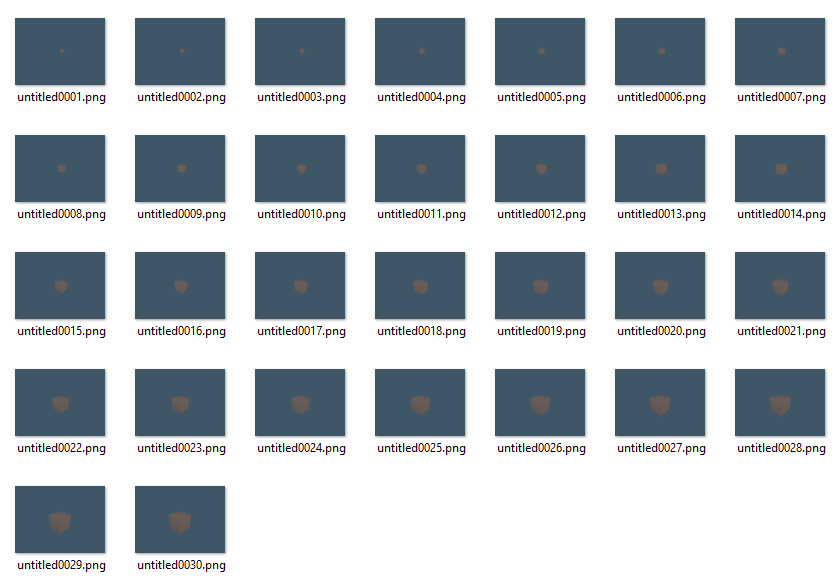
It is not typical, in that the first frame rendered is named untitled0001
Normally it would be untitled0000 since the sequence's Start Frame is 0 and render 31 frames
Currently, it renders 30 frames
Thank you!!!
It is not typical, in that the first frame rendered is named untitled0001
Normally it would be untitled0000 since the sequence's Start Frame is 0 and render 31 frames
Currently, it renders 30 frames
-
trueBlue
- Captain
- Posts: 5548
- Joined: 06 Jul 2009, 22:50
- Type the number ten into the box: 10
Re: Padding 0s for file names
I was able to add png, jpg, bmp, hdr, and tga file format choices
File name choice as well
.
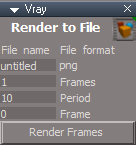
Render Animation icon
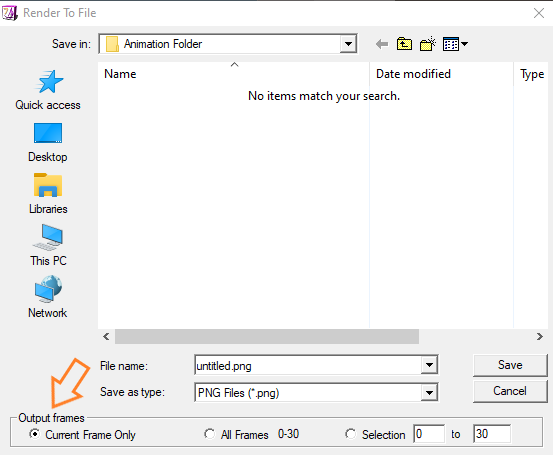
LMB - Use to Set the Render to File's render folder and Output Frames
RMB - Opens Folder
File name - Image name
File format - Image format
Frames - Number of Frames to Render
Period - Speed of which Frames are Rendered
Frames - Current Frame being Rendered
Render Frames - Starts the process
Note: Frame 0 will be appended with _0001, Frame 1 with 0002, etc...
This process supports Rendering while scripts,
Activities, and Timers are running
Required: Set the Render to File's render Folder and Output Frames first!
This sets the path to render to on the Vray panel's Output File attribute
Warning: If you do not set it, it will still render to an undefined area!
Set the number of Frames to render, Image name and format from the Vray panel
.
Thanks again, Clinton!
File name choice as well
- Vray Render to File.png (6.13 KiB) Viewed 55 times
Render Animation icon
LMB - Use to Set the Render to File's render folder and Output Frames
RMB - Opens Folder
File name - Image name
File format - Image format
Frames - Number of Frames to Render
Period - Speed of which Frames are Rendered
Frames - Current Frame being Rendered
Render Frames - Starts the process
Note: Frame 0 will be appended with _0001, Frame 1 with 0002, etc...
This process supports Rendering while scripts,
Activities, and Timers are running
Required: Set the Render to File's render Folder and Output Frames first!
This sets the path to render to on the Vray panel's Output File attribute
Warning: If you do not set it, it will still render to an undefined area!
Set the number of Frames to render, Image name and format from the Vray panel
Thanks again, Clinton!
-
clintonman
- Captain
- Posts: 5659
- Joined: 21 May 2009, 21:08
- Type the number ten into the box: 0
- Location: California
Re: Padding 0s for file names
You could subtract 1 from the number to start at 0.
-
trueBlue
- Captain
- Posts: 5548
- Joined: 06 Jul 2009, 22:50
- Type the number ten into the box: 10
Re: Padding 0s for file names
Was not sure (I tried) how to do that
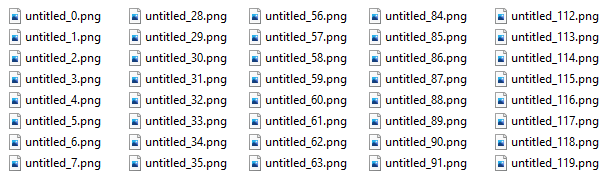
I like this without all the zeroes
Code: Select all
//		strnum = '0' + strnum
		strnum = '0' + strnum -1;
-
clintonman
- Captain
- Posts: 5659
- Joined: 21 May 2009, 21:08
- Type the number ten into the box: 0
- Location: California
Re: Padding 0s for file names
No zeros is ok as long as whatever program you use it with doesn't put 10 before 2 through 9.trueBlue wrote: 15 May 2022, 03:59 Was not sure (I tried) how to do thatI like this without all the zeroesCode: Select all
//		strnum = '0' + strnum
		strnum = '0' + strnum -1;
padding.png
-
trueBlue
- Captain
- Posts: 5548
- Joined: 06 Jul 2009, 22:50
- Type the number ten into the box: 10
Re: Padding 0s for file names
How would you, subtract 1 from the number to start at 0?
Removed due to update
Removed due to update
-
clintonman
- Captain
- Posts: 5659
- Joined: 21 May 2009, 21:08
- Type the number ten into the box: 0
- Location: California
Re: Padding 0s for file names
This does it.
- Attachments
-
- Vray Render to File5a44.RsObj
- (107.04 KiB) Downloaded 6 times
-
trueBlue
- Captain
- Posts: 5548
- Joined: 06 Jul 2009, 22:50
- Type the number ten into the box: 10
Re: Padding 0s for file names
Would have never figured out that one
Thank you again for the millionth time!
This opens up unlimited possibilities for Workspace's Render to File
Running Scripts while rendering
Brings tga file format
Sequence of Images in the Background, Ray Cast, Caustics, Reflections, Depth of Feild, etc...
Mix and match D3D and Vray materials
Have to say, this is better then the other Render to File(s)
Thank you again for the millionth time!
This opens up unlimited possibilities for Workspace's Render to File
Running Scripts while rendering
Brings tga file format
Sequence of Images in the Background, Ray Cast, Caustics, Reflections, Depth of Feild, etc...
Mix and match D3D and Vray materials
Have to say, this is better then the other Render to File(s)